
1. Konec produktuview
This manual provides essential instructions for the proper installation, operation, and maintenance of your SEEIRIR TP.HV352T.PB753(N) TV Motherboard. This motherboard is designed as a replacement component for televisions, offering precise adaptation and stable performance.
Klíčové vlastnosti:
- Precise Adaptation: Engineered for perfect replacement of original TV motherboards.
- Oprava poruchy: Capable of resolving common display issues such as black screen, blurred screen, or no signal.
- Stabilní a odolný: Constructed with industrial-grade PCB materials to withstand high temperatures and moisture, ensuring long-term reliability.
- Snadná instalace: Features clear interface identification and includes a comprehensive installation guide.
- Základní funkce: Provides all necessary functions for daily television use.
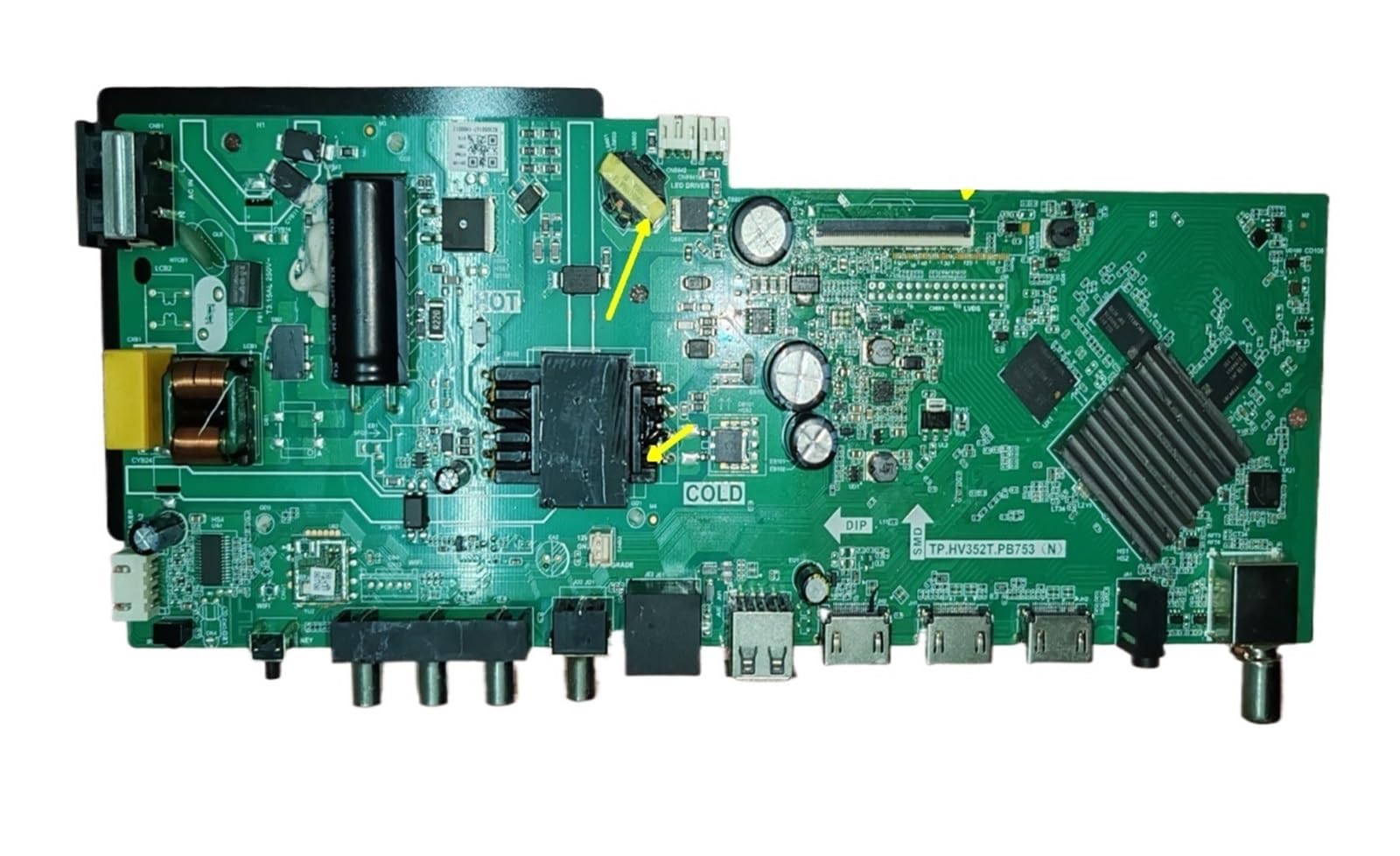
Obrázek 1: Přední strana view of the SEEIRIR TP.HV352T.PB753(N) TV Motherboard, showing various ports and components.
2. Bezpečnostní informace
Před instalací nebo provozem tohoto produktu si prosím přečtěte a pochopte všechny bezpečnostní pokyny. Nedodržení těchto pokynů může vést k úrazu elektrickým proudem, požáru nebo poškození produktu či jiného zařízení.
- Odpojení napájení: Always disconnect the television from the main power supply before beginning any installation or maintenance work.
- Statická elektřina: Elektronické součástky jsou citlivé na statickou elektřinu. Při manipulaci se základní deskou používejte vhodná antistatická opatření (např. antistatický náramek).
- Profesionální instalace: If you are not confident in your ability to perform the installation, seek assistance from a qualified technician.
- Větrání: Ensure adequate ventilation around the television after installation to prevent overheating of components.
- Expozice tekutin: Keep the motherboard and television away from liquids and excessive moisture.
- Manipulace s komponentami: Základní desku držte za okraje, abyste se nedotkli citlivých součástek.
3. Nastavení a instalace
This section provides general guidelines for installing the TP.HV352T.PB753(N) TV Motherboard. Refer to the detailed installation guide included with your product for specific steps and diagrams.
- Připravte televizor:
- Odpojte televizor ze zásuvky.
- Položte televizor displejem dolů na měkký, čistý povrch, abyste ochránili obrazovku.
- Pro přístup k vnitřním součástem sejměte zadní kryt televizoru.
- Remove the Old Motherboard:
- Carefully disconnect all cables connected to the existing motherboard (e.g., power, LVDS, backlight, speaker, input ports). Note their positions or take photos for reference.
- Unscrew the mounting screws holding the old motherboard in place.
- Opatrně zvedněte a vyjměte starou základní desku.
- Install the New Motherboard:
- Align the new SEEIRIR TP.HV352T.PB753(N) motherboard with the mounting holes in the TV chassis.
- Zajistěte základní desku příslušnými šrouby. Nepřetahujte je.
- Reconnect all cables to their corresponding ports on the new motherboard. Ensure all connections are firm and correctly oriented. Pay special attention to the LVDS cable and power connections (35-110V, 600mA, FCP 75W).
- Počáteční zapnutí:
- Before replacing the back cover, plug the TV into a power outlet.
- Power on the TV and check for basic functionality (e.g., power indicator, screen display, sound).
- If issues arise, refer to the Troubleshooting section.
- Konečná montáž:
- Once basic functionality is confirmed, unplug the TV again.
- Replace the TV's back cover and secure it with screws.
- Reconnect all external peripherals and power up the TV for full testing.
Poznámka: The motherboard features clear interface identification to assist with correct cable connections. Always double-check connections before powering on.
4. Provoz
Once the SEEIRIR TP.HV352T.PB753(N) TV Motherboard is correctly installed, the television should function as expected. The motherboard manages all core TV operations.
- Zapnutí/vypnutí: Use the TV's remote control or physical power button to turn the television on or off.
- Výběr vstupu: Select desired input sources (HDMI, AV, USB, etc.) using the TV remote.
- Ladění kanálů: If applicable, perform channel scanning for over-the-air or cable channels.
- Navigace v nabídce: Access and navigate the TV's on-screen display (OSD) menu for settings adjustments (picture, sound, network, etc.).
Refer to your television's original user manual for detailed instructions on specific TV functions and menu navigation.
5. Údržba
The SEEIRIR TP.HV352T.PB753(N) TV Motherboard is designed for durability with industrial-grade PCB. Minimal maintenance is required, but following these guidelines can extend its lifespan and ensure optimal performance:
- Odstranění prachu: Periodically clean the interior of the TV (with power disconnected) using compressed air to remove dust buildup, which can impede cooling and cause component failure.
- Větrání: Ensure the TV's ventilation openings are not blocked. Proper airflow is crucial to prevent overheating of the motherboard and other internal components.
- Podmínky prostředí: Operate the TV in a stable environment, avoiding extreme temperatures, high humidity, and direct sunlight.
- Přepětí: Consider using a surge protector to safeguard the TV and its internal components, including the motherboard, from electrical spikes.
6. Řešení problémů
This section addresses common issues you might encounter after installing the SEEIRIR TP.HV352T.PB753(N) TV Motherboard. If problems persist, consult a qualified technician.
| Problém | Možná příčina | Řešení |
|---|---|---|
| Žádné napájení / Televizor se nezapne |
|
|
| Black Screen / No Display |
|
|
| Blurred Screen / Distorted Image |
|
|
| Žádný signál |
|
|
7. Specifikace
| Funkce | Detail |
|---|---|
| Číslo modelu | TP.HV352T.PB753(N) |
| Značka | SEEIRIR |
| Compatible & Video Equipment Style | Zobrazovací zařízení |
| Vstupní objemtage Dosah | 35-110V |
| Proudový výstup | 600 mA |
| Power Output (Variant) | FCP 75W |
| Hmotnost položky | 500 gramů |
| ASIN | B0FF41WYG7 |
8. Záruka a zákaznická podpora
Informace o záruce:
Specific warranty terms for the SEEIRIR TP.HV352T.PB753(N) TV Motherboard are typically provided by the seller at the time of purchase. Please refer to your purchase documentation or contact the seller directly for details regarding warranty coverage, duration, and claims procedures. Standard return policies may apply as per the retailer's terms.
Zákaznická podpora:
For technical assistance, installation queries, or troubleshooting beyond the scope of this manual, please contact the seller or manufacturer directly. You can typically find their contact information on your purchase invoice or the product packaging.
prodejce: taizhoushidimaimaoyistore