
1. Úvod
Thank you for choosing the EZVIZ CB8 Pro 4K Solar Camera. This manual provides essential information for the safe and effective use of your device, including setup, operation, maintenance, and troubleshooting. Please read this manual thoroughly before using the product and retain it for future reference.
2. Obsah balení
Ensure all items listed below are present in your package. If any items are missing or damaged, please contact your retailer.
- EZVIZ CB8 Pro 4K Camera
- 5W solární panel
- Montážní šablona
- Sada šroubů
- Napájecí adaptér (pro počáteční nabití)
- USB kabel
- Rychlý průvodce
- Návod k použití (tento dokument)
3. Konec produktuview
The EZVIZ CB8 Pro 4K Solar Camera is a wireless outdoor security camera designed for comprehensive surveillance. It features 4K resolution, a 360° pan-and-tilt design, color night vision, human and vehicle detection, auto-tracking, two-way audio, and a built-in sound and light siren. The included 5W solar panel ensures continuous power for its 10400mAh battery.
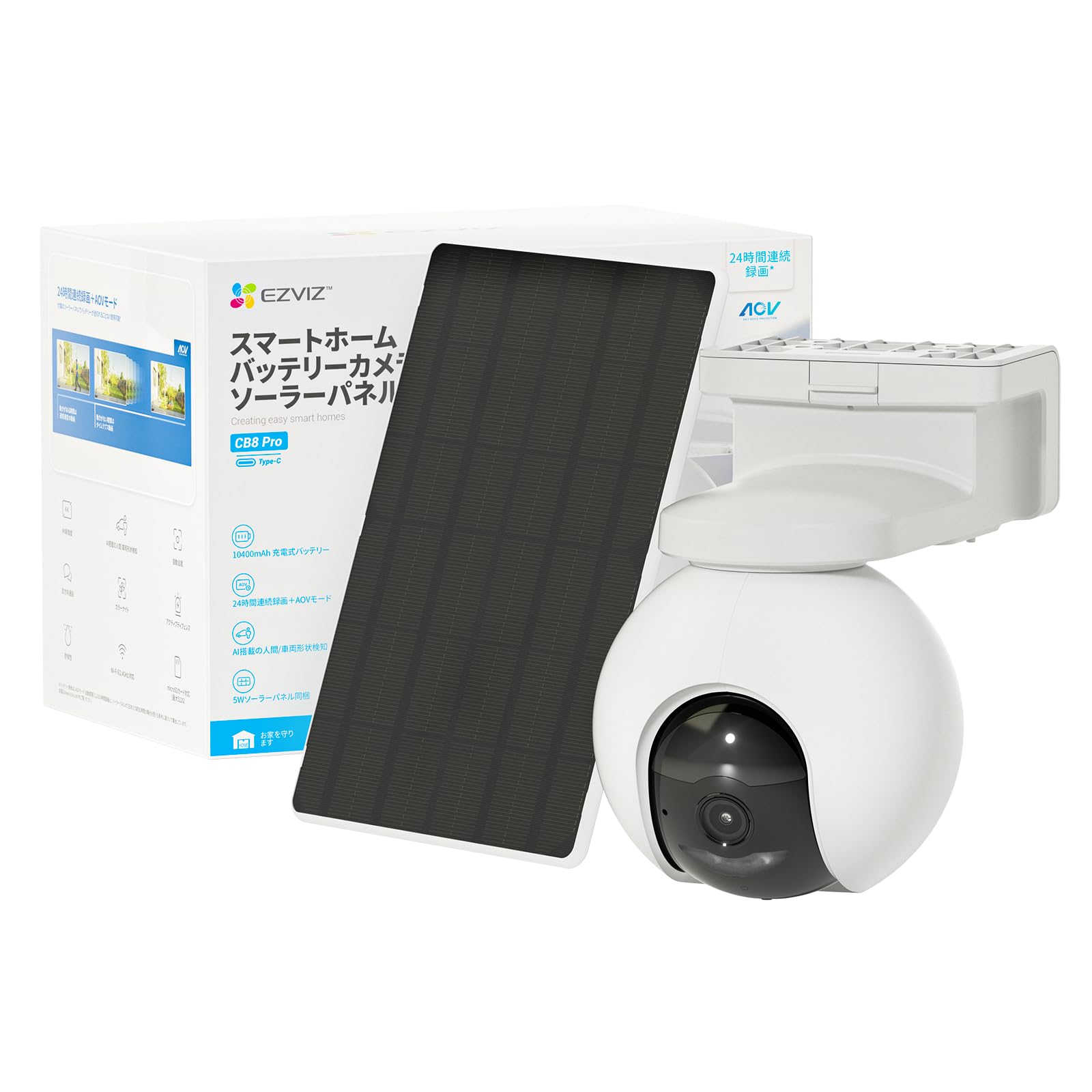
Image: EZVIZ CB8 Pro 4K Solar Camera and its accompanying 5W solar panel, illustrating the complete kit for outdoor surveillance.
Klíčové vlastnosti:
- Rozlišení videa 4K: Poskytuje jasné a podrobné video footage.
- 360° otáčení a naklápění: Nabízí široké pole view s dálkovým ovládáním.
- Barevné noční vidění: Zlepšená viditelnost za zhoršených světelných podmínek.
- Detekce osob a vozidel: Intelligent algorithms reduce false alarms.
- Automatické sledování: Follows detected subjects within its field of view.
- Obousměrný zvuk: Umožňuje komunikaci prostřednictvím kamery.
- Sound & Light Siren: Deters intruders with an audible alarm and flashing light.
- 100% Wire-Free: Easy installation without power cables.
- 5W solární panel: Provides continuous charging for the built-in 10400mAh battery.
- IP66 Odolnost proti povětrnostním vlivům: Určeno pro venkovní použití za různých povětrnostních podmínek.
4. Nastavení
4.1 Počáteční nabíjení
Before installation, fully charge the camera using the provided power adapter and USB cable. Connect the USB cable to the camera's charging port and the adapter to a power outlet. The charging indicator will show the charging status.
4.2 EZVIZ App Installation and Account Setup
- Stáhněte si aplikaci EZVIZ z App Storu (iOS) nebo Obchodu Google Play (Android).
- Open the app and create an EZVIZ account if you don't have one, or log in to your existing account.
- Tap the '+' icon on the app's home screen to add a new device.
- Naskenujte QR kód umístěný na fotoaparátu nebo jeho obalu.
- Follow the in-app instructions to connect the camera to your Wi-Fi network. Ensure your Wi-Fi signal is strong at the installation location.
4.3 Montáž kamery a solárního panelu
The camera and solar panel are designed for wall mounting. Choose a location that provides optimal surveillance coverage and receives ampsluneční světlo pro solární panel.
- Vyberte umístění: Identify a suitable mounting spot, ideally 2-3 meters (7-10 feet) above the ground, with a clear view and good Wi-Fi signal. Ensure the solar panel can receive direct sunlight for several hours daily.
- Vrtací otvory: Use the provided mounting template to mark and drill pilot holes for the camera and solar panel brackets.
- Bezpečné držáky: Attach the mounting brackets to the wall using the screws and wall anchors provided.
- Připojení kamery a solárního panelu: Mount the camera onto its bracket and adjust its angle. Attach the solar panel to its bracket and connect its cable to the camera's charging port.
- Konečné úpravy: K tomu použijte aplikaci EZVIZ view the live feed and make final adjustments to the camera's angle for optimal coverage.
5. Ovládání fotoaparátu
5.1 Živě View a přehrávání
Přístup k aplikaci EZVIZ view the live feed from your camera. You can also review zaznamenané footage stored on the microSD card (if installed) or in the EZVIZ CloudPlay service (subscription required).
5.2 Pan, Tilt, Zoom (PTZ) Control
V přímém přenosu view interface of the EZVIZ app, use the directional controls to pan (rotate horizontally) and tilt (rotate vertically) the camera lens. The 360° pan and tilt functionality allows you to cover a wide area.
5.3 Režimy nočního vidění
Kamera nabízí několik možností nočního vidění:
- Barevný režim: Provides full-color video even in low light.
- Infračervený režim: Standard black-and-white night vision.
- Chytré noční vidění: Automatically switches from black-and-white to full color upon motion detection.
You can select your preferred mode in the camera settings within the EZVIZ app.
5.4 Human & Vehicle Detection and Auto-Tracking
The camera uses advanced algorithms to distinguish between humans, vehicles, and other moving objects, reducing false alarms. When a human or vehicle is detected, the camera can automatically track its movement across the monitored area. Enable these features in the EZVIZ app's detection settings.
5.5 Obousměrný zvuk
Use the microphone and speaker built into the camera to communicate with visitors or deter intruders. Tap the microphone icon in the live view mluvit a poslouchat přes reproduktor kamery.
5.6 AOV (Always on Video) Mode
The AOV mode enables continuous recording by capturing images at preset time intervals and compiling them into a time-lapse video. When activity is detected, it switches to normal speed video. Note that AOV mode requires an SD card for storage and is not supported for cloud storage.
5.7 Local Storage (MicroSD Card)
The camera supports a microSD card up to 512 GB (sold separately) for local video storage. Insert the microSD card into the designated slot on the camera. This allows for recording without a monthly subscription fee. You can access recorded footage directly from the EZVIZ app.
6. Údržba
6.1 Čištění fotoaparátu
Regularly clean the camera lens and solar panel with a soft, dry cloth to ensure optimal performance. Avoid using harsh chemicals or abrasive materials that could damage the surfaces.
6.2 Péče o baterii
The camera's 10400mAh battery is designed for long life. Ensure the solar panel is positioned to receive maximum sunlight to maintain battery charge. In prolonged periods of low sunlight, you may need to manually charge the camera using the power adapter.
7. Řešení problémů
| Problém | Možná příčina | Řešení |
|---|---|---|
| Fotoaparát offline v aplikaci | Weak Wi-Fi signal, camera battery low, network issue | Check Wi-Fi signal strength, ensure solar panel is charging, restart camera and router. |
| Špatná kvalita videa | Špinavý objektiv, nízká šířka pásma, špatné osvětlení | Clean the lens, ensure stable internet connection, adjust camera position for better lighting. |
| Detekce pohybu nefunguje | Detection settings incorrect, obstructions | Verify detection settings in the app, clear any obstructions in the camera's view. |
| Solární panel se nenabíjí | Insufficient sunlight, panel dirty, cable disconnected | Relocate panel for more sun, clean panel, check cable connection. |
8. Specifikace
| Funkce | Detail |
|---|---|
| Značka | EZVIZ |
| Název modelu | CB8 Pro Kit |
| Rozlišení záznamu videa | 4K |
| Efektivní rozlišení | 4 MP |
| Vnitřní/venkovní použití | Venkovní |
| Protokol připojení | Wi-Fi |
| Speciální funkce | 2 Way Audio, Built In Light, HD Resolution, Night Vision, PTZ Technology |
| Typ montáže | Držák na zeď |
| Hodnocení voděodolnosti | IP66 |
| svtage | 5 V (DC) |
| Wattage | 10 wattů |
| Jsou vyžadovány baterie | Yes (Built-in 10400mAh) |
| Formát záznamu videa | MPEG-4 |
| Rozměry položky | 18.3 x 11.6 x 16.6 centimetrů |
| Hmotnost položky | 803 gramů |
9. Záruka a podpora
Your EZVIZ CB8 Pro 4K Solar Camera is covered by a limited warranty provided by the manufacturer. Please refer to the warranty card included in your package or visit the official EZVIZ webpodrobné záruční podmínky naleznete na webu.
For technical support, product inquiries, or service requests, please contact EZVIZ customer support through their official website or the contact information provided in your product documentation. Ensure you have your product model number (CB8 PRO 4K Kit) and serial number ready when contacting support.