1. Úvod
This manual provides detailed instructions for the installation, operation, and maintenance of your Girafit GRF-T350SW 3K 5MP Indoor/Outdoor Pan/Tilt/Zoom Wi-Fi Security Camera. Please read this manual thoroughly before using the product to ensure proper functionality and safety. Keep this manual for future reference.
2. Konec produktuview
Klíčové vlastnosti
- 3K 5MP Resolution with 4X Digital Zoom: Poskytuje jasné a podrobné video footage.
- 360° Pan and 180° Tilt: Offers comprehensive coverage of your monitoring area.
- AI Person/Pet/Vehicle Detection: Advanced artificial intelligence for accurate identification of subjects, reducing false alerts.
- Automatické sledování pohybu: Automatically follows detected subjects within the camera's field of view.
- Noční vidění v barvě hvězdného světla: Enhanced low-light performance for vivid color images at night.
- Obousměrný zvuk: Vestavěný mikrofon a reproduktor pro komunikaci v reálném čase.
- Auto Alert Siren: Odradí vetřelce zvukovým alarmem.
- Stupeň odolnosti proti povětrnostním vlivům IP65: Vhodné pro venkovní použití za různých povětrnostních podmínek.
- Flexibilní možnosti úložiště: Supports encrypted US cloud storage and local Micro SD card storage (up to 256GB).
- 2.4GHz/5GHz Wi-Fi Connectivity: Dual-band Wi-Fi support for stable connection.
Co je v krabici
- Girafit GRF-T350SW Camera Body
- Napájecí adaptér
- Montážní šrouby a kotvy
- Montážní šablona
- Uživatelská příručka

Figure 2.1: Girafit GRF-T350SW camera showing its pan and tilt capabilities.

Figure 2.2: The Girafit GRF-T350SW camera operating reliably in both rainy and sunny conditions, highlighting its IP65 weatherproof design.
3. Nastavení
3.1 Fyzická instalace
- Vyberte umístění: Select a suitable outdoor or indoor location that provides the desired viewing angle and is within range of your Wi-Fi network. Ensure the power outlet is accessible.
- Montáž kamery: Use the provided mounting template to mark drill holes. Secure the mounting bracket to the wall or ceiling using the screws and anchors. Attach the camera to the bracket.
- Připojte napájení: Zapojte napájecí adaptér do fotoaparátu a poté do elektrické zásuvky. Fotoaparát se zapne a spustí se spouštěcí sekvence.
3.2 Instalace aplikace a vytvoření účtu
- Download the Girafit App: Hledat 'Girafit' in your smartphone's app store (iOS or Android) and download the official application.
- Vytvořit účet: Otevřete aplikaci a podle pokynů na obrazovce zaregistrujte nový účet.
3.3 Síťové připojení
- Přidat zařízení: In the Girafit app, tap the '+' icon to add a new device. Select your camera model.
- Postupujte podle pokynů v aplikaci: The app will guide you through connecting the camera to your 2.4GHz or 5GHz Wi-Fi network. This typically involves scanning a QR code displayed on your phone with the camera lens.
- Dokončení: Once connected, the camera's status indicator will change, and you will see the live feed in the app.
4. Provoz
4.1 Ovládání otáčení, naklápění a zoomu
Z živého vysílání view in the Girafit app, use the on-screen controls to remotely adjust the camera's viewing angle. The camera supports 360° horizontal pan and 180° vertical tilt. You can also digitally zoom in up to 4X to view podrobnosti.

Figure 4.1: Visual comparison demonstrating the clarity of 3K 5MP resolution with 4X zoom compared to standard 3MP resolution.
4.2 Detekce pohybu a automatické sledování
The camera features advanced AI detection capabilities to identify humans, pets, and vehicles. When motion is detected, the camera can automatically track the subject, zoom in, record the event, and send push notifications to your smartphone.
- Povolit detekci: Navigate to the camera settings in the app to enable AI Person/Pet/Vehicle Detection.
- Nastavení detekčních zón: Definujte specifické oblasti v záběru kamery view where you want motion detection to be active.
- Activate Auto Tracking: Enable auto tracking in the settings to allow the camera to follow detected subjects.
- Auto Alert Siren: Configure the camera to trigger an audible siren upon detection to deter unwanted visitors.

Figure 4.2: Illustration of the camera's automatic tracking feature, showing a person being followed with a 4X zoom.

Figure 4.3: The camera's AI accurately detecting a human, a pet, and a vehicle in a home environment.

Figure 4.4: The camera detecting activity in a defined hexagonal area and issuing an auto voice alert.
4.3 Noční vidění
The GRF-T350SW offers multiple night vision modes for clear surveillance in low-light conditions.
- Noční vidění v barvě hvězdného světla: Utilizes a Starlight Sensor and f/1.6 aperture to capture more light, providing full-color video even in very dim environments.
- Infračervený režim: Standardní černobílé noční vidění s využitím infračervených LED diod.
- Režim reflektoru: Activates built-in spotlights to illuminate the area and capture color video when motion is detected at night.
You can switch between these modes or set them to automatic in the app settings.

Figure 4.5: Visual representation of the camera's Starlight Color Night Vision, Infrared Mode, and Spotlight Mode capabilities.
4.4 Obousměrný zvuk
The integrated microphone and speaker allow for two-way communication. You can speak through the camera to visitors or deter intruders directly from your smartphone via the Girafit app.
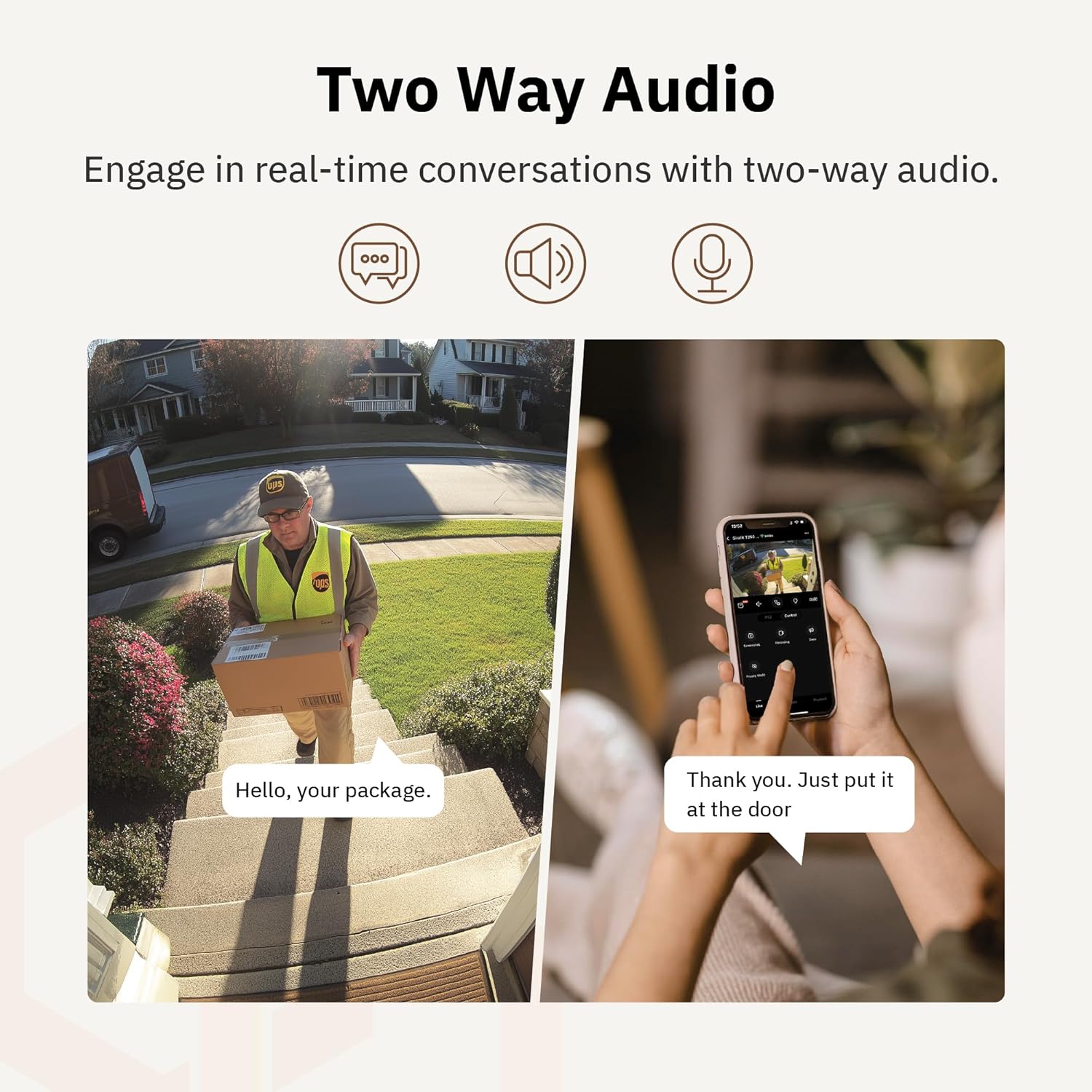
Obrázek 4.6: Exampnapříklad použití obousměrného zvuku pro komunikaci s doručovatelem u dveří.
4.5 Režim soukromí
For enhanced privacy, the camera features a privacy mode. When activated, the camera lens physically tilts down by 180°, ensuring no live feed is captured or transmitted. This provides 100% privacy protection when needed.

Figure 4.7: The camera in privacy mode, with the lens tilted downwards to ensure no recording or live view.
4.6 Video úložiště
The camera supports two primary methods for video storage:
- Micro SD karta: Insert a Micro SD card (up to 256GB, not included) into the designated slot on the camera for local storage of recordings.
- Cloudové úložiště: Girafit offers encrypted cloud storage services in the US. Refer to the app for subscription options and details.
5. Údržba
5.1 Čištění
Pro udržení optimálního výkonu pravidelně čistěte objektiv a kryt fotoaparátu. Používejte měkký,amp hadříkem setřete prach a nečistoty. Nepoužívejte agresivní chemikálie ani abrazivní materiály, které by mohly poškodit čočku nebo povrchovou úpravu.
5.2 aktualizací firmwaru
Girafit regularly releases firmware updates to improve camera performance, add new features, and enhance security. Check the Girafit app periodically for available updates and follow the in-app instructions to install them. Ensure the camera has a stable power supply during updates.
6. Řešení problémů
- Kamera se nepřipojuje k Wi-Fi:
- Ensure your Wi-Fi network is 2.4GHz or 5GHz and the password is correct.
- Přesuňte kameru blíže k Wi-Fi routeru.
- Restartujte router a kameru.
- Špatná kvalita videa:
- Zkontrolujte rychlost svého internetového připojení.
- Vyčistěte čočku fotoaparátu.
- Ujistěte se, že kamera má dostatečné napájení.
- Detekce pohybu nefunguje:
- Ověřte, zda je v nastavení aplikace povolena detekce pohybu.
- Upravte citlivost detekce a detekční zóny.
- Ujistěte se, že v záběru kamery nejsou žádné překážky. view.
- Problémy s obousměrným zvukem:
- Check microphone and speaker permissions for the Girafit app on your phone.
- Ujistěte se, že mikrofon a reproduktor kamery nejsou nic blokovány.
For further assistance, please contact Girafit customer support.
7. Specifikace
| Funkce | Popis |
|---|---|
| Název modelu | GRF-T350SW |
| Rozlišení záznamu videa | 3K (5MP) |
| Vnitřní/venkovní použití | Venkovní |
| Technologie připojení | Wi-Fi (2.4GHz/5GHz), Wired |
| Zdroj napájení | Elektrický kabel |
| Typ montáže | Držák na zeď |
| Speciální funkce | 2-Way Audio, AI Detection (Human/Pet/Vehicle), Auto Tracking, Color Night Vision, IP65 Weatherproof |
| Kompatibilní zařízení | Desktop, Laptop, Smartphone (Android/iOS) |
| Rozměry položky (D x Š x V) | 2.63 x 2.63 x 4.76 palce |
| Hmotnost položky | 14.7 unce |
| Možnosti úložiště | Micro SD karta (až 256 GB), cloudové úložiště |
| UPC | 764742517881 |
8. Záruka a podpora
Girafit products are designed for reliability and performance. For warranty information, please refer to the warranty card included with your product or visit the official Girafit website. For technical support, troubleshooting assistance, or any inquiries regarding your Girafit GRF-T350SW camera, please contact Girafit customer service through the contact information provided on the official website or within the Girafit app.


