
1. Úvod
This manual provides detailed instructions for the assembly, operation, and maintenance of your WorkPro Momentum Ergonomic High-Back Active Chair. Please read this manual thoroughly before assembly and use to ensure proper function and safety.
The WorkPro Momentum chair is designed to provide an exceptional seating experience, integrating precision and comfort. Key features include a premium seat cushion with 3D printed lattice mesh, an active high-back for dynamic support, multiple reclining positions, built-in lumbar support, pneumatic 1-touch height adjustment, and 3D adjustable armrests.

Image 1.1: The WorkPro Momentum Ergonomic High-Back Active Chair in a modern office environment, showcasing its design and presence.
2. Bezpečnostní informace
VAROVÁNÍ: Nedodržení těchto bezpečnostních pokynů může vést ke zranění nebo poškození produktu.
- Pneumatické nastavení výšky: The pneumatic height adjustment mechanism may cause injury if not used carefully. Always follow manufacturer's instructions for safe use. Avoid sudden movements when adjusting height.
- Shromáždění: Před použitím se ujistěte, že jsou všechny součásti bezpečně upevněny. Pravidelně kontrolujte všechny šrouby a vruty, zda jsou pevně utažené.
- Nosnost: This chair supports up to 275 lbs (124.7 kg). Do not exceed this weight limit.
- Zamýšlené použití: This chair is designed for indoor office and home office use. Do not use for purposes other than its intended design.
- Děti: Keep children away from the chair during assembly. Do not allow children to play on or with the chair.
- Stabilita: Do not stand on the chair. Avoid leaning excessively to one side or backward, which could cause the chair to tip.
3. Obsah balení
Before beginning assembly, verify that all parts are present and undamaged. If any parts are missing or damaged, do not proceed with assembly. Contact customer support immediately.
- Opěradlo
- Sestava sedáku
- Loketní opěrky (levá a pravá)
- Základna židle (hvězdná základna)
- Kolečka (5 kusů)
- Plynový výtahový válec
- Sada hardwaru (šrouby, podložky, imbusový klíč)
4. Nastavení a montáž
Assembly is required for this product. Please follow these steps carefully. It is recommended to assemble the chair on a soft, clean surface to prevent scratching.
- Připevnění koleček k základně: Vložte všechna pět koleček do otvorů na konci každé nohy základny židle. Pevně zatlačte, dokud nezacvaknou na místo.
- Vložte plynový zvedák: Place the gas lift cylinder into the center hole of the assembled chair base. Ensure it sits securely.
- Připevnění loketních opěrek k sedadlu: Align the armrests with the pre-drilled holes on the underside of the seat cushion assembly. Secure them using the provided screws and Allen wrench. Do not overtighten initially.
- Připevnění opěradla k sedáku: Connect the backrest to the seat cushion assembly using the designated mounting points and hardware. Ensure proper alignment before tightening all screws.
- Připojení sestavy sedadla k plynovému zvedáku: Carefully place the assembled seat and backrest onto the gas lift cylinder, ensuring the center mechanism hole aligns with the top of the gas lift. Press down firmly to secure.
- Závěrečná kontrola: Once assembled, sit on the chair to ensure all components are properly seated and stable. Test all adjustment functions.
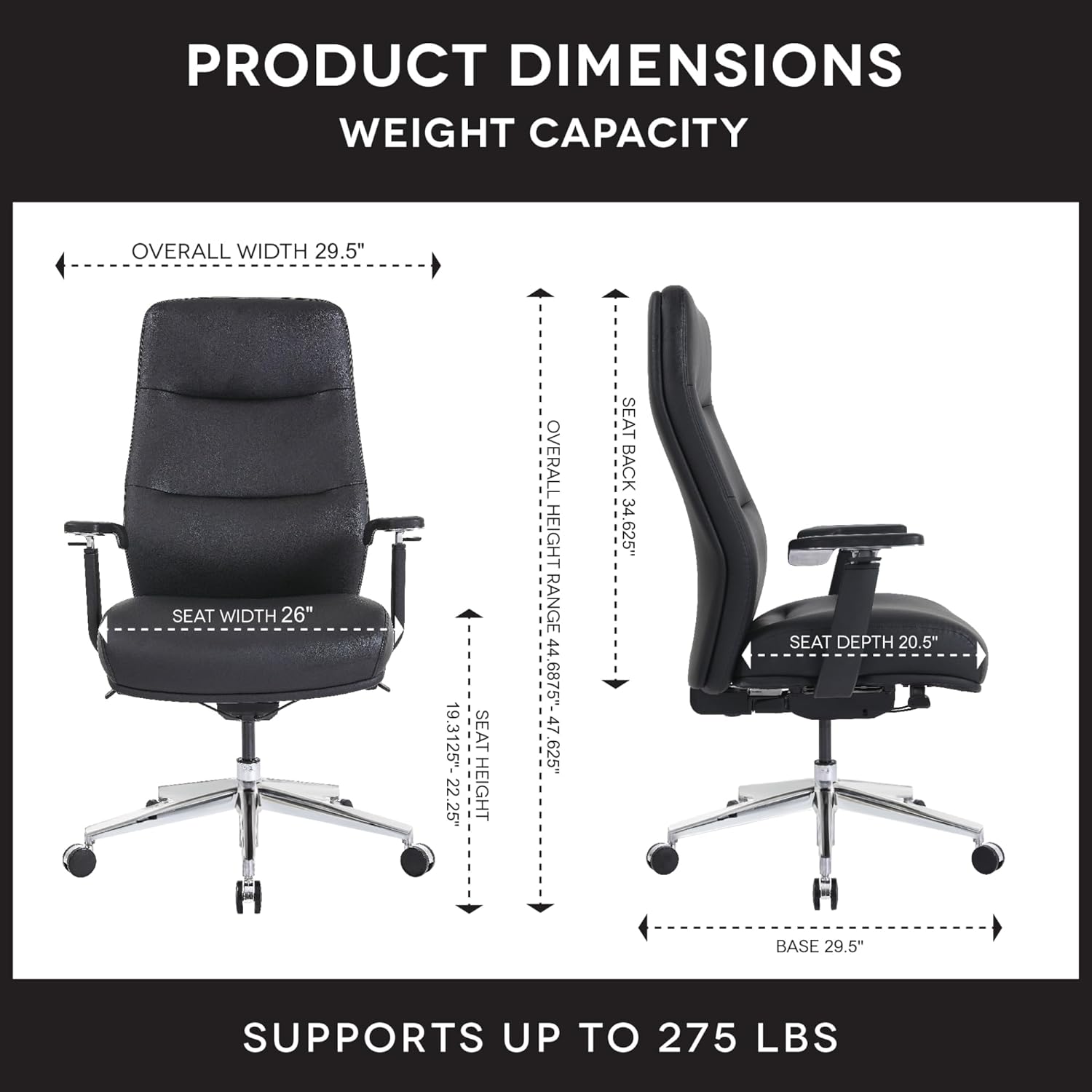
Image 4.1: Detailed product dimensions and weight capacity (275 lbs) of the WorkPro Momentum Ergonomic High-Back Active Chair.
5. Návod k obsluze
Your WorkPro Momentum chair offers several adjustment features to customize your seating experience for optimal comfort and ergonomic support.
5.1. Nastavení výšky sedadla
To adjust the seat height, locate the pneumatic 1-touch lever typically found on the right side beneath the seat. While seated, pull the lever up to lower the seat. To raise the seat, stand up slightly and pull the lever up. Release the lever at your desired height.
5.2. Reclining Positions
The chair features multiple reclining positions. Use the recline tension knob (usually located under the front of the seat) to adjust the resistance of the recline. A separate lever (often on the left side) may be used to lock the backrest in a specific reclined position or allow for free-flowing tilt.

Image 5.1: The WorkPro Momentum chair illustrating its capability for multiple reclining positions, allowing users to find their optimal comfort angle.
5.3. Active High-Back Support
The active high-back is designed to move harmoniously with your body, providing continuous support and promoting healthy posture throughout the day. This dynamic movement helps reduce static pressure and encourages micro-movements.

Obrázek 5.2: Zadní část view of the WorkPro Momentum chair demonstrating the active movement of its high-back, adapting to the user's posture.
5.4. Bederní opěrka
The chair features built-in lumbar support that cradles your lower back, ensuring proper spinal alignment and reducing strain. This support is integrated into the backrest design.
5.5. Nastavení loketní opěrky 3D
The 3D armrests offer customizable support with three adjustment capabilities:
- Nastavení výšky: Press the button on the side of the armrest and move it up or down to your desired height.
- Pivot: Rotate the armrest pads inward or outward to support your arms during various tasks.
- Forward & Backward Movement: Slide the armrest pads forward or backward to find the optimal position for your forearms.
5.6. Premium Seat Cushion
The premium seat cushion design incorporates a 3D printed lattice mesh structure combined with foam layers. This construction ensures long-lasting comfort and maintains its shape and performance over time.

Obrázek 5.3: Rozložený view illustrating the multi-layered construction of the WorkPro Momentum chair's premium seat cushion, including the 3D printed lattice mesh.
6. Údržba
Regular maintenance will help prolong the life and appearance of your WorkPro Momentum chair.
- Cleaning Vegan Leather: For general cleaning, wipe the vegan leather upholstery with a soft, damp hadříkem. Na odolnější skvrny použijte jemný mýdlový roztok a ihned otřete dosucha. Nepoužívejte agresivní chemikálie ani abrazivní čisticí prostředky.
- Kontrola hardwaru: Periodically inspect all screws, bolts, and connections to ensure they are tight. Retighten as necessary to maintain stability and safety.
- Údržba koleček: Keep casters free of hair, dust, and debris to ensure smooth movement. You may occasionally clean the caster wheels with a damp tkanina.
- Plynový výtah: The gas lift is a sealed unit and requires no user maintenance. If it fails to function, contact customer support.
7. Řešení problémů
Pokud narazíte na problémy s vaší židlí, podívejte se na následující běžné problémy a jejich řešení:
| Problém | Možná příčina | Řešení |
|---|---|---|
| Židle se nedá nastavit na výšku | Porucha plynového zvedáku nebo není zasunutá páka | Ensure the lever is fully pulled. If still unresponsive, the gas lift may need replacement. Contact support. |
| Židle se kymácí nebo je nestabilní | Volný hardware | Check and tighten all screws and bolts, especially those connecting the seat, backrest, and armrests to the mechanism. |
| Skřípavé zvuky | Volné spoje nebo tření mezi díly | Tighten all hardware. Apply a small amount of silicone lubricant to moving parts if necessary, avoiding contact with upholstery. |
| Kolečka se neotáčejí hladce | Nečistoty v kolech | Odstraňte z koleček veškeré vlasy, prach nebo nečistoty. |
8. Specifikace
| Funkce | Detail |
|---|---|
| Značka | WorkPro |
| Číslo modelu | 735854699437 |
| Barva | Černý |
| Materiál | Vegan Leather (Faux Leather), Foam, Wood Frame |
| Hmotnost položky | 64 liber (29 kg) |
| Hmotnostní kapacita | Až 275 liber (124.7 kg) |
| Celkové rozměry (D x Š x V) | 16.54 x 36.22 x 25.98 palce (přibližně) |
| Rozsah výšky sedadla | 19.13" - 22.23" (approximate) |
| Styl zad | High Back, Active Movement |
| Styl paže | 3D Adjustable (Height, Pivot, Forward/Backward) |
| Ležící polohy | Násobek |
| Montáž Vyžadována | Ano |
| Dodržování | ANSI/BIFMA Compliant, FSC Certified Wood/Paper |
9. Záruka a podpora
For warranty information, please refer to the documentation provided at the time of purchase or contact your retailer. Warranty terms and conditions may vary.
If you require further assistance, have questions about assembly, operation, or need to report a missing/damaged part, please contact the manufacturer or your point of purchase. The manufacturer of this product is OFFICE DEPOT.
You can often find support resources, FAQs, and contact information on the official WorkPro website or through the retailer where you purchased the chair.
WorkPro Store: Visit the WorkPro Store on Amazon