
EnergyPort H29
EnergyPort Smart Bracelet H29 User Manual
Model: H29
1. Úvod
This manual provides detailed instructions for the setup, operation, maintenance, and troubleshooting of your EnergyPort Smart Bracelet H29. This device is designed to assist you in monitoring various health and fitness metrics, including heart rate, blood oxygen, blood pressure, sleep patterns, and activity tracking.

Image 1.1: The EnergyPort Smart Bracelet H29 with both the blue silicone and blue nylon bands.
2. Co je v krabici
Prosím, ověřte, zda jsou v balení přítomny všechny položky:
- EnergyPort Smart Screenless Watch (1 unit)
- Návod k obsluze (1 kus)
- Magnetický nabíjecí kabel (1 kus)
- Replacement Straps (2 units)

Image 2.1: Package contents of the EnergyPort Smart Bracelet H29.
3. Průvodce nastavením
3.1 Initial Power On and Bluetooth Activation
For the first use, it is necessary to activate the device's Bluetooth functionality.
- Zapnutí: Press and hold the side button for 3 seconds. The device will vibrate once, and a green light will flash, indicating successful power-on.
- Aktivujte Bluetooth: While the device is powered on, press and hold the side button for 10 seconds. The device will vibrate twice in succession, and the green light will flash again, confirming Bluetooth activation.
3.2 Instalace a párování aplikace
To utilize all features of your Smart Bracelet, download and install the companion application.
- Stáhnout aplikaci: Scan the QR code provided in the packaging or visit Aplikace QWatch Pro to download the 'QWatch Pro' application on your Android or iOS device.
- Povolit Bluetooth: Ujistěte se, že je na vašem smartphonu povoleno Bluetooth.
- Spárovat zařízení: Open the 'QWatch Pro' app, navigate to the device pairing section, and select 'H29' from the list of available devices to connect.

Image 3.1: Steps for initial Bluetooth activation and connecting the bracelet to the QWatch Pro app.
4. Návod k obsluze
4.1 Sledování fyzické zdatnosti
The EnergyPort Smart Bracelet H29 offers over 170 professional sports modes and comprehensive activity tracking.
- Tréninkové režimy: Select from over 170 sports modes, including running, hiking, yoga, and gym activities.
- GPS sledování: For outdoor activities like city running or hiking, the device syncs GPS routes to your phone app, providing detailed route maps and distance data.
- Nastavení cíle: Set smart goals within the app to guide your fitness journey and track progress.

Image 4.1: The smart bracelet tracking outdoor running with GPS synchronization.

Image 4.2: Visual representation of the extensive range of sports modes supported by the device.
4.2 Monitorování zdraví
The device provides continuous monitoring of key health metrics.
- Srdeční frekvence: Continuous heart rate monitoring with alerts for abnormal readings during activity or rest.
- Kyslík v krvi (SpO2): Automatic detection of blood oxygen saturation, useful for high-altitude activities or sleep monitoring.
- Krevní tlak: Continuous blood pressure monitoring with trend analysis and alerts for abnormal values.
- Sledování spánku: Monitory spánkutages (hluboký, lehký, bdělý) pro poskytnutí informací o kvalitě spánku.
- Sledování stresu: Tracks stress levels and offers guided breathing exercises to help manage stress.
- Zdraví žen: AI-powered period prediction and exercise adjustments based on menstrual cycle.
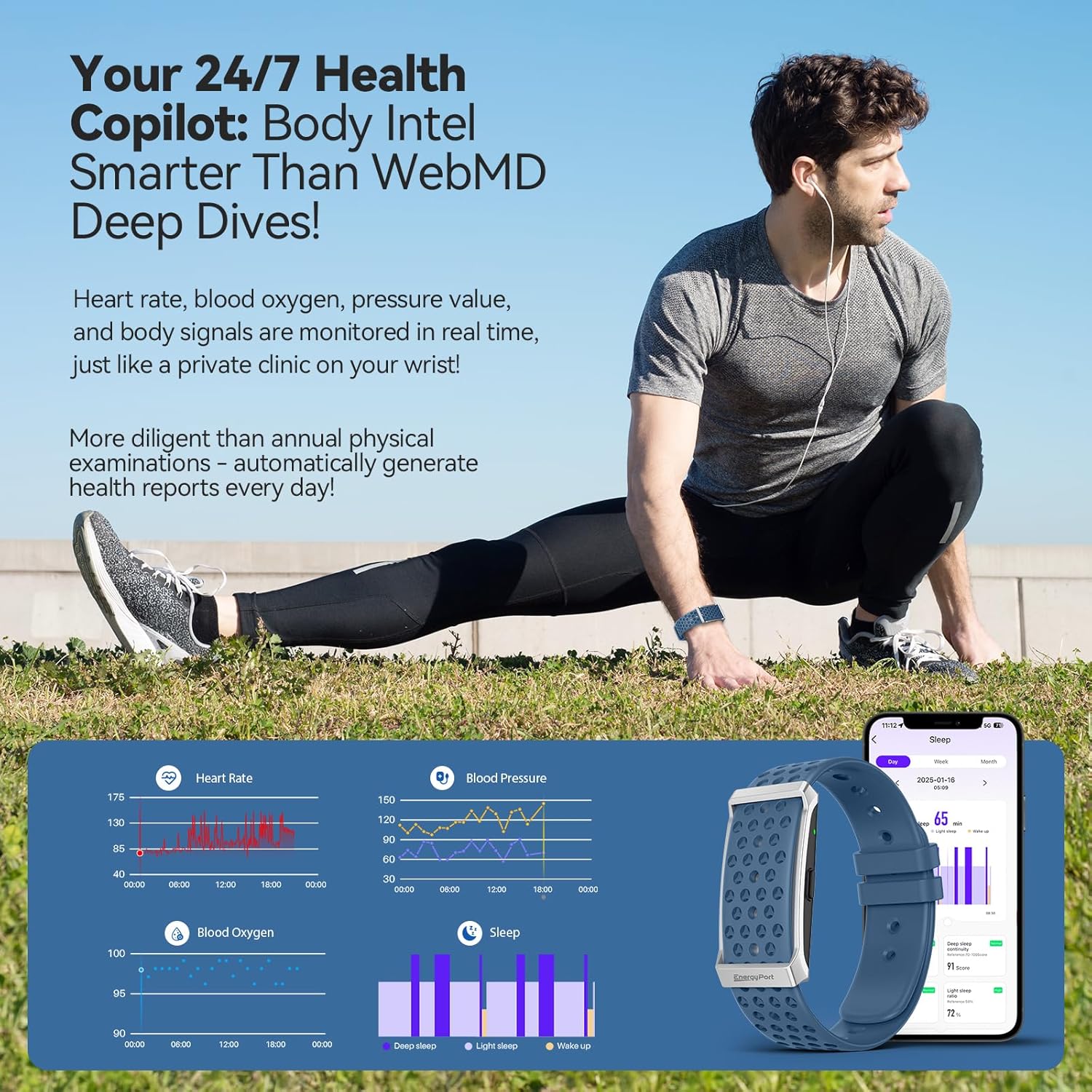
Obrázek 4.3: Konecview of health data tracked by the smart bracelet, including heart rate, blood pressure, blood oxygen, and sleep.

Image 4.4: Detailed sleep tracking and analysis provided by the device.
4.3 Funkce chytrého asistenta
The bracelet integrates smart features to keep you connected and organized.
- Oznámení: Receive customizable vibration alerts for incoming calls, messages, and app notifications.
- Dálkové ovládání fotoaparátu: Používejte náramek jako dálkové ovládání fotoaparátu vašeho smartphonu.
- Připomenutí: Set gentle reminders for hydration, movement, or other custom alerts.
- Tiché alarmy: Set vibrating alarms that wake you discreetly without disturbing others.

Image 4.5: Notification display and smart alerts on the bracelet.
5. Údržba
5.1 Nabíjení
The EnergyPort Smart Bracelet H29 features an extended battery life.
- Výdrž baterie: Expect 20-30 days of regular use and 45-60 days on standby from a single charge.
- Proces nabíjení: Use the provided magnetic charging cable. Align the magnetic pins with the charging contacts on the back of the device.

Image 5.1: Charging the EnergyPort Smart Bracelet H29.
5.2 Voděodolnost
The device is designed for daily water exposure.
- Hodnocení: 1 ATM waterproof, suitable for depths up to 10 meters.
- Používání: Resistant to rain, sweat, and handwashing.
- Pozor: Avoid immersion in hot water.

Image 5.2: The smart bracelet's 1 ATM water resistance for daily activities.
5.3 Cleaning and Strap Care
To maintain hygiene and comfort, regularly clean your bracelet and straps.
- Čištění: Wipe the device and straps with a soft, damp tkanina. Vyhněte se agresivním chemikáliím.
- Systém popruhů: The device comes with a dual strap system (nylon and silicone) for various activities and comfort. Interchange straps as needed.

Image 5.3: The lightweight design and dual strap options for comfort.
6. Řešení problémů
If you encounter issues with your EnergyPort Smart Bracelet H29, refer to the following common solutions:
- Zařízení se nezapíná: Ensure the device is fully charged. If it's the first use, follow the Bluetooth activation steps (Section 3.1) carefully.
- Nelze spárovat s aplikací:
- Confirm Bluetooth is enabled on both the bracelet and your smartphone.
- Ensure the 'QWatch Pro' app is updated to the latest version.
- Restart both the bracelet and your smartphone, then attempt pairing again.
- Inaccurate Health Readings (HR, SpO2, BP):
- Ujistěte se, že náramek pevně sedí na zápěstí, není příliš těsný ani příliš volný.
- Clean the sensor on the back of the device.
- Pro dosažení nejlepší přesnosti zůstaňte během měření v klidu.
- Sleep Tracking Issues: Ensure the bracelet is worn consistently throughout the night. Verify that the app has the correct time zone settings.
- Workout Tracking Not Starting/Stopping: Ensure you initiate the workout mode correctly within the app or on the device. Wait for any countdowns to complete before starting your activity.
- Unexpected Vibrations: Check your notification settings within the 'QWatch Pro' app to ensure only desired alerts are enabled.
- App Glitches or Typos: Ensure your 'QWatch Pro' app is updated. If issues persist, try reinstalling the app.
7. Specifikace
| Funkce | Detail |
|---|---|
| Název modelu | H29 |
| Značka | EnergyPort |
| Rozměry produktu | 2.4 x 4.3 x 4.3 palce |
| Hmotnost položky | 5.9 unce |
| Kapacita paměti | 64 MB |
| Operační systém | Android, iOS |
| Technologie připojení | Bluetooth |
| Standard bezdrátové komunikace | Bluetooth |
| GPS | GPS přes smartphone |
| Voděodolnost | 1 ATM (10m depth) |
| Výdrž baterie (běžné používání) | 20-30 dní |
| Životnost baterie (pohotovostní režim) | 45-60 dní |
| Speciální funkce | Day&Night Sleep Tracker, Call Reminder, Message Notification, Heart Rate Monitor, Blood Pressure Watch, Activity Tracker, Calorie Tracker, Pedometer, Camera Remote, Alarm, Sedentary Reminder, Water Drinking Reminder, GPS Running, 173 Exercise Modes |
8. Záruka a podpora
8.1 Informace o záruce
The EnergyPort Smart Bracelet H29 comes with a 3-letá záruka covering all manufacturing defects. During this period, EnergyPort will cover repairs or replacements for eligible defects.
Image 8.1: EnergyPort's 3-year support commitment.
8.2 Lifetime Support and No Subscriptions
Enjoy free lifetime access to all core features of your EnergyPort Smart Bracelet H29. There are no subscription fees required to use the device's primary functionalities.
8.3 Zákaznická podpora
For further assistance, technical support, or warranty claims, please contact EnergyPort customer service through the official webweb nebo vaše nákupní platforma.
Ask a question about this manual
Ask about setup, troubleshooting, compatibility, parts, safety, or missing instructions. Manuals+ will review the question and use this page’s manual context to help answer it.