
1. Úvod
This manual provides comprehensive instructions for the setup, operation, and maintenance of your Beyution RC813A Voice Replacement Remote Control. This remote is designed to be compatible with various TCL QLED UHD 4K Smart TV models in the QM6K and QM7K series. Please read this manual carefully to ensure proper use and to maximize your remote control's functionality.
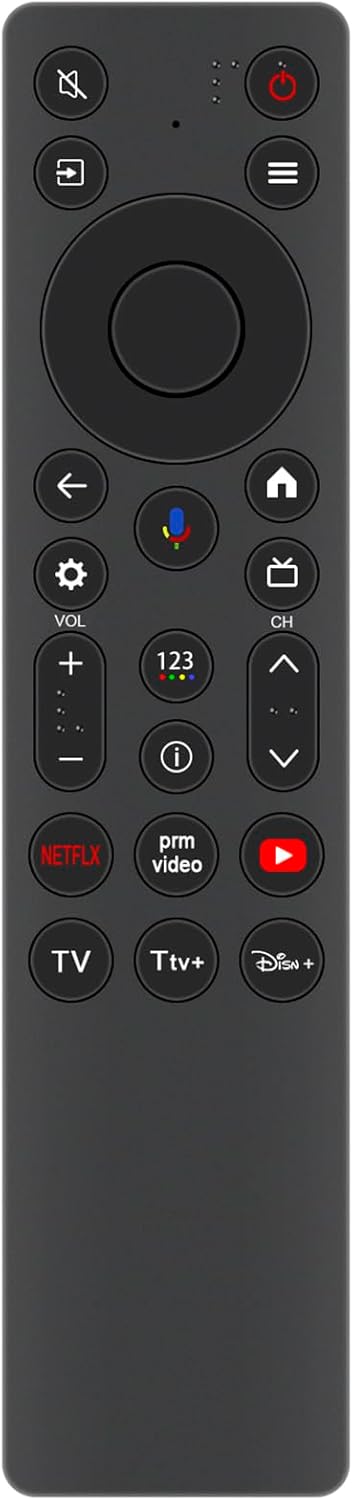
Obrázek 1: Přední view of the Beyution RC813A remote control. This image displays the front of the Beyution RC813A remote control, showing all buttons and their layout, including power, navigation, volume, channel, and dedicated app buttons.
2. Nastavení
2.1 Instalace baterie
- Najděte přihrádku na baterie na zadní straně dálkového ovladače.
- Posuňte kryt baterie dolů nebo stiskněte západku pro jeho otevření.
- Insert two new AAA ALKALINE batteries, ensuring the positive (+) and negative (-) terminals match the indicators inside the compartment.
- Nasaďte kryt baterie zpět jeho zasunutím zpět na místo, dokud bezpečně nezacvakne.

Obrázek 2: Zadní view of the Beyution RC813A remote control with the battery compartment open. This image shows the rear of the Beyution RC813A remote control with the battery cover removed, revealing the two AAA battery slots for proper battery insertion.
2.2 Spárování dálkového ovladače
After installing the batteries, the remote control needs to be paired with your TCL Smart TV. The pairing process typically involves the following steps:
- Ujistěte se, že je vaše chytrá televize TCL zapnutá.
- Namiřte dálkový ovladač směrem k televizoru.
- Stiskněte a podržte OK button (center of the navigation pad) and the Zadní button (left arrow) simultaneously for a few seconds.
- A pairing message should appear on your TV screen, indicating that the remote is connecting.
- Once paired, the remote control will function normally. If pairing fails, try repeating the steps or consult your TV's user manual for specific remote pairing instructions.
3. Ovládání dálkového ovladače
3.1 Funkce tlačítek
The Beyution RC813A remote control features a standard layout for easy navigation and control of your TCL Smart TV. Key buttons include:
- Vypínač: Zapíná nebo vypíná televizor.
- Navigační tlačítko (nahoru/dolů/vlevo/vpravo/OK): Používá se pro navigaci v menu a výběr.
- Tlačítko Zpět: Vrátí se na předchozí obrazovku nebo nabídku.
- Tlačítko Domů: Accesses the TV's main home screen.
- Zvýšení/Snížení hlasitosti: Upravuje úroveň hlasitosti televizoru.
- Kanál nahoru/dolů: Mění televizní kanály.
- Tlačítko ztlumení: Ztlumí nebo zruší ztlumení zvuku televizoru.
- Vyhrazená tlačítka aplikací: Quick access to popular streaming services like Netflix, Prime Video, YouTube, and Disney+.
- Tlačítko hlasového ovládání: Activates the voice assistant for commands (see Section 3.2).
3.2 Funkce hlasového ovládání
The RC813A remote control supports voice commands, allowing for hands-free operation and quicker access to content. To use voice control:
- Stiskněte tlačítko Tlačítko hlasového ovládání (typically marked with a microphone icon).
- Mluvte jasně do mikrofonu umístěného na dálkovém ovladači.
- ExampMezi příkazy patří: „Otevřít Netflix“ nebo „Hledat action movies," "Switch to HDMI 1," or "What's the weather?"
- Televizor zpracuje váš příkaz a odpovídajícím způsobem zareaguje.

Obrázek 3: Beyution RC813A remote control emphasizing its voice control functionality. This image illustrates the Beyution RC813A remote control, highlighting its voice control feature with a prominent microphone icon and accompanying 'VOICE CONTROL' text, indicating its capability for voice commands.

Obrázek 4: User interacting with a TCL Smart TV using the Beyution RC813A remote control. This image depicts a hand holding the Beyution RC813A remote control, interacting with a TCL Smart TV displaying a menu interface, demonstrating typical usage.
4. Kompatibilita
The Beyution RC813A Voice Replacement Remote Control is compatible with the following TCL QLED UHD 4K Smart TV models:
- Řada QM6K
- Řada QM7K
- 50QM6K
- 55QM7K
- 65QM6K
- 65QM7K
- 75QM6K
- 75QM7K
- 85QM6K
- 85QM7K
- 98QM6K
- 98QM7K
If your specific TV model is not listed, please verify compatibility with the product seller or your TV's manufacturer.
5. Řešení problémů
- Dálkové ovládání nereaguje:
- Ujistěte se, že jsou baterie vloženy správně se správnou polaritou.
- Replace old batteries with new ALKALINE batteries.
- Ujistěte se, že mezi dálkovým ovladačem a infračerveným přijímačem televizoru nejsou žádné překážky.
- Re-pair the remote control with your TV as described in Section 2.2.
- Hlasové ovládání nefunguje:
- Ujistěte se, že je dálkový ovladač správně spárován s televizorem.
- Mluvte jasně a přímo do mikrofonu.
- Zkontrolujte nastavení televizoru a ujistěte se, že je povoleno hlasové ovládání.
- Krátká provozní vzdálenost:
- Vyměňte baterie za nové.
- Ensure a clear line of sight to the TV. The remote is designed for stable performance up to 8 meters, and available up to 10 meters.
6. Specifikace
| Funkce | Detail |
|---|---|
| Číslo modelu produktu | RC813A |
| Značka | Beyution |
| Technologie připojení | Wireless (requires pairing) |
| Speciální funkce | Voice Control, Ergonomic Design |
| Barva | Černý |
| Kompatibilní zařízení | TCL QLED UHD 4K Smart TVs (QM6K, QM7K Series) |
| Rozměry produktu | 5 x 1 x 0.6 palce (12.7 x 2.54 x 1.52 cm) |
| Hmotnost položky | 1 unce (28.35 gramy) |
| Zdroj napájení | 2 x AAA ALKALINE Batteries (not included) |

Obrázek 5: Beyution RC813A remote control with its physical dimensions. This image shows the Beyution RC813A remote control with its physical dimensions clearly marked: 4.3 cm (1.69 in) width and 18.5 cm (7.28 in) length, providing a visual reference for its size.
7. Údržba
- Dálkový ovladač udržujte v čistotě otíráním měkkým, suchým hadříkem.
- Nevystavujte dálkový ovladač extrémním teplotám, přímému slunečnímu záření nebo vlhkosti.
- Nenechávejte dálkový ovladač upustit ani jej nevystavujte silným nárazům.
- Pokud dálkový ovladač nebudete delší dobu používat, vyjměte baterie, abyste zabránili jejich vytečení.
8. Záruka a podpora
For any questions or issues regarding your Beyution RC813A Voice Replacement Remote Control, please contact the seller or manufacturer directly. They are committed to providing a satisfactory answer within 24 hours.