
1. Úvod
This manual provides detailed instructions for the setup, operation, and maintenance of your boAt Aavante 5.2.4 Prime 6250DA Dolby Atmos Soundbar. This system is designed to deliver an immersive audio experience with its 5.2.4 channel configuration, dual subwoofers, wireless satellite speakers, and Dolby Atmos technology.
2. Obsah balení
Ověřte, zda jsou v balení přítomny všechny níže uvedené položky:
- Soundbar
- Subwoofer (2x)
- Satellite Speakers (x2)
- Napájecí kabel
- Dálkové ovládání
- AA Batteries (x2) for Remote
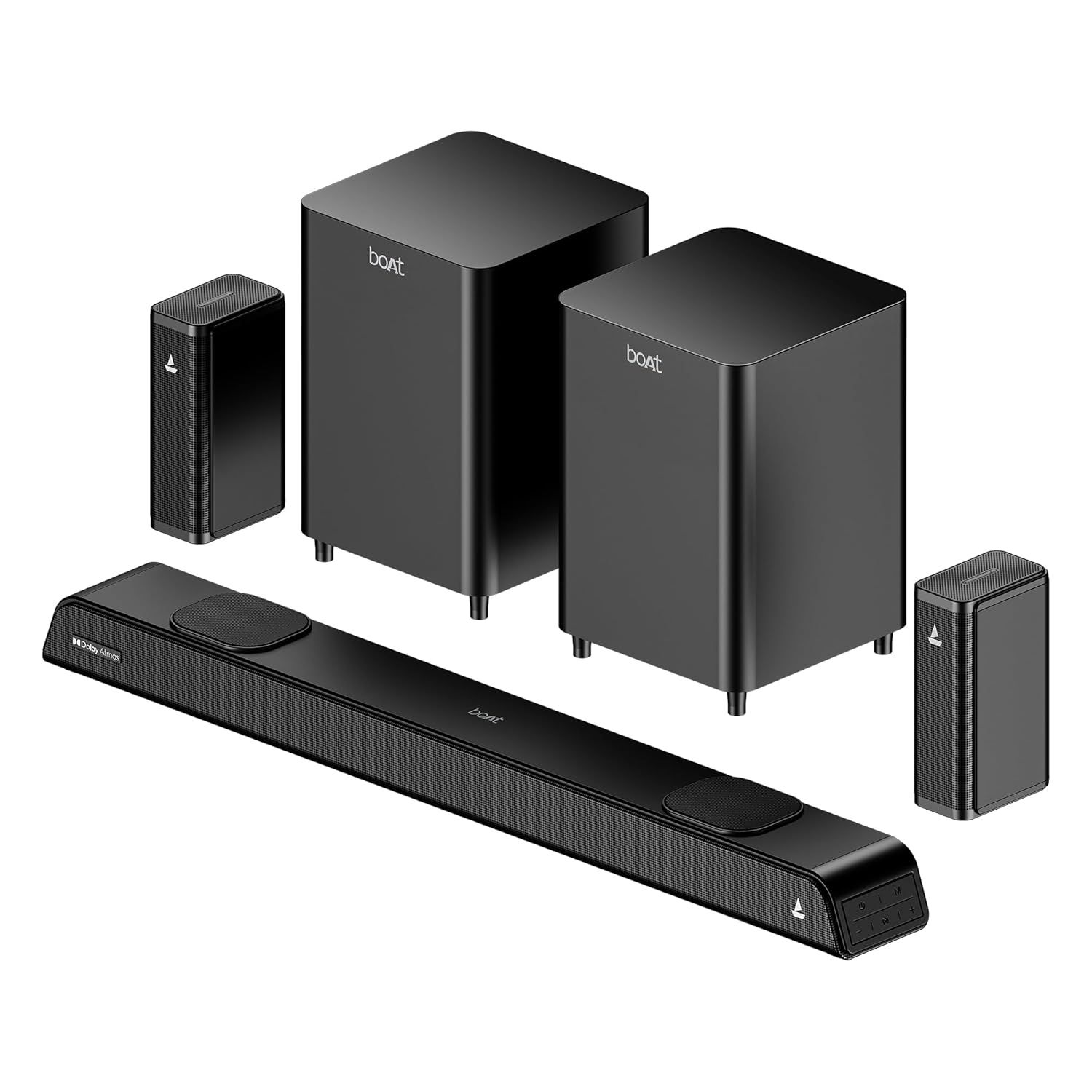
Image: The complete boAt Aavante 5.2.4 Prime 6250DA soundbar system, including the main soundbar unit, two subwoofers, and two satellite speakers, all in a premium black finish.
3. Konec produktuview
3.1 Systémové komponenty
The boAt Aavante 5.2.4 Prime 6250DA system consists of the following main components:
- Soundbar: The central unit housing multiple speakers for front and height channels.
- Dual Wired Subwoofers: Two dedicated units for powerful bass reproduction.
- Bezdrátové zadní satelitní reproduktory: Two compact speakers that connect wirelessly to the main system for surround sound.
3.2 Ovládací prvky a indikátory
The soundbar features onboard controls and an LED display. A master remote control is included for comprehensive system management.

Image: The master remote control for the boAt Aavante 5.2.4 Prime 6250DA, showing buttons for power, volume, mode selection, EQ settings, Bluetooth, bass, and treble adjustments.
4. Nastavení
4.1 Umístění reproduktorů
Optimal placement is crucial for achieving the best sound experience:
- Soundbar: Place the soundbar centrally below your television. Ensure it is not obstructed.
- Subwoofery: Position the two subwoofers on the floor, ideally near the front of the room. Experiment with placement to find the best bass response for your listening area.
- Satelitní reproduktory: Place the wireless satellite speakers behind your primary listening position, to the left and right. Ensure they have a clear line of sight to the soundbar for stable wireless connection.

Image: Diagram illustrating the recommended placement for the 5.2.4 channel soundbar system, showing the soundbar in front of the TV, two subwoofers near the front, and two satellite speakers positioned behind the listener for immersive surround sound.

Image: A visual representation of a 360-degree surround sound setup, highlighting the effect of multiple phantom speakers creating an immersive audio environment around the listener.
4.2 Připojení systému
Connect the soundbar to your audio sources using the available ports. Ensure all power cables are securely connected to the soundbar, subwoofers, and satellite speakers, then plug them into a power outlet.

Image: Icons representing the various connectivity options available on the boAt Aavante 5.2.4 Prime 6250DA soundbar: Optical, Bluetooth v5.3, AUX IN, HDMI e-ARC, and USB.
Připojení HDMI (eARC):
- Connect an HDMI cable (not included) from the HDMI eARC port on the soundbar to the HDMI eARC/ARC port on your television.
- On your TV, navigate to the audio settings and set the sound output to 'Auto' or 'Passthrough' to ensure proper transmission of Dolby Atmos or 5.1 content. If set to 'PCM' or 'Stereo', the soundbar will default to 2.0 stereo output.
Optické připojení:
- Connect an optical cable (not included) from the OPTICAL OUT port on your TV or audio source to the OPTICAL IN port on the soundbar.
- Na soundbaru vyberte jako vstupní zdroj „Optický“.
Připojení AUX:
- Connect a 3.5mm AUX cable (not included) from the audio output of your device to the AUX IN port on the soundbar.
- Na soundbaru vyberte jako vstupní zdroj „AUX“.
USB připojení:
- Vložte USB disk se zvukovým souborem filedo USB portu na soundbaru.
- Select 'USB' as the input source on the soundbar. The soundbar will automatically begin playing compatible audio files.
5. Návod k obsluze
5.1 Zapnutí/vypnutí
Stiskněte tlačítko Moc button on the remote control or the soundbar to turn the system on or off.
5.2 Výběr vstupního zdroje
Stiskněte tlačítko MODE button on the remote control or the soundbar to cycle through available input sources: HDMI (eARC), Optical, AUX, USB, and Bluetooth.
5.3 Párování Bluetooth
- Turn on the soundbar and select 'Bluetooth' mode. The LED display will indicate 'BT'.
- Enable Bluetooth on your mobile device and search for 'boAt Aavante 6250DA'.
- Select the device to pair. Once connected, the soundbar will indicate successful pairing.
5.4 režimy EQ
The soundbar offers various Equalizer (EQ) modes to optimize audio for different content types. Press the EQ button on the remote to switch between modes:
- Film: Zlepšuje srozumitelnost dialogů a filmové efekty.
- Hudba: Poskytuje vyvážený zvuk profile pro přehrávání hudby.
- Sportovní: Optimizes audio for sports broadcasts, emphasizing commentary and crowd sounds.
- Zprávy: Zaměřuje se na srozumitelnost hlasu ve zprávách a diskusních pořadech.

Image: A graphical representation of the EQ modes interface, showing options for Movie, Music, Sports, and News, allowing users to personalize sound settings.
5.5 Ovládání hlasitosti, basů a výšek
Použijte VOL+ / VOL- buttons on the remote to adjust the overall volume. Dedicated BASS + / BAS- a TREBLE + / ZTROJNÁSOBIT- buttons allow for fine-tuning of low and high frequencies.
6. Údržba
Pro zajištění dlouhé životnosti a optimálního výkonu vašeho soundbaru:
- Čištění: Use a soft, dry cloth to clean the surfaces of the soundbar, subwoofers, and satellite speakers. Avoid using liquid cleaners or abrasive materials.
- Větrání: Zajistěte dostatečné proudění vzduchu kolem všech součástí, abyste zabránili přehřátí. Neblokujte větrací otvory.
- Prostředí: Chraňte systém před přímým slunečním zářením, zdroji tepla a nadměrnou vlhkostí.
7. Řešení problémů
If you encounter issues with your boAt Aavante 5.2.4 Prime 6250DA, refer to the following common solutions:
| Problém | Možná příčina | Řešení |
|---|---|---|
| Žádná síla | Napájecí kabel není připojen; zásuvka není aktivní. | Zkontrolujte připojení k napájení, zkuste jinou zásuvku. |
| Žádný zvuk | Incorrect input source selected; volume too low; cables loose. | Select correct input; increase volume; check all audio cables. |
| No sound from satellite speakers | Wireless connection issue; speakers not powered. | Ensure satellite speakers are powered on and paired with the soundbar. |
| Dolby Atmos not working | TV audio output not set to 'Auto' or 'Passthrough'; content is not Dolby Atmos. | Set TV sound output to 'Auto' or 'Passthrough'. Ensure playing Dolby Atmos compatible content. |
| Problémy s párováním pomocí rozhraní Bluetooth | Zařízení je příliš daleko; soundbar není v režimu párování; rušení. | Ensure soundbar is in BT mode; move device closer; restart both devices. |

Image: A visual representation of how Dolby Atmos creates an immersive sound field, with sound waves emanating from various points around the listener, including overhead, for a multi-dimensional audio experience.

Image: A comparison graphic showing the difference between regular audio and Dolby Atmos audio waveforms, illustrating the enhanced detail and dynamic range provided by Dolby Atmos.
8. Specifikace
| Funkce | Detail |
|---|---|
| Název modelu | Aavante 5.2.4 Prime 6250DA |
| Číslo modelu | HA0079 |
| Zvukový výstup | 625W RMS |
| Konfigurace kanálu | 5.2.4 Channel (Soundbar, Dual Subwoofers, Wireless Satellites) |
| Audio technologie | Dolby Atmos |
| Konektivita | Bluetooth v5.3, HDMI (eARC), USB, AUX, Optical, Coaxial |
| Kontrolní metoda | Dálkové ovládání |
| Rozměry produktu | 90D x 7.4W x 11H Centimeters (Soundbar) |
| Hmotnost položky | 7 kg (celý systém) |
| Zahrnuté komponenty | Soundbar, 2x Subwoofers, 2x Satellites, Cable, Remote |
| Zdroj napájení | Kabelové |
| Baterie pro dálkové ovládání | 2 AA baterie (součástí balení) |

Obrázek: Interní view of the soundbar highlighting its components and the powerful 625W output, indicating boAt Signature Sound technology.

Image: Two boAt subwoofers, emphasizing their role in delivering powerful and deep bass for the audio system.
9. Záruka a podpora
Your boAt Aavante 5.2.4 Prime 6250DA soundbar system comes with a Omezená záruka. For detailed warranty terms and conditions, please refer to the warranty card included in your package or visit the official boAt webmísto.
For technical assistance, troubleshooting not covered in this manual, or warranty claims, please contact boAt customer support through their official channels. Keep your purchase receipt and product serial number handy when contacting support.