
1. Úvod
Thank you for choosing the SIXTOP Android 15 Carplay Autoradio. This manual provides essential information for the proper installation, operation, and maintenance of your new car multimedia system. Please read this manual thoroughly before use to ensure optimal performance and safety.
2. Bezpečnostní informace
- Doporučená profesionální instalace: Instalaci by měl provádět kvalifikovaný technik, aby se předešlo poškození vozidla nebo jednotky.
- Napájení: Ujistěte se, že je jednotka připojena k 12V stejnosměrnému napájení se záporným uzemněním.
- Vyhněte se rozptylování: Neobsluhujte jednotku způsobem, který by vás rozptyloval od řízení. Vždy upřednostňujte bezpečnost silničního provozu.
- Teplota: Nevystavujte jednotku extrémním teplotám nebo přímému slunečnímu záření po delší dobu.
- vlhkost: Udržujte jednotku suchou. Vystavení vlhkosti může způsobit poruchu nebo poškození.
3. Kompatibilní vozidla
This autoradio is designed for specific Mercedes Benz models. Please verify your vehicle's compatibility before installation.
- Mercedes Benz A-Class W169 (2004-2012)
- Mercedes Benz B-Class B200/W245 (2004-2012)
Compare your vehicle's central console and adapter port with the images below to confirm compatibility.
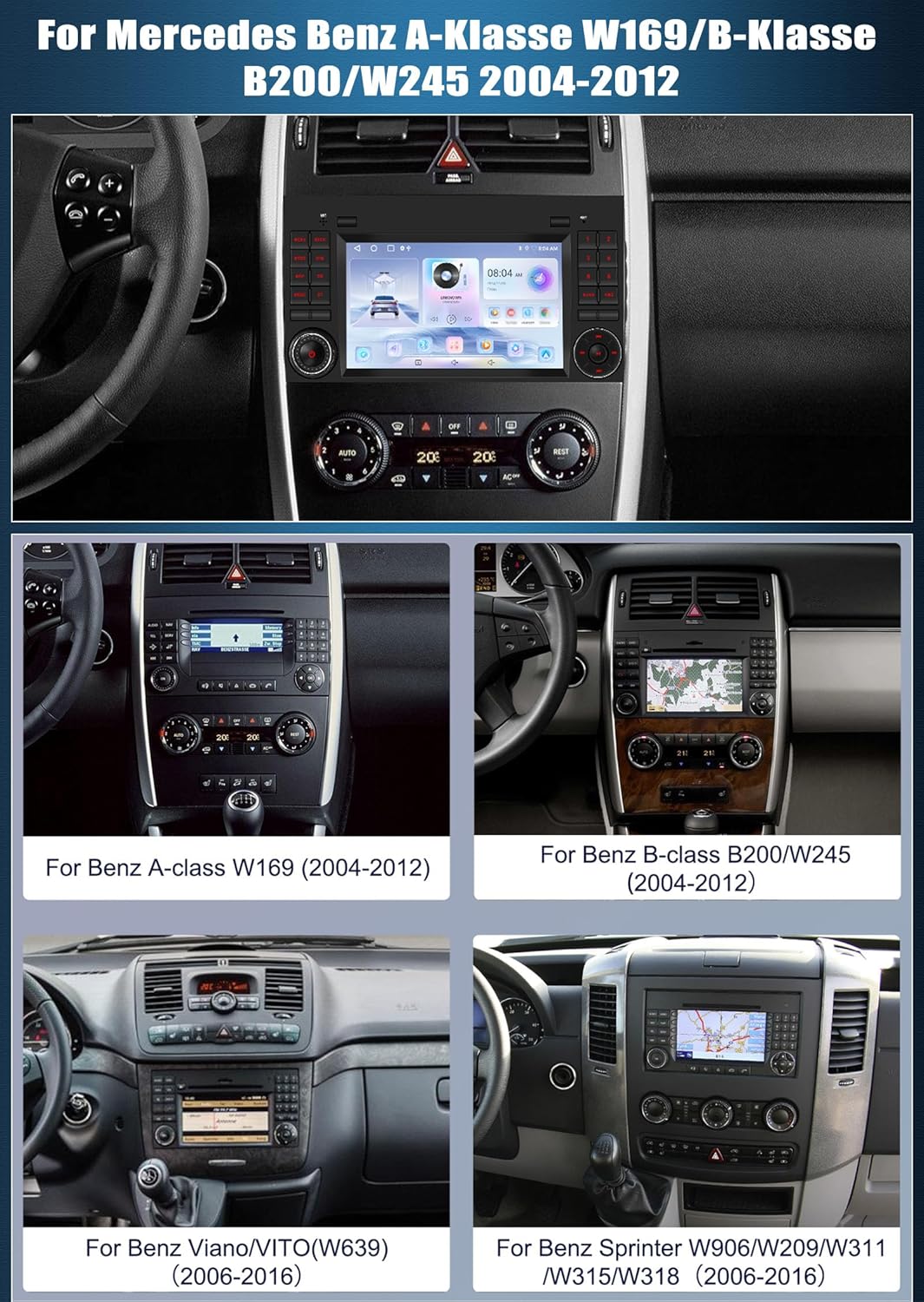
Image: Various Mercedes Benz dashboards, including A-Class W169 and B-Class W245, showing the fitment area for the autoradio. This image helps users identify if their vehicle's dashboard matches the compatible models.
4. Obsah balení
Upon opening the package, ensure all items listed below are present and undamaged.
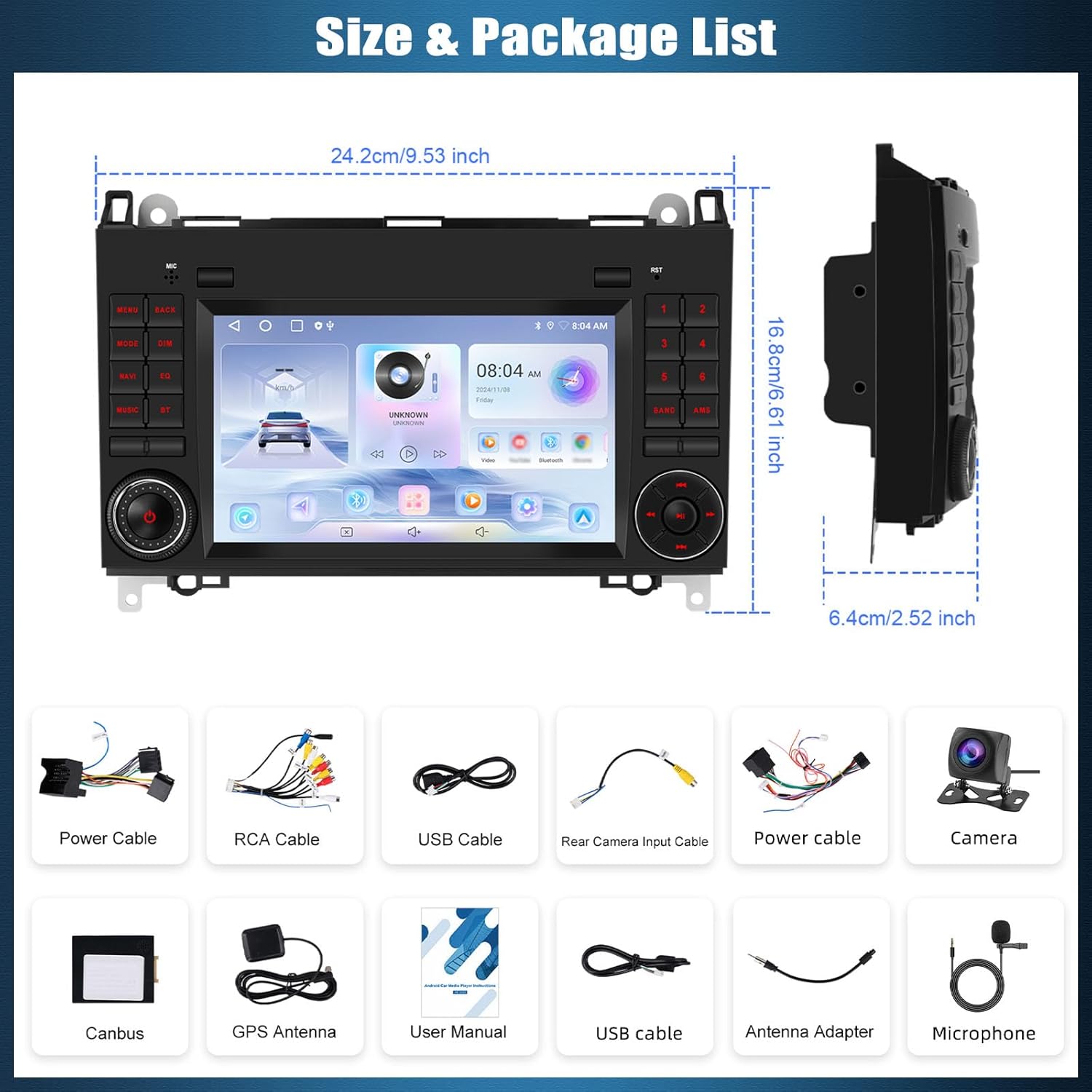
Image: The autoradio unit with its dimensions (24.2cm x 16.8cm x 6.4cm) and a visual representation of all included accessories. This includes various cables, a camera, GPS antenna, and the user manual.
- SIXTOP Android 15 Carplay Autoradio Unit
- Napájecí kabel (x2)
- RCA kabel
- USB kabel (x2)
- Vstupní kabel zadní kamery
- Camera (Rear View)
- Dekodér CANbusu
- GPS anténa
- Uživatelská příručka
- Anténní adaptér
- Externí mikrofon
5. Nastavení a instalace
Installation of the autoradio involves electrical connections and dashboard disassembly. It is highly recommended to have this procedure performed by a certified professional to avoid damage to your vehicle or the unit.
5.1 Kontroly před instalací
- Ujistěte se, že je vypnuté zapalování vozidla a odpojená baterie.
- Ověřte, zda je přítomen veškerý obsah balení.
- Confirm vehicle compatibility with the unit.
5.2 Zapojení kabeláže
Refer to the wiring diagram provided in the included user manual for detailed connection instructions. Key connections include:
- Napájecí kabel: Connect to the vehicle's power supply (12V DC, negative ground).
- Dekodér CANbusu: Connect to the vehicle's CAN-BUS system for steering wheel controls and other vehicle data integration.
- GPS anténa: Namontujte na místě s průhledným view oblohy pro optimální příjem signálu.
- Vstupní kabel zadní kamery: Connect the included rear camera for reversing display functionality.
- USB kabely: For connecting external devices or USB drives.
- Externí mikrofon: Connect for improved call quality during Bluetooth hands-free operation.
6. Návod k obsluze
6.1 Základní ovládací prvky a dotyková obrazovka
The unit features a 7-inch IPS 2.5D touchscreen for primary interaction. Physical buttons on the unit and steering wheel controls provide additional functionality.

Image: The autoradio unit displaying its high-definition touchscreen with various colorful backlight options. The image also illustrates how the unit integrates with the vehicle's steering wheel controls for convenient operation.
6.2 Ovládací prvky na volantu (SWC)
The unit supports original steering wheel buttons, allowing control over audio functions without taking your hands off the wheel. After installation, the system should automatically recognize and map most common controls. If not, refer to the system settings for manual configuration.
6.3 Wireless CarPlay, Wired Android Auto, and Mirror Link
Connect your smartphone to access navigation, music, calls, and more directly on the autoradio display.
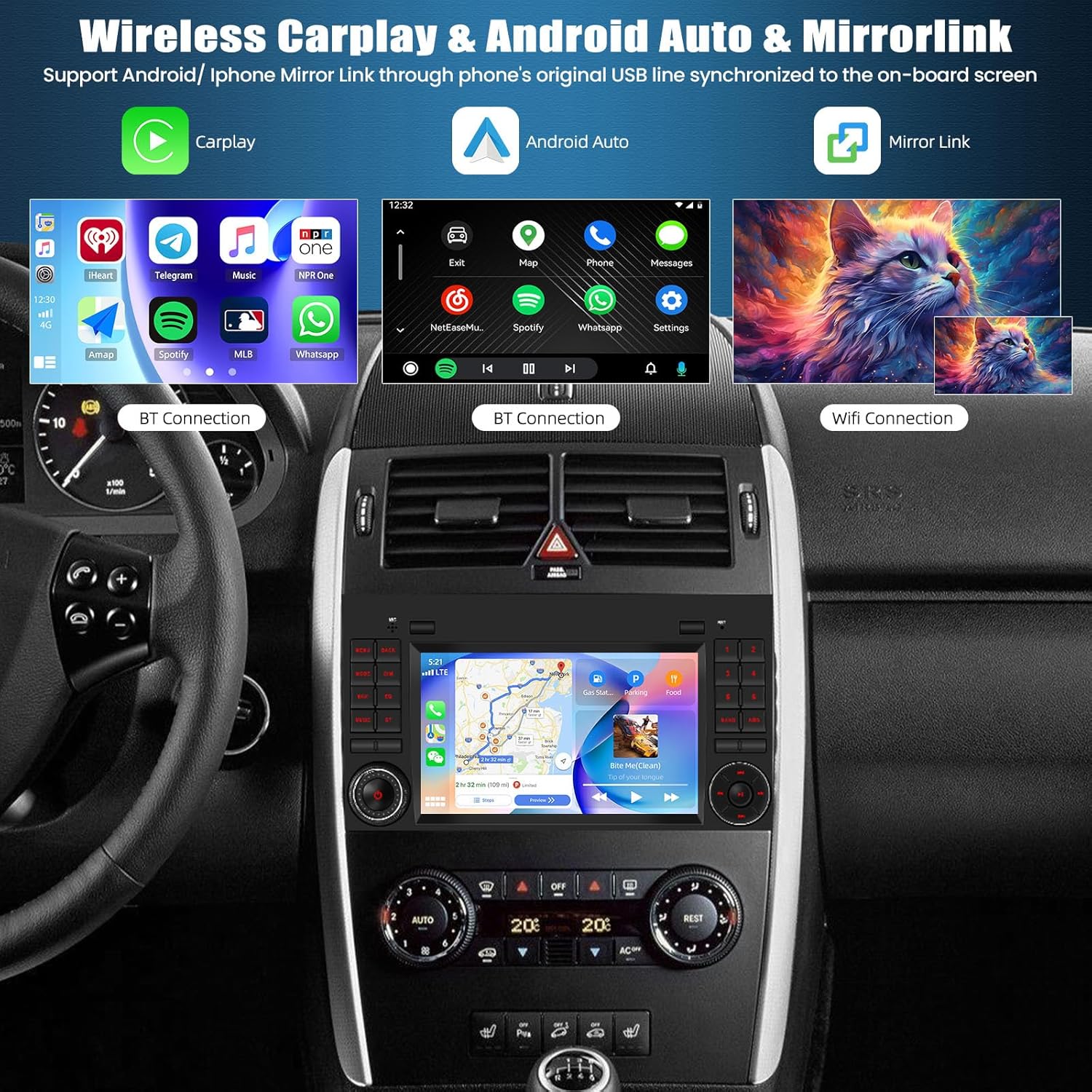
Image: The autoradio screen demonstrating the interfaces for Wireless CarPlay, Android Auto, and Mirrorlink. This visual shows how smartphone applications and content are displayed and controlled on the unit.
- CarPlay (Wireless/Wired): For iPhone users. Connect wirelessly via Bluetooth and Wi-Fi, or via USB cable.
- Android Auto (Wired): For Android users. Connect via USB cable.
- Zrcadlový odkaz (iOS/Android): Allows mirroring your phone's screen onto the autoradio display. Connect via USB or Wi-Fi.
6.4 Připojení Bluetooth
Pair your mobile phone via Bluetooth for hands-free calling and audio streaming.

Image: A multi-panel image illustrating the Bluetooth calling interface, Bluetooth music playback, FM/RDS radio tuner, and DSP (Digital Sound Processor) settings for audio customization.
- Hands-free volání: Access your phonebook, make and receive calls directly from the unit. The external microphone enhances call clarity.
- Bluetooth přehrávání hudby: Stream audio from your paired device to the car's speakers.
6.5 FM/RDS rádio
Nalaďte si své oblíbené rozhlasové stanice s čistým příjmem.
- FM/RDS: Enjoy FM radio with RDS (Radio Data System) for station information, traffic updates, and weather forecasts.
- Přednastavené stanice: Store up to 18 of your preferred stations for quick access.
6.6 GPS navigace
The unit features integrated GPS for reliable navigation.
- Online mapy: Connect to Wi-Fi to use online navigation applications.
- Offline mapy: Download maps from the Play Store for navigation without an internet connection.
6.7 Rear Camera Function (Reversing Display)
Enhance parking safety with the included rear camera.

Image: A visual comparison demonstrating the clarity of the unit's reversing display compared to other systems. It highlights features like HD resolution, clear image, waterproof design, 170° wide-angle view, and night vision capabilities.
- When the vehicle is shifted into reverse gear, the screen automatically displays the rear camera feed.
- Supports AHD camera input for high-definition video.
6.8 DSP Settings (Digital Sound Processor)
Přizpůsobte si zvukový zážitek pomocí vestavěného DSP.
- Adjust equalizer settings (EQ) to match your audio preferences.
- Explore multiple surround sound field modes for an immersive listening experience.
7. Údržba
- Čištění obrazovky: Dotykovou obrazovku jemně otírejte měkkým hadříkem, který nepouští vlákna. Nepoužívejte abrazivní čisticí prostředky ani rozpouštědla.
- Aktualizace softwaru: Pravidelně kontrolujte dostupné aktualizace softwaru, abyste zajistili optimální výkon a přístup k novým funkcím. Aktualizace lze obvykle najít v nastavení systému nebo v nastavení výrobce. webmísto.
- Vyhněte se kontaktu s tekutinami: Do not allow liquids to enter the unit, as this can cause severe damage.
8. Řešení problémů
| Problém | Možná příčina | Řešení |
|---|---|---|
| Jednotka se nezapne. | Uvolněné připojení napájení, spálená pojistka, problém s autobaterií. | Zkontrolujte napájecí kabely a připojení. Zkontrolujte pojistky vozidla. Ujistěte se, že je baterie vozidla nabitá. |
| Žádný zvuk. | Volume too low, mute activated, incorrect audio output settings, loose speaker wires. | Increase volume. Check if mute is active. Verify audio settings. Inspect speaker connections. |
| Slabý nebo ztracený signál GPS. | GPS anténa je zablokovaná nebo nesprávně nainstalovaná. | Ujistěte se, že má anténa GPS volný view oblohy. Zkontrolujte připojení antény. |
| Problémy s připojením Bluetooth. | Zařízení není v režimu párování, nesprávný párovací kód, rušení. | Ensure phone's Bluetooth is on and in pairing mode. Re-pair the device. Move closer to the unit. |
| Zadní kamera se nezobrazuje. | Camera cable loose, camera faulty, incorrect input selection. | Check camera cable connections. Ensure vehicle is in reverse. Verify camera input settings. |
Pokud problémy přetrvávají i po vyzkoušení těchto řešení, kontaktujte zákaznickou podporu.
9. Specifikace
| Funkce | Popis |
|---|---|
| Značka | SIXTOP |
| Operační systém | Android 15 |
| Zobrazit | 7-inch IPS 2.5D Touchscreen |
| Technologie připojení | Bluetooth, WiFi |
| Speciální funkce | Android Auto, Apple CarPlay (Wireless/Wired), GPS Navigation, FM/RDS Radio, Mirror Link, Steering Wheel Control (SWC) Support, DSP |
| Kompatibilní zařízení | Auto |
| Režim zvukového výstupu | Stereo |
| Konfigurace prostorového zvuku | 2.0 |
| Barva | Černý |
| Rozměry produktu | 10P x 10l x 10H mm (Approx. 24.2cm x 16.8cm x 6.4cm) |
| Hmotnost položky | 1400 gramů |
10. Záruka a podpora
For warranty information and technical support, please refer to the documentation included with your purchase or contact the retailer/manufacturer directly. Keep your proof of purchase for warranty claims.