
1. Úvod
This manual provides essential information for the safe operation and maintenance of your SuperRC V666 Drone with Camera. Please read it thoroughly before first use to ensure proper setup and to maximize your flying experience. The V666 drone features a brushless motor, optical flow positioning, and an HD 180° adjustable camera, designed for both beginner and adult users.
2. Bezpečnostní opatření
- Letové prostředí: Létejte v otevřeném prostoru, mimo dosah lidí, zvířat, budov a elektrického vedení. Vyhněte se létání za silného větru nebo nepříznivých povětrnostních podmínek.
- Bezpečnost baterie: Používejte pouze dodané baterie a nabíjecí kabel. Baterie nepřebíjejte ani nepropichujte. Pokud baterie vykazují známky poškození nebo nafouknutí, přestaňte je používat.
- Bezpečnost vrtule: Udržujte ruce, obličej a volné oblečení v dostatečné vzdálenosti od rotujících vrtulí. Před letem se ujistěte, že jsou vrtule bezpečně upevněny.
- Přímá viditelnost: Během letu vždy udržujte vizuální linii s dronem.
- Doporučený věk: This product is suitable for users aged 14 and above.
- Rušení: Avoid flying near strong electromagnetic interference sources.
- Multiple Drones: When operating multiple drones simultaneously, power on and pair each drone and its remote control separately to prevent frequency conflicts.
3. Obsah balení
Ověřte, zda jsou v balení obsaženy všechny níže uvedené položky:
Obrázek: Overview of the SuperRC V666 Drone package contents, showing the drone, remote control with screen, two batteries, spare propellers, screwdriver, USB charging cable, card reader, and memory card.
- SuperRC V666 Drone
- Remote Control with Integrated Screen
- 2 x Lithium Ion Batteries (1000mAh each)
- Náhradní vrtule
- Kryty vrtule
- Kabelka
- Kabel micro-USB
- Šroubovák
- Čtečka karet
- Paměťová karta
4. Identifikace součásti
4.1 Drone Overview
Obrázek: Podrobný view of the SuperRC V666 Drone, showing the main body, camera, and protected propellers.
Familiarize yourself with the drone's key components:
- Fotoaparát: Front-mounted, 180° manually adjustable HD camera.
- Vrtule: Four propellers with protective guards.
- Bezkartáčové motory: Zajišťují stabilní a silný let.
- Přihrádka na baterie: Located on the drone's body.
- Vypínač: For turning the drone on/off.
- Body Light: Integrated lighting for visibility.
4.2 Dálkové ovládání Overview
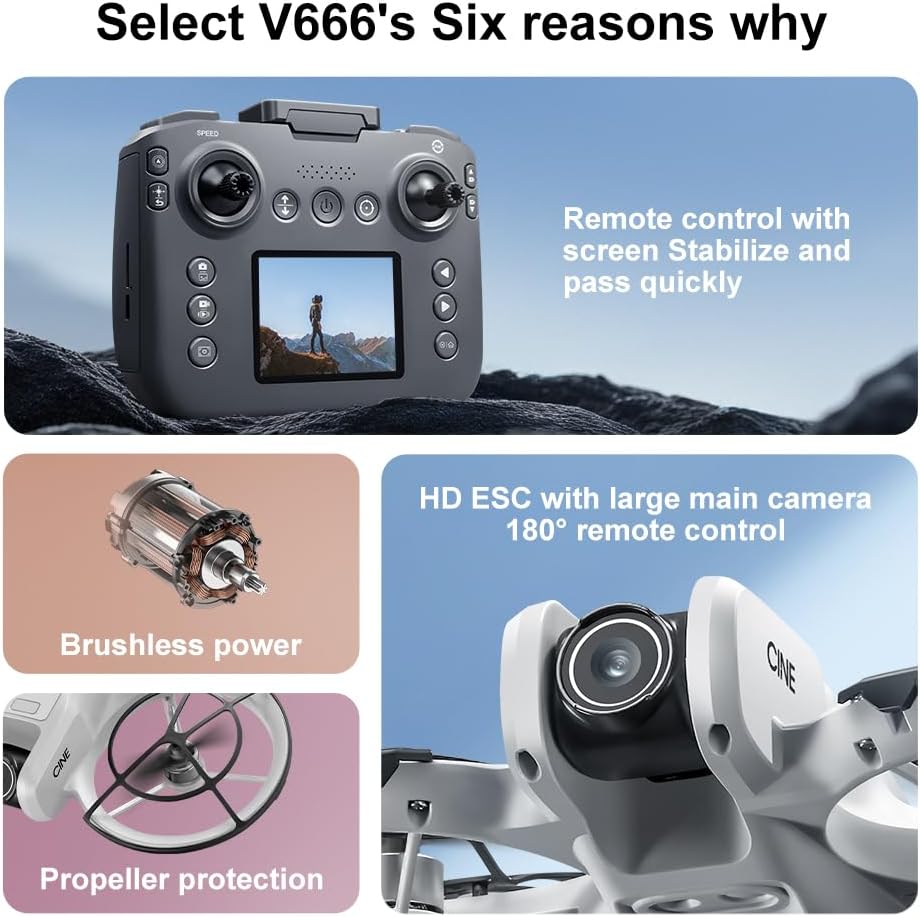
Image: The remote control for the SuperRC V666 Drone, featuring a central display screen, dual joysticks, and multiple control buttons.
Vlastnosti dálkového ovládání:
- Joysticky: Left for throttle/yaw, right for pitch/roll.
- Integrovaná obrazovka: Displays flight information and live camera feed.
- Vypínač: Zapnutí/vypnutí dálkového ovladače.
- Tlačítko pro vzlet/přistání s jedním tlačítkem: Zahájí automatický vzlet nebo přistání.
- Tlačítko nastavení rychlosti: Přepíná mezi různými rychlostmi letu.
- Photo/Video Buttons: For capturing images and recording video.
- Ořezávací tlačítka: For fine-tuning drone stability.
5. Nastavení
5.1 Instalace a nabíjení baterie
- Insert the fully charged Lithium Ion battery into the drone's battery compartment. Ensure it clicks into place securely.
- To charge the battery, connect it to the Micro-USB cable and then to a USB power source (e.g., computer, USB wall adapter). The charging indicator will show the charging status.
- Charge the remote control battery using its dedicated charging port and cable.
5.2 Instalace vrtule
The drone comes with propeller guards pre-installed. If you need to replace propellers:
- Identify the correct propeller type (A or B) for each motor. Propellers are typically marked.
- Align the propeller with the motor shaft and press down firmly until it is secure.
- Ensure all propellers rotate freely without obstruction.
5.3 Párování dronu a dálkového ovladače

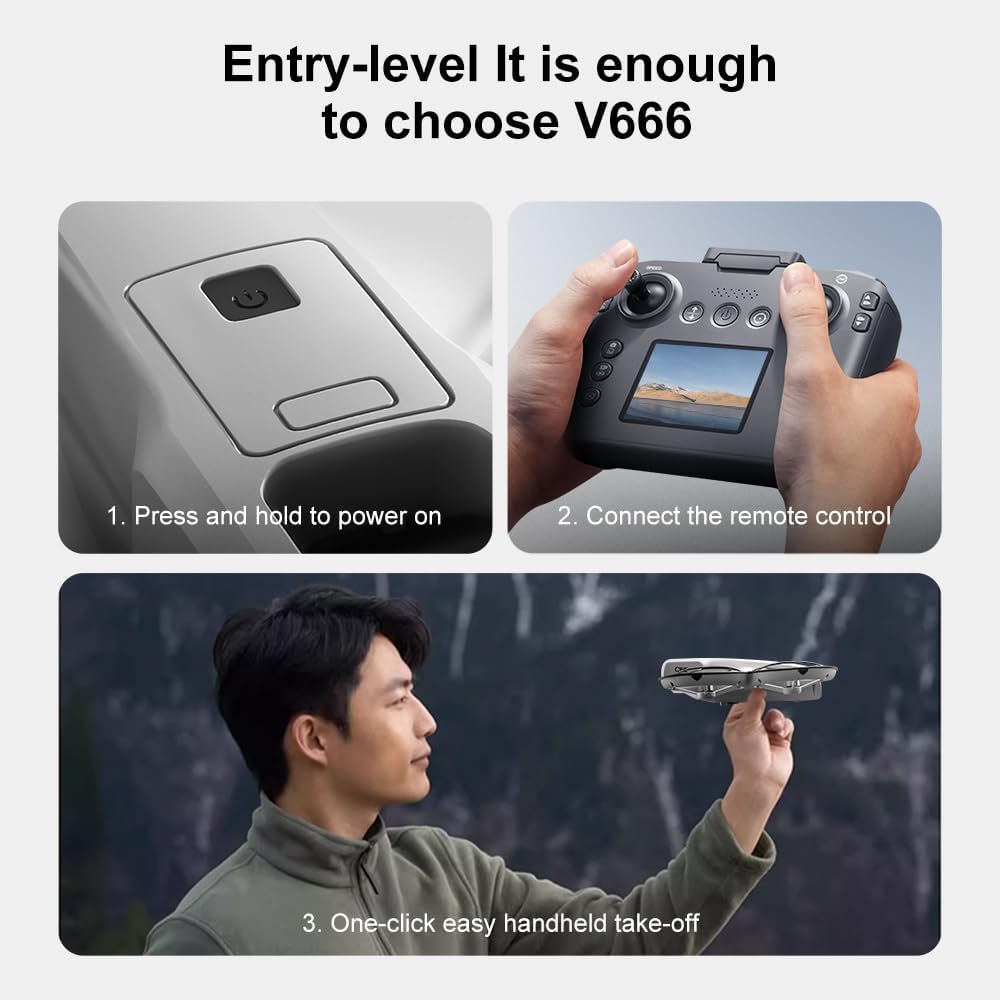
Image: Visual guide demonstrating the steps for powering on the drone, connecting the remote control, and initiating a one-click handheld take-off.
- Umístěte dron na rovný a rovný povrch.
- Press and hold the power button on the drone until its indicator lights turn on.
- Zapněte dálkové ovládání.
- The drone and remote control will automatically attempt to pair. Once paired, the drone's indicator lights will become solid.
- Poznámka: If operating multiple drones, power on and pair each drone and its remote control individually to avoid signal interference.
6. Návod k obsluze
6.1 Základní ovládací prvky letu
- Levý joystick (plyn/stáčení):
- Push up/down: Increase/decrease altitude (Throttle).
- Push left/right: Rotate drone left/right (Yaw).
- Pravý joystick (náklon/klopení):
- Push up/down: Move drone forward/backward (Pitch).
- Push left/right: Move drone left/right (Roll).
- Nastavení rychlosti: Press the speed button on the remote to cycle through different flight speeds (e.g., low, medium, high).
6.2 One-Key Functions
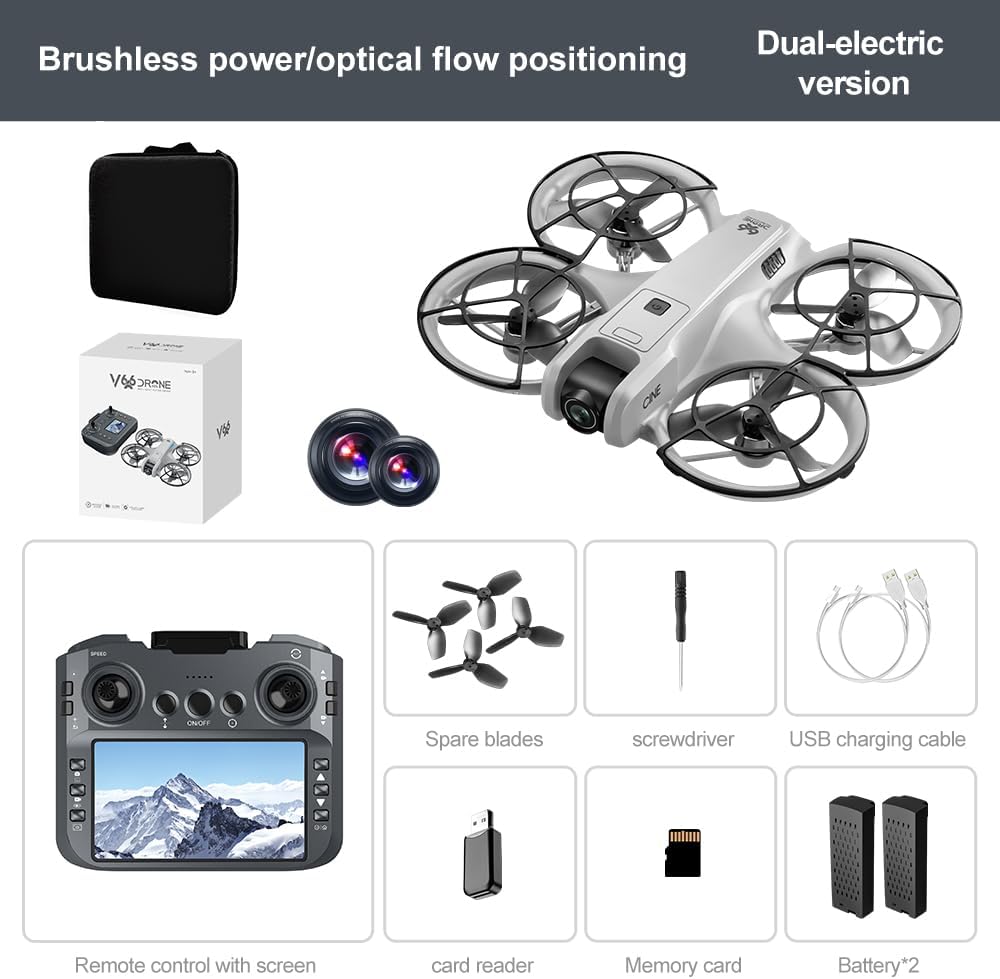
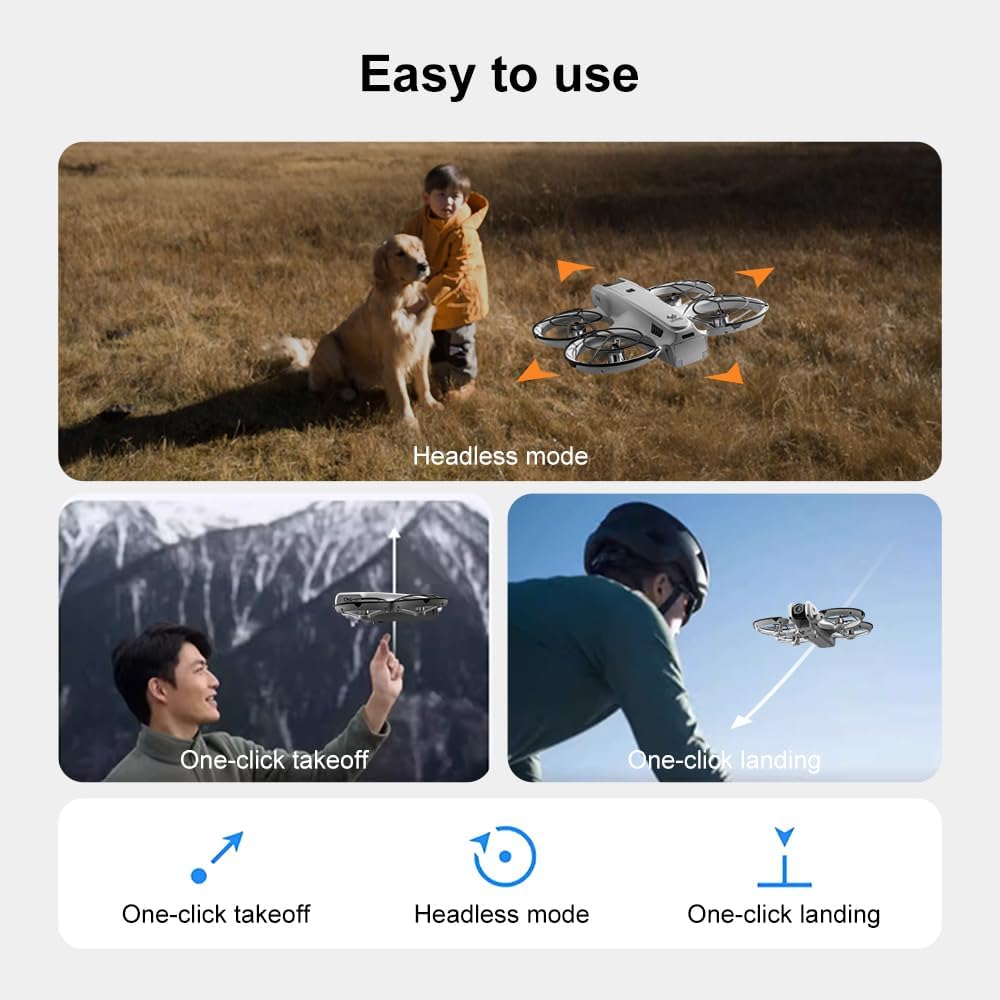
Image: Visual representation of the drone's Headless Mode, One-Click Take-off, and One-Click Landing functionalities.
- Vzlet jedním klíčem: Press the designated button once, and the drone will automatically ascend to a stable hovering height.
- Přistání jedním klíčem: Press the designated button once, and the drone will automatically descend and land gently.
- Návrat jedním klíčem: Activates the drone's return-to-home function. The drone will attempt to return to its take-off point.
6.3 Bezhlavý režim
In Headless Mode, the drone's orientation is relative to the pilot, regardless of which way the drone's front is facing. This simplifies control for beginners.
6.4 Ovládání gesty
The drone supports gesture-based photo and video capture. Perform specific hand gestures in front of the camera to trigger these functions during flight.
6.5 Obsluha kamery
- Nastavení úhlu kamery: The camera lens can be manually adjusted 180° before flight to achieve the desired viewúhel.
- Pořízení fotografie/videa: Use the dedicated buttons on the remote control to take photos or start/stop video recording.
- Živý přenos: The integrated screen on the remote control provides a real-time view from the drone's camera via Wi-Fi connectivity.
- Skladování: Captured photos and videos are saved to the inserted memory card.
7. Údržba
- Čištění: K čištění dronu a dálkového ovladače používejte měkký, suchý hadřík. Nepoužívejte rozpouštědla ani agresivní chemikálie.
- Výměna vrtule: If propellers are damaged, replace them with spare parts using the provided screwdriver. Ensure correct propeller type (A or B) is used for each motor.
- Skladování: Store the drone and its components in a cool, dry place, away from direct sunlight and extreme temperatures. Remove batteries if storing for extended periods.
8. Řešení problémů
| Problém | Možná příčina | Řešení |
|---|---|---|
| Dron se nezapne | Baterie není nabitá nebo je nesprávně nainstalována. | Ujistěte se, že je baterie plně nabitá a správně vložená. |
| Drone fails to pair with remote control | Remote control not powered on, or pairing sequence incorrect. | Ensure both devices are powered on. Follow pairing steps (Section 5.3). Avoid multiple drones pairing simultaneously. |
| Dron se během letu unáší | Not calibrated on a flat surface, or environmental factors. | Ensure drone is placed on a flat surface before take-off. Perform calibration if available (refer to remote control instructions). Avoid strong winds. |
| Poor camera image quality or no live feed | Weak Wi-Fi signal, camera lens dirty, or memory card issue. | Ensure drone is within Wi-Fi range. Clean camera lens. Check memory card for proper insertion and sufficient space. |
| Krátká doba letu | Baterie není plně nabitá nebo je baterie vybitá. | Fully charge batteries before each flight. Consider replacing old batteries if performance significantly degrades. |
9. Specifikace
| Funkce | Detail |
|---|---|
| Značka | SuperRC |
| Název modelu | V666 |
| Barva | Šedá |
| Hmotnost položky | 0.2 kilogramu (přibližně 7 unce) |
| Rozměry produktu | 7 cm D x 6 cm Š x 2 cm V |
| Úroveň dovedností | Začátečník |
| Typ motoru | Bezkartáčový motor |
| Fotoaparát | HD 180° Manually Adjustable |
| Rozlišení záznamu videa | 720p |
| Formát záznamu videa | MP4 |
| Technologie připojení | Wi-Fi, Radio Frequency |
| Technologie optických senzorů | Optical Flow, CMOS |
| Typ baterie | Lithium Ion |
| Kapacita baterie | 1000 XNUMX mAh |
| Typ ovládání | Dálkové ovládání |
| Speciální funkce | Adjustable Camera, One Button Return, One Key Rotation, Rechargeable, Speed Adjustment, Optical Flow Positioning |
10. Záruka a podpora
For warranty information or technical support, please refer to the documentation included with your purchase or contact SuperRC customer service directly. Keep your proof of purchase for any warranty claims.
Pro další pomoc můžete navštívit SuperRC Store on Amazon.