
Zavedení
This manual provides comprehensive instructions for the LogiLink AA0187 2.4GHz Wireless Gaming Controller. It covers setup, operation, maintenance, troubleshooting, and technical specifications. Please read this manual carefully before using the device to ensure proper functionality and longevity.

Image: The LogiLink AA0187 wireless gaming controller, shown with its included USB-A receiver and USB-C adapter.
Pokyny pro nastavení
1. Instalace baterie
- Vyhledejte přihrádku na baterie na zadní straně ovladače.
- Otevřete kryt baterie.
- Vložte dvě baterie AAA a dbejte na správnou polaritu (+/-).
- Pevně zavřete kryt baterie.

Obrázek: Podrobný view of the controller's back, highlighting the battery compartment for AAA batteries.
2. Připojení přijímače
The LogiLink AA0187 controller uses a 2.4 GHz wireless connection via a USB receiver.
- Identify the appropriate USB port on your device (PC, Android TV box, PS3).
- For devices with a standard USB-A port, plug the USB-A receiver directly into the port.
- For devices with a USB-C port (e.g., some Android smartphones/tablets), attach the included USB-C adapter to the USB-A receiver, then plug the adapter into the USB-C port. Ensure your Android device supports OTG (On-The-Go) functionality.
- Systém by měl automaticky detekovat a nainstalovat potřebné ovladače.
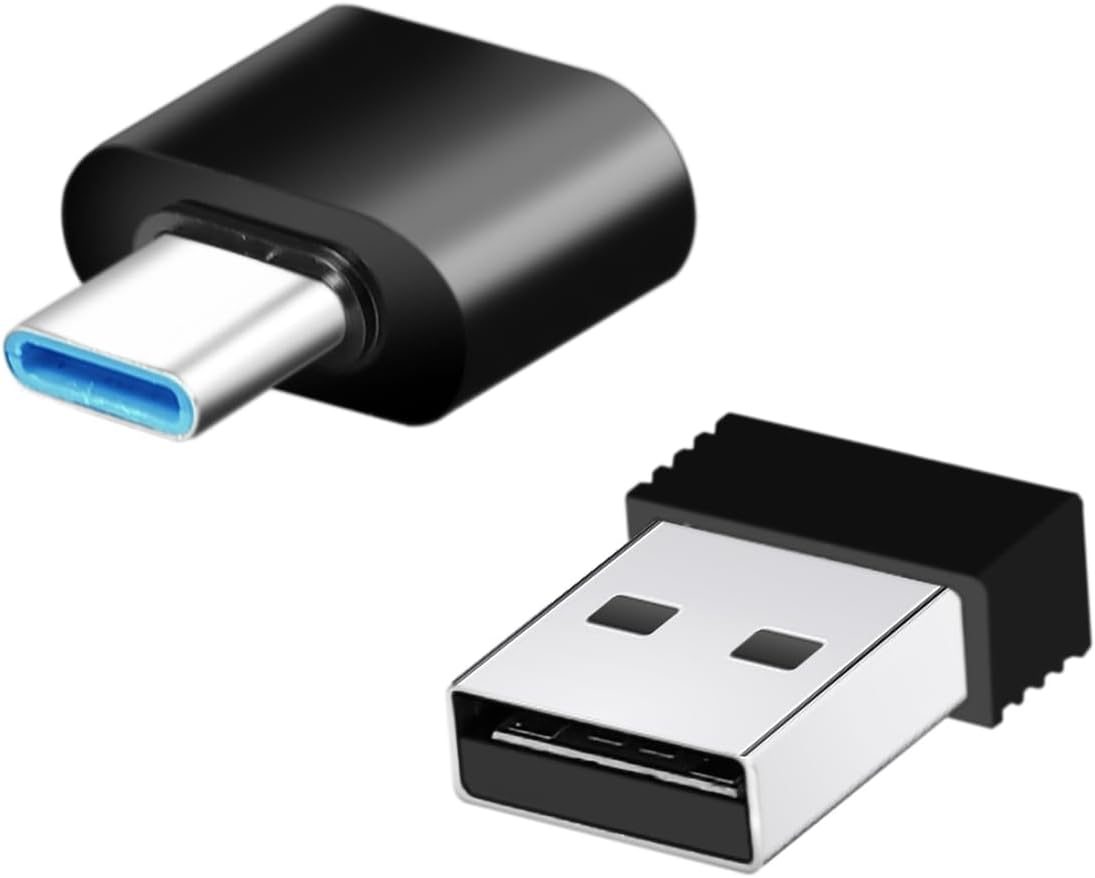
Image: The USB-A wireless receiver and the USB-C adapter, used for connecting the controller to various devices.
3. Powering On the Controller
Once batteries are installed and the receiver is connected, press the MODE button on the controller to power it on. The Power LED indicator should illuminate, indicating a successful connection.
Návod k obsluze
Rozložení ovladače
Image: A diagram illustrating the various buttons and components of the LogiLink AA0187 controller, including joysticks, D-pad, function buttons, and shoulder buttons.
- Směrová podložka (D-Pad): Pro směrový vstup.
- Funkční tlačítka (A, B, X, Y): Tlačítka primárních akcí.
- Right/Left Rocker (Analog Joysticks): For precise 360° movement and camera control.
- Tlačítko Start: Typically used to pause games or access menus.
- Tlačítko VYBRAT: Často se používá pro sekundární funkce nebo navigaci v menu.
- Tlačítko MODE: Powers the controller on/off and may switch operating modes (if applicable).
- Tlačítka L1/R1: Shoulder buttons, often used for actions like aiming or switching items.
- Tlačítka L2/R2: Trigger buttons, often used for actions like firing or accelerating.
- LED indikátory: Show power status and connection mode.
Základní použití
Once connected, the controller functions as a standard input device for compatible games and applications. Refer to your game's specific control settings for optimal configuration.
Údržba
- Čištění: K čištění ovladače používejte měkký, suchý hadřík. Nepoužívejte agresivní chemikálie ani abrazivní materiály.
- Skladování: Store the controller in a dry place away from direct sunlight and extreme temperatures. Remove batteries if the controller will not be used for an extended period to prevent leakage.
- Péče o baterie: Replace batteries when the controller's performance degrades or the power indicator shows low battery. Dispose of used batteries responsibly according to local regulations.
Odstraňování problémů
- Ovladač se nepřipojuje:
- Ujistěte se, že jsou baterie správně nainstalovány a jsou dostatečně nabité.
- Ověřte, zda je USB přijímač bezpečně zapojen do zařízení.
- Zkuste zapojit přijímač do jiného USB portu.
- For Android devices, confirm OTG support and that the USB-C adapter is correctly used.
- Stiskněte tlačítko MODE button on the controller to attempt reconnection.
- Input lag or unresponsive buttons:
- Zkontrolujte stav baterie a v případě nízkého nabití ji vyměňte.
- Ensure the controller is within the 8-meter wireless range of the receiver.
- Minimize interference from other 2.4 GHz wireless devices.
- Controller not recognized by game:
- Ensure the controller is connected and powered on.
- Check the game's settings for controller support and configuration options.
- Restart the game or the device.
Specifikace
| Číslo modelu | AA0187 |
| Typ připojení | 2.4 GHz bezdrátový |
| Bezdrátové Dosah | Až 8 metrů (v otevřeném prostoru) |
| Frekvenční rozsah | 2408-2470 MHz |
| Max. Přenosový výkon | 3.21 mW |
| Napájení | 2x AAA baterie |
| Kompatibilita | Windows PC, Android smartphones/tablets/TV boxes/Smart TVs (Android requires OTG support), PlayStation 3 |
| Joysticky | Non-slip 360° analog joysticks |
| Zahrnuté příslušenství | 1x USB-A Receiver, 1x USB-C Adapter |
| Rozměry (cca) | 15.7 cm (šířka) x 9.2 cm (výška) x 6.2 cm (hloubka) |
| Hmotnost (přibližně) | 109 g (bez baterií) |

Image: The controller shown with its approximate dimensions and icons indicating compatibility with Windows, Android, TV-Box, and PS3.
Záruka a podpora
Informace o záruce a technickou podporu naleznete v dokumentaci dodané s vaším nákupem nebo navštivte oficiální webové stránky LogiLink. webUschovejte si doklad o koupi pro případ reklamace.
For further assistance, you may contact LogiLink customer service through their official channels.