
1. Úvod
This manual provides detailed instructions for the installation, operation, and maintenance of your Evanshow Fingerprint Door Lock, Model 190NOSilver. Please read this manual thoroughly before installation and use to ensure proper function and security. This smart lock offers multiple convenient access methods, enhancing security for various indoor applications.
2. Vlastnosti produktu
- 4-in-1 Smart Lock: Offers multiple access options including fingerprint, password, IC card, and mechanical keys.
- Vysoká kapacita: Supports up to 100 unique fingerprints and 100 user-defined passwords.
- Advanced Fingerprint Sensor: Features an upgraded sensor with 0.5-second recognition speed and 360° recognition for quick and accurate access.
- Snadná instalace: Designed for straightforward installation on wooden doors 1.18"-1.97" thick, without requiring complex drilling or wiring.
- Vylepšené zabezpečení: Utilizes advanced biometric technology to prevent unauthorized access, ensuring home security.
- Funkce automatického zámku: Customizable auto-lock feature for added convenience and peace of mind.
- Heslo proti narušení přístupu: Allows users to enter random digits before or after the actual password to prevent onlookers from guessing the code.
3. Obsah balení
Před zahájením instalace ověřte, zda jsou všechny komponenty přítomny:
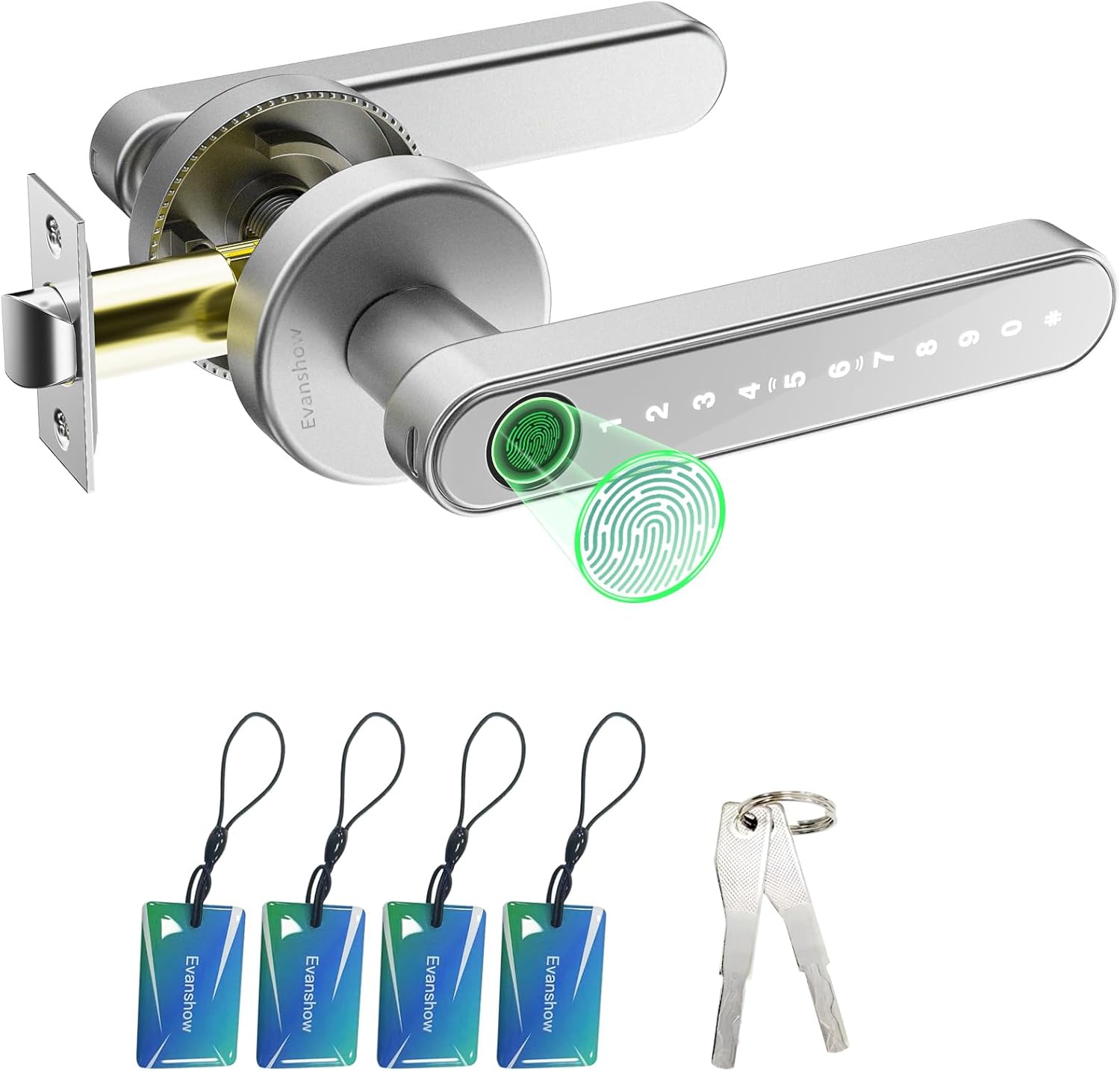
Figure 3.1: All components included in the Evanshow Fingerprint Door Lock package.
- Exterior Handle with Keypad and Fingerprint Sensor (1)
- Interior Handle (1)
- Latch Mechanism (1)
- Strike Plate (1)
- Screws and Installation Hardware (various)
- Small Screwdriver (1)
- IC karty (4)
- Mechanické klíče (2)
- Nabíjecí kabel USB-C (1)
- AAA baterie (4)
- Návod k použití (tento dokument)
4. Instalační příručka
The Evanshow Fingerprint Door Lock is designed for easy installation. A video tutorial is available to guide you through the process.
Video 4.1: Official installation guide for the Evanshow Fingerprint Door Lock.
4.1 Kontroly před instalací
- Ensure your door thickness is between 1.18 inches (30mm) and 1.97 inches (50mm).
- Confirm the door bore hole diameter is suitable for standard door locks.
- Determine the hand orientation (left or right swing) of your door. The lock is reversible.

Obrázek 4.2: Požadavky na rozměry dveří pro instalaci.
4.2 Postup instalace
- Nainstalujte západku: Insert the latch mechanism into the edge of the door and secure it with screws. Ensure the latch bolt faces the correct direction for your door swing.
- Instalace protikusu: Attach the strike plate to the door frame, aligning it with the latch mechanism.
- Prepare Handles: Connect the wires from the exterior handle to the interior handle.
- Držadla pro montáž: Insert the exterior handle through the door, ensuring the spindle aligns with the latch. Then, attach the interior handle, securing both sides with the provided screws.
- Nainstalujte baterie: Open the battery compartment on the interior handle and insert 4 AAA batteries, ensuring correct polarity.
- Test funkčnosti: After installation, test all unlocking methods (fingerprint, password, IC card, mechanical key) to ensure proper operation.
5. Návod k obsluze
Your Evanshow Fingerprint Door Lock offers multiple ways to secure and access your space.

Obrázek 5.1: Přesview of the 4-in-1 smart lock access options.
5.1 Metody odemykání
- Odemknutí otisků prstů: Přiložte zaregistrovaný prst na snímač otisků prstů. Zámek se po úspěšném rozpoznání odemkne přibližně za 0.5 sekundy.
- Odemknutí heslem: Enter your registered passcode on the keypad. The keypad illuminates when activated.
- Odemknutí IC karty: Tap a registered IC card against the designated area on the exterior handle.
- Mechanické odemknutí klíčem: In case of emergency or battery depletion, use the provided mechanical keys to unlock the door. The keyhole is located at the bottom of the exterior handle.

Figure 5.2: Fingerprint unlocking in action.

Figure 5.3: Using the keypad for password entry.

Figure 5.4: Unlocking the door with an IC card.

Figure 5.5: Using a mechanical key for emergency access.
5.2 Funkce automatického uzamčení
The lock can be configured to automatically lock after a set period. This feature can be customized or disabled as needed.

Figure 5.6: Auto-lock functionality for enhanced security.
5.3 Heslo proti narušování přístupu
To prevent others from observing your password, you can enter random digits before or after your actual password. The lock will still recognize the correct sequence within the longer input.

Figure 5.7: Using the anti-peep password feature.
5.4 Přidávání/odstraňování uživatelů
Refer to the detailed instructions in the included instruction manual for specific steps on how to enroll new fingerprints, set up new passcodes, and register or remove IC cards. This process typically involves accessing the lock's programming mode.
6. Údržba
6.1 Výměna baterie
The lock requires 4 AAA batteries. When the battery level is low, the lock will provide an audible or visual warning. Replace all four batteries simultaneously to ensure optimal performance.

Figure 6.1: Location of the battery compartment on the interior handle.
6.2 Čištění
Povrch zámku otřete měkkým, suchým hadříkem. Nepoužívejte abrazivní čisticí prostředky ani rozpouštědla, která by mohla poškodit povrchovou úpravu nebo elektronické součástky.
7. Řešení problémů
- Zámek nereaguje: Check battery levels and replace if necessary. Ensure the wires are securely connected.
- Otisk prstu nebyl rozpoznán: Ensure your finger is clean and dry. Re-enroll your fingerprint if issues persist.
- Heslo nefunguje: Verify the correct passcode is being entered. Try resetting the passcode.
- Automatické zamykání se neaktivuje: Check the auto-lock settings and ensure it is enabled with the desired delay.
- Mechanický klíč nefunguje: Ujistěte se, že je klíč zcela zasunutý a správně otočený.
8. Specifikace
| Funkce | Specifikace |
|---|---|
| Číslo modelu | 190NOSilver |
| Materiál | Kov |
| Rozměry produktu | 1"D x 2"Š |
| Hmotnost položky | 1.2 libry |
| Typ zámku | Soukromí |
| Materiál rukojeti | Kov |
| Orientace rukou | Reverzibilní |
| Speciální funkce | Otisk prstu |
| Jsou vyžadovány baterie | 4 AAA baterie |
| Barva | Černý |
9. Záruka a podpora
For warranty information and technical support, please refer to the contact details provided on the product packaging or the official Evanshow webUschovejte si účtenku jako doklad o koupi pro případ reklamace.