
1. Úvod
This manual provides essential instructions for setting up, operating, maintaining, and troubleshooting your HONOR 400 5G smartphone. Please read this guide thoroughly to ensure proper use and to maximize the performance of your device.
The HONOR 400 is a powerful 5G smartphone featuring a 6.55-inch AMOLED display, a Qualcomm Snapdragon 7 Gen 3 processor, 12GB of RAM, and 512GB of internal storage. It operates on Android 15 and is equipped with a 5300mAh battery, a 200MP main camera, and dual-SIM capabilities.
2. Co je v krabici
Upon unboxing your HONOR 400 smartphone, verify that all items are present:
- Smartphone HONOR 400 5G
- USB kabel
- (Other accessories such as a charger, SIM ejector tool, or protective case may vary by region and package contents.)
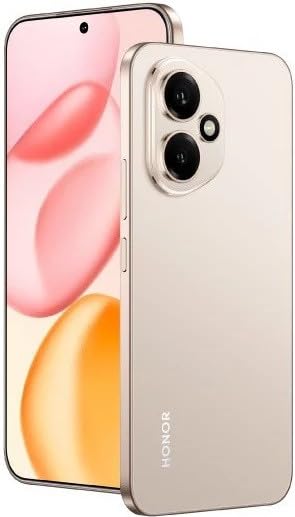
Obrázek 2.1: The HONOR 400 5G Smartphone. This image displays the device's sleek design and the main screen.
3. Zařízení skončiloview
Seznamte se s fyzickými součástmi svého smartphonu HONOR 400.
3.1 Přední View
- Zobrazit: 6.55-inch AMOLED screen with 1264 x 2736 pixels resolution.
- Přední kamera: 50 MP, f/2.0 (wide) for selfies and video calls.
- Sluchátko: Nachází se na horním okraji displeje.
An illustration of the front view would typically show the display, front camera, and earpiece.
3.2 Zadní View
- Main Camera System:
- 200 MP, f/1.9 (wide), 1/1.4", PDAF, OIS
- 12 MP, f/2.2, 112° (ultrawide), AF
- Blikat: LED blesk pro fotografování za slabého osvětlení.
- HONOR Logo: Identifikace značky.
An illustration of the rear view would typically highlight the camera module and brand logo.
3.3 Strana Views a porty
- Vypínač: Typically on the right side, used to power on/off and wake/sleep the device.
- Tlačítka hlasitosti: Typically on the right side, above the power button, for adjusting volume.
- Port USB Type-C: Nachází se ve spodní části, slouží k nabíjení a přenosu dat.
- Zásuvka na SIM kartu: Location varies, typically on the side or bottom, for inserting Nano-SIM cards.
- Microphones & Speakers: Strategically placed for calls and audio output.
Illustrations of the device's sides would show the placement of buttons, ports, and the SIM tray.
4. Nastavení
4.1 Vkládání SIM karet
- Najděte přihrádku na SIM kartu na vašem zařízení.
- Vložte nástroj pro vysunutí SIM karty (pokud je součástí dodávky) do malého otvoru vedle zásobníku a jemně zatlačte, dokud zásobník nevyskočí.
- Place your Nano-SIM card(s) into the designated slots on the tray. The HONOR 400 supports Dual-SIM (Nano-SIM + ESIM OR Nano-SIM + Nano-SIM). Ensure the gold contacts face downwards.
- Opatrně vložte zásobník zpět do telefonu.
An image demonstrating SIM card insertion would be helpful here.
Důležité: Před nákupemasing, verify network compatibility with your service provider. This device supports GSM networks (2G, 3G, 4G LTE, and 5G SA/NSA) but does not support CDMA networks.
4.2 Počáteční zapnutí a průvodce nastavením
- Stiskněte a podržte tlačítko napájení, dokud se nezobrazí logo HONOR.
- Follow the on-screen instructions to complete the initial setup, which includes selecting your language, connecting to Wi-Fi, setting up your Google account, and configuring security features.
5. Obsluha vašeho zařízení
Operační systém 5.1 Android 15
Your HONOR 400 runs on Android 15, offering a user-friendly interface and access to a vast ecosystem of applications via the Google Play Store. Navigate using gestures or on-screen buttons, customize your home screen, and manage notifications.
5.2 Základní funkce
- Uskutečňování hovorů: Klepněte na ikonu Telefon, zadejte číslo a klepněte na tlačítko Volat.
- Odesílání zpráv: Use the Messaging app to send SMS/MMS.
- Prohlížení internetu: Otevřete a web prohlížeč (např. Chrome) pro přístup k internetu přes Wi-Fi nebo mobilní data.
- Správa aplikací: Download, install, and uninstall apps from the Google Play Store.
5.3 Použití kamery
The HONOR 400 features a versatile camera system:
- Zadní kamera: Utilize the 200 MP main sensor for high-resolution photos and the 12 MP ultrawide lens for expansive shots. Features include PDAF and Optical Image Stabilization (OIS).
- Přední kamera: The 50 MP wide-angle front camera is ideal for selfies and video conferencing.
- Nahrávání videa: Capture videos in up to 4K resolution at various frame rates (30, 60, 120 fps).
A diagram of the camera interface or tips for photography modes could be included here.
5.4 Konektivita
Your device supports multiple connectivity options:
- 5G/4G LTE: Vysokorychlostní mobilní datové připojení.
- Wi-Fi: Připojte se k bezdrátovým sítím pro přístup k internetu.
- Bluetooth: Spárujte s bezdrátovými sluchátky, reproduktory a dalšími zařízeními.
- USB Type-C: For charging and connecting to a computer for data transfer.
6. Údržba
6.1 Péče o baterii
- The HONOR 400 is equipped with a 5300mAh non-removable battery.
- Pro prodloužení životnosti baterie se vyhýbejte extrémním teplotám a častému úplnému vybíjení baterie.
- Use the provided USB cable and a compatible charger for optimal charging.
6.2 Aktualizace softwaru
Regularly check for and install software updates to ensure your device has the latest features, security patches, and performance improvements. You can usually find this option in your phone's Settings menu under "System & updates" or "About phone."
6.3 Čištění vašeho zařízení
K čištění obrazovky a těla telefonu používejte měkký hadřík, který nepouští vlákna. Nepoužívejte agresivní chemikálie ani abrazivní materiály.
7. Řešení problémů
This section addresses common issues you might encounter with your HONOR 400 smartphone.
7.1 Zařízení se nezapíná
- Ujistěte se, že je baterie nabitá. Před opětovným zapnutím připojte telefon k nabíječce alespoň na 15 minut.
- Try a forced restart by holding the Power button for an extended period (e.g., 10-15 seconds).
7.2 Problémy s připojením k síti
- Zkontrolujte, zda je vaše SIM karta správně vložena.
- Ověřte, zda jsou v nastavení telefonu povolena mobilní data.
- Restartujte zařízení.
- Confirm with your service provider that your plan is active and there are no network outagve vaší oblasti.
- Ensure your device is compatible with your network's frequencies (GSM only, no CDMA).
7.3 Pády nebo zamrzání aplikací
- Zavřete a znovu otevřete aplikaci.
- Vymažte mezipaměť a data aplikace v Nastavení > Aplikace.
- Ujistěte se, že je aplikace aktualizována na nejnovější verzi.
- Restartujte telefon.
7.4 Pomalý výkon
- Zavřete nepotřebné aplikace na pozadí.
- Vymažte mezipaměť a dočasně files.
- Ensure you have sufficient free storage space (512GB internal storage).
- Pravidelně restartujte zařízení.
8. Specifikace
| Funkce | Detail |
|---|---|
| Název modelu | Čest 400 |
| Operační systém | Android 15.0 |
| Procesor | Qualcomm SM7550-AB Snapdragon 7 Gen 3 (4 nm), osmijádrový (1x 2.63 GHz Cortex-A715 a 3x 2.4 GHz Cortex-A715 a 4x 1.8 GHz Cortex-A510) |
| BERAN | 12 GB |
| Interní úložiště | 512 GB (nerozšiřitelná) |
| Zobrazit | 6.55 Inches AMOLED, 1B colors, 1264 x 2736 pixels |
| Zadní kamera | 200 MP (wide, OIS) + 12 MP (ultrawide) |
| Přední kamera | 50 MP (širokoúhlý) |
| Rozlišení záznamu videa | 4K (30, 60, 120 fps) |
| Kapacita baterie | 5300 miliamp Hours (non-removable) |
| SIM karta | Duální SIM karta (Nano-SIM + ESIM NEBO Nano-SIM + Nano-SIM) |
| Konektivita | 5G, GSM, LTE, Wi-Fi, Bluetooth, USB Type-C |
| Rozměry | 156.5 x 74.6 x 7.3 mm (6.16 x 2.94 x 0.29 palce) |
| Hmotnost | 202 gramů (6.49 oz) |
| Barva | Desert Gold (as per product listing, actual color may vary by variant) |
9. Záruka a podpora
9.1 Záruka výrobce
The HONOR 400 smartphone comes with a 1 roky záruka výrobceTato záruka se vztahuje na vady materiálu a zpracování při běžném používání. Uschovejte si prosím doklad o koupi pro případ uplatnění záruky.
For specific terms and conditions of the warranty, please refer to the warranty card included with your product or visit the official HONOR support webmísto.
9.2 Zákaznická podpora
For further assistance, technical support, or service inquiries, please contact HONOR customer support through their official webwebu nebo kontaktních informací uvedených na obalu produktu.
You can typically find support resources, FAQs, and contact details on the official HONOR webmísto: www.hihonor.com