
Zavedení
This manual provides essential information for setting up, operating, maintaining, and troubleshooting your NIMO 15.6-inch FHD Gaming Laptop, model Nimo N153. Please read this manual thoroughly before using your device to ensure proper function and longevity.

Image: The NIMO 15.6-inch FHD Gaming Laptop, showcasinjeho elegantní design.
Co je v krabici
Po vybalení zkontrolujte, zda jsou přítomny všechny níže uvedené položky:
- 1 x Nimo N153 Laptop
- 1 x Type-C 100W PD Fast Charger
- 1 x Uživatelská příručka (tento dokument)
- Windows 11 Home (předinstalovaný)
- Informace o záruce a vrácení
Nastavení
1. První zapnutí a nabíjení
Before first use, connect the laptop to the power adapter and a wall outlet. The Type-C 100W PD Fast Charger is designed for efficient charging. Allow the battery to charge sufficiently before disconnecting.

Image: The compact Type-C 100W PD Fast Charger included with the laptop.
2. Operating System Setup (Windows 11)
Upon first boot, follow the on-screen instructions to complete the Windows 11 Home setup. This includes selecting your region, language, connecting to a Wi-Fi network, and creating a user account.
3. Fingerprint Reader Setup
For enhanced security, set up the integrated fingerprint reader. Navigate to Windows Settings > Accounts > Sign-in options and follow the prompts to register your fingerprint.

Image: Close-up of the laptop's keyboard, highlighting the fingerprint reader and backlit keys.
4. Připojení periferií
Notebook je vybaven různými porty pro připojení externích zařízení:
- USB porty: Connect USB devices such as mice, keyboards, and external storage.
- Port HDMI: Připojte se k externímu monitoru nebo televizoru pro rozšířené zobrazení.
- Porty typu C: For data transfer, charging, and connecting compatible Type-C accessories.
- Slot pro kartu Micro SD: Insert Micro SD cards for additional storage or data transfer.
- Sluchátkový jack: Připojte sluchátka nebo externí reproduktory.
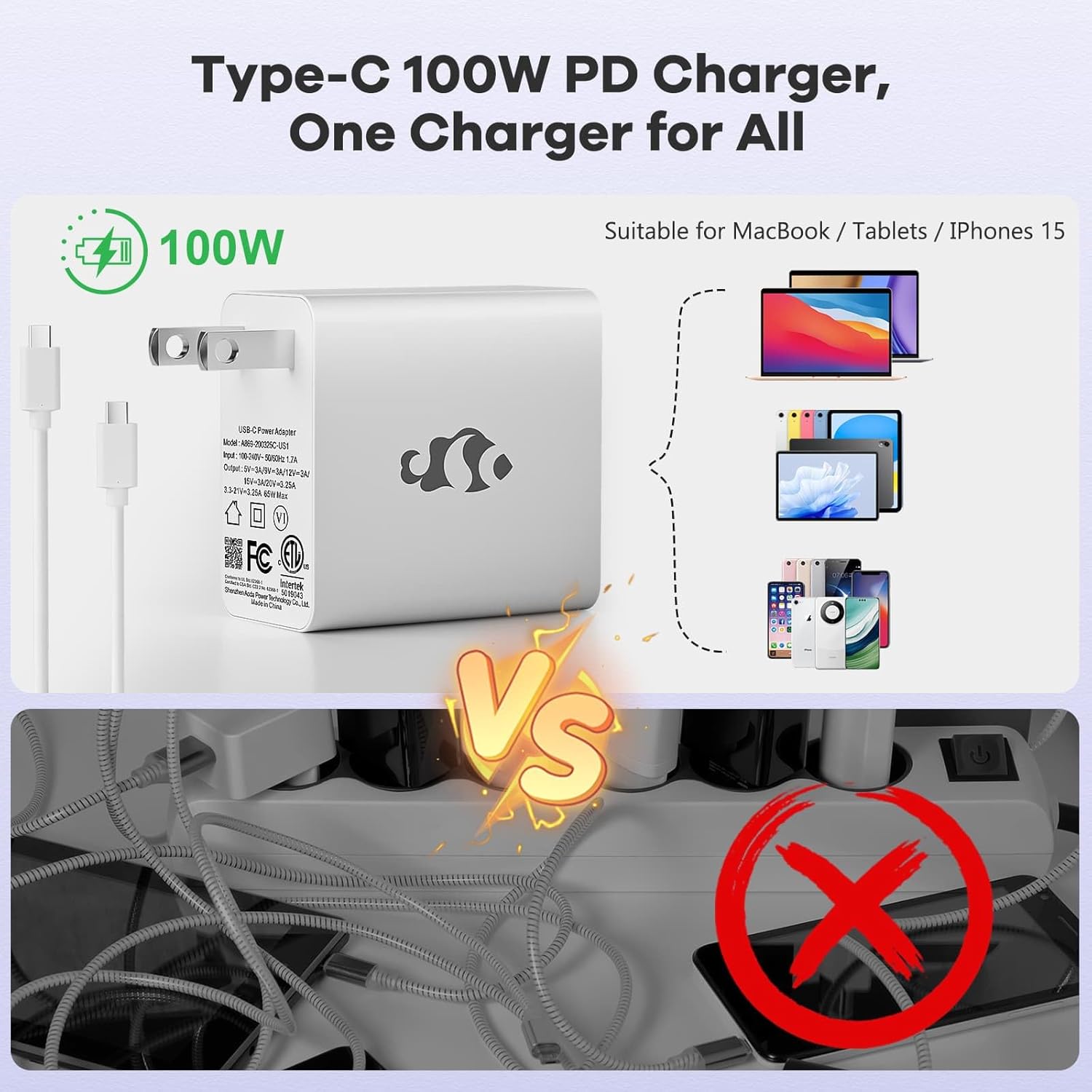
Image: Diagram illustrating the various ports available on the NIMO laptop, including USB, HDMI, Type-C, Micro SD, and headphone jack.
Návod k obsluze
1. Zapnutí/vypnutí a režim spánku
- Zapnutí: Stiskněte tlačítko napájení umístěné na klávesnici.
- Vypnout: V systému Windows klikněte na tlačítko Start a poté vyberte Napájení > Vypnout.
- Režim spánku: Zavřete víko notebooku nebo klikněte na tlačítko Start a poté vyberte Napájení > Spánek.
2. Keyboard and Touchpad Functions
- Podsvícená klávesnice: The keyboard features backlighting for use in low-light conditions. Use the dedicated function key (Fn + F key combination, typically) to adjust brightness or toggle it on/off.
- Numerická klávesnice: The full-size keyboard includes a numeric keypad for convenient data entry.
- Multi-touch Touchpad: Supports various gestures for navigation and control within Windows. Refer to Windows settings for touchpad gesture customization.
3. Bezdrátové připojení
- Wi-Fi: Chcete-li se připojit k bezdrátové síti, klikněte na ikonu Wi-Fi na hlavním panelu, vyberte požadovanou síť a v případě potřeby zadejte heslo.
- Bluetooth: Chcete-li spárovat zařízení Bluetooth, přejděte do Nastavení systému Windows > Bluetooth a zařízení a podle pokynů přidejte nové zařízení.
4. Webcam Shield
The laptop is equipped with a physical webcam shield for privacy. Slide the shield to cover or uncover the webvačka podle potřeby.
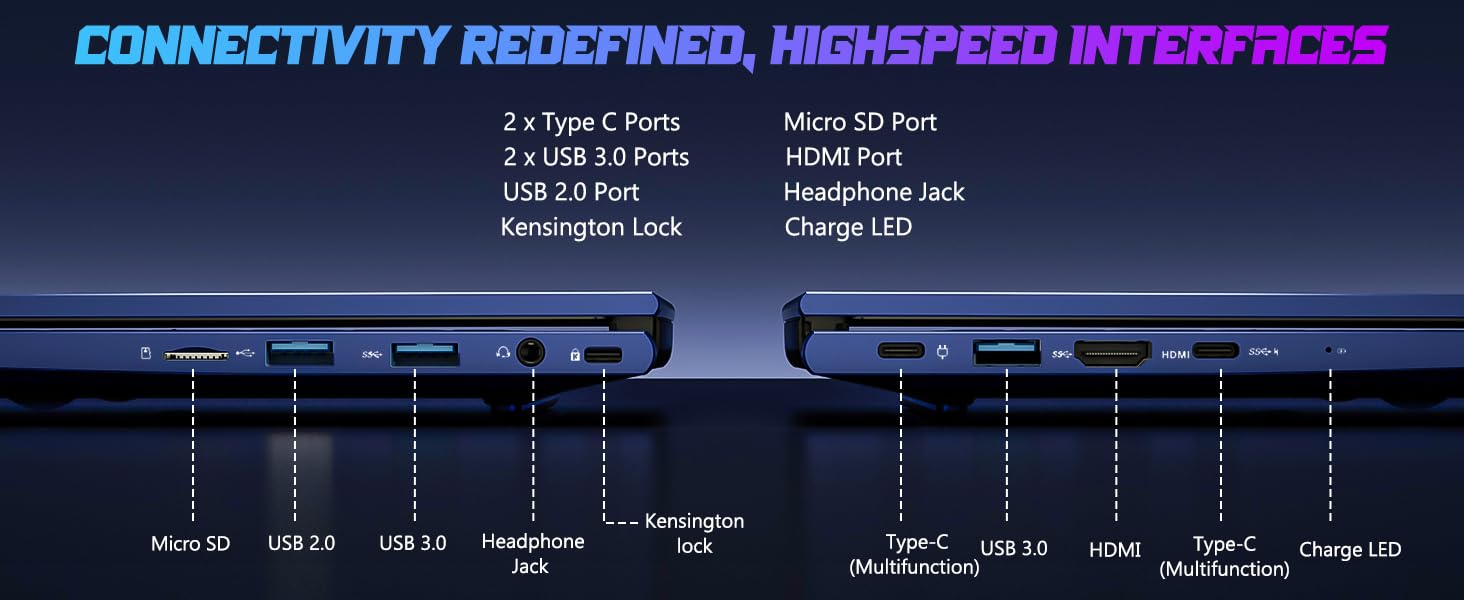
Image: Illustration of the laptop's webcam with a privacy shield feature.
5. Funkce displeje
The 15.6-inch FHD IPS anti-glare display (1920x1080 resolution) provides clear visuals. Adjust display settings such as brightness and resolution through Windows Display Settings.

Image: The NIMO laptop displaying a vibrant image on its 15.6-inch FHD IPS screen.
Údržba
1. Čištění notebooku
- Obrazovka: Lehce používejte měkký hadřík, který nepouští vlákna dampvodou nebo čističem obrazovek. Nestříkejte tekutinu přímo na obrazovku.
- Klávesnice a šasi: Použijte měkký, suchý hadřík. Na odolnou špínu použijte lehceamp Lze použít hadřík a ujistit se, že se do otvorů nedostane žádná kapalina.
- Porty: Udržujte porty bez prachu a nečistot. V případě potřeby použijte stlačený vzduch a držte nádobku ve svislé poloze.
2. Aktualizace softwaru
Regularly check for and install Windows updates to ensure system stability, security, and optimal performance. Go to Windows Settings > Windows Update.
3. Možnost upgradu
The Nimo N153 laptop supports upgradable dual-channel memory and detachable RAM/SSD. If you plan to upgrade components, it is recommended to consult a qualified technician or refer to NIMO's official support resources to avoid voiding your warranty or damaging the device.
Odstraňování problémů
If you encounter issues with your NIMO laptop, try the following basic troubleshooting steps:
- Bez napájení: Ensure the charger is securely connected to both the laptop and a working power outlet. Check the charge LED indicator.
- Problémy se zobrazením: If the screen is blank, try connecting an external monitor via HDMI to check if the issue is with the laptop's internal display. Ensure display drivers are up to date.
- Problémy s připojením (Wi-Fi/Bluetooth): Restart the laptop and your router/Bluetooth device. Check Windows network settings to ensure Wi-Fi and Bluetooth are enabled.
- Pomalý výkon: Close unnecessary applications, check for malware, and ensure sufficient free storage space on the SSD.
- Zamrznutí systému: Press and hold the power button for 10-15 seconds to force a shutdown, then restart the laptop.
For more complex issues or if the problem persists, please contact NIMO customer support.
Specifikace
| Funkce | Detail |
|---|---|
| Značka | NIMO |
| Název modelu | Nimo N153 |
| Velikost obrazovky | 15.6 palce |
| Rezoluce | 1920x1080 Pixels (FHD IPS Anti-glare) |
| Model CPU | AMD Ryzen 5 6600H (6 jader, 12 vláken, až 4.5 GHz) |
| Grafický koprocesor | AMD Radeon 660M (Integrated GPU) |
| Velikost nainstalované paměti RAM | 16 GB DDR5 (4800 MHz) |
| Velikost pevného disku | 1TB SSD (PCIe 4.0) |
| Operační systém | Windows 11 Home |
| Speciální funkce | Backlit Keyboard, Fingerprint Reader, HD Audio, Numeric Keypad, Webcam Shield |
| Technologie připojení | Wi-Fi (802.11a/b/g/n/ac), Bluetooth |
| Porty | 2x Type-C, 2x USB 3.0, 1x USB 2.0, 1x HDMI, 1x Micro SD, 1x Headphone Jack, Kensington Lock |
| Životnost baterie | Up to 5 Hours (Usage), Up to 7 Hours (Standby) |
| Kapacita baterie | 53.58 W hodin |
| Nabíječka | 100W GaN Type-C PD Fast Charger |
| Hmotnost položky | 3.8 libry |
| Rozměry (D x Š x T) | 14.07 cm x 8.98 cm x 0.76 cm |
Poznámka: Specifikace se mohou změnit bez předchozího upozornění.
Záruka a podpora
1. Záruka výrobce
Your NIMO N153 laptop is covered by a 2letá záruka výrobce from Nimo Direct Inc. This warranty covers defects in materials and workmanship under normal use. Please retain your proof of purchase for warranty claims.
2. Zásady vrácení
NIMO offers a 90denní bezproblémová lhůta pro vrácení zboží. If you are not satisfied with your purchase, you may return the product within 90 days of purchase. Refer to your purchase documentation for specific return procedures.
3. Zákaznická podpora
For technical assistance, warranty claims, or any product-related inquiries, please contact NIMO customer support:
- E-mail: service@nimopc.com
- online: Visit the official NIMO webweb s informacemi o podpoře a možnostmi kontaktování.
Náš specializovaný tým podpory je vám k dispozici.

Image: NIMO customer service representatives ready to assist.