
BNCF Bpad 11
BNCF Bpad 11 Android 15 Tablet User Manual
Model: Bpad 11
1. Úvod
This manual provides essential information for the proper use and maintenance of your BNCF Bpad 11 Android 15 Tablet. Please read this manual thoroughly before operating the device to ensure optimal performance and longevity.
2. Co je v krabici
Upon opening your BNCF Bpad 11 package, verify that all items listed below are present:
- Bpad 11 Tablet
- Ochranné pouzdro
- Adaptér
- Kabel USB typu C
- SIM Card Ejector Pin
- Uživatelská příručka (tento dokument)

This diagram illustrates the contents of the BNCF Bpad 11 package, including the tablet, gift box, user manual, protective case, SIM card ejector pin, and Type-C charging cable.
3. Konec produktuview
Familiarize yourself with the physical components and ports of your BNCF Bpad 11 tablet.

This diagram illustrates the location of the rear camera, power button, volume up/down buttons, 3.5mm headphone jack, front camera, SIM/MicroSD card slot, and speakers on the BNCF Bpad 11 tablet.
3.1 Fyzické komponenty
- Zobrazit: 11-inch FHD IPS In-cell display (1920x1200 resolution, 90Hz refresh rate).
- Přední kamera: 5MP pro videohovory a selfie.
- Zadní kamera: 8MP pro pořizování fotografií a videí.
- Vypínač: Located on the side for turning the device on/off and locking/unlocking the screen.
- Tlačítka hlasitosti: Upravte úrovně zvuku.
- Řečníci: Dva reproduktory pro zvukový výstup.
3.2 Porty a sloty
- Port USB Type-C: Pro nabíjení a přenos dat.
- 3.5mm konektor pro sluchátka: Pro připojení drátových sluchátek.
- Slot pro SIM/MicroSD kartu: Supports 4G LTE connectivity and expandable storage up to 1TB via MicroSD card.
4. Nastavení
4.1 Počáteční zapnutí
- Stiskněte a podržte Tlačítko napájení until the BNCF logo appears on the screen.
- Postupujte podle pokynů na obrazovce a vyberte jazyk, připojte se k síti Wi-Fi a nastavte si účet Google.
4.2 Vložení SIM/MicroSD karty
- Vyhledejte slot pro kartu SIM/MicroSD na boku tabletu.
- Vložte SIM Card Ejector Pin do malého otvoru vedle zásobníku, abyste jej vysunuli.
- Place your Nano-SIM card(s) and/or MicroSD card into the tray according to the diagram on the tray.
- Opatrně vložte zásobník zpět do tabletu.
5. Návod k obsluze
Operační systém 5.1 Android 15
Your Bpad 11 runs on the Android 15 operating system, offering an intuitive user interface and enhanced features.
- Secure Private Space: Utilize stricter app isolation with hidden notifications, supported by Google's security updates.
- Smarter Screen Recording: Focuses on single-app recording for enhanced privacy.
- Faster Multitasking with App Pairs: Quick split-screen functionality for efficient multitasking.
- Better Taskbar Customization: Easier pinning for faster app access.

This image highlights key features of the Android 15 operating system, including Secure Private Space, Smarter Screen Recording, Faster Multitasking with App Pairs, and Better Taskbar Customization.
5.2 Zobrazení a výkon
- Obnovovací frekvence 90Hz: Provides a smooth and responsive visual experience, ideal for browsing and gaming.
- Procesor Helio G100: The MediaTek Helio G100 Octa-Core processor and Mali-G57 MC2 GPU ensure efficient performance for demanding applications.

The image emphasizes the 90Hz refresh rate of the tablet's display, indicating smoother visuals compared to standard 60Hz screens.
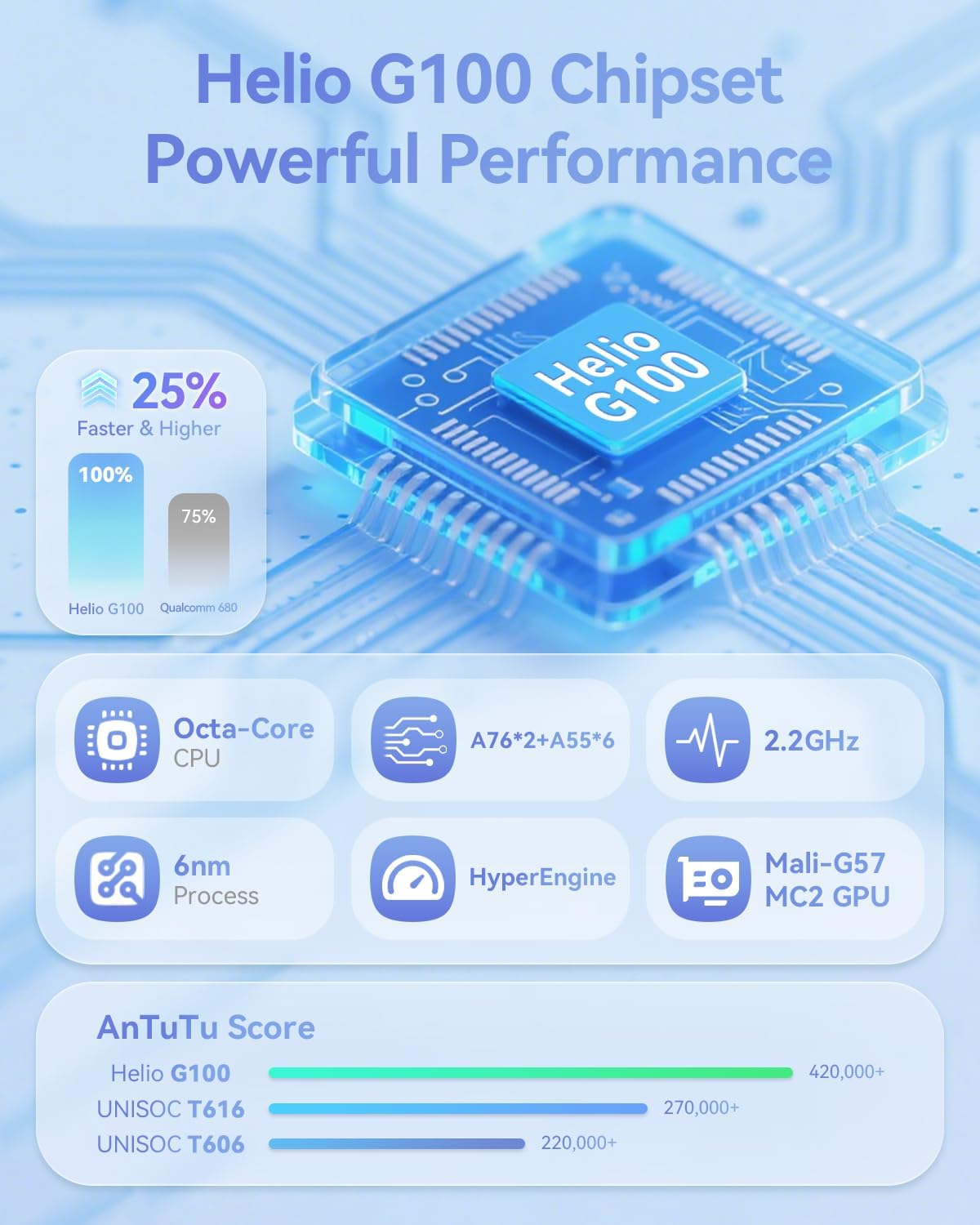
This image provides technical details about the Helio G100 chipset, including its Octa-Core CPU, 6nm process, 2.2GHz clock speed, and Mali-G57 MC2 GPU, along with AnTuTu benchmark scores.
5.3 Konektivita
- 4G LTE: Supports mobile network connectivity for internet access on the go.
- Dual-band Wi-Fi (2.4G & 5G): For stable and fast wireless internet connections.
- Bluetooth 5.0: For pairing with wireless accessories like headphones and keyboards.
- GPS: Integrováno pro navigační a lokalizační služby.
6. Multimediální funkce
6.1 Zvuk a video
- Podpora Widevine L1: Enables streaming of high-definition content (1080P) from platforms like Netflix, Hulu, Prime Video, and Disney+.
- Duální reproduktory: Provides immersive audio for media consumption.

The image illustrates the tablet's Widevine L1 certification for high-definition streaming and its dual speaker setup for an enhanced audio experience.
6.2 Kamery a rozpoznávání obličejů
- Přední kamera: 5 MP
- Zadní kamera: 8 MP
- Rozpoznávání obličejů: Securely unlock your device using facial recognition technology.
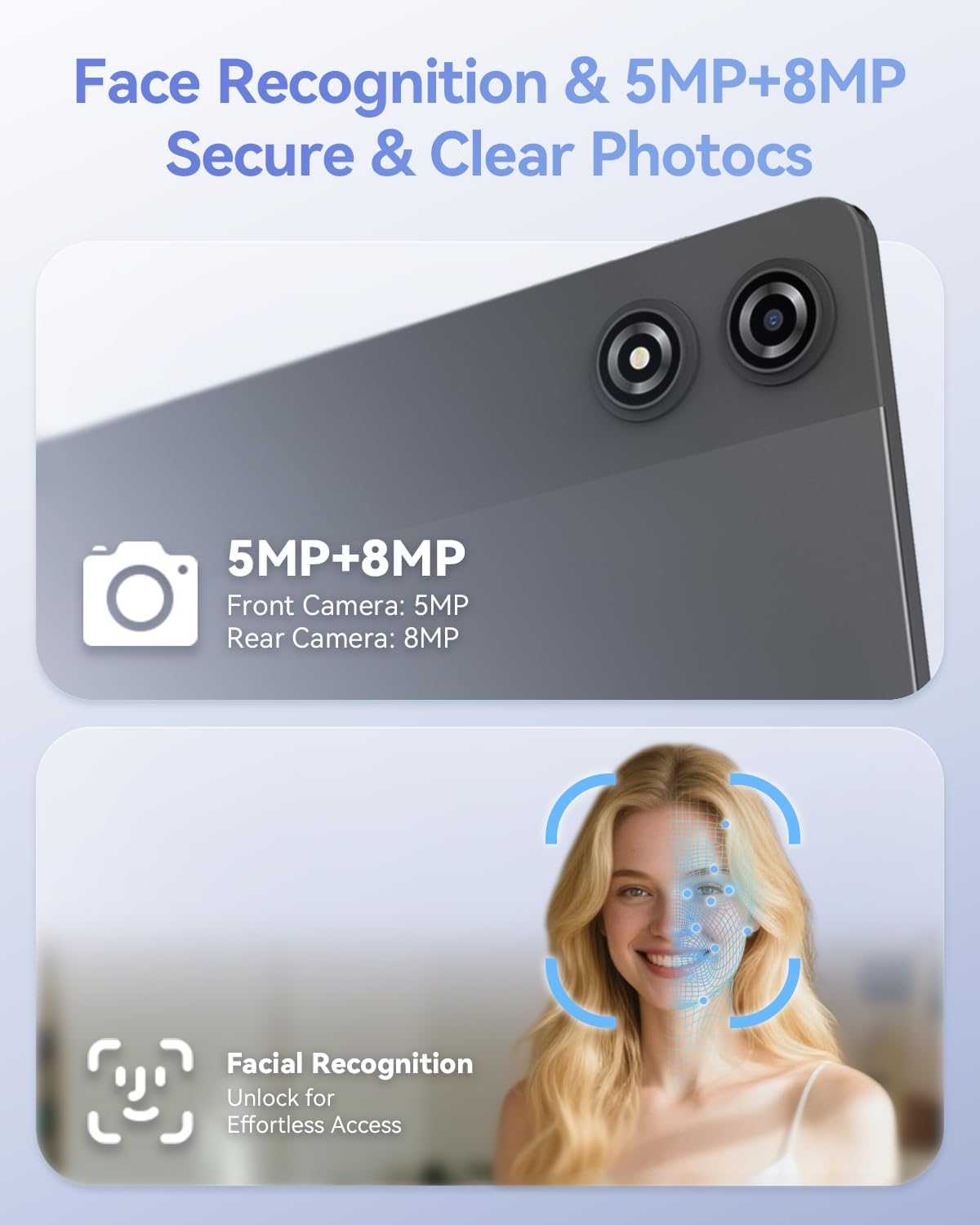
This image details the 5MP front camera and 8MP rear camera, along with the facial recognition feature for secure and effortless device access.
7. Storage and Battery
- BERAN: 20 GB (8 GB fyzické + 12 GB virtuální) pro plynulý multitasking.
- Interní úložiště: 128 GB pro aplikace a média.
- Rozšiřitelné úložiště: Supports up to 1TB via MicroSD card.
- Baterie: Kapacita 7000 mAh pro delší používání.
- Rychlé nabíjení: Supports PD 18W fast charging for quick recharges.

This image details the 20GB RAM (8GB physical + 12GB virtual), 128GB ROM, 1TB expandable storage, and the 7000mAh battery with PD 18W fast charging capabilities.
8. Řešení problémů
If you encounter issues with your BNCF Bpad 11, refer to the common solutions below. For further assistance, please contact customer support.
| Problém | Možná příčina | Řešení |
|---|---|---|
| Zařízení se nezapne. | Low battery or system crash. | Nabíjejte tablet alespoň 30 minut. Pokud stále nereaguje, stiskněte a podržte tlačítko napájení po dobu 10–15 sekund, abyste vynutili restart. |
| Dotyková obrazovka nereaguje. | Dočasná softwarová závada nebo rušení ochranného krytu obrazovky. | Restart the tablet. Ensure the screen is clean and free of debris. If a screen protector is installed, check for proper application or try removing it temporarily. |
| Problémy s připojením k Wi-Fi. | Incorrect password, router issue, or tablet Wi-Fi module error. | Verify Wi-Fi password. Restart your router. Toggle Wi-Fi off and on in tablet settings. Forget the network and reconnect. |
| Aplikace jsou pomalé nebo padají. | Too many apps running in the background, low storage, or outdated app versions. | Close unnecessary background apps. Clear app caches. Ensure apps are updated to their latest versions. Free up internal storage. |
9. Specifikace
| Funkce | Detail |
|---|---|
| Značka | BNCF |
| Název modelu | Bpad 11 |
| Operační systém | Android 15 |
| Velikost obrazovky | 11 palce |
| Rozlišení obrazovky | 1920 x 1200 pixelů (FHD IPS) |
| Obnovovací frekvence | 90 Hz |
| Procesor | Osmijádrový procesor MediaTek Helio G100 (2.2 GHz) |
| GPU | Mali-G57 MC2 |
| BERAN | 20 GB (8 GB fyzické + 12 GB virtuální) |
| Velikost paměti Flash | 128 GB |
| Rozšiřitelné úložiště | Až 1 TB (MicroSD) |
| Kapacita baterie | 7000 XNUMX mAh |
| Nabíjení | PD 18W Fast Charging (USB Type-C) |
| Zadní kamera | 8 MP |
| Přední kamera | 5 MP |
| Bezdrátové připojení | 4G LTE, 2.4G/5G WiFi (802.11ac, 802.11g), Bluetooth 5.0 |
| Navigace | GPS |
| Audio port | 3.5mm jack pro sluchátka |
| Hmotnost položky | 1.05 libry (cca 475 g) |
| Rozměry produktu | 10.2 x 6.7 x 0.3 palce |
10. Záruka a podpora
BNCF is committed to quality and customer satisfaction. For tablets purchased from the BNCF Official Flagship Store, a 12měsíční záruka na bezplatnou opravu is provided, along with lifetime technical support.
If you have any questions, encounter a software glitch, or have a hardware concern, please contact BNCF customer service. Our team aims to respond within 24 hours to assist you with solutions, returns, or exchanges.

An icon representing customer support, indicating availability for assistance and highlighting the one-year warranty and lifetime technical support.
For more information, visit the official BNCF Store: BNCF Store on Amazon
Ask a question about this manual
Ask about setup, troubleshooting, compatibility, parts, safety, or missing instructions. Manuals+ will review the question and use this page’s manual context to help answer it.