
Zavedení
The ATK VXE Dragonfly R1 Wireless Gaming Mouse is engineered for high-performance gaming, offering a lightweight design, advanced sensor technology, and versatile connectivity. This manual provides detailed instructions for setting up, operating, and maintaining your R1 gaming mouse to ensure optimal performance.

Obrázek: Nahoře view of the ATK VXE Dragonfly R1 Wireless Gaming Mouse in black, showcasinjeho ergonomický tvar a rozložení tlačítek.
Obsah balení
Prosím, ověřte, zda jsou v balení přítomny všechny položky:
- ATK VXE Dragonfly R1 Wireless Gaming Mouse
- Nabíjecí/datový kabel USB-C
- Bezdrátový přijímač 2.4 GHz (USB adaptér)
- Uživatelská příručka (tento dokument)
- Nonstandard Battery (pre-installed)
Nastavení
1. Nabíjení myši
Before first use, it is recommended to fully charge the mouse. Connect the supplied USB-C cable to the mouse's charging port and the other end to a USB power source (e.g., computer USB port, USB wall adapter).
2. Možnosti připojení
The ATK VXE Dragonfly R1 supports multiple connection modes:
- Bezdrátové připojení 2.4 GHz: For optimal gaming performance. Insert the 2.4GHz USB receiver into an available USB port on your computer. The mouse should automatically connect.
- Bluetooth: For general use and compatibility with various devices. Activate Bluetooth pairing mode on the mouse (refer to operating instructions for specific button combinations) and select "ATK VXE R1" from your device's Bluetooth settings.
- Kabelové (USB-C): Připojte myš přímo k počítači pomocí kabelu USB-C. V tomto režimu se myš také nabíjí.

Image: Diagram illustrating the Tri-Mode connectivity options: Bluetooth, 2.4GHz wireless, and wired USB-C connection for the ATK VXE Dragonfly R1 mouse.
Návod k obsluze
1. Zapnutí/vypnutí
Locate the power switch on the underside of the mouse. Slide it to the "ON" position to power on and "OFF" to power off.
2. Nastavení DPI
The mouse features adjustable DPI settings. Press the DPI button (usually located on the underside or top of the mouse, depending on the model) to cycle through preset DPI levels. An indicator light may change color to show the current DPI setting.
3. Programmable Macro Keys
The ATK VXE Dragonfly R1 includes programmable macro keys. To customize these keys, download and install the official ATKGEAR software from the manufacturer's website. The software allows you to assign functions, macros, and adjust other mouse settings.
Klíčové vlastnosti
- Lightweight Design (48g): The R1 mouse is designed for agility and comfort during extended gaming sessions.
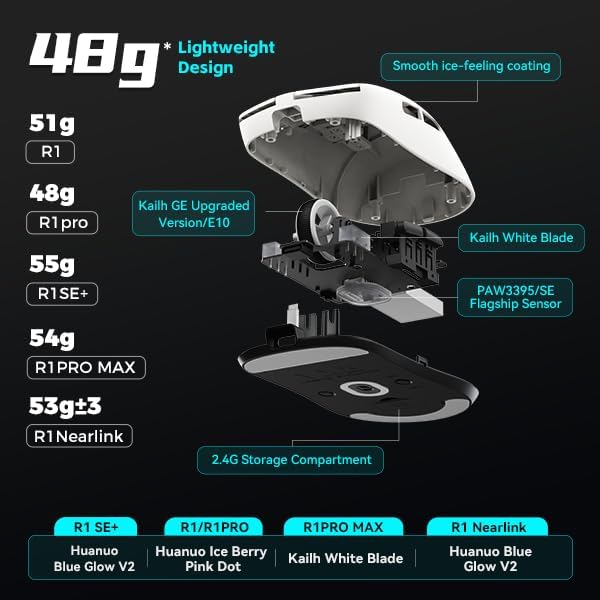
Obrázek: Rozložený view of the ATK VXE Dragonfly R1 mouse highlighting its lightweight internal components and showing weight comparisons for different R1 series models.
- PAW3395/SE Flagship Sensor: Equipped with a high-end optical sensor for precise tracking and accuracy, essential for competitive gaming.
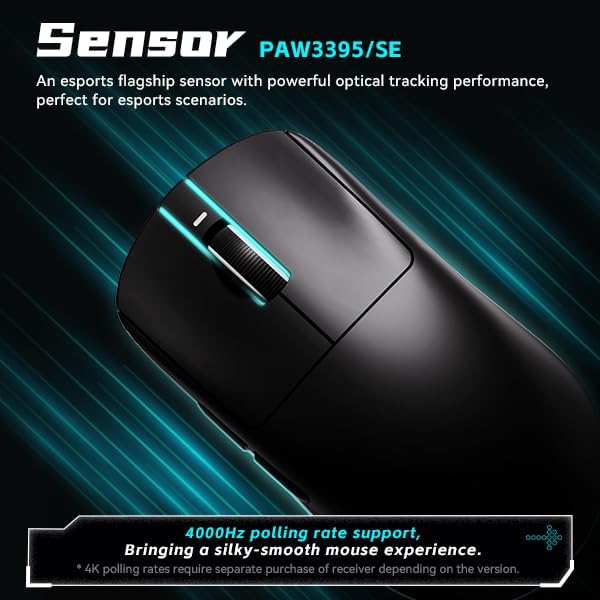
Image: Close-up of the ATK VXE Dragonfly R1 mouse, emphasizing the PAW3395/SE sensor and indicating 4000Hz polling rate support.
- Technologie převodovky Smart Speed X: VXE's proprietary wireless technology ensures ultra-low latency and enhanced signal stability, even in environments with interference.

Image: Depiction of the ATK VXE Dragonfly R1 mouse with text highlighting "Smart Speed X" wireless transmission technology for low latency.
- Nordic/BEKEN(compx)/Hisilicon Nearlink MCU: Features a flagship-level chip for powerful performance, low power consumption, and improved interference resistance.

Image: Graphic showing the ATK VXE Dragonfly R1 mouse and its MCU, emphasizing 4K polling rate capability for both office and gaming.
- ATK Micro Switches (Kailh White Blade / Ice Berry Pink Dot): Designed for a consistent click feel and long lifespan.
- Kailh White Blade: 100 Million Click Lifespan, balanced feel.
- Ice Berry Pink Dot: 90 Million Click Lifespan, soft bounce feel.

Image: Detailed illustration comparing Kailh White Blade and Ice Berry Pink Dot micro switches, showing their click lifespan and feel characteristics.
- Hladký povrch s pocitem ledu: A dirt-resistant and easy-to-clean surface that provides a comfortable and grippy feel.

Image: Visual representation of the smooth ice-feeling coating on the ATK VXE Dragonfly R1 mouse, contrasting smooth and matte textures available on different R1 series models.
Údržba
- Čištění: K otření povrchu myši použijte měkký, suchý hadřík. V případě odolných nečistot použijte lehceamp cloth with mild soap can be used, ensuring no liquid enters the mouse. The "Ice-Feel" coating is designed to be dirt-resistant and easy to clean.
- Péče o baterie: Chcete-li prodloužit životnost baterie, vyvarujte se častého úplného vybíjení myši. Nabíjejte myš, když je indikátor nabití baterie nízký. Pokud myš delší dobu nepoužíváte, skladujte ji na chladném a suchém místě.
- Údržba senzoru: Keep the optical sensor on the underside of the mouse clean and free from dust or debris for accurate tracking.
Odstraňování problémů
- Myš nereaguje:
- Ujistěte se, že je myš zapnutá.
- Zkontrolujte úroveň nabití baterie a v případě potřeby ji dobijte.
- For 2.4GHz wireless, ensure the USB receiver is securely plugged in and within range.
- V případě Bluetooth se ujistěte, že je na vašem zařízení povoleno připojení Bluetooth a myš je spárovaná.
- Zkuste se připojit pomocí kabelu USB-C, abyste vyloučili problémy s bezdrátovým připojením.
- Inconsistent tracking:
- Vyčistěte optický senzor na spodní straně myši.
- Ujistěte se, že myš používáte na vhodném povrchu (např. podložce pod myš).
- Check for software updates for the mouse driver or ATKGEAR software.
- Problémy s připojením:
- Move the mouse closer to the 2.4GHz receiver or Bluetooth device.
- Avoid sources of strong electromagnetic interference (e.g., Wi-Fi routers, other wireless devices).
- Re-pair the Bluetooth connection or re-insert the 2.4GHz receiver.
Specifikace
| Funkce | Detail |
|---|---|
| Model | R1 |
| Rozměry | 6.3 x 4.72 x 2.36 palce (balení) |
| Hmotnost položky | 7 ounces (approx. 48g for mouse only) |
| Senzor | PAW3395/SE Optical |
| Konektivita | Bluetooth, bezdrátové připojení 2.4 GHz, kabelové připojení USB-C |
| Míra hlasování | Up to 4000Hz (requires separate receiver for some versions) |
| Mikrospínače | Kailh White Blade (100M clicks) / Ice Berry Pink Dot (90M clicks) |
| Povlak | Hladký pocit ledu |
| Baterie | Nestandardní baterie (součástí balení) |
| Výrobce | ATKGEAR |

Image: Detailed table outlining specifications for various models within the VXE Dragonfly R1 series, including dimensions, coating, sensor, chip, polling rate, battery life, weight, microswitches, scroll wheel, mouse feet, and connection methods.
Záruka a podpora
Informace o záruce a technickou podporu získáte od oficiálního prodejce ATKGEAR. website or contact their customer service. Specific warranty terms may vary by region and retailer. Keep your proof of purchase for warranty claims.
Manufacturer: ATKGEAR


