
1. Konec produktuview
The TRIGKEY Key i13 Mini PC is a compact and powerful computing solution designed for various applications, from gaming and content creation to business and educational use. It features a 13th Gen Intel Core i9-13900HK processor, high-speed DDR5 RAM, and PCIe 4.0 SSD storage, offering robust performance in a small form factor.

Figure 1: The TRIGKEY Key i13 Mini PC, showcasinjeho kompaktní design a různé porty na přední i zadní straně.
Klíčové vlastnosti:
- Procesor: 13th Gen Intel Core i9-13900HK (14 Cores/20 Threads, up to 5.4 GHz)
- Paměť: 32 GB DDR5 RAM (rozšiřitelná)
- Skladování: 1TB PCIe 4.0 SSD (expandable with dual M.2 2280 slots)
- Grafika: Grafická karta Intel Iris Xe (96EU)
- Výstup displeje: Triple display support via HDMI (4K 60Hz), DisplayPort 1.4 (4K 144Hz), and Thunderbolt 4 (40Gbps/DP1.4)
- Konektivita: WiFi 6 (Intel AX200), Bluetooth 5.2, 2.5G LAN
- Porty: Thunderbolt 4, USB-C 3.2, USB-A 3.2, DP1.4, HDMI, 2.5G LAN, 3.5mm audio jacks
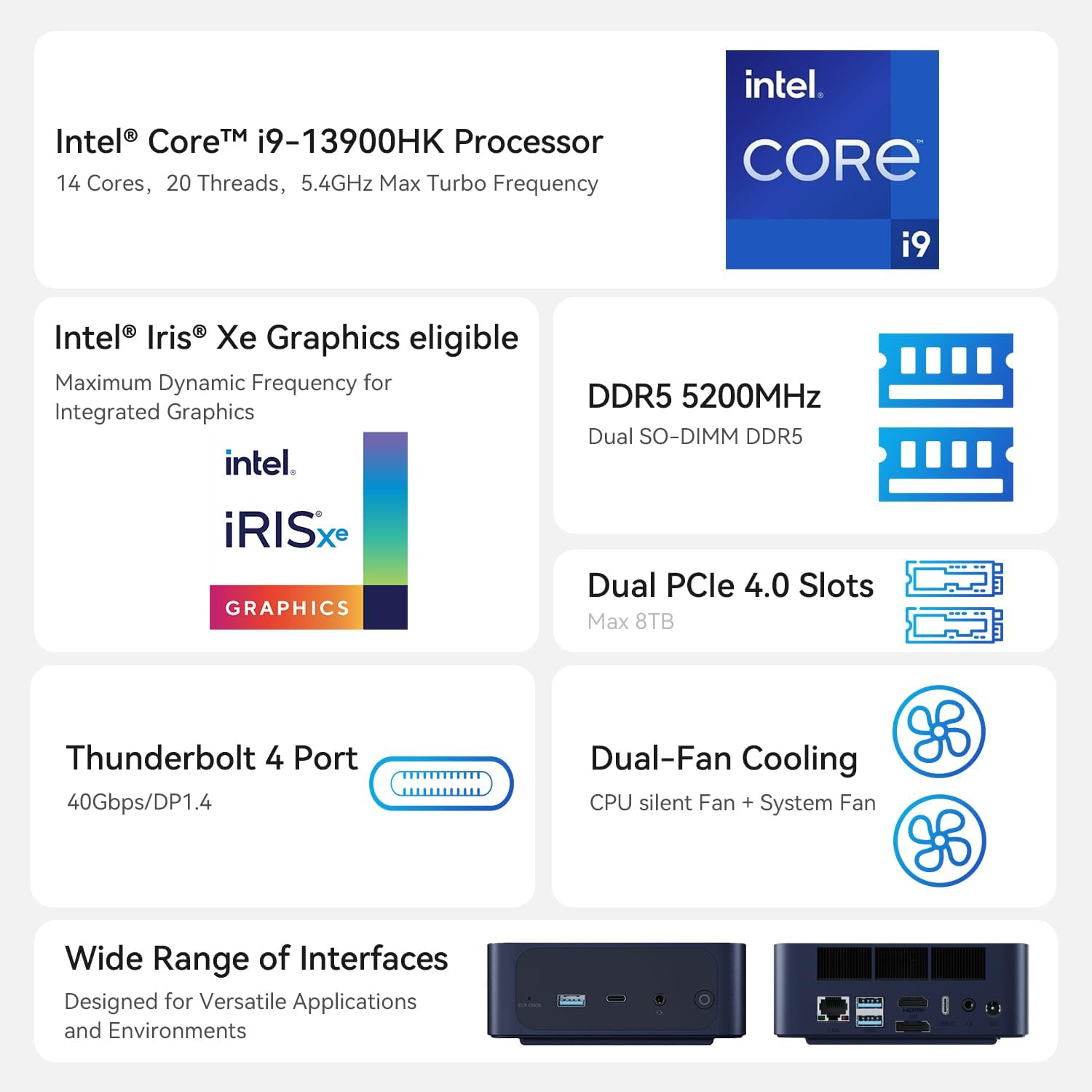
Figure 2: An illustration of the Intel Core i9-13900HK processor, emphasizing its core count, threads, and turbo frequency.
2. Průvodce nastavením
2.1 Co je v krabici
Než budete pokračovat v instalaci, ujistěte se, že jsou přítomny všechny komponenty:
- 1 x TRIGKEY Key i13 Mini PC
- 1 x HDMI kabel (100 cm)
- 1 x Uživatelská příručka
- 1 x napájecí adaptér (19V/5.26A)
2.2 Připojení mini počítače
Follow these steps to connect your TRIGKEY Key i13 Mini PC:
- Připojení displeje: Use the provided HDMI cable or a DisplayPort/Thunderbolt cable to connect your monitor(s) to the corresponding ports on the mini PC. The device supports up to three independent displays.
- Připojení periferií: Plug in your USB keyboard, mouse, and any other USB devices into the available USB-A or USB-C ports.
- Připojit síť: For a wired connection, connect an Ethernet cable from your router or modem to the 2.5G LAN port on the mini PC. For wireless, ensure the WiFi antennas are properly positioned (if external) or that the internal antenna has clear signal access.
- Připojte napájení: Insert the power adapter into the DC IN port on the mini PC, then plug the adapter into a power outlet.
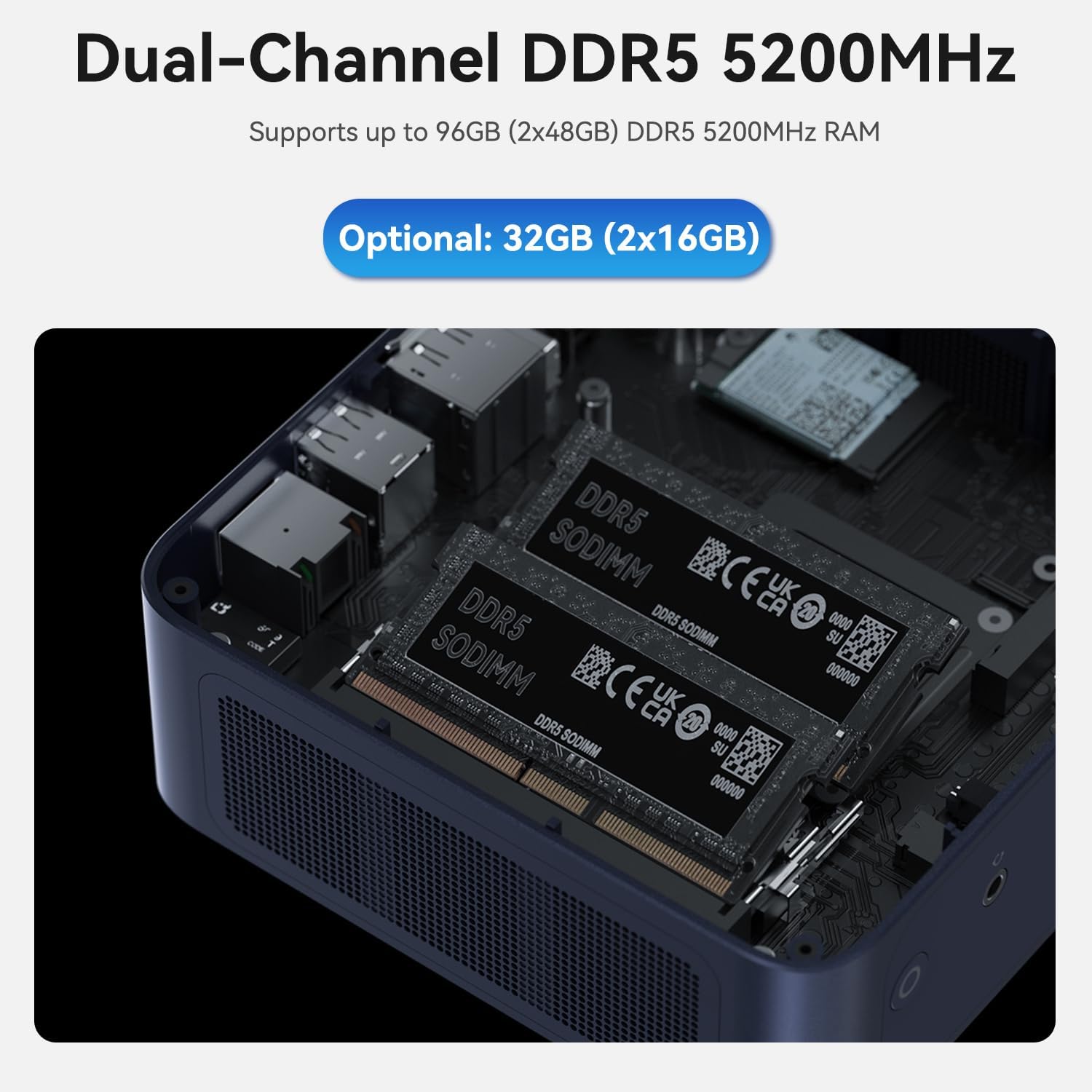
Figure 3: A diagram illustrating the various ports on the TRIGKEY Key i13 Mini PC, including Thunderbolt 4, USB-C, USB-A, DP1.4, HDMI, LAN, and audio jacks.
2.3 Počáteční zapnutí
After connecting all necessary cables, press the power button located on the front of the mini PC. The system will boot up, and you should see the operating system loading on your connected display.
3. Návod k obsluze
3.1 Řízení spotřeby
- Zapnutí: Stiskněte jednou tlačítko napájení.
- Vypnout: Access the operating system's power options to perform a proper shutdown.
- Restartovat: Access the operating system's power options to restart the system.
- Režim spánku: Access the operating system's power options to put the system into sleep mode.
3.2 Konfigurace displeje
The TRIGKEY Key i13 supports up to three independent displays. To configure multiple displays:
- Connect your monitors to the HDMI, DisplayPort, and Thunderbolt 4 ports.
- Once connected, the operating system (e.g., Windows) should automatically detect the displays.
- Navigate to your display settings (e.g., right-click on desktop > Display settings) to arrange, extend, or duplicate your displays as needed.
3.3 Síťové a bezdrátové připojení
The mini PC offers advanced connectivity options:
- Wired Network (2.5G LAN): For optimal speed and stability, use the 2.5G Ethernet port. Ensure your router and network infrastructure support 2.5G speeds for full performance.
- Bezdrátová síť (WiFi 6): The integrated WiFi 6 (Intel AX200) module provides high-speed wireless connectivity. To connect, open your operating system's network settings, select your desired WiFi network, and enter the password.
- Bluetooth (BT 5.2): Use Bluetooth 5.2 to connect wireless peripherals such as keyboards, mice, headphones, or speakers. Access your operating system's Bluetooth settings to pair devices.

Obrázek 4: Overview of the mini PC's connectivity options, including WiFi 6, Bluetooth 5.2, and 2.5G LAN.
3.4 Rozšíření úložiště a paměti
The TRIGKEY Key i13 Mini PC is designed for easy upgrades:
- BERAN: The device comes with 32GB DDR5 RAM (2x16GB) and supports up to 96GB (2x48GB) DDR5 5200MHz SO-DIMM memory. To upgrade, carefully open the chassis and replace the existing SO-DIMM modules.
- SSD: It includes a 1TB PCIe 4.0 SSD. The mini PC features dual M.2 2280 PCIe 4.0 slots, each supporting up to 4TB, for a total of 8TB storage. To add or upgrade SSDs, open the chassis and install M.2 2280 NVMe SSDs into the available slots.

Obrázek 5: Vnitřní view of the mini PC, displaying the dual DDR5 SO-DIMM slots for memory installation.

Obrázek 6: Vnitřní view of the mini PC, illustrating the dual M.2 2280 PCIe 4.0 slots for storage expansion.
4. Údržba
4.1 Čištění
To ensure optimal performance and longevity, regularly clean your mini PC:
- K otření vnějších částí zařízení používejte měkký, suchý hadřík.
- Pro odstranění prachu nahromaděného ve větracích otvorech použijte stlačený vzduch. Před čištěním se ujistěte, že je zařízení vypnuté a odpojené od sítě.
- Nepoužívejte tekuté čisticí prostředky přímo na zařízení.
4.2 Aktualizace softwaru
Keep your operating system and drivers updated to ensure system stability, security, and performance. Regularly check for updates through your operating system's settings.
4.3 Chladicí systém
The TRIGKEY Key i13 features a dual-fan cooling system to manage internal temperatures. Ensure the vents are not obstructed to allow for proper airflow. If you notice excessive fan noise or overheating, ensure the device is in a well-ventilated area.

Figure 7: A diagram demonstrating the airflow and cooling mechanism within the TRIGKEY Key i13 Mini PC, highlighting the system fan and SSD heatsink.
5. Řešení problémů
This section addresses common issues you might encounter with your TRIGKEY Key i13 Mini PC.
5.1 Bez napájení
- Ujistěte se, že je napájecí adaptér bezpečně připojen k mini PC i k funkční zásuvce.
- Ověřte funkčnost elektrické zásuvky zapojením jiného zařízení.
- Zkontrolujte napájecí adaptér, zda nevykazuje viditelné poškození.
5.2 Žádný výstup na displej
- Confirm that the display cable (HDMI, DP, Thunderbolt) is securely connected to both the mini PC and the monitor.
- Ujistěte se, že je monitor zapnutý a nastavený na správný vstupní zdroj.
- Try connecting to a different display or using a different cable to rule out display or cable issues.
5.3 Problémy s připojením k síti
- Kabelové: Check if the Ethernet cable is properly connected. Verify your router/modem is working correctly.
- Bezdrátový: Ensure WiFi is enabled in your operating system settings. Confirm you are connected to the correct network and have entered the password accurately. Restart your router/modem if necessary.
- Update network drivers if issues persist.
5.4 Problémy s výkonem systému
- Zavřete nepotřebné aplikace běžící na pozadí.
- Check for and install any pending operating system or driver updates.
- Zajistěte, aby mini PC měl dostatečné větrání a aby se nepřehříval.
- Run a system diagnostic or antivirus scan to check for software conflicts or malware.
If you encounter issues not covered here or require further assistance, please contact TRIGKEY customer support.
6. Specifikace
| Funkce | Specifikace |
|---|---|
| Procesor | Intel Core i9-13900HK (14C/20T, up to 5.4 GHz) |
| BERAN | 32GB DDR5 5200MHz (2x16GB), Max 96GB |
| Skladování | 1TB PCIe 4.0 SSD (Dual M.2 2280 slots, Max 8TB) |
| Grafika | Grafická karta Intel Iris Xe (96EU) |
| Maximální rozlišení obrazovky | 3840x2160 (4K) |
| Operační systém | OS (Pre-installed, typically Windows 11 Pro) |
| Bezdrátové připojení | Wi-Fi 6 (Intel AX200), Bluetooth 5.2 |
| Kabelová síť | 2.5G LAN |
| Porty | 1x Thunderbolt 4 (40Gbps/DP1.4), 1x USB-C 3.2 (10Gbps), 3x USB-A 3.2 (10Gbps), 1x DP1.4 (4K 144Hz), 1x HDMI (4K 60Hz), 1x 2.5G LAN, 2x 3.5mm audio jack, 1x DC IN |
| Hmotnost položky | 2.38 libry |
| Rozměry balení | 5.67 x 5.51 x 4.29 palce |
| Design Type | Mini PC |
7. Záruka a podpora
7.1 Informace o záruce
The TRIGKEY Key i13 Mini PC comes with a one-year warranty from the date of purchase. This warranty covers manufacturing defects and hardware malfunctions under normal use conditions. Please retain your proof of purchase for warranty claims.
7.2 Zákaznická podpora
TRIGKEY is committed to providing excellent customer service. For any technical assistance, troubleshooting, or warranty inquiries, please utilize the following support options:
- Online podpora: Visit the official TRIGKEY store on Amazon for FAQs and product information: TRIGKEY Amazon Store
- Technická podpora: We offer 24/7 one-to-one customer service and lifelong technical support. Refer to the contact information provided with your product packaging or on the official TRIGKEY webstránky pro přímé kanály podpory.