
1. Úvod
This manual provides essential instructions for setting up, operating, maintaining, and troubleshooting your FUNYET 2-in-1 Laptop, Model FUN01-05. This device features a 14.1-inch Full HD touchscreen, an Intel Core i7-1265U processor, 16GB RAM, and a 512GB SSD, running Windows 11 Pro. Its 360-degree reversible screen allows for versatile usage modes.
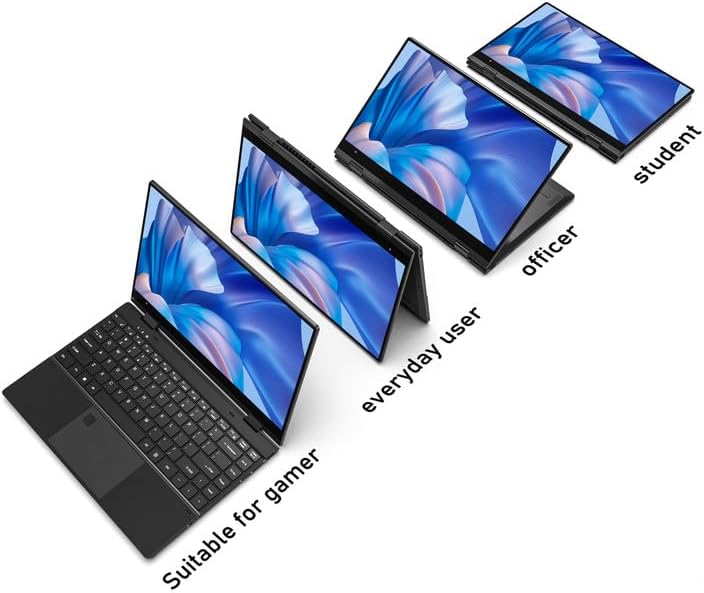
Figure 1: FUNYET 2-in-1 Laptop showcasing its versatile modes.
2. Obsah balení
Ověřte, zda jsou v balení přítomny všechny položky:
- FUNYET 2-in-1 Touch Screen Laptop
- AC adaptér
- Záruční list
- Pokyny (tato příručka)
3. Nastavení
3.1 Počáteční nabíjení a zapnutí
- Connect the AC adapter to the DC-IN port on the laptop and plug it into a power outlet.
- Allow the laptop to charge for at least 30 minutes before initial use.
- Press and hold the Power Button (located on the side) until the screen illuminates.
3.2 Nastavení systému Windows 11 Pro
Follow the on-screen prompts to complete the Windows 11 Pro initial setup. This includes selecting your region, language, connecting to a Wi-Fi network, and creating a user account.
3.3 Nastavení čtečky otisků prstů
For enhanced security and quick access, set up the fingerprint reader:
- Navigate to Windows Settings > Accounts > Sign-in options.
- Under "Windows Hello Fingerprint," click "Set up" and follow the instructions to register your fingerprint.

Figure 2: Backlit keyboard and integrated fingerprint reader.
4. Návod k obsluze
4.1 Řízení spotřeby
- Zapnutí: Stiskněte tlačítko napájení.
- Režim spánku: Briefly press the Power Button or close the lid.
- Vypnout: Přejděte do nabídky Start > Napájení > Vypnout.
- Restartovat: Přejděte do nabídky Start > Napájení > Restartovat.
4.2 Režimy 2 v 1
The laptop's 360-degree hinge allows for four primary modes:
- Notebook Mode: Standardní konfigurace notebooku pro psaní a produktivitu.
- Režim stojanu: Fold the keyboard back to prop up the screen for viewobsahu.
- Režim stanu: Position the laptop in an inverted 'V' shape, ideal for touch interaction or presentations in confined spaces.
- Režim tabletu: Fold the screen completely back against the base for a tablet experience.

Figure 3: Different operational modes of the 2-in-1 laptop.
4.3 Touchscreen and Keyboard
- Dotyková obrazovka: Use gestures similar to a smartphone or tablet for navigation and interaction.
- Podsvícená klávesnice: The keyboard features a backlight for use in low-light conditions. The backlight can typically be toggled or adjusted using function keys (e.g., Fn + F5).
4.4 Konektivita
Your laptop supports various connectivity options:
- Wi-Fi 6: For high-speed wireless internet access. Connect via Windows Settings > Network & Internet > Wi-Fi.
- Bluetooth 5.2: For connecting wireless peripherals like headphones, mice, or keyboards. Pair devices via Windows Settings > Bluetooth & devices.
- Porty: The laptop includes various ports for external devices.

Figure 4: Laptop ports and their functions.
Dostupné porty:
- DC-IN (vstup napájení)
- USB 3.1 Type-C (Video Output, Data Transfer, Charging)
- Audio Port (Headphones/Microphone)
- Tlačítko napájení
- TF Card Slot (for storage expansion up to 1TB)
- USB 3.1 typu A
5. Údržba
5.1 Čištění
- K čištění obrazovky a vnějšího povrchu použijte měkký hadřík, který nepouští vlákna.
- Na odolné šmouhy, damphadřík lehce navlhčete vodou nebo čističem šetrným k obrazovkám.
- Vyhněte se agresivním chemikáliím, abrazivům nebo nadměrné vlhkosti.
5.2 Péče o baterii
- Chcete-li maximalizovat životnost baterie, vyhněte se častému úplnému vybíjení.
- Pokud notebook delší dobu nepoužíváte, skladujte jej na chladném a suchém místě.
- The laptop features a 38 Watt-hour Lithium-Ion battery, providing up to 8 hours of usage.
5.3 Tepelné hospodářství
The laptop is designed with an improved thermal system to maintain optimal operating temperatures. Ensure proper airflow by not blocking the ventilation openings, especially during intensive tasks.

Figure 5: Laptop thermal design for efficient cooling.
6. Řešení problémů
Pokud narazíte na problémy, vyzkoušejte následující základní kroky pro řešení problémů:
- Bez napájení: Ujistěte se, že je síťový adaptér bezpečně připojen k notebooku i k funkční zásuvce. Zkuste jinou zásuvku.
- Obrazovka se nezobrazuje: Připojte externí monitor a zkontrolujte, zda je problém s displejem notebooku. Restartujte notebook.
- Pomalý výkon: Close unnecessary applications. Check for Windows updates. Ensure sufficient free storage space.
- Problémy s Wi-Fi/Bluetooth: Toggle Wi-Fi/Bluetooth off and on in Windows Settings. Restart the laptop. Check router/device connections.
- Závady displeje: Ensure your Windows operating system and graphics drivers are up to date. This can often resolve display anomalies.
- Nereagující dotykový displej: Restart the laptop. Ensure the screen is clean and free of debris.
V případě přetrvávajících problémů se obraťte na sekci podpory nebo na zákaznický servis.
7. Specifikace
| Funkce | Detail |
|---|---|
| Značka | FUNYET |
| Název modelu | Magbook |
| Číslo modelu | FUN01-05 |
| Velikost obrazovky | 14.1 palce |
| Rozlišení displeje | 1920 x 1080 pixelů (FHD) |
| Typ zobrazení | LCD, Touchscreen, Glossy Finish |
| Procesor | Intel Core i7-1265U (až 4.8 GHz, 8 jader, 12 vláken) |
| BERAN | 16 GB DDR4 (3733 MHz) |
| Skladování | 512 GB SSD (PCIE x 4), expandable up to 1TB with TF card |
| Operační systém | Windows 11 Pro |
| Grafika | Integrovaná grafika Intel Iris Xe Graphics |
| Bezdrátové připojení | Wi-Fi 6, Bluetooth 5.2 |
| Porty | USB 3.1 Type-A, USB 3.1 Type-C, DC-IN, Audio Jack, TF Card Slot |
| Fotoaparát | Front 2 MP |
| Zabezpečení | Rozpoznávání otisků prstů |
| Baterie | 38 Watt Hours Lithium Ion (up to 8 hours) |
| Hmotnost | 3 libry |
| Rozměry (D x Š x T) | 12.7 cm x 8.6 cm x 0.6 cm |
8. Záruka a podpora
8.1 Informace o záruce
Your FUNYET 2-in-1 Laptop comes with a 2letá omezená zárukaTato záruka se vztahuje na výrobní vady a poruchy hardwaru za běžného používání. Uschovejte si prosím doklad o koupi pro případ uplatnění záruky.
Navíc a 180denní zásada bezplatného vrácení is offered from the date of purchase.
8.2 Zákaznická podpora
For technical assistance, warranty claims, or any product-related inquiries, please contact FUNYET customer support:
- Telefonická podpora: +1 800-986-9631 (English phone support available)
- Online podpora: 24/7 instant online support is available. Please visit the official FUNYET webstránky pro kontaktní údaje.