
1. Úvod
This manual provides essential information for setting up, operating, maintaining, and troubleshooting your new HP All-in-One Desktop PC, Model 0024. Please read these instructions carefully to ensure proper use and longevity of your device.

Image 1.1: HP All-in-One Desktop PC, showing the display, keyboard, and mouse.
2. Obsah balení
Ověřte, zda jsou v balení přítomny všechny položky:
- HP All-in-One Desktop PC (Model 0024)
- Kabelová klávesnice
- Wired Mouse
- Napájecí adaptér a kabel
3. Nastavení
3.1 Vybalení
- Carefully remove the PC and accessories from the packaging.
- Place the PC on a stable, flat surface.
3.2 Připojení periferních zařízení
Connect the keyboard, mouse, and power adapter to the appropriate ports on the back of the PC.
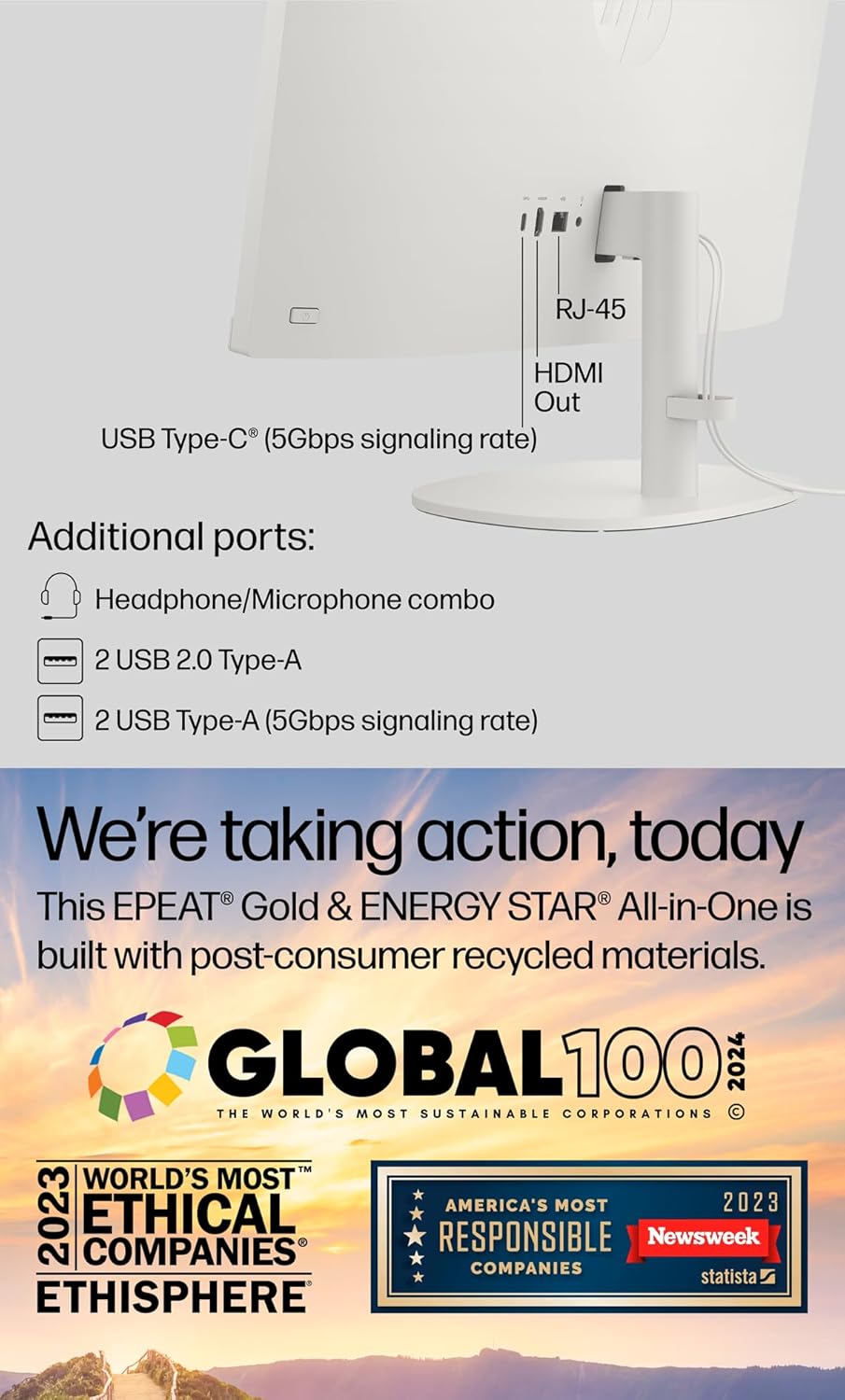
Obrázek 3.1: Zadní strana view of the HP All-in-One PC, highlighting the various ports for connectivity.
- Moc: Connect the power cable to the power adapter, then to the PC and a wall outlet.
- Klávesnice a myš: Connect the USB cables from the keyboard and mouse to any available USB Type-A ports on the PC.
- Externí displej (volitelné): If using an external monitor, connect it to the HDMI-out port.
- Síť (volitelné): For a wired internet connection, connect an Ethernet cable to the RJ-45 port.
3.3 Počáteční zapnutí a nastavení systému Windows 11
- Press the power button, usually located on the side or bottom bezel of the display.
- Postupujte podle pokynů na obrazovce a dokončete počáteční nastavení systému Windows 11, včetně jazyka, regionu, síťového připojení a vytvoření uživatelského účtu.
- The myHP application may guide you through additional setup steps for HP-specific features.

Image 3.2: The myHP application interface, designed to simplify initial PC setup and management.
4. Ovládání počítače
4.1 Basic Navigation (Windows 11)
Familiarize yourself with the Windows 11 interface:
- Nabídka Start: Přístup k aplikacím, nastavením a možnostem napájení.
- Hlavní panel: Připněte si často používané aplikace a view otevřené programy.
- Desktop: Your primary workspace for icons and open windows.
4.2 Konektivita
- Wi-Fi 6: To connect to a wireless network, click the network icon in the taskbar, select your desired network, and enter the password.
- Bluetooth: Enable Bluetooth in Windows Settings to pair with wireless devices like headphones or speakers.
- Ethernet: If connected via RJ-45, your PC will automatically detect the wired network.
4.3 Using the Camera and Microphone
The HP All-in-One PC features an HP True Vision 720p HD privacy camera and integrated dual array digital microphones, suitable for video calls and online meetings.

Image 4.1: A user engaged in a video conference, demonstrating the PC's camera and microphone capabilities.
- Kamera pro ochranu soukromí: The camera includes a physical privacy shutter. Slide the shutter to cover the lens when not in use.
- Mikrofony: The dual array microphones are designed to capture clear audio and reduce background noise.
4.4 Porty Overview
The PC offers a variety of ports for connecting external devices:

Image 4.2: Detailed diagram illustrating the location and type of ports on the HP All-in-One PC.
- USB Type-C (5Gbps): For data transfer only.
- USB Type-A (5Gbps): Vysokorychlostní USB porty pro periferie.
- USB 2.0 typu A: Standardní USB porty pro periferie.
- HDMI-out 1.4: Connects to an external display.
- Kombinace sluchátek/mikrofonu: Pro audio vstup a výstup.
- RJ-45: Pro kabelové připojení k síti Ethernet.
5. Údržba
5.1 Čištění
- Zobrazit: Použijte měkký hadřík, který nepouští vlákna dampOpláchněte vodou nebo čističem obrazovek. Vyhněte se agresivním chemikáliím.
- Podvozek: Otřete měkkým suchým hadříkem.
- Klávesnice a myš: Use compressed air to remove dust from crevices.
5.2 Aktualizace softwaru
Pravidelně aktualizujte operační systém a ovladače, abyste zajistili optimální výkon a zabezpečení.
- Aktualizace systému Windows: Přejít na Nastavení > Aktualizace systému Windows pro kontrolu a instalaci aktualizací.
- Asistent podpory HP: Use the pre-installed HP Support Assistant application to manage HP-specific driver and software updates.
5.3 Zálohování dat
Pravidelně zálohujte své důležité věci filena externí disk nebo do cloudového úložiště, aby se zabránilo ztrátě dat.
6. Řešení problémů
Tato část se zabývá běžnými problémy, se kterými se můžete setkat.
- Bez napájení:
Ensure the power cable is securely connected to the PC and the wall outlet. Test the outlet with another device. - Bez displeje:
Check if the PC is powered on. If an external monitor is connected, ensure it is also powered on and correctly connected via HDMI. - Žádné internetové připojení:
For Wi-Fi, verify your network password and router status. For Ethernet, ensure the cable is properly connected to the RJ-45 port and your router. - Klávesnice nebo myš nereaguje:
Check USB connections. Try connecting them to different USB ports. - Pomalý výkon:
Close unnecessary applications. Check for available Windows updates. Consider running a disk cleanup or antivirus scan.
7. Specifikace
Key technical specifications for the HP All-in-One Desktop PC, Model 0024.

Image 7.1: Physical dimensions of the HP All-in-One PC.
| Funkce | Popis |
|---|---|
| Model | 0024 |
| Procesor | Intel Celeron J4025 (2.0 GHz base, up to 2.9 GHz, 2 cores) |
| Zobrazit | 21.5-inch FHD (1920 x 1080), VA, Anti-Glare, 250 nits, 72% NTSC |
| BERAN | 12 GB DDR4 (konfigurovatelné až 64 GB) |
| Skladování | 1TB PCIe NVMe M.2 SSD (Configurable up to 2TB) |
| Operační systém | Windows 11 Home, 64bitový |
| Grafika | Integrovaná grafika Intel UHD Graphics |
| Webvačka | HP True Vision 720p HD privacy camera with dual array digital microphones |
| Bezdrátové připojení | Wi-Fi 6, Bluetooth |
| Porty | 1x USB Type-C (5Gbps), 2x USB Type-A (5Gbps), 2x USB 2.0 Type-A, 1x HDMI-out 1.4, 1x Headphone/Microphone combo, 1x RJ-45 |
| Rozměry (D x Š x V) | 19.30 x 7.05 x 14.99 palce |
| Hmotnost | 12.56 liber |
8. Záruka a podpora
Your HP All-in-One Desktop PC comes with a standard manufacturer's warranty. For detailed warranty information, please refer to the warranty card included with your product or visit the official HP support webmísto.
Pro technickou pomoc, stažení ovladačů nebo další podporu navštivte stránky podpory HP website or contact HP customer service. Keep your product model number (0024) and serial number ready when contacting support.