
1. Úvod
This manual provides detailed instructions for the installation, operation, and maintenance of your GNCC 2K 3MP Indoor WiFi Surveillance Camera, model P5W. Please read this manual thoroughly before using the product to ensure proper functionality and safety.
2. Konec produktuview
2.1 Obsah balení
Ověřte, zda jsou v balení přítomny všechny položky:
- GNCC 2K 3MP Indoor WiFi Surveillance Camera (P5W)
- Napájecí adaptér
- 2-meter Power Cable
- Montážní základna
- Šrouby pro instalaci
- Uživatelská příručka (tento dokument)
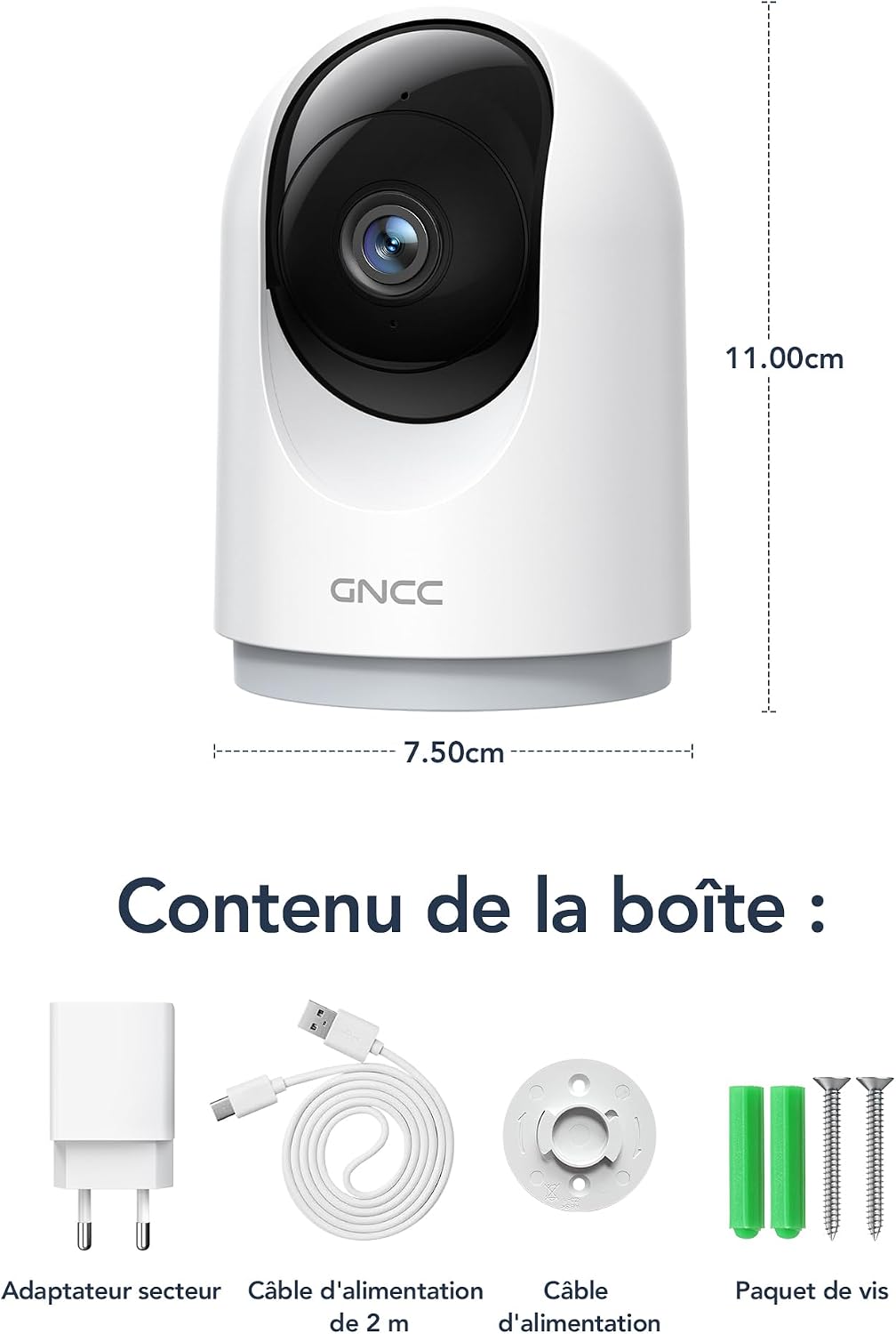
Figure 2.1: Package Contents and Camera Dimensions. The image displays the camera, power adapter, USB cable, mounting base, and screws. Dimensions are indicated as 7.50cm width and 11.00cm height.
2.2 Funkce fotoaparátu
- Rozlišení 2K 3MP: Poskytuje jasné a podrobné video footage.
- 360° pokrytí: Features 355° horizontal pan and 60° vertical tilt for comprehensive monitoring.
- 2.4GHz WiFi připojení: Připojuje se k vaší domácí síti pro vzdálený přístup.
- Infračervené noční vidění: Automatically activates in low light, providing clear visibility up to 15 meters.
- Obousměrný zvuk: Umožňuje komunikaci v reálném čase prostřednictvím kamery.
- Detekce a sledování pohybu s umělou inteligencí: Detects movement, human shapes, pets, and abnormal sounds, sending instant alerts to your phone.
- Více zařízení View: Monitor up to four cameras simultaneously on your mobile device.
- Integrace chytré domácnosti: Kompatibilní s Amazon Alexa a Google Assistant pro hlasové ovládání.
- Režim soukromí: Remotely disable recording and live view prostřednictvím aplikace.
- Flexibilní úložiště: Supports Cloud storage (subscription required) and local storage via MicroSD card (up to 128GB, not included).

Figure 2.2: Key Features of the GNCC P5W Camera.
3. Pokyny k nastavení
3.1 Zapnutí fotoaparátu
- Connect the 2-meter power cable to the camera's power input port.
- Zapojte napájecí adaptér do standardní elektrické zásuvky.
- Kamera se zapne a její kontrolka začne blikat, což znamená, že je připravena k nastavení.
3.2 Instalace aplikace a vytvoření účtu
- Stáhněte si oficiální aplikaci GNCC z obchodu s aplikacemi pro váš chytrý telefon (iOS App Store nebo Google Play Store).
- Otevřete aplikaci a postupujte podle pokynů na obrazovce a vytvořte si nový účet, nebo se přihlaste, pokud již nějaký máte.
3.3 Připojení fotoaparátu k Wi-Fi
Ujistěte se, že je váš chytrý telefon připojen k síti Wi-Fi s frekvencí 2.4 GHz. Fotoaparát nepodporuje Wi-Fi s frekvencí 5 GHz.
- V aplikaci GNCC klepněte na ikonu „+“ pro přidání nového zařízení.
- Select your camera model (P5W) from the list of devices.
- Follow the app's prompts to connect the camera to your 2.4GHz Wi-Fi network. This typically involves scanning a QR code displayed on your phone with the camera lens.
- Po připojení se kontrolka kamery rozsvítí nepřerušovaně a uslyšíte potvrzovací zvuk.
3.4 Montáž fotoaparátu
The camera can be placed on a flat surface or mounted to a wall/ceiling using the provided mounting base and screws.
- Montáž na stůl: Place the camera on a stable, flat surface. Ensure it has a clear view oblasti, kterou chcete monitorovat.
- Montáž šroubováním:
- Vyberte vhodné místo pro montáž.
- Use the mounting base as a template to mark the screw positions on the wall or ceiling.
- Vyvrtejte pilotní otvory a v případě potřeby vložte hmoždinky do zdi.
- Secure the mounting base with the provided screws.
- Attach the camera to the mounting base by twisting it until it locks securely.
4. Návod k obsluze
4.1 Živě View a ovládání otáčení/náklonu
Open the GNCC app and select your camera to access the live view. Use the on-screen controls to pan (355° horizontal) and tilt (60° vertical) the camera lens to adjust the viewúhel.

Figure 4.1: 360° Coverage of the GNCC P5W Camera.
4.2 Obousměrný zvuk
Z živého vysílání view screen, tap the microphone icon to enable two-way audio. You can speak into your phone, and your voice will be transmitted through the camera's speaker. Similarly, you can hear audio from the camera's environment.
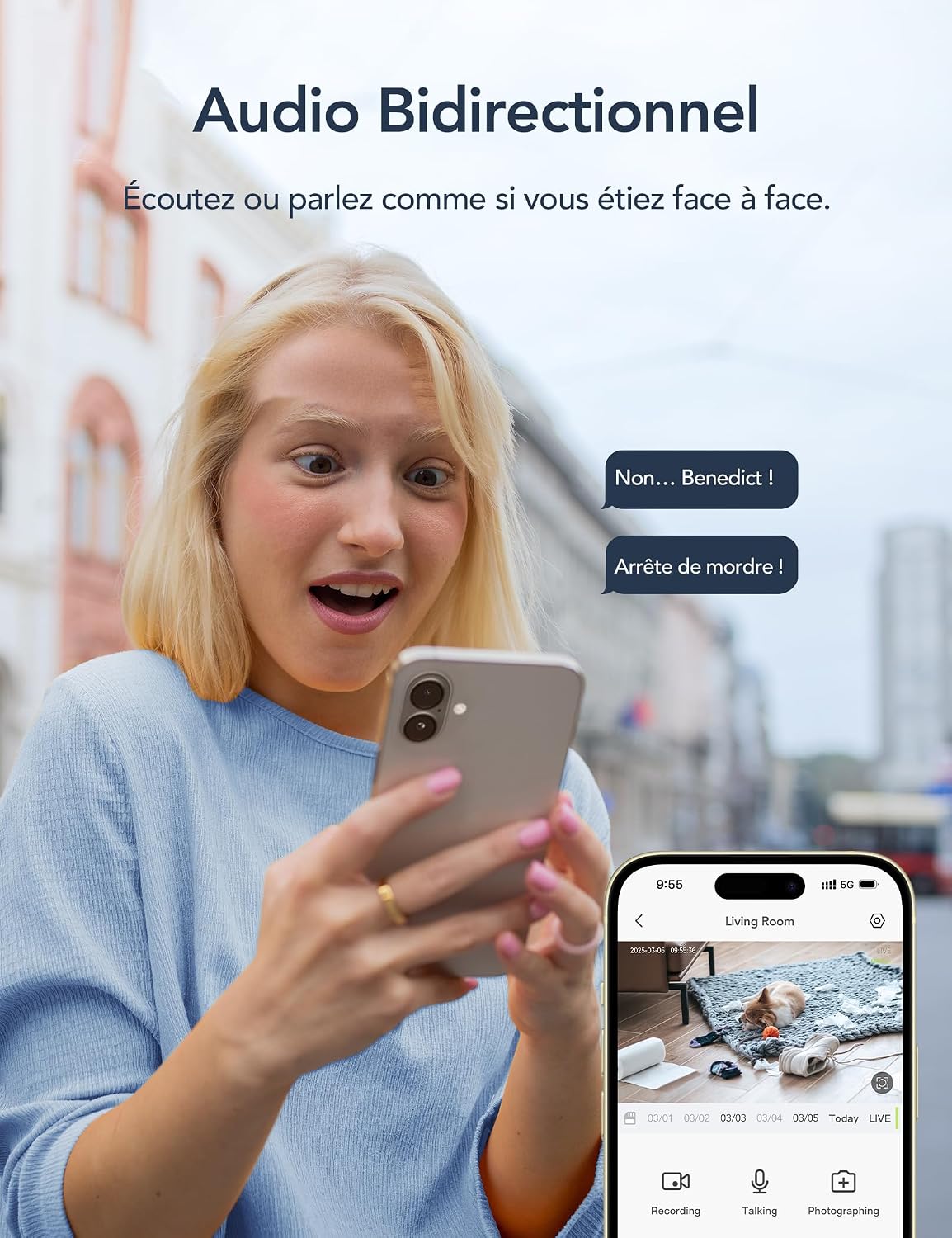
Figure 4.2: Two-Way Audio Functionality.
4.3 Detekce pohybu a upozornění
The camera is equipped with AI-powered motion detection, human shape detection, pet detection, and abnormal sound detection. When an event is detected, the camera will automatically record and send an instant notification to your smartphone.
- Enabling/Disabling Alerts: Navigate to the camera settings in the app to customize alert preferences, including sensitivity levels and detection zones.
- Sledování pohybu: Když je detekován pohyb, kamera dokáže automaticky sledovat pohybující se objekt ve svém zorném poli view.

Figure 4.3: Motion Detection and Instant Notifications.
4.4 Noční vidění
The camera automatically switches to infrared night vision mode in low-light conditions, providing clear black-and-white video up to 15 meters. No manual intervention is required.

Figure 4.4: Night Vision in operation, showing a baby in a crib.
4.5 Možnosti úložiště
- Paměťová karta MicroSD: Insert a MicroSD card (up to 128GB, not included) into the camera's designated slot for local recording. The camera will continuously record or record upon motion detection, depending on your settings.
- Cloudové úložiště: Optional cloud storage is available via subscription, offering 24/7 unlimited recording and access to past footage. A 14-day free trial for smart AI detection features may be available.

Figure 4.5: Cloud and Local Storage Options.
4.6 Smart Home Integration (Alexa & Google Assistant)
The GNCC P5W camera can be integrated with Amazon Alexa and Google Assistant for convenient voice control. Follow the instructions in your Alexa or Google Home app to link your GNCC account and devices.
- Example Voice Command: "Alexa, show me the living room camera."

Figure 4.6: Smart Home Integration and Advanced Features.
4.7 Režim soukromí
To ensure privacy, you can remotely disable the camera's recording and live view functions through the GNCC app. This feature allows you to turn off surveillance when not needed.
5. Údržba
- Čištění: K čištění objektivu a těla fotoaparátu používejte měkký, suchý hadřík. Nepoužívejte agresivní chemikálie ani abrazivní materiály.
- Aktualizace firmwaru: Regularly check the GNCC app for available firmware updates. Keeping your camera's firmware up-to-date ensures optimal performance and security.
- Cyklus napájení: Pokud se s kamerou vyskytnou problémy, zkuste ji na 10 sekund odpojit od zdroje napájení a poté ji znovu zapojit.
- Správa microSD karet: If using a MicroSD card, periodically check its status in the app and format it if necessary to maintain recording quality and prevent errors.
6. Řešení problémů
| Problém | Možná příčina | Řešení |
|---|---|---|
| Fotoaparát se nedaří připojit k Wi-Fi. | Incorrect Wi-Fi password; Camera too far from router; 5GHz Wi-Fi network used; Router firewall settings. |
|
| Žádné živé view nebo offline stav. | No internet connection; Camera powered off; Weak Wi-Fi signal. |
|
| Nejsou přijímána upozornění na detekci pohybu. | Alerts disabled in app; Incorrect detection zone/sensitivity; App notifications blocked by phone settings. |
|
| Obousměrný zvuk nefunguje. | Microphone/speaker muted in app; Phone volume too low; Network latency. |
|
7. Specifikace
| Funkce | Detail |
|---|---|
| Název modelu | P5W |
| Rezoluce | 2K (1296 Pixels effective capture, 1440p screen capture resolution) |
| Rozsah otáčení/naklánění | Horizontální 355°, Vertikální 60° |
| Konektivita | 2.4 GHz Wi-Fi (bezdrátové) |
| Rozsah nočního vidění | Až 15 metrů |
| Zvuk | Obousměrný zvuk |
| Detekce pohybu | AI Motion, Human, Pet, Abnormal Sound Detection |
| Možnosti úložiště | MicroSD Card (up to 128GB), Cloud Storage (subscription) |
| Zdroj napájení | Wired Electric Cable (5 Volts, 3 Watts) |
| Rozměry (D x Š x V) | 7.5 x 7.5 x 14.9 cm |
| Hmotnost | 330 gramů |
| Provozní prostředí | Pouze pro vnitřní použití |
| Kompatibilní zařízení | Smartphone (iOS/Android), Amazon Alexa, Google Assistant |
| GTIN / UPC | 850070296489 |
8. Záruka a podpora
8.1 Informace o záruce
GNCC products are designed and manufactured to the highest quality standards. For specific warranty details, please refer to the warranty card included in your product packaging or visit the official GNCC webUschovejte si účtenku jako doklad o koupi pro případ reklamace.
The product has a return policy duration of 30 days for refund/replacement, as per Amazon's policy.
8.2 Zákaznická podpora
If you encounter any issues or have questions regarding your GNCC P5W camera, please contact GNCC customer support through the following channels:
- Oficiální Webmísto: Visit the GNCC official webweb s nejčastějšími dotazy, články podpory a kontaktními informacemi.
- Podpora v aplikaci: The GNCC app may offer a support section or direct contact options.
- E-mailová podpora: Viz obal produktu nebo oficiální webweb s e-mailovou adresou zákaznické podpory.
When contacting support, please have your product model (P5W) and purchase information ready.