
Ledwood PLAYKARAOKE
Ledwood PLAYKARAOKE Portable Karaoke Speaker
Návod k použití
Zavedení
Děkuji za nákupasing the Ledwood PLAYKARAOKE Portable Karaoke Speaker. This manual provides essential information for the safe and efficient operation of your device. Please read it thoroughly before use and retain it for future reference.
Důležité bezpečnostní informace
- Nevystavujte zařízení vodě ani nadměrné vlhkosti.
- Vyhněte se extrémním teplotám.
- Nepokoušejte se zařízení rozebírat ani opravovat sami. Veškerý servis svěřte kvalifikovanému personálu.
- Uchovávejte mimo dosah dětí.
- Používejte pouze dodaný nabíjecí kabel a adaptér.
- Během používání a nabíjení zajistěte dostatečné větrání.
Obsah balení
Zkontrolujte prosím, zda jsou přítomny všechny položky:
- Ledwood PLAYKARAOKE Portable Karaoke Speaker
- 2 bezdrátové mikrofony
- Nabíjecí kabel (USB-C)
- Uživatelská příručka
- 32GB USB Key
Konec produktuview
The Ledwood PLAYKARAOKE is a compact and powerful portable karaoke speaker designed for entertainment. It features a 120W output, dynamic RGB LED lighting, and multiple connectivity options.
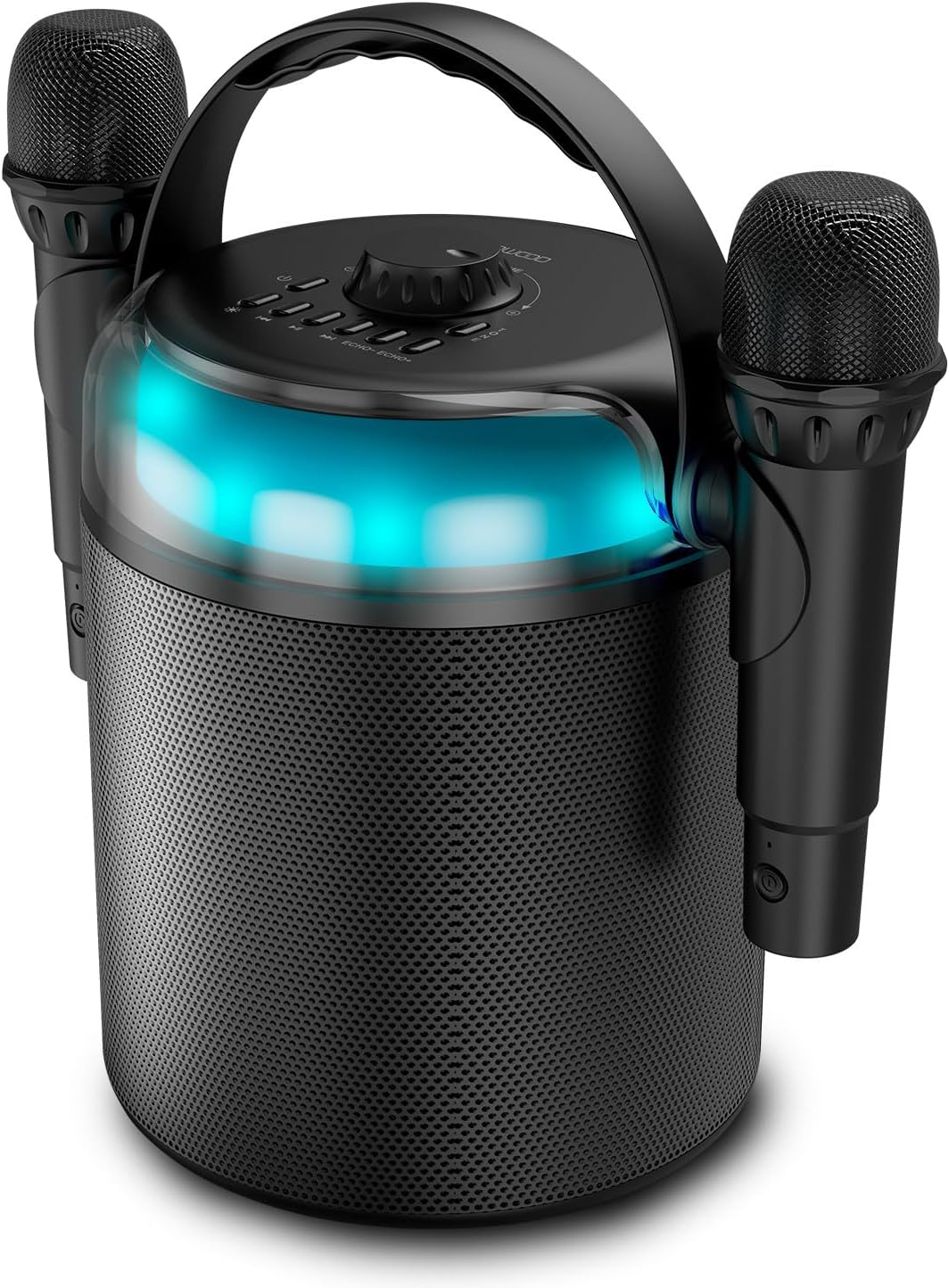
Figure 1: Ledwood PLAYKARAOKE Speaker with Microphones
This image shows the main unit of the Ledwood PLAYKARAOKE speaker, a cylindrical black device with a handle on top. Two wireless microphones are securely attached to the sides of the speaker. A blue LED light band is visible around the top section of the speaker.
Ovládací panel

Obrázek 2: Horní ovládací panel
Tento obrázek nabízí pohled shora dolů view of the speaker's control panel. It features a large central volume knob, a power button, buttons for LED light control, playback controls (play/pause, skip), and echo adjustment for the microphones.
Seznamte se s tlačítky a porty na zařízení:
- Knoflík hlasitosti: Upravuje celkový zvukový výstup.
- Vypínač: Zapíná nebo vypíná reproduktor.
- Tlačítko LED světla: Cycles through LED light effects or turns them off.
- Ovládání přehrávání: Přehrát/Pozastavit, Předchozí skladba, Další skladba.
- Echo Controls (Echo-, Echo+): Adjusts the echo effect on the microphones.
- Tlačítko režimu: Switches between input sources (Bluetooth, USB, MicroSD, AUX, COAX).
- Vocal Effects Button: Cycles through different vocal effects (Man, Woman, Monster, Child, Reverb).
- USB port: Pro přehrávání z USB disku.
- Slot pro microSD kartu: Pro přehrávání z microSD karty.
- Vstup AUX: 3.5mm audio vstup pro externí zařízení.
- COAX Input: Coaxial audio input.
- Nabíjecí port: Port USB-C pro nabíjení reproduktoru.
Nastavení
1. Nabíjení reproduktoru
- Připojte dodaný nabíjecí kabel USB-C k nabíjecímu portu na reproduktoru.
- Druhý konec kabelu připojte k vhodnému napájecímu adaptéru USB (není součástí balení) nebo k napájenému portu USB.
- Rozsvítí se kontrolka nabíjení. Úplné nabití trvá přibližně 4 hodiny.
- Po úplném nabití odpojte nabíjecí kabel.
2. Zapnutí/vypnutí
- Pro zapnutí stiskněte a podržte Tlačítko napájení until the LED lights illuminate and you hear an audible prompt.
- Chcete-li přístroj vypnout, stiskněte a podržte tlačítko Tlačítko napájení again until the LED lights turn off.
3. Pairing Wireless Microphones
The two wireless microphones are typically pre-paired with the speaker. If they do not connect automatically:
- Ujistěte se, že je reproduktor zapnutý.
- Insert batteries into the microphones (if not already installed).
- Power on each microphone. They should automatically connect to the speaker.
- If connection issues persist, refer to the Troubleshooting section.
Návod k obsluze
1. Připojení Bluetooth
- Zapněte reproduktor. Automaticky se přepne do režimu párování Bluetooth (indikováno blikající LED diodou).
- Na smartphonu, tabletu nebo jiném zařízení s podporou Bluetooth povolte Bluetooth a vyhledejte dostupná zařízení.
- Select "Ledwood PLAYKARAOKE" from the list.
- Once connected, the speaker will emit an audible confirmation, and the LED will stop flashing.
- You can now play audio from your connected device through the speaker.
2. Přehrávání z USB/MicroSD
- Insert a USB drive or microSD card (with audio files) into the corresponding port/slot on the speaker.
- The speaker should automatically switch to USB/MicroSD mode and begin playing audio. If not, press the Tlačítko režimu pro výběr správného vstupu.
- Použijte Ovládací prvky přehrávání (Play/Pause, Previous Track, Next Track) to manage your music.
3. AUX/COAX Input
- Connect an external audio device (e.g., TV, PC) to the speaker using a 3.5mm AUX cable or a coaxial cable (not included).
- Stiskněte tlačítko Tlačítko režimu repeatedly until the speaker switches to AUX or COAX input mode.
- Přehrávejte zvuk z externího zařízení. Zvuk bude vycházet z reproduktoru.
4. Nastavení hlasitosti
Otočte velký Ovladač hlasitosti on the top panel clockwise to increase volume and counter-clockwise to decrease volume.
5. Using Vocal Effects
While using the microphones:
- Stiskněte tlačítko Vocal Effects Button to cycle through the available vocal effects: Man, Woman, Monster, Child, and Reverb.
- Použijte Echo- a Echo+ buttons to adjust the intensity of the echo effect on your voice.
6. LED světelné efekty
Stiskněte tlačítko Tlačítko LED světla to cycle through different dynamic RGB LED light patterns or to turn the lights off.
Údržba
- Čištění: Reproduktor otřete měkkým, suchým hadříkem. Nepoužívejte abrazivní čisticí prostředky ani rozpouštědla.
- Skladování: Přístroj skladujte na chladném a suchém místě mimo dosah přímého slunečního záření a extrémních teplot.
- Péče o baterie: For optimal battery life, charge the speaker fully before long periods of storage and recharge it every few months.
Odstraňování problémů
| Problém | Možné řešení |
|---|---|
| Reproduktor se nezapne. | Ujistěte se, že je baterie nabitá. Připojte nabíjecí kabel a zkuste to znovu. |
| Z reproduktoru není slyšet žádný zvuk. |
|
| Mikrofony nefungují. |
|
| Nestabilní připojení Bluetooth. |
|
Specifikace
- Model: Ledwood PLAYKARAOKE
- Výstupní výkon: 120W
- Ovladače reproduktorů: 4" (10 cm) Woofer, 1.25" Tweeter
- Verze Bluetooth: 5.1
- Životnost baterie: Až 3 hodin (při 70% hlasitosti)
- Doba nabíjení: Přibližně 4 hodiny
- Vstupní porty: USB, MicroSD, AUX (3.5mm), COAX
- Mikrofony: 2 bezdrátové mikrofony
- Vokální efekty: Man, Woman, Monster, Child, Reverb (5 effects)
- LED světla: Dynamické RGB
- Rozměry reproduktoru (V x Š x H): 215 x 168 x 168 mm
- Microphone Dimensions (H x Dia): 175 x 50 mm
- Dodávané příslušenství: 32GB USB Key
Záruka a podpora
For warranty information and technical support, please refer to the warranty card included with your product or visit the official Ledwood webUschovejte si doklad o koupi pro případné reklamace.
Ask a question about this manual
Ask about setup, troubleshooting, compatibility, parts, safety, or missing instructions. Manuals+ will review the question and use this page’s manual context to help answer it.