
1. Úvod
Thank you for choosing the AMACOOL TF02 12-inch Table Fan. This manual provides essential information for the safe and efficient operation of your new fan. Please read it thoroughly before use and retain it for future reference.
2. Důležité bezpečnostní pokyny
Abyste snížili riziko požáru, úrazu elektrickým proudem nebo zranění, dodržujte následující bezpečnostní opatření:
- Před čištěním nebo jakoukoli údržbou vždy odpojte ventilátor ze zásuvky.
- Neprovozujte ventilátor s poškozeným kabelem nebo zástrčkou. Pokud je kabel poškozen, musí být vyměněn výrobcem nebo kvalifikovaným servisním zástupcem.
- Keep fingers, pencils, or any other objects out of the fan grille when it is running.
- Nepoužívejte ventilátor v blízkosti okna, protože déšť může způsobit nebezpečí úrazu elektrickým proudem.
- Ujistěte se, že ventilátor je umístěn na stabilním, rovném povrchu, aby se zabránilo jeho převrácení.
- This fan is intended for indoor use only. Do not use it outdoors or in wet locations.
- Neponořujte ventilátor do vody nebo jiných kapalin.
- Dohlížejte na děti, když je ventilátor používán.
3. Obsah balení
Ověřte, zda jsou v balení přítomny všechny položky:
- AMACOOL TF02 12-inch Table Fan
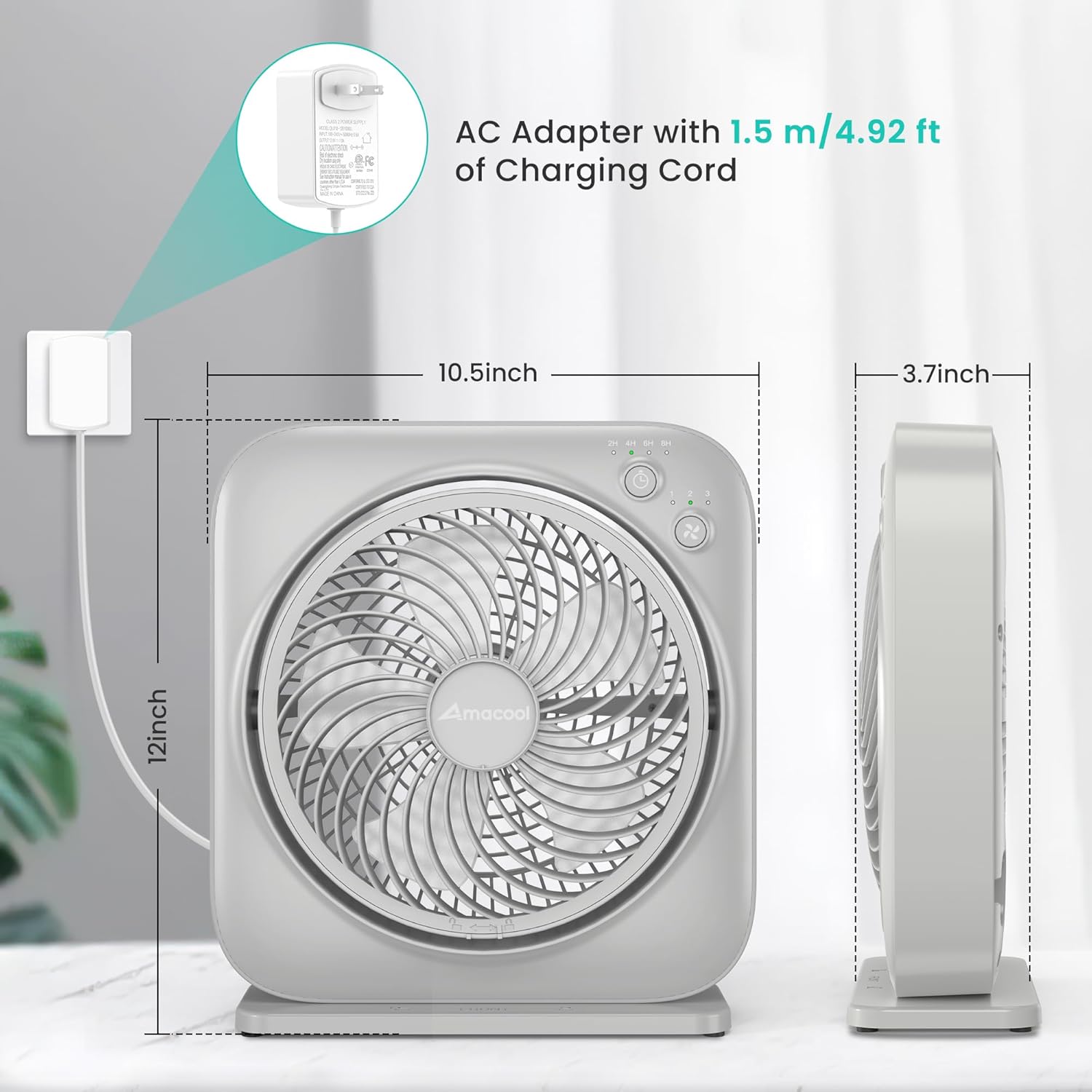
- AC Adapter with 1.5m/4.92ft Charging Cord
- Návod k použití
4. Konec produktuview
The AMACOOL TF02 is a compact and quiet table fan designed for personal cooling. It features adjustable speeds, a timer function, and an adjustable blowing angle.
Klíčové vlastnosti:
- 3 nastavitelné rychlosti: Customize airflow from gentle breeze to powerful circulation.
- 8hodinový časovač: Nastavte ventilátor tak, aby se automaticky vypnul po 2, 4, 6 nebo 8 hodinách.
- Nastavitelný úhel: Direct airflow up to 270 degrees vertically.
- Tichý provoz: Engineered for low noise, suitable for bedrooms and offices.
- Energeticky účinný: Operates at only 7 watts.
- Přenosný design: Lightweight and compact for easy relocation.
Identifikace součásti:
- Přední mřížka
- Lopatky ventilátoru
- Control Panel (Power/Speed Button, Timer Button, Indicator Lights)
- Zadní mřížka
- Port vstupu napájení
- Základna/stojan

5. Pokyny k nastavení
Follow these steps to set up your AMACOOL TF02 Table Fan:
- Rozbalit: Opatrně vyjměte ventilátor a veškeré příslušenství z obalu.
- Umístění: Place the fan on a firm, level surface. Ensure there is adequate space around the fan for proper airflow.
- Připojte napájení: Insert the AC adapter into the power input port on the back of the fan. Plug the AC adapter into a standard electrical outlet. The power indicator light will illuminate (often orange) to show it is receiving power.
6. Návod k obsluze
Your AMACOOL TF02 Table Fan is designed for simple operation.
Zapnutí/vypnutí a nastavení rychlosti:
- Stiskněte tlačítko Tlačítko napájení/rychlosti (often marked with a fan icon) once to turn the fan on to Speed 1 (low).
- Press the button again to cycle through Speed 2 (medium) and Speed 3 (high).
- To turn the fan off, continue pressing the Power/Speed Button until all speed indicator lights are off, or press and hold the button for 2 seconds at any speed.

Funkce časovače:
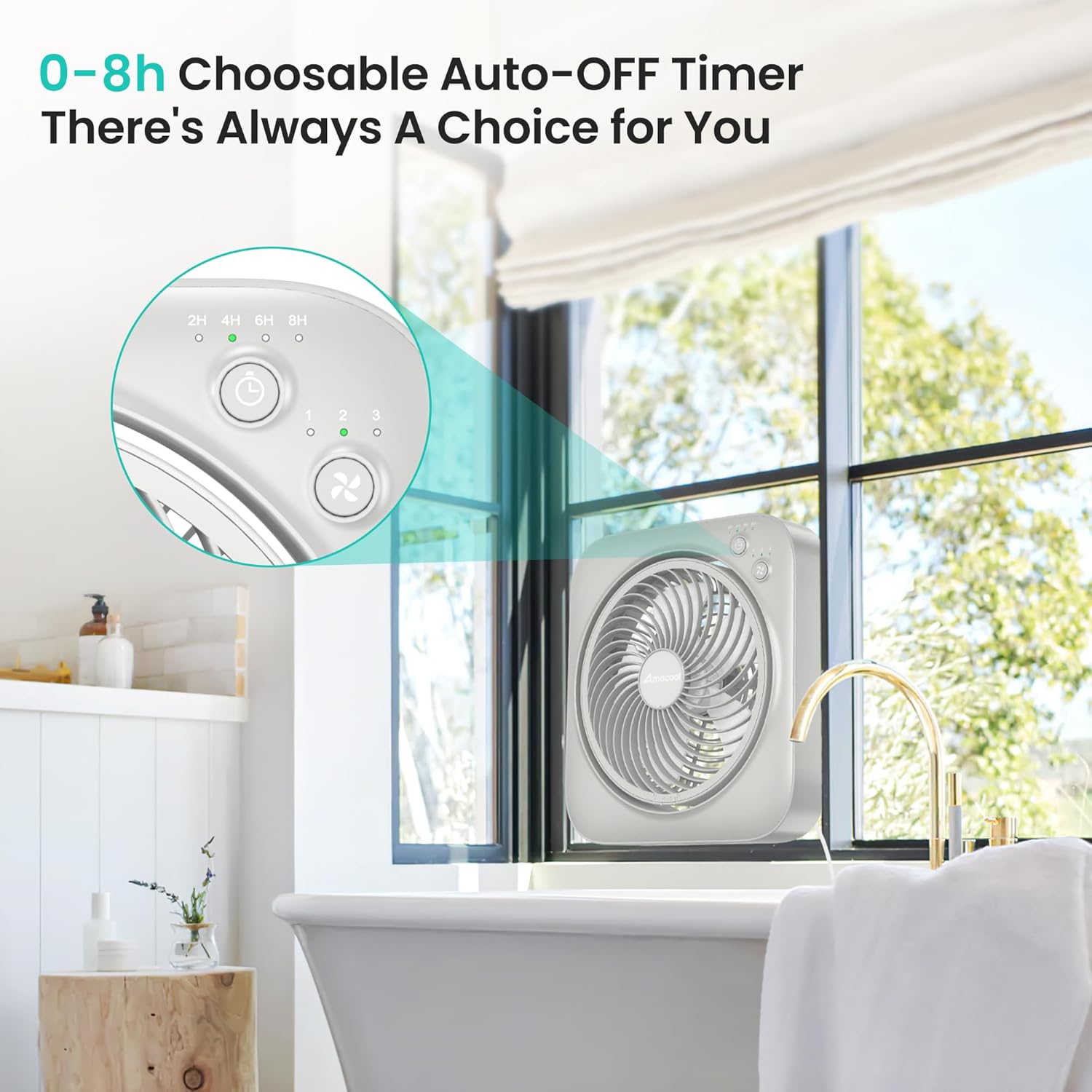
- While the fan is running, press the Tlačítko časovače (often marked with a clock icon) to activate the timer.
- Each press will cycle through the available timer settings: 2 hours, 4 hours, 6 hours, and 8 hours. Corresponding indicator lights will illuminate.
- The fan will automatically turn off once the selected time has elapsed.
- To deactivate the timer, press the Timer Button until all timer indicator lights are off.
Adjusting the Blowing Angle:
- The fan head can be manually tilted up or down to adjust the airflow direction.
- Gently hold the fan body and tilt the front grille to your desired angle, up to 270 degrees.

Tichý provoz:
The fan is designed to operate quietly, making it suitable for use in environments where noise is a concern, such as bedrooms or offices.

Všestranné umístění:
Its compact size and adjustable features make it suitable for various locations, including desktops, kitchen counters, or bathroom windows.


Video 1: Demonstrating the AMACOOL Table Fan's cooling capabilities in various settings.
7. Údržba
Pravidelné čištění a údržba zajistí optimální výkon a dlouhou životnost vašeho ventilátoru.
Čištění ventilátoru:
- Před čištěním vždy odpojte ventilátor.
- Použijte měkký, damp hadřík k otření vnějších povrchů ventilátoru.
- To clean the fan blades, unscrew the front grille. Gently rotate and remove the front cover and grille. Wipe the blades with a soft cloth.
- Před opětovnou montáží a zapojením ventilátoru se ujistěte, že jsou všechny díly zcela suché.
- Do not use abrasive cleaners or solvents, as they may damage the fan's surface.

8. Řešení problémů
Pokud narazíte na problémy s ventilátorem, podívejte se na následující běžné problémy a jejich řešení:
| Problém | Možná příčina | Řešení |
|---|---|---|
| Ventilátor se nezapne. | Žádné napájení. | Ensure the AC adapter is securely plugged into both the fan and a working electrical outlet. Check if the outlet has power. |
| Slabé proudění vzduchu. | Rychlost ventilátoru je příliš nízká; mřížka nebo lopatky jsou znečištěné. | Increase the fan speed. Clean the fan blades and grilles as per maintenance instructions. |
| Neobvyklý hluk nebo vibrace. | Fan not on a stable surface; Obstruction in blades. | Place the fan on a flat, stable surface. Unplug the fan and check for any obstructions around the blades. |
| Funkce časovače nefunguje. | Časovač není správně nastaven. | Press the Timer Button to select the desired duration. Ensure the corresponding indicator light is on. |
9. Specifikace
| Funkce | Specifikace |
|---|---|
| Značka | AMACOOL |
| Název modelu | TF02 Table Fan |
| Číslo modelu | TF02 |
| Velikost | 12 palců |
| Barva | Šedá |
| Rozměry produktu (D x Š x V) | 3.7"H x 10.39"Š x 11.57"V |
| Zdroj napájení | AC |
| Wattage | 7 wattů |
| Počet rychlostí | 3 |
| Nastavení časovače | 2H, 4H, 6H, 8H |
| Nastavitelný úhel náklonu | Až 270 stupňů |
| Kontrolní metoda | Tlačítko, dotyk |
| Materiál | Plast |
| Vnitřní/venkovní použití | Krytý |
10. Záruka a podpora
AMACOOL products are manufactured to high-quality standards. For warranty information, technical support, or customer service inquiries, please refer to the contact information provided on the product packaging or visit the official AMACOOL webstránky. Uschovejte si prosím doklad o koupi pro případné reklamace.
Navštivte AMACOOL Store pro více produktů a podporu.