
1. Úvod
The Blinky Bot Camera is an advanced mobile surveillance device designed for comprehensive home monitoring, particularly for pets and elderly family members. Featuring 360° coverage, 1080p HD video, Wi-Fi connectivity, and intelligent AI detection, it provides peace of mind through remote control and real-time interaction.

Obrázek 1.1: The Blinky Bot Camera, showcasing its compact design and remote monitoring capabilities via a smartphone app, with small dog and cat images in the background.
2. Obsah balení
Prosím, ověřte, zda jsou v balení přítomny všechny položky:
- 1 x Blinky Bot Camera
- 1 x nabíjecí kabel
3. Konec produktuview
The Blinky Bot Camera is engineered for versatile and reliable monitoring. Key features include:
- 360° pokrytí: Remotely control its direction through the app to inspect any area.
- Dual Lenses & Screens: Seamless 360° panoramic monitoring with simultaneous screen viewIng.
- Inteligentní detekce AI: Identifies humans and pets, with integrated night vision for low-light environments.
- AI-Powered Pet Interaction: Detects pet movement and engages follow mode for remote monitoring and entertainment.
- All-Terrain Tank Tread Design: Navigates rugs, floor thresholds, and outdoor bumps effortlessly.
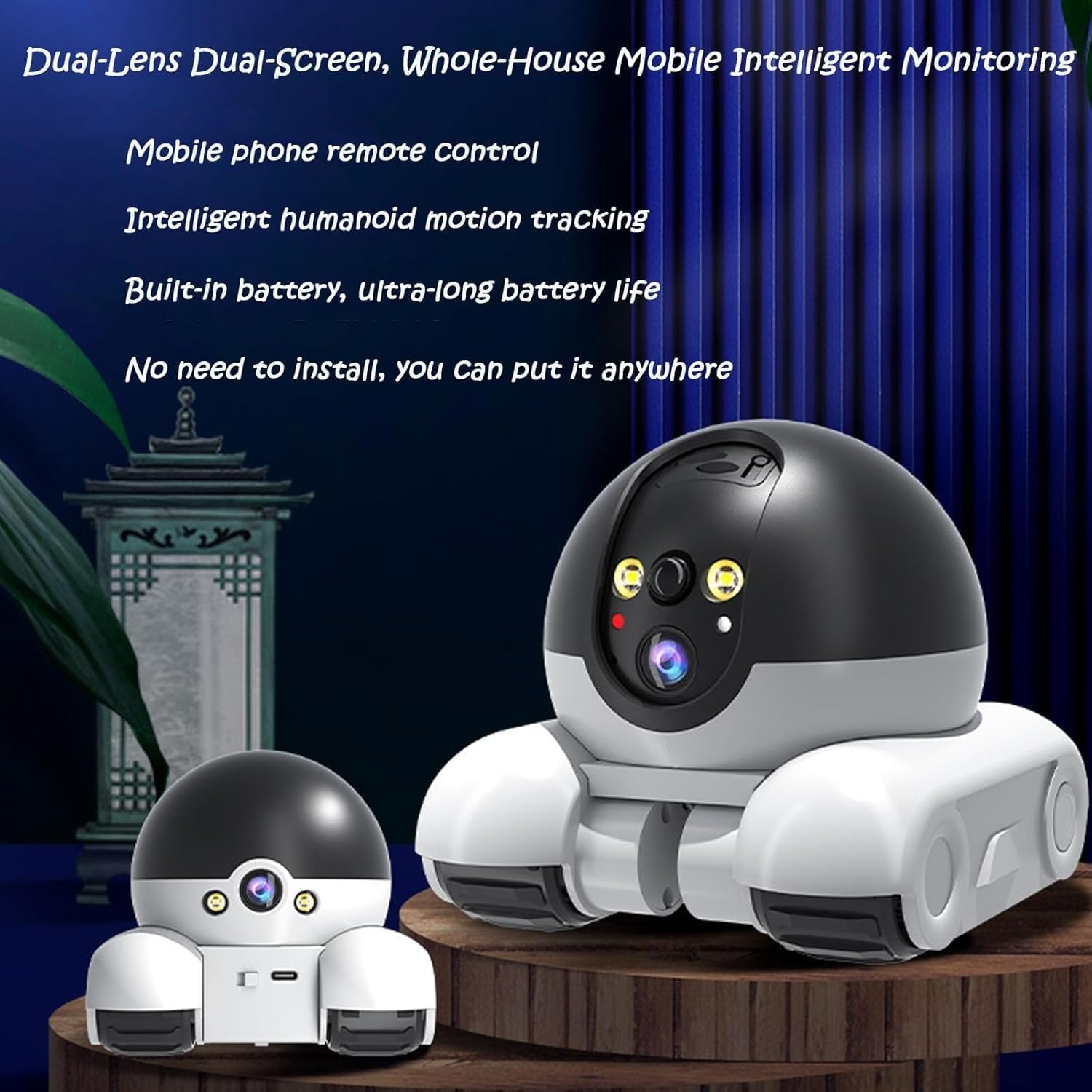
Obrázek 3.1: The Blinky Bot Camera highlighting its dual-lens and dual-screen capabilities for comprehensive monitoring.

Obrázek 3.2: The Blinky Bot Camera demonstrating its track wheels, designed for smooth navigation over various indoor surfaces like carpets and thresholds.
4. Nastavení
4.1 Nabíjení zařízení
Before first use, fully charge your Blinky Bot Camera. Connect the provided charging cable to the camera's charging port and a standard USB power adapter (not included). The charging indicator light will show the charging status.

Obrázek 4.1: The Blinky Bot Camera emphasizing its ultra-long battery life, reducing the need for frequent charging.
4.2 Instalace aplikace
Download the official Blinky Bot Camera app from your smartphone's app store (iOS App Store or Google Play Store). Hledat "Blinky Bot Camera" or scan the QR code provided in the quick start guide (if applicable).
4.3 Počáteční připojení
- Ujistěte se, že je váš smartphone připojen k síti Wi-Fi s frekvencí 2.4 GHz.
- Open the Blinky Bot Camera app and create an account or log in.
- Follow the in-app instructions to add a new device. This typically involves powering on the camera and scanning a QR code displayed on your phone with the camera's lens, or connecting via Bluetooth.
- Po připojení můžete kameru pojmenovat a spustit živý přenos viewIng.
5. Návod k obsluze
5.1 Remote Control and Navigation
Use the directional controls within the app to move the Blinky Bot Camera. The camera can patrol your home with full 360° coverage, allowing you to remotely inspect any area.
5.2 Funkce monitorování
The dual rotating HD lenses provide seamless 360° panoramic monitoring. You can view both camera feeds simultaneously within the app. The integrated night vision ensures clear visibility even in low-light conditions.
5.3 AI Detection and Pet Interaction
The camera's advanced AI identifies humans and pets. When pet movement is detected, the intelligent chips can engage a follow mode, allowing you to monitor and entertain your pets remotely. You can capture videos or photos directly from the app.

Obrázek 5.1: Remote pet monitoring and viewing via the Blinky Bot Camera app.

Obrázek 5.2: The Blinky Bot Camera demonstrating its ability to automatically identify and follow pet behavior for entertainment and monitoring.
5.4 Obousměrná komunikace
The Blinky Bot Camera supports two-way audio calls and one-way video, making it ideal for checking in on elderly family members living alone. You can speak through the camera and hear responses from the monitored area.

Obrázek 5.3: The Blinky Bot Camera positioned in a home environment, suitable for monitoring and interacting with elderly individuals.
6. Údržba
To ensure optimal performance and longevity of your Blinky Bot Camera, follow these maintenance guidelines:
- Čištění: Use a soft, dry cloth to clean the camera's exterior. Do not use liquid cleaners or aerosols.
- Péče o čočky: Gently wipe the camera lenses with a microfiber cloth to avoid scratches and ensure clear image quality.
- Péče o baterie: Avoid fully discharging the battery frequently. For long-term storage, charge the battery to about 50% and store in a cool, dry place.
- Aktualizace softwaru: Regularly check the app for firmware updates for your camera to ensure you have the latest features and security enhancements.
7. Řešení problémů
If you encounter issues with your Blinky Bot Camera, refer to the table below for common problems and solutions:
| Problém | Možná příčina | Řešení |
|---|---|---|
| Kamera se nepřipojuje k Wi-Fi | Incorrect Wi-Fi password; Camera too far from router; Router is 5GHz only. | Verify Wi-Fi password; Move camera closer to router; Ensure router supports 2.4GHz and connect to it. |
| Špatná kvalita videa | Slabý signál Wi-Fi; Znečištěný objektiv. | Zlepšete sílu signálu Wi-Fi; Očistěte objektiv fotoaparátu měkkým hadříkem. |
| Camera not moving | Low battery; Obstruction; App control issue. | Charge the camera; Remove any obstructions; Restart the app and camera. |
| Noční vidění nefunguje | Insufficient darkness; Feature disabled in app. | Ensure the environment is dark enough for night vision to activate; Check app settings to ensure night vision is enabled. |
8. Specifikace
Detailed technical specifications for the Blinky Bot Camera:
| Funkce | Detail |
|---|---|
| Model | A (WIFI) |
| Rozměry (D x Š x V) | 5.7 x 4.9 x 5.1 palce |
| Hmotnost | 0.44 kg / 15.5 oz |
| Rozlišení záznamu videa | 1080p |
| Protokol připojení | Wi-Fi |
| Zdroj napájení | Napájení z baterie |
| Vnitřní/venkovní použití | Krytý |
| Speciální funkce | Noční vidění |
| Zahrnuté komponenty | Nabíjecí kabel |
9. Záruka a podpora
This product comes with a standard manufacturer's warranty. For specific warranty terms and conditions, please refer to the product packaging or contact your retailer. If you require technical assistance or have questions not covered in this manual, please contact customer support through the app or the retailer's webstránky, kde jste produkt zakoupili.