
1. Úvod
Thank you for choosing the Devoko Electric Height Adjustable Desk. This manual provides detailed instructions for assembly, operation, and maintenance to ensure optimal performance and longevity of your desk. Please read this manual thoroughly before use and retain it for future reference.

Image 1.1: Devoko Electric Height Adjustable Desk (White, 160x80 cm) in a home office environment.
2. Bezpečnostní informace
- Před použitím se ujistěte, že jsou všechny součásti bezpečně upevněny.
- Během provozu držte děti a domácí zvířata v dostatečné vzdálenosti od stolu.
- Neumisťujte tekutiny přímo na ovládací panel ani do blízkosti elektrických součástí.
- Avoid overloading the desk. The maximum load capacity is 70 kg.
- Před čištěním nebo prováděním jakékoli údržby odpojte napájení.
- Používejte pouze dodaný napájecí adaptér.
3. Obsah balení
Verify that all parts are present and undamaged. If any parts are missing or damaged, please contact customer support.
- Desk tabletop (160x80 cm, white)
- Electric lifting frame (double beam support)
- Control panel with LED display and USB-A port
- Napájecí adaptér a kabely
- Fabric drawer (removable, 35x22x10.5 cm)
- Krabice pro správu kabelů
- Háček na sluchátka
- Montážní hardware a nástroje
- Uživatelská příručka
4. Nastavení a montáž
Assembly is designed to be straightforward with pre-drilled holes. It typically takes approximately 35 minutes.
- Rozbalte komponenty: Opatrně vyjměte všechny díly z obalu.
- Sestavte rám: Attach the electric lifting frame components according to the included diagram. Ensure the double beam support is correctly installed for maximum stability.
- Připevněte desku stolu: Secure the tabletop to the assembled frame using the provided screws and pre-drilled holes.
- Instalace příslušenství:
- Attach the control panel to your preferred side (left or right).
- Install the fabric drawer underneath the tabletop.
- Mount the headphone hook.
- Position the cable management box as desired.
- Připojte napájení: Zapojte napájecí adaptér do stolu a poté do zásuvky ve zdi.

Image 4.1: Simple assembly process with pre-drilled holes, estimated at 35 minutes.

Image 4.2: The desk offers two mounting options for the control panel and accessories, allowing for left or right-hand setup.
5. Návod k obsluze
5.1 Ovládací panel Overview

Image 5.1: The intuitive control panel features an LED display, up/down buttons, two memory presets, a function button, a USB-A charging port, and a sit/stand reminder.
- LED displej: Zobrazuje aktuální výšku stolu v centimetrech.
- Tlačítka nahoru/dolů: Press and hold to adjust the desk height upwards or downwards.
- Předvolby paměti (1, 2):
- To save a height: Adjust the desk to your desired height, then press the 'M' button followed by '1' or '2'. The display will confirm the setting.
- To recall a height: Press the '1' or '2' button to automatically move the desk to the saved position.
- Nabíjecí port USB-A: Provides convenient charging for your devices.
- Sit/Stand Reminder: The desk can be programmed to remind you to change positions. Refer to the full manual for detailed programming instructions.
5.2 Height Adjustment Demonstration
Video 5.2: Demonstration of the electric height adjustment feature, showcasing smooth and quiet operation from sitting to standing positions.
The desk features a powerful motor with a lifting speed of 13 mm/s and a noise level of ≤ 50dB, ensuring smooth and quiet transitions between heights.

Image 5.3: Smooth and fluid lifting mechanism with a powerful motor.
6. Vlastnosti a výhody
- Inteligentní ovládání: 6 functional buttons, 2 height presets, USB port, and postural reminder for easy and intuitive use.
- Professional Structure: Extra-large 65mm lifting frame with reinforced metal guides, tested for 50,000 cycles. 15mm thick tabletop with a maximum load of 70kg.
- Ample Workspace: 160x80 cm desk with a removable fabric drawer (35x22x10.5 cm), cable organizer, and hook, ideal for a tidy workspace.
- Tichý provoz: Optimized motor with noise below 55dB, suitable for quiet environments.
- Všestranný design: Can be used as a standing desk, folding table, or PC desk, adapting to work, study, and entertainment needs.

Image 6.1: The desk boasts a robust load capacity of up to 70 kg.

Image 6.2: Integrated features like a fabric drawer and headphone hook enhance functionality.

Image 6.3: Ergonomic and functional accessories for an organized workspace.

Image 6.4: Double beam support for enhanced stability and durability.

Image 6.5: Effective cable management system helps maintain a clean and tidy workspace.
7. Údržba
- Čištění: Otřete povrch stolu měkkým, damp hadříkem. Nepoužívejte abrazivní čisticí prostředky ani agresivní chemikálie.
- Inspekce: Pravidelně kontrolujte všechny šrouby a spoje, zda jsou pevně utažené.
- Správa kabelů: Ensure cables are neatly organized and not pinched by moving parts.
- Péče o motor: The electric motor is maintenance-free. Do not attempt to open or lubricate it.
8. Řešení problémů
| Problém | Možná příčina | Řešení |
|---|---|---|
| Stůl se nehýbe. | Odpojený napájecí kabel; přetížení; chyba motoru. | Zkontrolujte připojení napájení. Snižte hmotnost stolu. Odpojte na 10 sekund a znovu zapojte pro resetování. |
| Stůl se pohybuje nerovnoměrně nebo vydává neobvyklé zvuky. | Volné spoje; překážky; nerovnoměrné rozložení hmotnosti. | Zkontrolujte všechny šrouby a spoje. Odstraňte všechny překážky. Rovnoměrně rozložte hmotnost. |
| Předvolby paměti nefungují. | Předvolby nebyly správně uloženy. | Re-save the desired height by pressing 'M' then '1' or '2'. |
| USB port se nenabíjí. | Device not compatible; cable issue; power issue. | Ensure device is compatible. Try a different USB cable. Check if desk has power. |
9. Specifikace
| Funkce | Detail |
|---|---|
| Značka | Devoko |
| Model | 0790 |
| Barva | Bílý |
| Rozměry produktu | 160 x 80 x 73-118 cm (Length x Width x Height) |
| Materiál | Wood (Tabletop), Metal (Frame) |
| Speciální funkce | Height Adjustable, Multifunction, Memory Presets, USB Port, Cable Management |
| Hmotnost položky | 24.7 kg |
| Maximální nosnost | 70 kg |
| Rychlost zvedání | 13 mm/s |
| Úroveň hluku | ≤ 50dB |
| Počet zásuvek | 1 (fabric, removable) |
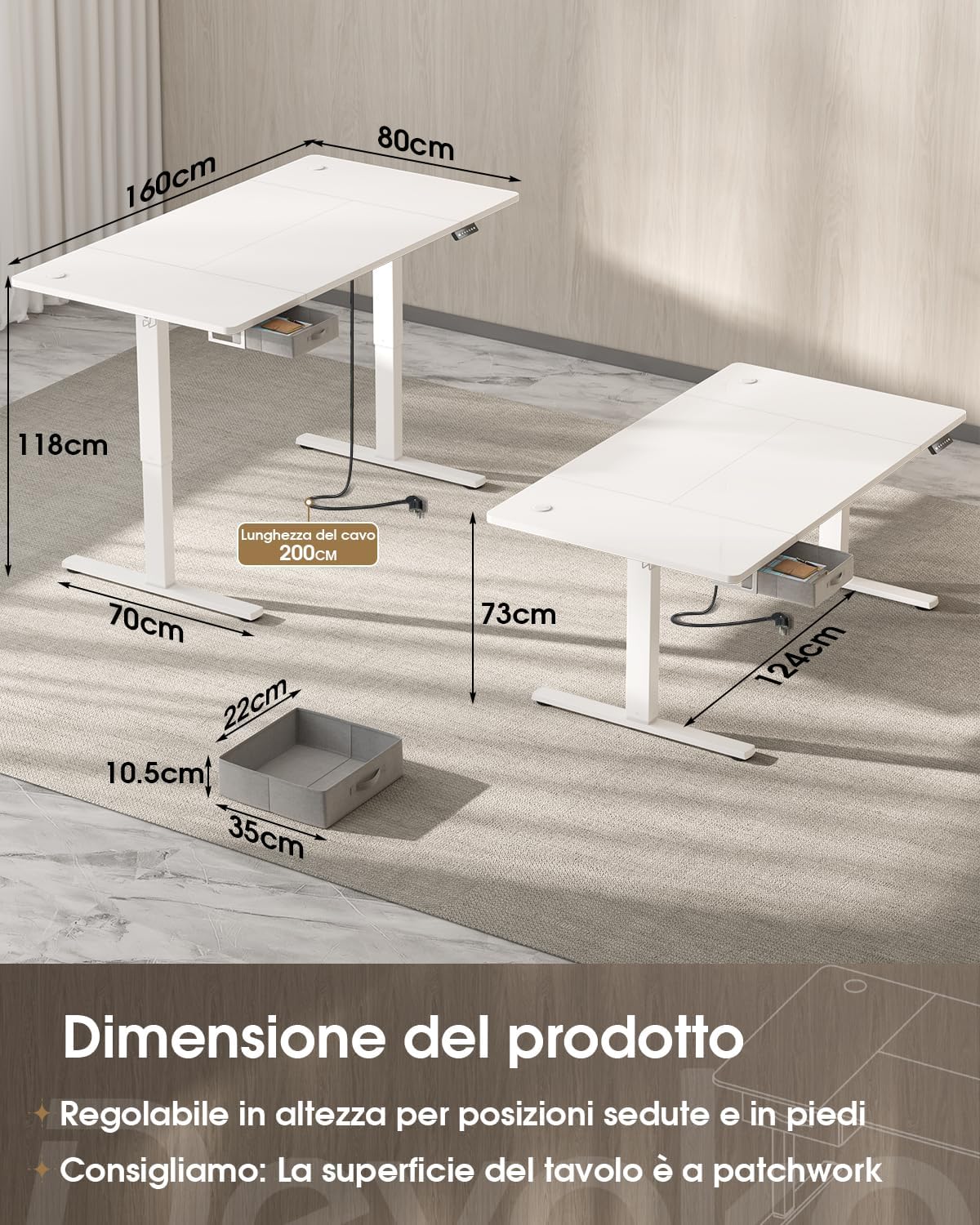
Image 9.1: Product dimensions and height adjustment range.

Image 9.2: Drawer dimensions and load capacity details.
10. Záruka a podpora
10.1 Informace o záruce
This Devoko product is covered by a standard manufacturer's warranty. Please refer to the warranty card included in your package for specific terms and conditions, or visit the official Devoko webDalší podrobnosti naleznete na webových stránkách. Uschovejte si doklad o koupi pro případ reklamace.
10.2 Zákaznická podpora
For any questions, technical assistance, or warranty claims, please contact Devoko customer support through the retailer where you purchased the product or visit the official Devoko webmísto:
- Online podpora: Navštivte obchod Devoko na Amazonu
- E-mail: Viz obal produktu nebo oficiální webweb pro nejnovější kontaktní e-mail.