
1. Úvod
Thank you for choosing the Devoko Electric Height-Adjustable Standing Desk. This manual provides detailed instructions for the assembly, operation, and maintenance of your new desk. Please read this manual thoroughly before use to ensure proper function and safety. Keep this manual for future reference.
2. Bezpečnostní upozornění
- Hmotnostní limit: Do not overload the desk. The maximum load capacity is 70 kg. Exceeding this limit may cause damage to the desk or personal injury.
- Elektrická bezpečnost: Use the integrated USB-A charging port with caution to avoid electrical hazards. Ensure cables are properly managed to prevent tripping or damage.
- Děti a domácí mazlíčci: Během provozu držte děti a domácí zvířata v dostatečné vzdálenosti od stolu, abyste předešli nehodám.
- Odbavení: Při nastavování výšky stolu se ujistěte, že nad ani pod ním nejsou žádné překážky.
- Zdroj napájení: Connect the desk only to a grounded power outlet.
- Údržba: Nepokoušejte se rozebírat ani opravovat motor ani řídicí systém sami. Pro pomoc kontaktujte zákaznickou podporu.
3. Obsah balení
Před zahájením montáže ověřte, zda jsou přítomny všechny součásti. Pokud některé součásti chybí nebo jsou poškozené, kontaktujte zákaznickou podporu společnosti Devoko.
- Desktop sections (4 parts, 15mm high-quality particle board)
- Desk frame (2 steel beams, 2 T-shaped legs)
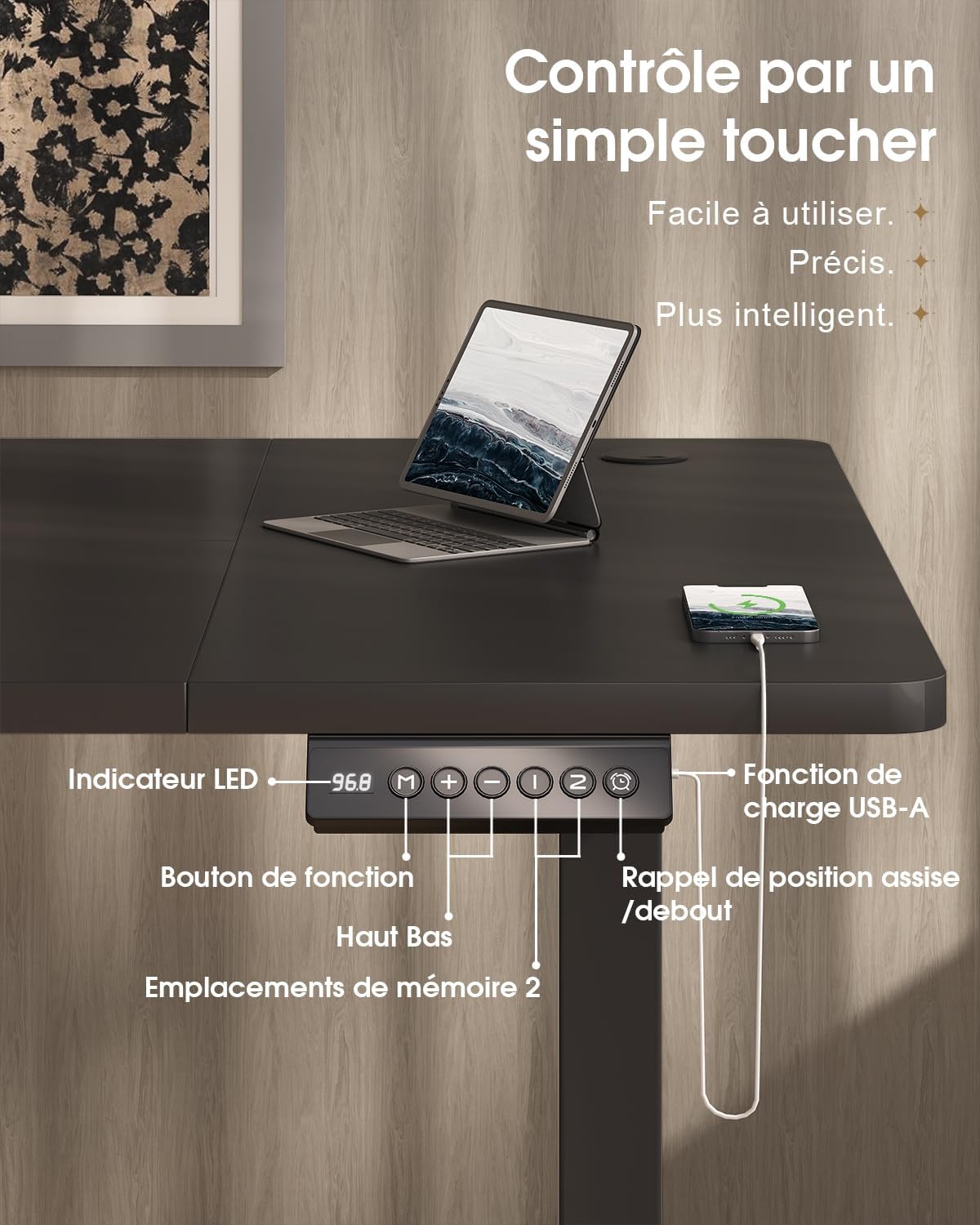
- Control panel with LED display and USB-A port
- Motor and power supply
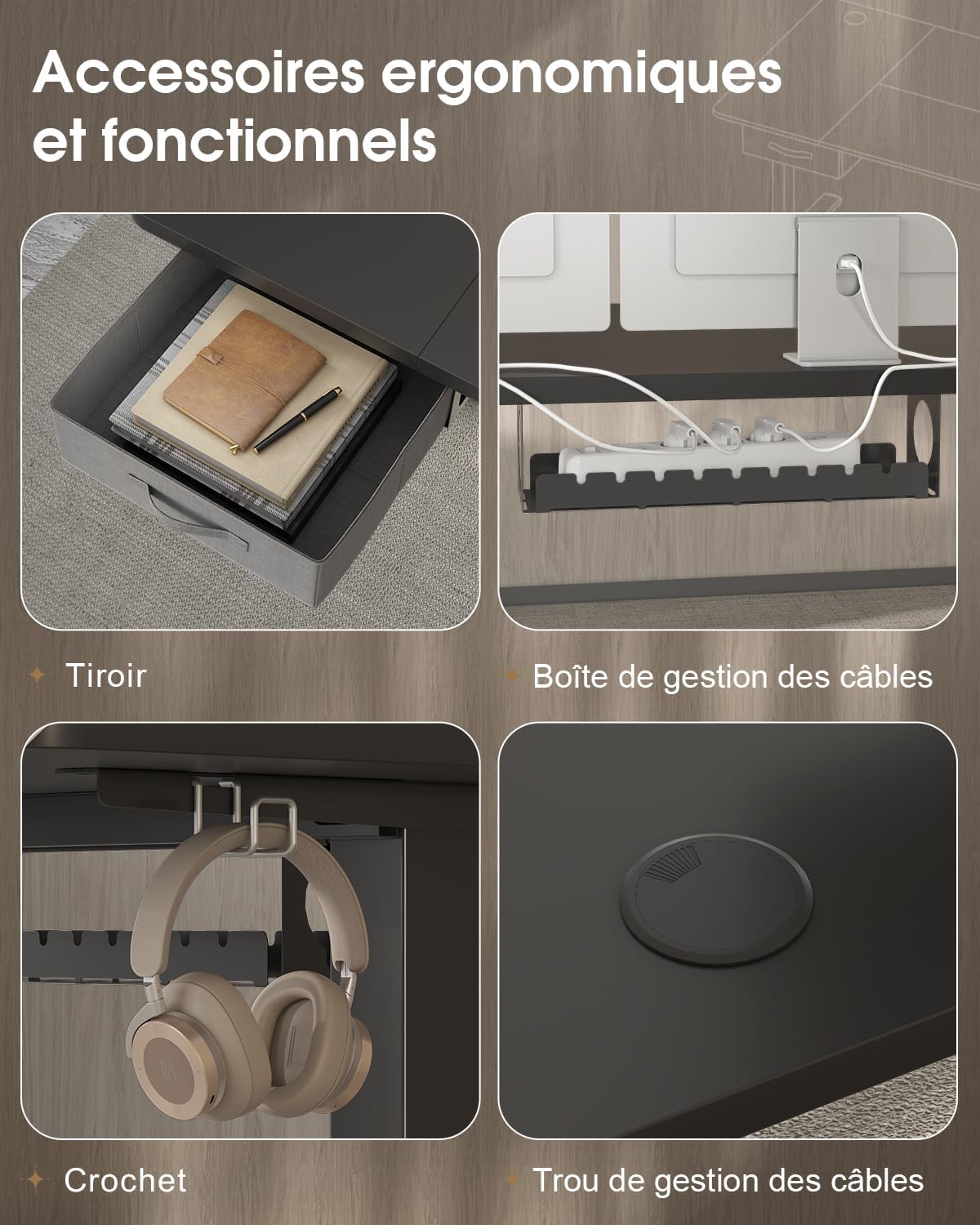
- Fabric drawer (35x22x10.5 cm)
- Háček na sluchátka
- Zásobník pro správu kabelů
- Kabelová průchodka
- Montážní hardware a nástroje
- Uživatelská příručka
4. Nastavení a montáž
The desktop is divided into 4 sections of 15mm high-quality particle board, which simplifies the assembly process. Follow the included graphical instructions for a smooth setup.
- Rozbalte komponenty: Opatrně vyjměte všechny díly z obalu a položte je na čistý, měkký povrch, abyste zabránili poškrábání.
- Sestavte rám: Attach the two T-shaped legs to the steel beams. Ensure all screws are tightened securely. The frame features a robust double-beam construction (65x45 mm cold-rolled steel alloy) for enhanced stability.
- Připojení sekcí plochy: Connect the four desktop sections together and then secure them to the assembled frame using the provided hardware.
- Instalace ovládacího panelu: Mount the control panel to the underside of the desk in an easily accessible location.
- Connect Motor and Power: Connect the motor to the control panel and then plug the power supply into the control panel.
- Instalace příslušenství: Attach the fabric drawer, headphone hook, cable management tray, and cable grommet as desired.


5. Návod k obsluze
5.1 Ovládací panel Overview
The desk features an intuitive control panel with an LED display for easy height adjustment and memory functions.

5.2 Nastavení výšky
- Tlačítka nahoru/dolů: Press and hold the 'Up' or 'Down' arrow buttons on the control panel to raise or lower the desk to your desired height. The LED display will show the current height.
- Výškový rozsah: The desk can be adjusted smoothly and quietly between 73 cm (sitting height) and 118 cm (standing height).
5.3 Předvolby paměti
The control panel allows you to save two preferred height settings for quick adjustments.
- Nastavení pozice v paměti: Adjust the desk to your desired height using the 'Up' or 'Down' buttons.
- Press the 'M' (Memory) button. The LED display will flash.
- Within 3 seconds, press either '1' or '2' to save the current height to that memory position. The LED display will confirm the setting.
- Vyvolání pozice z paměti: Jednoduše stiskněte tlačítko „1“ nebo „2“ a stůl se automaticky přesune do uložené výšky.
5.4 nabíjecí port USB-A
A convenient USB-A charging port is integrated into the control panel. Connect your compatible devices, such as smartphones or tablets, for charging. Ensure your device's charging cable is compatible with a USB-A port.
6. Vlastnosti
The Devoko Electric Height-Adjustable Standing Desk is designed with several ergonomic and functional features to enhance your workspace.
- Elektrické nastavení výšky: Smooth and quiet (less than 50 dB) motor allows for effortless transitions between sitting and standing positions.
- Robustní konstrukce: Features a double-beam frame made of 65x45 mm cold-rolled steel alloy, providing exceptional stability and a load capacity of up to 70 kg. All metal parts are powder-coated for durability.
- Integrovaná zásuvka: A fabric drawer (35x22x10.5 cm) is included for convenient storage of office supplies, helping to keep your desktop clutter-free.
- Háček na sluchátka: A side-mounted hook provides a dedicated spot for your headphones, keeping them within reach and off the desk surface.
- Systém správy kabelů: Includes a cable management tray and a cable grommet to organize and conceal power cords and other cables, maintaining a tidy and safe workspace.
- Nabíjecí port USB-A: Built-in port on the control panel for easy charging of your electronic devices.

7. Údržba
Regular maintenance will help prolong the life and performance of your Devoko standing desk.
- Čištění: Otřete povrch stolu a rám měkkým hadříkemamp hadříkem. Nepoužívejte agresivní chemikálie nebo abrazivní čisticí prostředky, které by mohly poškodit povrchovou úpravu.
- Zkontrolujte připojení: Pravidelně kontrolujte všechny šrouby a vruty, zda jsou pevně utažené. V případě potřeby je dotáhněte.
- Správa kabelů: Ensure cables are neatly organized and not pinched or strained, especially during height adjustments.
- Péče o motor: Avoid spilling liquids on the motor or control panel. If the desk is not used for an extended period, unplug it from the power outlet.
8. Řešení problémů
If you encounter any issues with your desk, refer to the following common problems and solutions. If the problem persists, contact customer support.
| Problém | Možná příčina | Řešení |
|---|---|---|
| Stůl se nehýbe ani nereaguje na ovládací prvky. | Power cable disconnected; motor cable disconnected; overload. | Check if the power cable is securely plugged into the wall outlet and the desk. Ensure the motor cable is connected. Reduce the load on the desk if it exceeds 70 kg. |
| Stůl se pohybuje nerovnoměrně nebo vydává neobvyklé zvuky. | Loose connections; uneven weight distribution. | Check and tighten all assembly screws. Redistribute weight evenly on the desktop. |
| LED displej zobrazuje chybový kód. | Porucha systému; chyba senzoru. | Unplug the desk from the power outlet for 10 minutes, then plug it back in to reset the system. If the error persists, contact customer support. |
| USB-A charging port not working. | Cable issue; device incompatibility. | Try a different USB cable or device. Ensure the desk is powered on. |
9. Specifikace
| Funkce | Specifikace |
|---|---|
| Značka | Devoko |
| Číslo modelu | 0790 |
| Barva | Černý |
| Materiál pro stolní počítače | Dřevotřísková deska |
| Materiál rámu | Steel alloy (65x45 mm cold-rolled steel) |
| Rozměry produktu (D x Š x V) | 180 cm x 80 cm x (73–118 cm) |
| Rozsah nastavení výšky | 73 cm až 118 cm |
| Kapacita zatížení | 70 kg |
| Úroveň hluku | Méně než 50 dB |
| Speciální funkce | Electric height adjustment, Integrated USB-A port, Cable management, Ergonomic design, 2 Memory presets, Drawer, Headphone hook |
| Hmotnost položky | 30.8 kg |
| Země původu | Čína |
10. Záruka a podpora
For warranty information or technical support, please refer to the purchase documentation or contact Devoko customer service. Keep your proof of purchase for any warranty claims.
Pro více informací můžete navštívit oficiální prodejnu Devoko: Obchod Devoko