
1. Úvod
This manual provides detailed instructions for the installation, operation, and maintenance of your Cuifati Triple Lens 2MP Wireless Outdoor Security Camera. Please read this manual thoroughly before using the product to ensure proper functionality and safety. Keep this manual for future reference.
2. Vlastnosti produktu
- Triple Lens Security Camera: Equipped with three 2MP HD lenses, supporting simultaneous recording from three screens for wide coverage in large areas like orchards and farmlands.
- Efficient Video Encoding: Utilizes H.265 video encoding technology, significantly reducing storage space usage. Supports cloud storage and local storage with up to 128GB memory cards (not included), ensuring data security and reliability.
- Inteligentní alarm: Integrated motion detection and human detection functions provide real-time alarm image pushes. Supports two-way voice communication and voice alarms for easy remote communication and emergency handling.
- Vnitřní a venkovní použití: Features external antennas for stronger, more stable signal. Includes a bracket and power supply for easy installation. Excellent water and dustproof performance makes it suitable for both indoor and outdoor environments.
- Více možností připojení: The WiFi security camera supports 2.4G WiFi, AP Hotspot, and Ethernet connections to suit various network environments. Allows remote viewing of footage via a mobile application, providing control over the situation anytime, anywhere.

Obrázek 2.1: Přesview of camera features including triple lens, real-time viewing, easy setup, motion detection, two-way audio, and 2.4G WiFi connectivity.

Figure 2.2: The camera's water and dustproof design ensures reliable outdoor performance.
3. Obsah balení
Před instalací se prosím ujistěte, že balení obsahuje všechny níže uvedené položky:
- Cuifati Triple Lens Security Camera
- Montážní konzola
- Napájecí adaptér (zástrčka EU)
- Montážní šrouby a hmoždinky
- Vodotěsné konektory
- Uživatelská příručka (tento dokument)
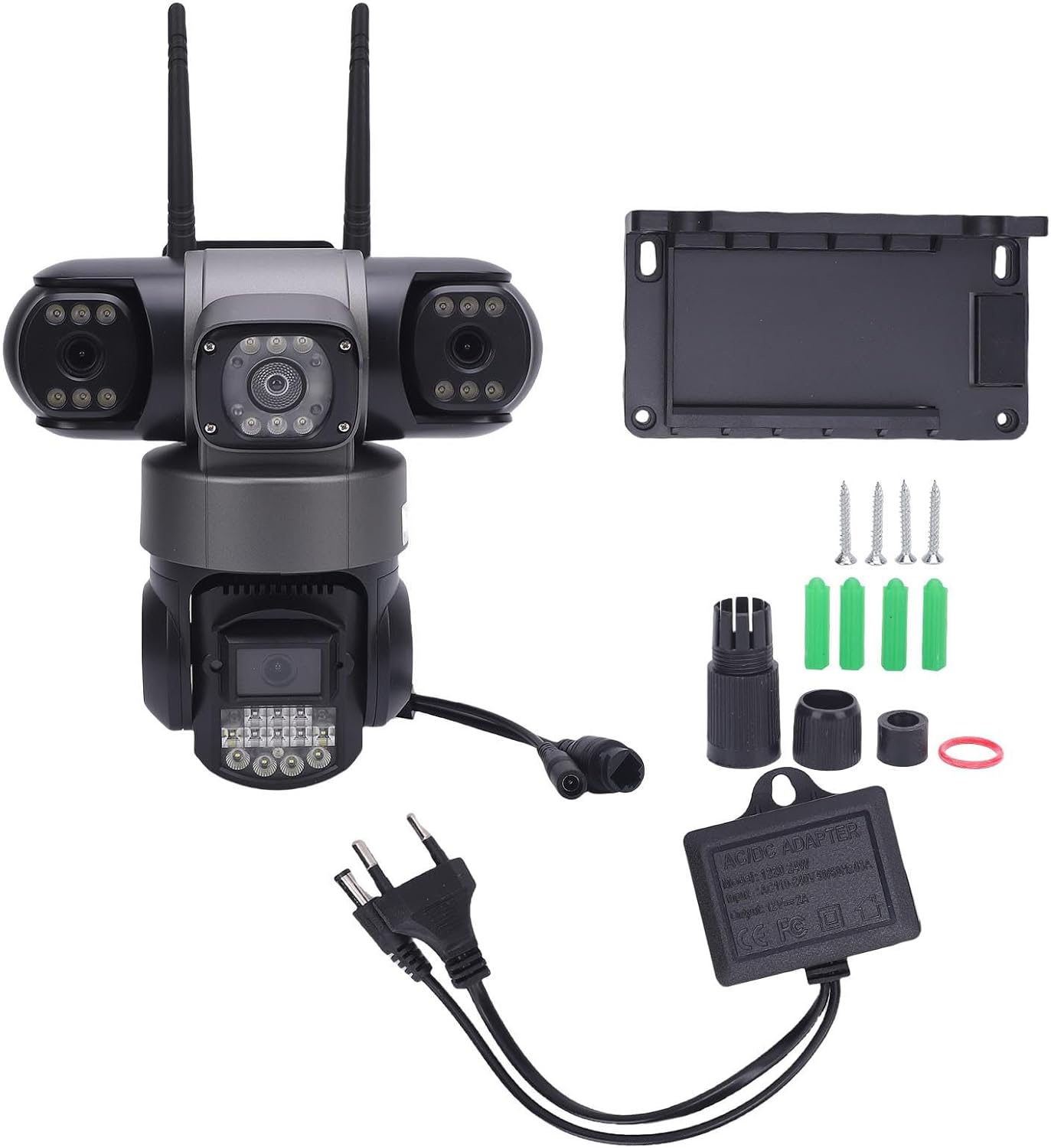
Obrázek 3.1: Součásti zahrnuté v balení produktu.
4. Nastavení a instalace
4.1 Fyzická instalace
- Vyberte umístění: Select a suitable outdoor or indoor location that provides the desired viewing angle and is within range of your 2.4G WiFi network or Ethernet connection. Ensure the location allows for power access.
- Namontujte držák: Use the provided screws and wall plugs to securely attach the mounting bracket to the chosen surface.
- Připojte kameru: Securely attach the camera to the mounting bracket. Adjust the camera's angle for optimal coverage.
- Připojte napájení: Connect the power adapter to the camera and plug it into a power outlet. Ensure the connection is secure and waterproof if installed outdoors.
4.2 Síťové připojení
The camera supports 2.4G WiFi, AP Hotspot, and Ethernet connections.
- Stáhněte si aplikaci: Download the designated mobile application (refer to packaging or quick start guide for app name) from your device's app store.
- Registrace/Přihlášení: Vytvořte si účet nebo se přihlaste do aplikace.
- Přidat zařízení: Postupujte podle pokynů v aplikaci a přidejte novou kameru. Obvykle to zahrnuje naskenování QR kódu na kameře nebo ruční zadání jejího ID.
- Konfigurace sítě: Select your preferred connection method (WiFi, AP Hotspot, or Ethernet) and follow the prompts to connect the camera to your network. For WiFi, enter your 2.4G WiFi network name and password.
- Počáteční nastavení: Complete any initial setup steps within the app, such as setting a device password or adjusting basic settings.
5. Návod k obsluze
5.1 V reálném čase ViewIng
Open the mobile application and select your camera from the device list to view živé footage. The triple lens design allows for simultaneous viewing of three distinct areas.

Figure 5.1: The camera's three lenses provide simultaneous monitoring of multiple areas.
5.2 Motion and Human Detection
The camera is equipped with advanced motion and human detection capabilities. When motion or a human figure is detected, the camera can trigger an alarm and send real-time notifications to your mobile device.
- Povolit/zakázat: Access the camera settings in the app to enable or disable motion and human detection.
- Citlivost: Adjust the detection sensitivity to minimize false alarms.
- Nastavení oznámení: Configure how you receive alerts (e.g., push notifications, email).

Figure 5.2: The camera's motion and humanoid detection system.

Figure 5.3: Real-time motion detection alerts sent to your mobile device.
5.3 Obousměrný zvuk
Utilize the two-way audio feature to communicate with individuals near the camera. This is useful for deterring intruders or communicating with visitors.
- Aktivace mikrofonu: V přímém přenosu view interface of the app, tap the microphone icon to speak through the camera's speaker.
- Poslouchat: Vestavěný mikrofon kamery umožňuje slyšet zvuk z okolí kamery.
5.4 Přehrávání videa
Nahráno footagk e lze přistupovat a znovuviewed through the mobile application. The camera supports both cloud storage and local storage (via a microSD card, not included).
- Přístup k nahrávkám: Navigate to the 'Playback' or 'Recordings' section within the app.
- Vyberte datum/čas: Choose the desired date and time to review zaznamenané události.
- Stáhnout/Sdílet: Options to download clips or share them may be available within the app.

Obrázek 5.4: Review zaznamenané footage na vašem mobilním zařízení.
6. Údržba
Pravidelná údržba zajistí optimální výkon a dlouhou životnost vaší bezpečnostní kamery.
- Čištění objektivu: Periodically clean the camera lenses with a soft, dry cloth to remove dust, dirt, or water spots that may obstruct the viewVyhněte se abrazivním čisticím prostředkům.
- Inspekce bydlení: Check the camera housing and mounting bracket for any signs of damage or loosening. Ensure all connections are secure.
- Aktualizace softwaru: Check the mobile application regularly for firmware updates for your camera. Keeping the firmware updated can improve performance and security.
- Napájení: Ujistěte se, že napájecí adaptér a kabel nejsou poškozené.
7. Řešení problémů
Pokud narazíte na problémy s fotoaparátem, podívejte se na následující běžné problémy a jejich řešení:
| Problém | Možná příčina | Řešení |
|---|---|---|
| Camera offline/No video feed | No power; Weak WiFi signal; Network disconnection | Check power connection; Move camera closer to router or use Ethernet; Restart camera and router. |
| Detekce pohybu nefunguje | Detection disabled; Incorrect sensitivity; Obstruction in view | Enable detection in app settings; Adjust sensitivity; Clear any obstructions. |
| Špatná kvalita videa | Dirty lens; Low bandwidth; Poor lighting | Clean lenses; Ensure stable internet connection; Check lighting conditions. |
| Nelze se připojit k WiFi | Incorrect WiFi password; 5G WiFi network; Out of range | Verify 2.4G WiFi password; Ensure router is 2.4G compatible; Move camera closer to router. |
8. Specifikace
| Značka | Cuifati |
| Číslo modelu | Cuifati432dc1swh5-11 |
| Rozměry produktu | 22 x 22 x 15.98 cm |
| Hmotnost | 893 gramů |
| Konfigurace objektivu | Triple 2MP HD Lenses |
| Kódování videa | H.265 |
| Konektivita | 2.4G WiFi, AP Hotspot, Ethernet |
| Možnosti úložiště | Cloud Storage, Local Storage (up to 128GB microSD card, not included) |
| Speciální funkce | Motion Detection, Human Detection, Two-Way Audio, Voice Alarm |
| Environmentální hodnocení | Vodě a prachuodolné |
| Napájení | Included Power Adapter (EU Plug) |

Figure 8.1: Camera dimensions and rotation capabilities.
9. Záruka a podpora
Specific warranty information for this product is not available in the provided data. Please refer to the product packaging or contact the retailer/manufacturer directly for warranty details and customer support. For technical assistance, consult the mobile application's help section or the manufacturer's official webmísto.