
FIREBAT MN56, A6
FIREBAT Mini PC MN56 and A6 Series User Manual
Models: MN56 (Ryzen7 8745HS) & A6 (Ryzen7 6800H)
1. Úvod
This user manual provides detailed instructions for setting up, operating, maintaining, and troubleshooting your FIREBAT Mini PC. This guide covers both the MN56 model (featuring AMD Ryzen 7 8745HS) and the A6 model (featuring AMD Ryzen 7 6800H). Please read this manual thoroughly before using your device to ensure proper operation and longevity.
The FIREBAT Mini PCs are designed for a wide range of applications, from home and office use to education and light gaming, offering powerful performance in a compact form factor.

Figure 1.1: FIREBAT MN56 (white) and A6 (black) Mini PCs. The MN56 model is shown with RGB lighting and a vertical stand, while the A6 model is a compact black cube.
2. Bezpečnostní informace
Abyste předešli zranění, úrazu elektrickým proudem, požáru a poškození zařízení, dodržujte prosím následující bezpečnostní opatření:
- Use only the power adapter provided with your Mini PC.
- Nevystavujte zařízení vodě, vlhkosti ani extrémním teplotám.
- Neumisťujte zařízení na přímé sluneční světlo nebo do blízkosti zdrojů tepla.
- Ensure proper ventilation; do not block the ventilation openings.
- Nepokoušejte se zařízení rozebírat ani opravovat sami. Veškerý servis svěřte kvalifikovanému personálu.
- Udržujte zařízení mimo dosah silných magnetických polí.
- S přístrojem zacházejte opatrně, abyste předešli jeho fyzickému poškození.
3. Průvodce nastavením
3.1. Obsah balení
Než budete pokračovat, ověřte, zda je v balení přítomno vše:
- FIREBAT Mini PC (MN56 or A6 model)
- Napájecí adaptér
- HDMI kabel
- Uživatelská příručka (tento dokument)
- (Optional) VESA Mount Bracket and Screws
3.2. Připojení periferií
Follow these steps to connect your Mini PC to a display and other essential peripherals:
- Připojení displeje: Use the provided HDMI cable or a DisplayPort (DP) cable to connect your monitor to the corresponding port on the Mini PC. Both models support triple display output via HDMI, DisplayPort, and USB-C.
- Připojení klávesnice a myši: Plug your USB keyboard and mouse into any available USB-A ports on the Mini PC.
- Připojení k síti (volitelné): For a wired internet connection, connect an Ethernet cable from your router to the LAN port(s) on the Mini PC. Both models feature 2.5Gbps LAN ports.
- Připojte napájení: Plug the power adapter into the DC-IN port on the Mini PC, then plug the other end into a power outlet.
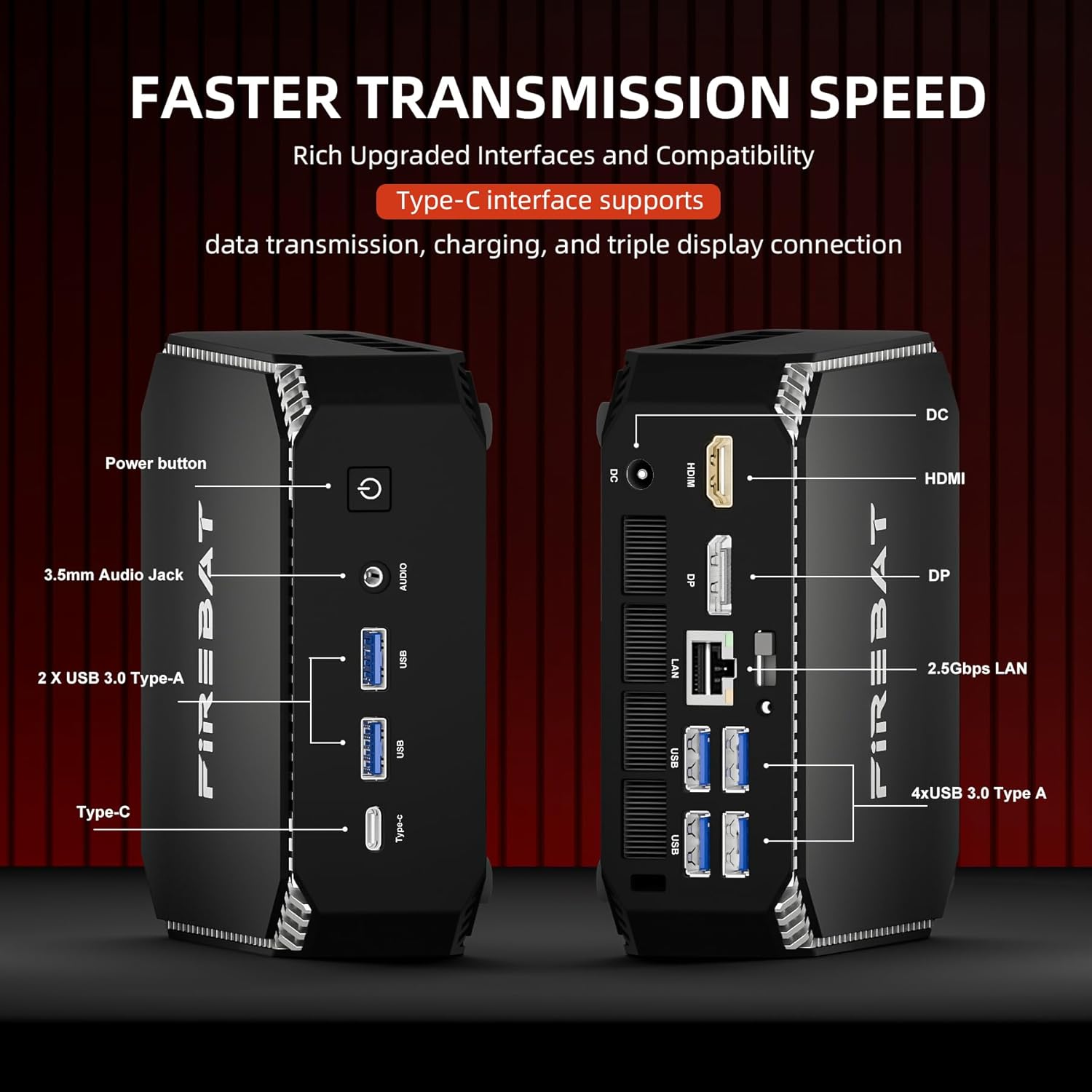
Obrázek 3.1: Přesview of ports on the FIREBAT A6 Mini PC, including Power button, 3.5mm Audio Jack, USB 3.0 Type-A, Type-C, DC-IN, HDMI, DisplayPort, and 2.5Gbps LAN ports.
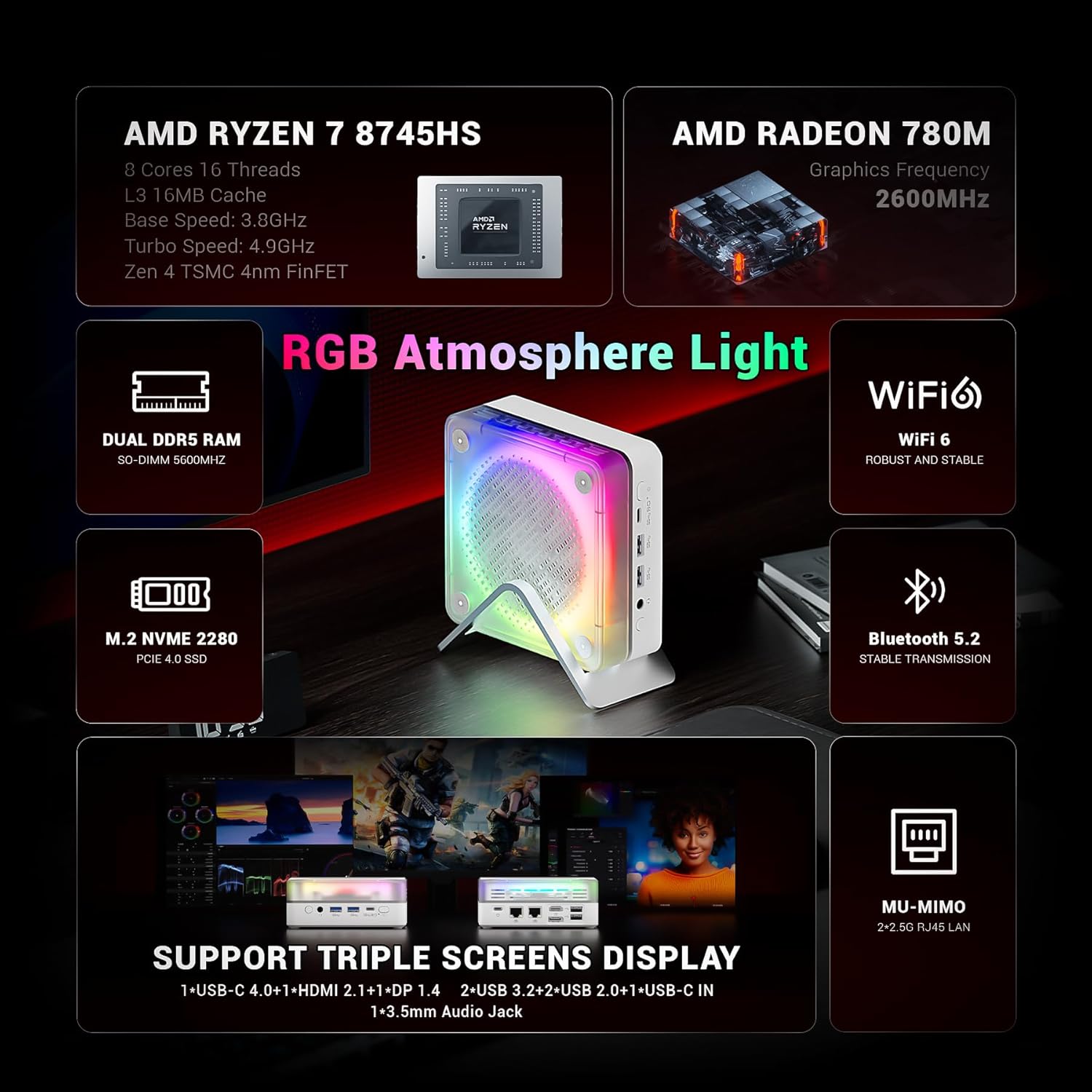
Figure 3.2: The MN56 model also features multiple USB ports, HDMI, DisplayPort, and USB-C for display output, along with dual 2.5Gbps LAN ports.
3.3. Počáteční zapnutí
After connecting all peripherals:
- Press the Power button located on the Mini PC. The power indicator light will illuminate.
- The Mini PC will boot up. Follow the on-screen instructions to complete the initial Windows setup (if applicable).
4. Návod k obsluze
4.1. Řízení spotřeby
- Zapnutí: Stiskněte tlačítko napájení.
- Vypnout: V systému Windows klikněte na tlačítko Start a poté vyberte Napájení > Vypnout.
- Restartovat: V systému Windows klikněte na tlačítko Start a poté vyberte Napájení > Restartovat.
- Spát: V systému Windows klikněte na tlačítko Start a poté vyberte Napájení > Režim spánku.
4.2. Konfigurace displeje
Both MN56 and A6 models support triple display output, allowing you to connect up to three monitors simultaneously for enhanced productivity.
- Connect your monitors to the HDMI, DisplayPort, and USB-C video output ports.
- In Windows, right-click on the desktop and select "Display settings" to configure your multiple displays (extend, duplicate, or show only on one).
Figure 4.1: The MN56 Mini PC demonstrating support for triple screen display configurations via USB-C, HDMI, and DisplayPort.
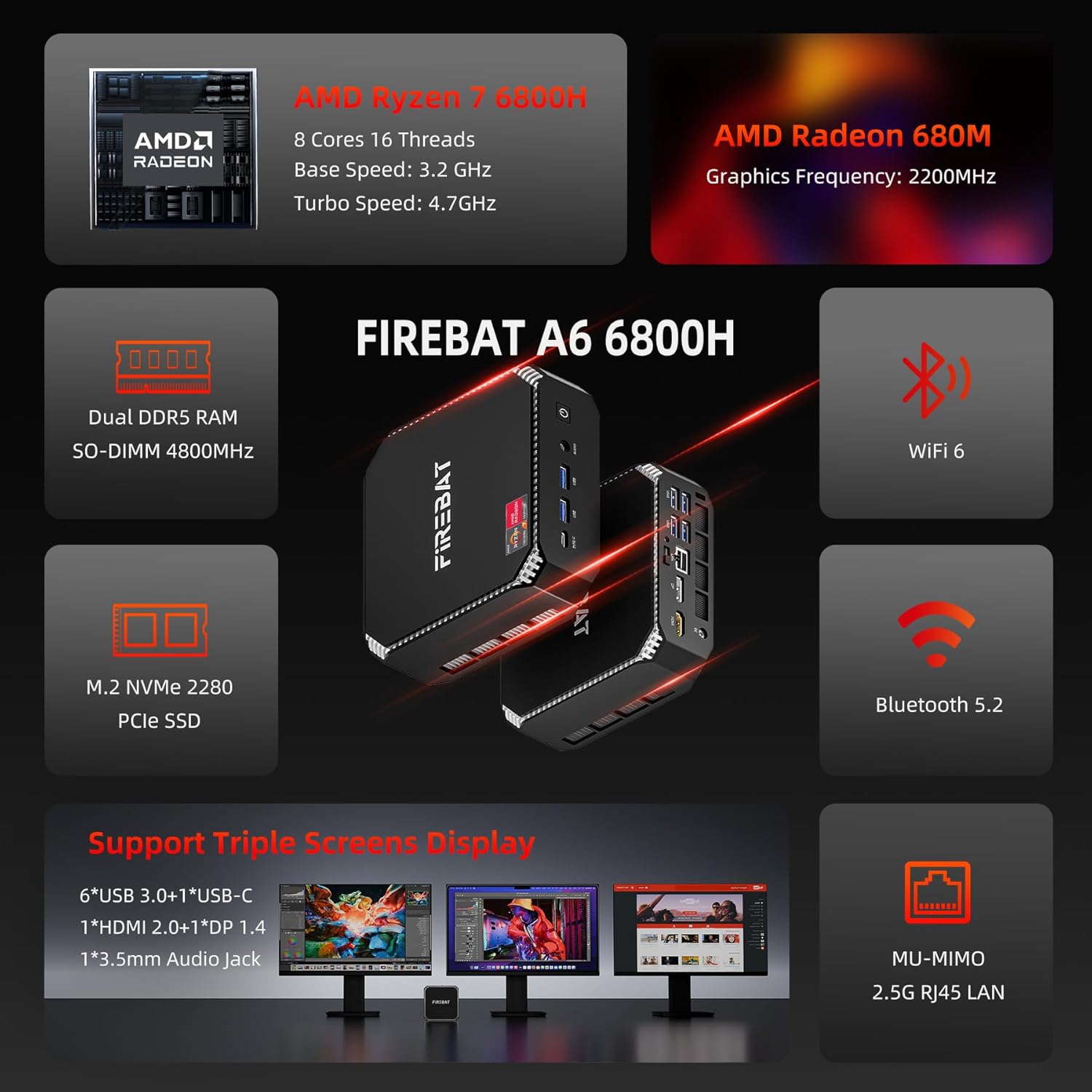
Figure 4.2: The A6 Mini PC also supports triple screen display, offering versatile connectivity options for multiple monitors.
4.3. Síť a konektivita
- Wi-Fi: Both models support Wi-Fi 6 for robust and stable wireless connections. To connect, click the Wi-Fi icon in the taskbar, select your network, and enter the password.
- Bluetooth: Integrated Bluetooth 5.2 allows for stable transmission to connect wireless peripherals like keyboards, mice, and headphones. Enable Bluetooth in Windows settings to pair devices.
- Kabelová LAN: Utilize the dual 2.5Gbps RJ45 LAN ports for high-speed wired network connections.
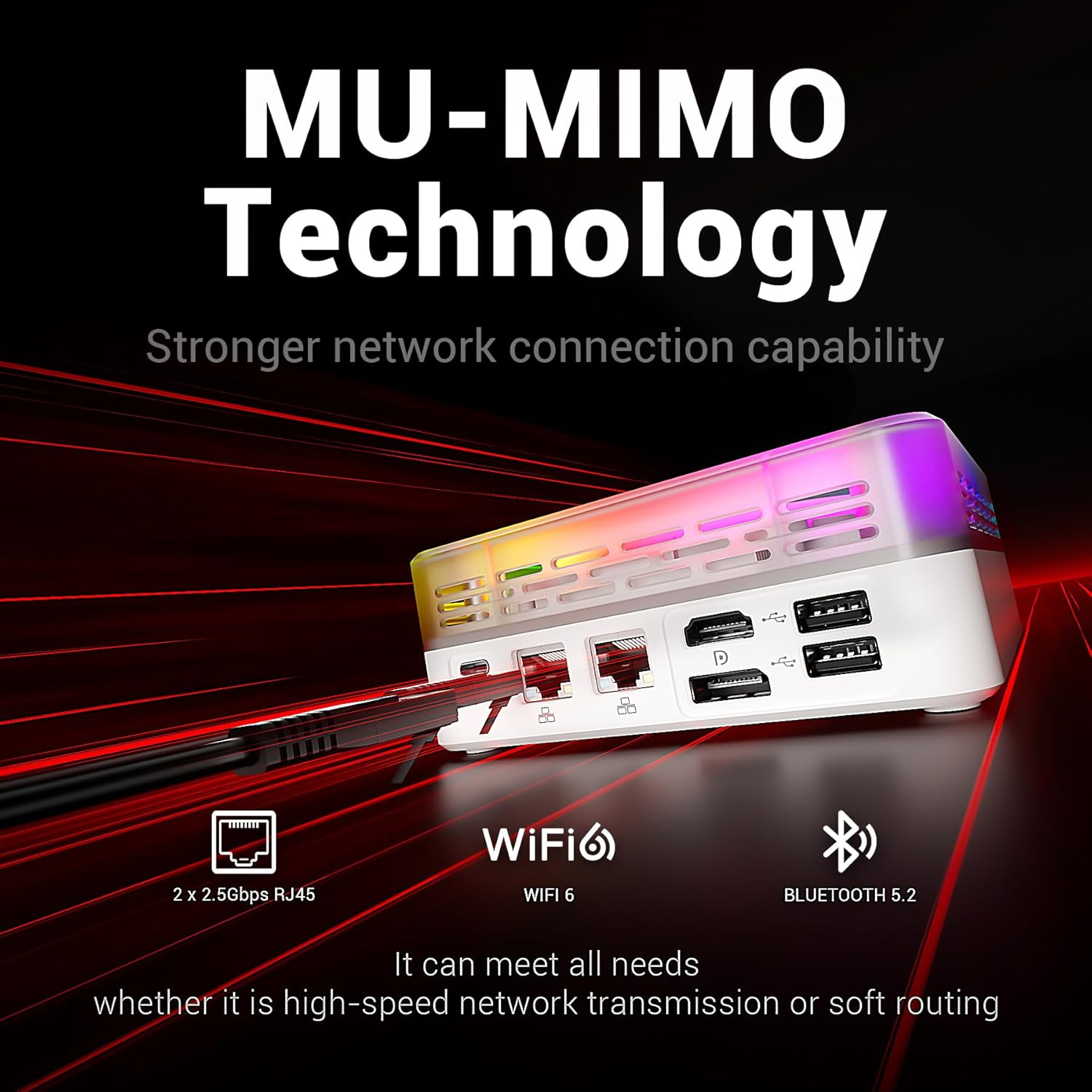
Figure 4.3: The MN56 Mini PC highlights its MU-MIMO Technology, Wi-Fi 6, Bluetooth 5.2, and dual 2.5Gbps RJ45 LAN ports for superior network connectivity.
4.4. Rozšíření úložiště
Both Mini PC models come with M.2 NVMe 2280 PCIe SSDs for fast storage. If you need to expand storage, consult a qualified technician or refer to the detailed upgrade guide available on the FIREBAT website for compatible M.2 SSDs.
5. Specifikace
5.1. FIREBAT MN56 Model (White)
| Funkce | Detail |
|---|---|
| Procesor | AMD Ryzen 7 8745HS (8 Cores, 16 Threads, L3 16MB Cache, Base Speed: 3.8GHz, Turbo Speed: 4.9GHz, Zen 4 TSMC 4nm FinFET) |
| Grafika | AMD Radeon 780M (Graphics Frequency: 2600MHz, 12 graphics card cores) |
| BERAN | 32GB Dual DDR5 RAM (SO-DIMM 5000MHz) |
| Skladování | 1TB M.2 NVMe 2280 PCIe 4.0 SSD |
| Síť | Wi-Fi 6, Bluetooth 5.2, 2 x 2.5Gbps RJ45 LAN |
| Video výstup | Triple Screens Display (USB-C 4.0+HDMI 2.1+DP 1.4) |
| Porty | USB-C 4.0, HDMI 2.1, DisplayPort 1.4, USB 3.2, USB 2.0, 3.5mm Audio Jack, DC-IN, 2x 2.5Gbps LAN |
| Chlazení | Dual Fans with High-efficiency Thermal Grease (65W stable performance release) |

Figure 5.1: Detailed specifications of the Ryzen 7 8745HS processor in the MN56 model.
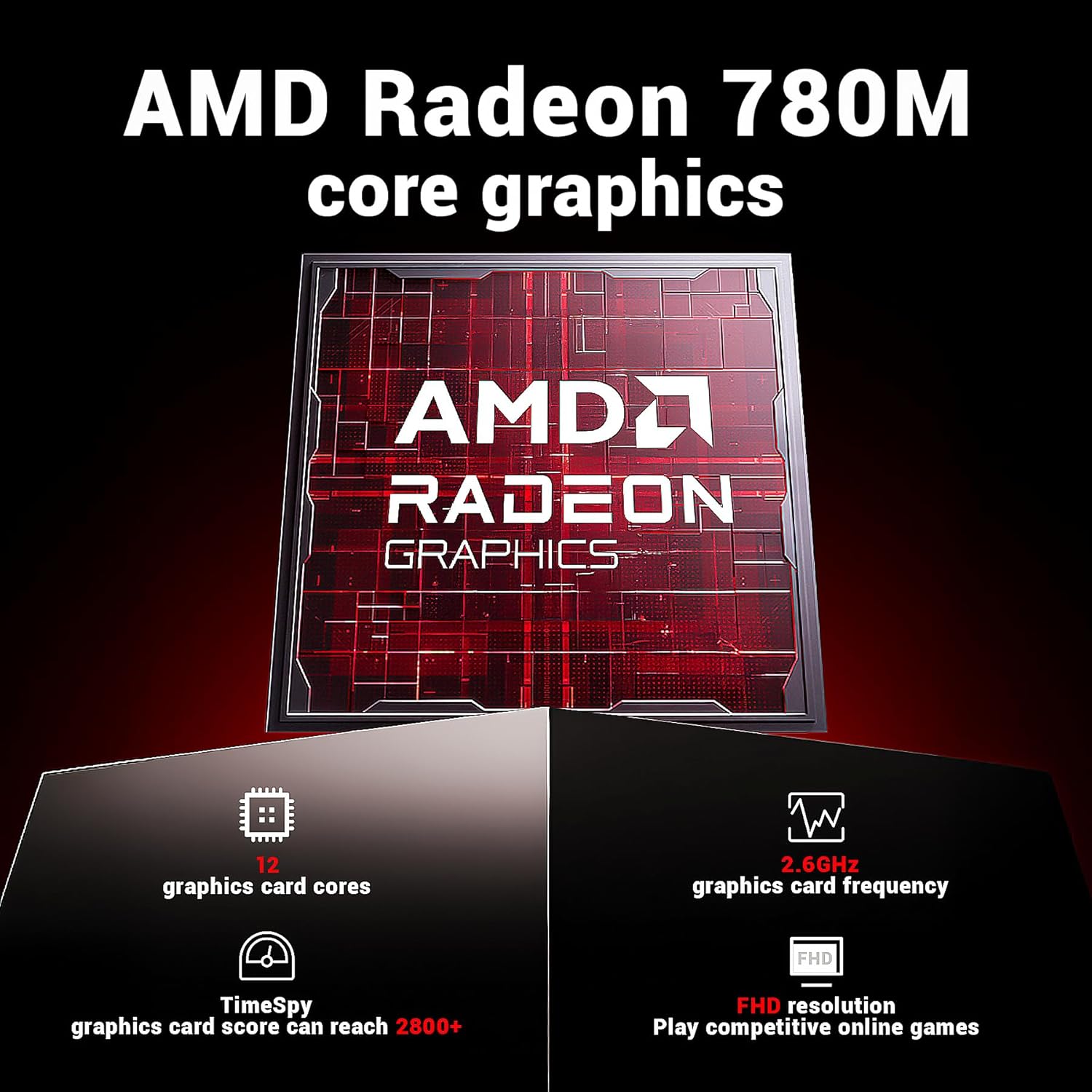
Figure 5.2: Detailed specifications of the AMD Radeon 780M core graphics in the MN56 model.

Figure 5.3: Illustration of the dual fan cooling system in the MN56 Mini PC, designed for efficient heat dissipation.
5.2. FIREBAT A6 Model (Black)
| Funkce | Detail |
|---|---|
| Procesor | AMD Ryzen 7 6800H (8 Cores, 16 Threads, Base Speed: 3.2GHz, Turbo Speed: 4.7GHz) |
| Grafika | AMD Radeon 680M (Graphics Frequency: 2200MHz) |
| BERAN | 16GB Dual DDR5 RAM (SO-DIMM 4800MHz) |
| Skladování | 512GB M.2 NVMe 2280 PCIe SSD |
| Síť | Wi-Fi 6, Bluetooth 5.2, 2.5G RJ45 LAN |
| Video výstup | Triple Screens Display (6x USB 3.0+1x USB-C, 1x HDMI 2.0+1x DP 1.4) |
| Porty | Power button, 3.5mm Audio Jack, 2x USB 3.0 Type-A, Type-C, DC-IN, HDMI, DisplayPort, 4x USB 3.0 Type-A, 2x 2.5Gbps LAN |
Obrázek 5.4: Přesview of the FIREBAT A6 Mini PC's key specifications, including CPU, GPU, RAM, storage, and connectivity.
6. Údržba
Pravidelná údržba pomáhá zajistit dlouhou životnost a optimální výkon vašeho Mini PC.
- Čištění: Use a soft, dry cloth to wipe the exterior of the Mini PC. For dust accumulation in vents, use compressed air. Ensure the device is powered off and unplugged before cleaning.
- Aktualizace softwaru: Regularly check for and install operating system updates (e.g., Windows Updates) and driver updates for your hardware. This improves security, performance, and compatibility.
- Tepelný management: Ensure the Mini PC is placed in a well-ventilated area. Do not obstruct the air vents. The dual-fan cooling system is designed to maintain optimal temperatures, but proper airflow is crucial.
- Záloha dat: Pravidelně zálohujte důležitá data na externí disk nebo cloudové úložiště, abyste předešli jejich ztrátě.
7. Řešení problémů
Tato část se zabývá běžnými problémy, se kterými se můžete setkat, a nabízí možná řešení.
| Problém | Možná příčina | Řešení |
|---|---|---|
| Žádné napájení / Zařízení se nezapne | Napájecí adaptér není připojen, vadná zásuvka, problém s tlačítkem napájení. | Ujistěte se, že je napájecí adaptér bezpečně připojen k Mini PC i k funkční zásuvce. Zkuste jinou zásuvku. |
| Žádné zobrazení na monitoru | Incorrect cable connection, monitor input not selected, display driver issue. | Zkontrolujte připojení kabelů HDMI/DP/USB-C. Ujistěte se, že je monitor nastaven na správný vstupní zdroj. Zkuste jiný kabel displeje nebo monitor. |
| Problémy s připojením Wi-Fi | Incorrect Wi-Fi password, router issue, driver issue. | Verify Wi-Fi password. Restart your router. Check Wi-Fi drivers in Device Manager. |
| Pomalý výkon | Too many applications running, insufficient RAM, overheating, full storage. | Ukončete nepotřebné aplikace. Zajistěte správné větrání. Uvolněte místo na disku. Zkontrolujte procesy na pozadí. |
| Peripheral not recognized (USB, Bluetooth) | Driver issue, faulty peripheral, port issue. | Try a different USB port or re-pair Bluetooth device. Update drivers for the peripheral. |
If the problem persists after trying these solutions, please contact FIREBAT customer support.
8. Záruka a podpora
FIREBAT is committed to providing high-quality products and excellent customer service.
- Informace o záruce: For detailed warranty terms and conditions, please refer to the warranty card included with your product or visit the official FIREBAT webZáruka se obvykle vztahuje na vady materiálu a zpracování při běžném používání.
- Technická podpora: If you encounter any issues not covered in this manual or require further assistance, please contact our support team.
Kontaktní údaje:
- E-mail: support@firebatpc.com
- Webmísto: www.firebatpc.com
When contacting support, please have your product model (MN56 or A6) and purchase information ready to expedite the process.
Ask a question about this manual
Ask about setup, troubleshooting, compatibility, parts, safety, or missing instructions. Manuals+ will review the question and use this page’s manual context to help answer it.