
1. Úvod
The ATTACK SHARK X11SE is a high-performance wireless gaming mouse designed for precision and comfort. It features a lightweight design, advanced sensor technology, and versatile connectivity options to enhance your gaming and productivity experience.

Obrázek: Overview of the ATTACK SHARK X11SE's key features including PAW3311 sensor, 63g lightweight design, 22000 DPI, HUANO switches, tri-mode switch, BK52820 chip, TTC encoders, and 65 hours of battery life.
Klíčové vlastnosti:
- PAW3311 Gaming Sensor: Equipped with the flagship PixArt PAW3311 sensor, offering up to 22,000 DPI with 6 adjustable levels, 400 IPS tracking speed, 35G acceleration, and a 1000Hz/1ms polling rate.
- Ultralight 63g Design: Weighing only 63 ± 3g, this mouse features a minimalist, full-casing design optimized for reduced weight without compromising build quality.
- Třírežimové připojení: Supports 2.4 GHz wireless, USB-C wired, and Bluetooth connections for versatile use across various devices.
- Durable Switches & Encoder: Features HUANO switches with a lifespan of 20 million clicks and an optimized TTC encoder for precise scroll wheel feedback.
- Ergonomický design: Dimensions (128 x 64 x 40 mm) suitable for medium to large hands, accommodating palm, claw, and fingertip grip styles for extended comfort.
- Dual Driver Support: Kompatibilní s Web Driver and proprietary ATTACK SHARK driver for advanced customization of buttons, DPI, polling rate, and macros.
2. Nastavení
Obsah balení:
- ATTACK SHARK X11SE Wireless Gaming Mouse
- USB-C kabel
- USB přijímač (2.4 GHz)
- Uchopovací páska
- Uživatelská příručka
Nabíjení myši:
Connect the mouse to your computer using the provided USB-C cable. The mouse has a 300mAh battery, providing up to 65 hours of uninterrupted use on a full charge (2-3 hours charging time).

Image: The ATTACK SHARK X11SE mouse illustrating its efficient battery management, offering up to 65 hours of use from a 300mAh battery, fully charged in 2-3 hours.
Režimy připojení:
The X11SE mouse supports three connection modes: 2.4GHz Wireless, Bluetooth, and USB-C Wired.

Image: The ATTACK SHARK X11SE mouse highlighting its lightning-fast 2.4G wireless connection, wired mode via USB-C, and Bluetooth 5.2 capabilities.
- Bezdrátový režim 2.4 GHz:
- Vyhledejte USB přijímač, obvykle uložený v přihrádce na spodní straně myši.
- Zapojte USB přijímač do volného USB portu na vašem počítači.
- Turn on the mouse using the switch on the bottom. Select the 2.4G mode.
- Myš by se měla připojit automaticky.
- Režim Bluetooth:
- Turn on the mouse and select the Bluetooth mode using the switch on the bottom.
- Press and hold the Bluetooth toggle button (often located near the mode switch) for 3 seconds to enter pairing mode. The indicator light will flash.
- V počítači nebo zařízení přejděte do nastavení Bluetooth a vyhledejte nová zařízení.
- Select "ATTACK SHARK X11SE" from the list to pair.
- Drátový režim USB-C:
- Connect the USB-C cable to the front port of the mouse and the other end to a USB port on your computer.
- Myš se automaticky přepne do kabelového režimu a začne se nabíjet.
3. Provoz
Funkce tlačítek:
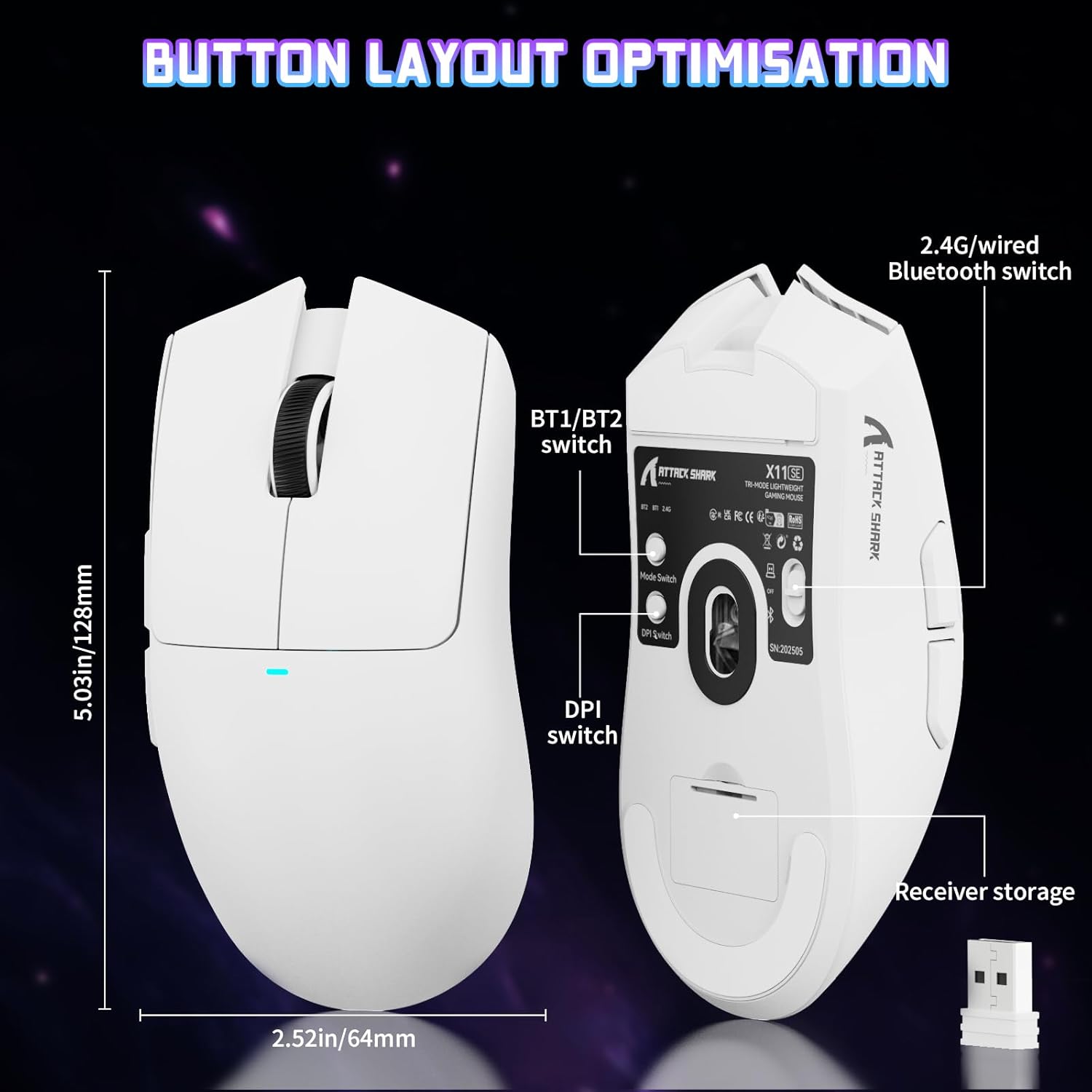
Image: The ATTACK SHARK X11SE mouse displaying its button layout, including the BT1/BT2 switch, DPI switch, and receiver storage, along with its dimensions (128mm length, 64mm width).
- Levé kliknutí: Tlačítko primární akce.
- Klikněte pravým tlačítkem myši: Tlačítko sekundární akce, obvykle pro kontextové nabídky.
- Rolovací kolečko: Scrolls up/down. Can also be pressed for a middle-click function.
- Boční tlačítka (vpřed/vzad): Used for navigation in web prohlížeče nebo akce ve hře.
- Přepínač DPI: Located on the underside of the mouse, this button cycles through preset DPI levels.
- Přepínač režimu: Located on the underside, this switch allows you to select between 2.4G wireless, Bluetooth, and Off modes.
Nastavení DPI:
The X11SE features a PixArt PAW3311 sensor with up to 22,000 DPI. You can adjust the DPI sensitivity using the dedicated DPI switch on the bottom of the mouse. For more precise control and custom DPI levels, use the official software.
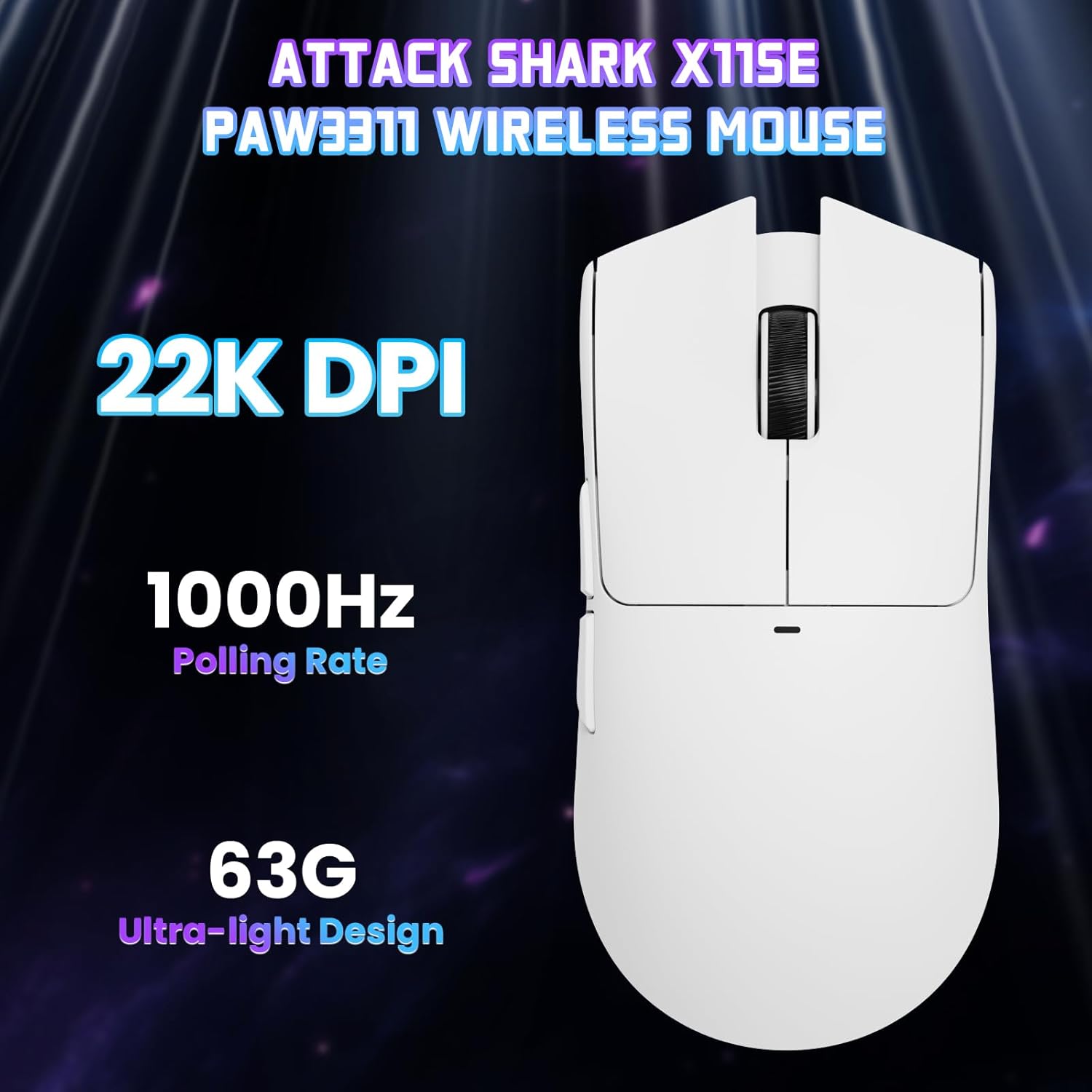
Obrázek: Pohled shora dolů view of the ATTACK SHARK X11SE mouse, emphasizing its 22,000 DPI capability and 1000Hz polling rate for high-performance gaming.
4. Přizpůsobení
The ATTACK SHARK X11SE mouse offers extensive customization options through its dedicated software. This allows you to personalize button assignments, DPI settings, polling rate, and create macros.
Instalace ovladače:
The mouse supports two drivers:
- Web Řidič: Přístup přes http://szslxd-tech.com/#/
- ATTACK SHARK Proprietary Driver: Stáhnout z https://attackshark.com/pages/dirver-download
Download and install the preferred driver software on your Windows, macOS, or Linux system.
Softwarové funkce:

Image: The ATTACK SHARK X11SE software interface, demonstrating options for mouse settings, DPI adjustments, parameter settings, macro editing, and personal profiles.
- Programování tlačítek: Přiřaďte funkce libovolnému ze 5 tlačítek.
- Nastavení DPI: Create custom DPI profiles and adjust sensitivity levels.
- Míra hlasování: Adjust the polling rate for optimal responsiveness.
- Editor maker: Record and assign complex sequences of commands to a single button.
- Profile Řízení: Save and switch between different profilepro různé hry nebo aplikace.
5. Údržba
Čištění:
- K otření povrchu myši použijte měkký, suchý hadřík.
- Pro odolnou špínu lehceampOtřete hadřík vodou nebo jemným čisticím roztokem. Vyhněte se agresivním chemikáliím.
- Clean the optical sensor area on the bottom of the mouse with a cotton swab to ensure accurate tracking.
Péče o baterie:
- Abyste prodloužili životnost baterie, vyhněte se častému úplnému vybíjení.
- Pokud myš delší dobu nepoužíváte, skladujte ji na chladném a suchém místě.
6. Řešení problémů
Běžné problémy a řešení:
- Myš nereaguje:
- Ujistěte se, že je myš nabitá.
- Check the mode switch on the bottom of the mouse to ensure it's in the correct mode (2.4G, BT, or Wired).
- For 2.4GHz mode, ensure the USB receiver is securely plugged in. Try a different USB port.
- For Bluetooth mode, ensure Bluetooth is enabled on your device and the mouse is paired correctly. Try re-pairing.
- V případě kabelového režimu se ujistěte, že je kabel USB-C správně připojen.
- DPI se nemění:
- Press the DPI switch on the bottom of the mouse.
- If using custom DPI settings, ensure the driver software is running and the correct profile je aktivní.
- Zpoždění nebo přerušované připojení:
- Ensure the mouse is close to the USB receiver (for 2.4GHz) or your device (for Bluetooth).
- Zabraňte rušení od jiných bezdrátových zařízení.
- Ujistěte se, že je baterie myši dostatečně nabitá.
- Aktualizujte ovladače myši, pokud jsou k dispozici.
7. Specifikace
| Funkce | Specifikace |
|---|---|
| Značka | ÚTOČNÉHO ŽRALOKA |
| Název modelu | X11SE |
| Barva | Bílý |
| Technologie připojení | 2.4 GHz Wireless/USB-C Wired/Bluetooth |
| Speciální funkce | 63g ultralight, BK52820 Chip, TTC Encoder, Dual Driver |
| Technologie detekce pohybu | Optical (PixArt PAW3311) |
| Počet tlačítek | 5 |
| Orientace rukou | Obouruký |
| Doporučené použití produktu | Počítačové hry |
| Kompatibilní zařízení | Desktop Computer, MAC |
| Operační systém | Windows, macOS, Linux |
| Počet baterií | 1 Lithium Polymer (součástí balení) |
| Zdroj napájení | Napájení z baterie |
| Maximum Mouse Sensitivity | 22000 DPI |
| Rozsah | 300 centimetru |
| Styl | Ergonomický |
| Materiál | Plast |
| Země původu | Čína |
| Zahrnuté komponenty | USB-C Cable, Manual, Grip Tape |
| UPC | 752010613663 |
8. Záruka a podpora
Informace o záruce:
The ATTACK SHARK X11SE Wireless Gaming Mouse comes with a six-month warranty from the date of purchase. Please retain your proof of purchase for warranty claims.
Stažení ovladačů:
For the latest drivers and software updates, please visit:
- Web Řidič: http://szslxd-tech.com/#/
- ATTACK SHARK Driver: https://attackshark.com/pages/dirver-download
Related Product Video:
Video: Oficiální video s prodejcemasing the ATTACK SHARK X11 Mouse, demonstrating its features and functionality. While specifically for the X11, it provides relevant insights into the X11SE's design and operation.


