
1. Úvod
This manual provides detailed instructions for the setup, operation, maintenance, and troubleshooting of your FUNYET Mini PC FY3. This compact desktop computer is equipped with an Intel 12th Gen Alder Lake N95 processor, 16GB DDR4 RAM, and a 512GB SSD, running on Windows 11 Pro. It supports 4K displays and offers versatile connectivity for various applications.
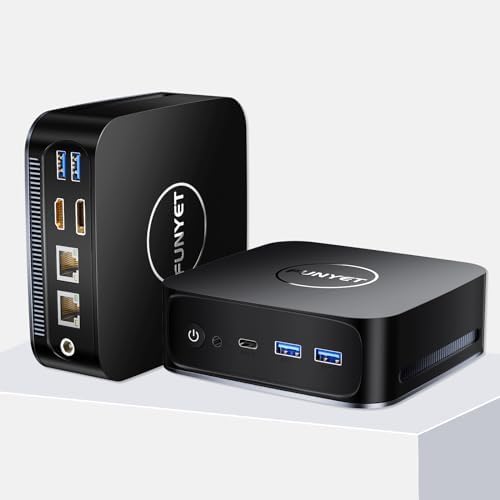
Obrázek 1.1: Přední a zadní část view of the FUNYET Mini PC FY3, showcasinjeho kompaktní design a různé porty.
2. Vlastnosti produktu
The FUNYET Mini PC FY3 is designed for efficiency and performance in a small form factor. Key features include:
- Výkonný procesor: Intel Alder Lake N95 with 4 cores and 4 threads, up to 3.4GHz.
- Integrovaná grafika: Intel UHD Graphics (max 1200MHz) supporting 4K 60Hz ultra-high-definition output.
- Paměť: 16GB DDR4 RAM, expandable up to 32GB.
- Skladování: 512GB M.2 SATA SSD, expandable up to 2TB, supporting PCIe4.0 and SATA3.0 SSD memory settings.
- Operační systém: Pre-installed Windows 11 Pro for enhanced speed and security.
- Konektivita: Dual RJ45 Ethernet ports (1x 2.5Gbps, 1x Gigabit), 5G Wi-Fi, and Bluetooth 4.2.
- Podpora zobrazení: Dual-screen display capability via HDMI and DisplayPort (DP).
- Efektivní chlazení: Built-in cooling fan for reliable performance.

Obrázek 2.1: Konecview of the FUNYET Mini PC FY3's core specifications, including processor speed, core count, graphics, and connectivity options.

Obrázek 2.2: Detailní view of the Intel Alder Lake N95 processor, highlighting its base and turbo frequencies, memory speed, and power consumption.

Image 2.3: Illustration of the SO-DIMM RAM slot and M.2 SSD, demonstrating the upgrade potential for memory and storage.
3. Porty a připojení
The FUNYET Mini PC FY3 offers a comprehensive set of ports for connecting various peripherals and displays:
- Přední panel:
- 1 x tlačítko napájení
- 1 x konektor pro sluchátka
- 1 x Type-C Port
- 2 x USB 3.2 porty
- Zadní panel:
- 2 x USB 3.2 porty
- 1 x HDMI 2.0 port
- 1 x DisplayPort (DP 1.4)
- 2 x RJ45 Ethernet Ports (1x 2.5Gbps, 1x Gigabit)
- 1 x DC 5.5 Power Input

Image 3.1: Diagram illustrating all available ports on the front and rear panels of the Mini PC, with labels for each connection type.

Image 3.2: Close-up of the dual RJ45 Ethernet ports, emphasizing stable network connectivity with Wi-Fi 5 and Bluetooth 4.2.
4. Průvodce nastavením
Follow these steps to set up your FUNYET Mini PC FY3:
- Připojení k displeji: Connect your monitor or TV to the Mini PC using an HDMI or DisplayPort cable. The Mini PC supports dual-screen display.
- Připojení periferií: Plug in your USB keyboard and mouse into the available USB 3.2 ports.
- Internetové připojení: For wired internet, connect an Ethernet cable to one of the RJ45 ports. For wireless internet, ensure your Wi-Fi network is available during initial setup.
- Zapnutí: Connect the power adapter to the DC 5.5 port on the Mini PC, then plug the adapter into a power outlet. Press the power button on the front panel to turn on the device.
- Počáteční nastavení: Follow the on-screen instructions to complete the Windows 11 Pro setup, including language, region, network, and user account creation.

Obrázek 4.1: Příkladample of a dual-screen display setup using the HDMI and DisplayPort outputs of the Mini PC.
5. Návod k obsluze
Once your Mini PC is set up, you can begin using it:
- Zapnutí/vypnutí: Stisknutím tlačítka napájení zapněte počítač. Chcete-li počítač vypnout, klikněte ve Windows na tlačítko Start a poté vyberte Napájení > Vypnout.
- Windows 11 Pro: Explore the features of Windows 11 Pro for productivity, entertainment, and security.
- Konektivita: Utilize the multiple USB ports for external devices, the Ethernet ports for stable wired connections, and Wi-Fi/Bluetooth for wireless peripherals and internet access.
- Duální displej: Configure your display settings in Windows to extend or duplicate your desktop across two monitors.
6. Údržba
Pravidelná údržba pomáhá zajistit dlouhou životnost a optimální výkon vašeho Mini PC:
- Udržujte v čistotě: Regularly clean the exterior of the Mini PC with a soft, dry cloth. Use compressed air to clear dust from ventilation openings to ensure proper airflow and cooling.
- Aktualizace softwaru: Keep your Windows 11 Pro operating system and drivers updated to the latest versions for security and performance improvements.
- Vyhněte se překážkám: Ensure the Mini PC is placed in a well-ventilated area, free from obstructions that could block airflow to the cooling fan.
- Bezpečné vypnutí: Always shut down the PC properly through the operating system to prevent data corruption.
7. Řešení problémů
If you encounter issues with your FUNYET Mini PC FY3, refer to the following common solutions:
| Problém | Možná příčina | Řešení |
|---|---|---|
| Žádná síla | Napájecí kabel není připojen, problém se zásuvkou, vadný adaptér. | Zkontrolujte připojení napájecího kabelu. Zkuste jinou zásuvku. Ujistěte se, že napájecí adaptér funguje. |
| Žádné zobrazení na monitoru | Display cable loose, incorrect input source on monitor, monitor off. | Ensure HDMI/DP cable is securely connected. Select the correct input source on your monitor. Turn on the monitor. |
| Žádné připojení k internetu | Ethernet cable disconnected, Wi-Fi disabled, router issue. | Zkontrolujte ethernetový kabel. Ujistěte se, že je v nastavení systému Windows povolena Wi-Fi. Restartujte router/modem. |
| Peripherals not working | Volné USB připojení, problém s ovladačem. | Reconnect USB devices. Try a different USB port. Check device manager for driver issues. |
8. Specifikace
Detailed technical specifications for the FUNYET Mini PC FY3:
| Funkce | Specifikace |
|---|---|
| Procesor | Intel 12th Gen Alder Lake N95 (3.4 GHz Max Turbo Frequency) |
| BERAN | 16GB DDR4 SDRAM (Expandable to 32GB) |
| Skladování | 512GB M.2 SSD (Supports PCIe4.0 and SATA3.0, Expandable to 2TB) |
| Grafický koprocesor | Grafická karta Intel UHD (integrovaná) |
| Operační systém | Windows 11 Pro |
| Bezdrátový typ | 802.11ac (Wi-Fi 5), Bluetooth 4.2 |
| Ethernetové porty | 2 x RJ45 (1x 2.5Gbps, 1x Gigabit) |
| USB porty | 4 x USB 3.2, 1 x Type-C |
| Video výstup | 1 x HDMI 2.0, 1 x DisplayPort (DP 1.4) |
| Zvuk | 1 x konektor pro sluchátka |
| Vstup napájení | DC 5.5 |
| Hmotnost položky | 1.72 libry |
| Rozměry produktu | 5.11 x 1.67 x 5.15 palce |
| Barva | Černý |
9. Záruka a podpora
FUNYET is committed to providing quality products and customer satisfaction:
- Záruka: The FUNYET Mini PC FY3 comes with a one-year warranty.
- Returns & Repairs: We offer 30 days free exchange and 1 year free repair for all our products.
- Zákaznická podpora: If you have any questions or require assistance with your product, please contact FUNYET support. We aim to reply within 24 hours.