
1. Úvod
This manual provides essential information for the safe and effective use of your Mibro GS Pro2 Multisport Smartwatch. Please read this manual thoroughly before using the device and retain it for future reference.
Konec produktuview
The Mibro GS Pro2 is a versatile multisport smartwatch designed for various activities, featuring a 1.43-inch AMOLED display, Bi-Band GNSS for precise positioning, and extensive health and fitness tracking capabilities.

Image 1.1: Mibro GS Pro2 Smartwatch. This image displays the Mibro GS Pro2 smartwatch from an angled perspective, showcasing its round dark gray casing, black silicone strap, and the digital watch face with various data points like time, date, and weather.
2. Nastavení
2.1 Počáteční nabíjení
Before first use, fully charge your Mibro GS Pro2 smartwatch. Connect the magnetic charging cable to the charging contacts on the back of the watch and plug the USB end into a standard USB power adapter (not included).
- Plné nabití obvykle trvá přibližně 2.5 hodiny.
- Hodinky zobrazí na obrazovce indikátor nabíjení.
2.2 Párování s vaším smartphonem
To unlock the full functionality of your Mibro GS Pro2, pair it with your smartphone via the dedicated Mibro Fit application.
- Stáhněte si aplikaci: Hledat "Mibro Fit" in your smartphone's app store (iOS or Android) and install it.
- Vytvořit účet: Otevřete aplikaci Mibro Fit a postupujte podle pokynů na obrazovce k vytvoření účtu nebo přihlášení.
- Povolit Bluetooth: Ujistěte se, že je na vašem smartphonu povoleno Bluetooth.
- Přidat zařízení: In the Mibro Fit app, navigate to the "Device" or "Add Device" section.
- Vyberte hodinky: Select "Mibro GS Pro2" from the list of available devices.
- Potvrdit spárování: Na hodinkách i smartphonu se zobrazí požadavek na spárování. Potvrďte spárování na obou zařízeních.
Once paired, the watch will synchronize data with the app, and you can customize settings, receive notifications, and view detailed activity reports.
3. Obsluha zařízení
3.1 Základní navigace
The Mibro GS Pro2 features a responsive touchscreen and physical buttons for navigation.
- Dotyková obrazovka: Přejetím prstu nahoru, dolů, doleva nebo doprava můžete procházet nabídky a widgety. Klepnutím vyberete položky.
- Boční tlačítka: Use the physical buttons on the side of the watch to access specific functions (e.g., power on/off, return to home screen, quick access to sports modes). Refer to the watch's on-screen prompts for specific button assignments.
3.2 Zapnutí/vypnutí
- Zapnutí: Press and hold the power button (usually the top right button) until the Mibro logo appears.
- Vypnout: Stiskněte a podržte tlačítko napájení a poté z možností zobrazených na obrazovce vyberte „Vypnout“.
3.3 Uskutečňování a přijímání hovorů
When connected to your smartphone, the Mibro GS Pro2 allows you to manage calls directly from your wrist.
- Přijímání hovorů: When a call comes in, the watch will display the caller ID. You can tap the green icon to answer or the red icon to reject the call.
- Uskutečňování hovorů: Access the call function on your watch (usually through the phone icon or a dedicated widget) to dial numbers or select contacts from your synced phonebook.
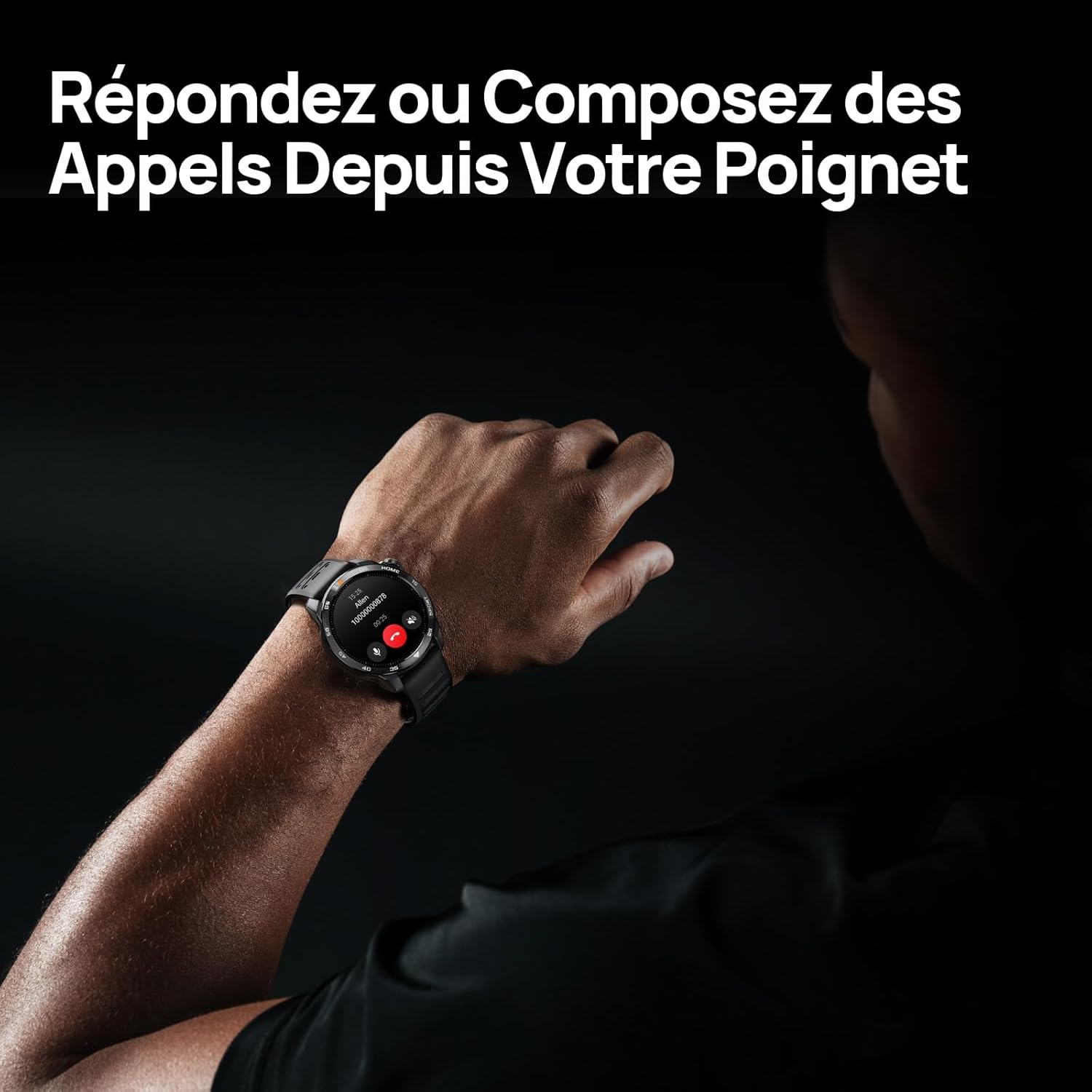
Image 3.1: Responding to calls on the Mibro GS Pro2. This image shows a person's wrist with the Mibro GS Pro2 smartwatch displaying an incoming call notification, illustrating the ability to answer or decline calls directly from the watch.
4. Vlastnosti
4.1 Displej
The Mibro GS Pro2 features a vibrant 1.43-inch AMOLED display, offering clear visibility even in bright outdoor conditions.
- Velikost: 1.43 palců
- Typ: AMOLED
- Rezoluce: 466x466 pixelů
- Jas: Špičkový jas až 1 750 nitů
- Vlastnosti: Touchscreen, Anti-fingerprint coating.

Image 4.1: Mibro GS Pro2 1.43" AMOLED High Brightness Screen. This image highlights the smartwatch's display specifications, including 1200 nits peak brightness, 466x466 resolution, and 60 fps refresh rate, demonstrating its clarity and responsiveness.
4.2 Multisport Modes
The watch supports over 150 sports modes, providing tailored data analysis for each activity. This includes intelligent transitions for multi-discipline events like triathlons.
- Aquatic Sports: Suitable for open water swimming and pool swimming, calculating parameters such as distance, pace, and trajectory. The watch is 5ATM water resistant.
- Cyklistika: Tracks various cycling metrics, including outdoor cycling, indoor cycling, mountain biking, and short-distance modes.
- Běh: Offers professional running algorithms, including running dynamics, performance index, and physical analysis based on real-time data. It records trajectories and provides long-term training plans.
- Other Sports: Includes modes for hiking, skiing, padel, and many more.

Image 4.2: Mibro GS Pro2 with 150+ Sports Modes. This image shows the smartwatch displaying various sports icons, indicating its extensive support for over 150 different physical activities, including swimming, cycling, and running.

Image 4.3: Mibro GS Pro2 5ATM Water Resistant. This image depicts a swimmer wearing the Mibro GS Pro2 smartwatch, with on-screen data showing swimming metrics like distance, stroke count, and calories burned, highlighting its water resistance and aquatic sport tracking capabilities.
4.3 GPS and Outdoor Navigation
The smartwatch features precise dual-frequency geolocation (Bi-Band GNSS) with real-time deviation alerts. It provides accurate route data and altitude variation measurements for outdoor activities like cycling tours or hiking.
- Dynamically adjust start/end points directly on the watch.
- Store up to 10 backup routes for navigation in areas without signal.
- Includes Barometer and Altimeter functions for environmental data.

Image 4.4: Mibro GS Pro2 Dual-Frequency GPS for Precise Outdoor Navigation. This image shows the smartwatch displaying a map and route tracking, alongside a smartphone app showing a detailed outdoor run trajectory, emphasizing its accurate GPS capabilities for outdoor activities.

Image 4.5: Mibro GS Pro2 Barometer and Altimeter. This image displays the watch showing barometric pressure, a compass, and altitude readings, with a person climbing in the background, illustrating its environmental sensing capabilities.
4.4 Monitorování zdraví
The Mibro GS Pro2 provides comprehensive health tracking features to help you monitor your well-being.
- Monitorování srdeční frekvence: Nepřetržité sledování tepové frekvence.
- Monitorování krevního kyslíku (SpO2): Měří hladinu saturace krve kyslíkem.
- Sledování spánku: Monitory spánkutages (lehký, hluboký, REM) a poskytuje skóre spánku.
- Sledování stresu: Sleduje úroveň stresu po celý den.
- VO2 Max & Recovery Time: Professional metrics for training optimization.
- Sledování aktivity: Records calories burned, total distance, and steps taken.

Image 4.6: Mibro GS Pro2 VO2 Max & Recovery Time. This image shows the smartwatch displaying VO2 Max percentage and recovery time recommendations, along with training effect metrics, aiding in professional workout analysis.

Image 4.7: Mibro GS Pro2 Blood Oxygen (SpO2) Monitoring. This image illustrates the watch's ability to track blood oxygen saturation levels over a 24-hour period, displayed as a graph on the watch face.

Image 4.8: Mibro GS Pro2 Sleep Tracking. This image shows the smartwatch displaying sleep quality metrics (Good, BPM, Stress) and a breakdown of sleep stages (Awake, Light Sleep, Deep Sleep), with a person sleeping in the background.
4.5 Životnost baterie
The Mibro GS Pro2 offers extended battery life to support prolonged use.
- Denní režim: Přibližně 20 dní.
- Režim GPS: Přibližně 20 hodiny.
- Úsporný režim: Up to 50+ days.

Image 4.9: Mibro GS Pro2 Ultra-Long Battery Life and Fast Charging. This image illustrates the watch's battery performance, showing 2.5 hours for a full charge and estimated usage times for daily mode (20+ days), power-saving mode (50+ days), and GPS mode (20 hours).
4.6 Smart Functions
Beyond fitness tracking, the Mibro GS Pro2 integrates seamlessly with your digital life.
- Upozornění na zprávy: Receive alerts for calls, SMS, and app notifications (e.g., TikTok, WhatsApp, Telegram, Instagram, Facebook, Snapchat).
- Ovládání hudby: Ovládejte přehrávání hudby na smartphonu přímo z hodinek.
- Najít můj telefon: Locate your paired smartphone using the watch.
- Přizpůsobitelné ciferníky: Personalize your watch with various watch face designs.

Image 4.10: Mibro GS Pro2 New Daily Health & Well-being Features. This image shows icons representing sleep tracking, wake-up reminders, music control, and 'find my phone' functionality, indicating the watch's smart features for daily use.

Image 4.11: Mibro GS Pro2 Message Push Notifications. This image shows the smartwatch displaying a message notification, surrounded by logos of popular social media and messaging apps, illustrating its capability to receive alerts from various platforms.

Image 4.12: Mibro GS Pro2 Personalized Watch Faces. This image displays a variety of digital watch faces, showcasing the customization options available to users for personalizing their smartwatch display.
5. Údržba
5.1 Čištění chytrých hodinek
- Pravidelně čistěte hodinky casing a popruh s měkkým, damp tkanina.
- Na odolné nečistoty použijte jemný mýdlový roztok a důkladně opláchněte čistou vodou.
- Před nabíjením se ujistěte, že jsou nabíjecí kontakty čisté a suché, aby nedošlo ke korozi.
- Nepoužívejte agresivní chemikálie, abrazivní čisticí prostředky nebo rozpouštědla, protože by mohly poškodit povrchovou úpravu a těsnění hodinek.
5.2 Voděodolnost
The Mibro GS Pro2 is 5ATM water resistant, meaning it can withstand pressures equivalent to a depth of 50 meters. This makes it suitable for swimming and showering. However, it is not recommended for diving or high-pressure water activities.
- Nemanipulujte s tlačítky pod vodou.
- Po kontaktu se slanou vodou opláchněte hodinky sladkou vodou a důkladně je osušte.
5.3 Péče o baterii
- Vyhněte se častému úplnému vybíjení baterie.
- Pokud hodinky delší dobu nepoužíváte, skladujte je na chladném a suchém místě.
- Používejte pouze dodaný nabíjecí kabel.
6. Řešení problémů
6.1 Hodinky se nezapínají
- Ujistěte se, že jsou hodinky plně nabité. Připojte je k nabíječce alespoň na 30 minut.
- Stiskněte a podržte tlačítko napájení po dobu 10–15 sekund pro pokus o vynucený restart.
6.2 Nelze spárovat se smartphonem
- Ujistěte se, že máte na smartphonu i hodinkách povoleno Bluetooth.
- Ujistěte se, že jsou hodinky v dosahu Bluetooth vašeho telefonu.
- Restartujte smartphone i hodinky.
- Vymažte mezipaměť Bluetooth v telefonu (pokud je k dispozici) a zkuste spárování zopakovat.
- Ujistěte se, že je aplikace Mibro Fit aktualizována na nejnovější verzi.
6.3 Inaccurate GPS Readings
- Ujistěte se, že se nacházíte v otevřeném venkovním prostoru s volným view z nebe.
- Před zahájením aktivity počkejte, až hodinky získají stabilní signál GPS.
- Ensure the watch's firmware is up to date via the Mibro Fit app.
6.4 Nezobrazování oznámení
- Check notification settings in the Mibro Fit app to ensure they are enabled for desired applications.
- Verify that your phone's notification permissions are granted to the Mibro Fit app.
- Ujistěte se, že jsou hodinky připojeny k telefonu přes Bluetooth.
7. Specifikace
| Funkce | Detail |
|---|---|
| Značka | Mikro |
| Číslo modelu | GS Pro2 |
| Velikost displeje | 1.43 palců |
| Typ zobrazení | AMOLED |
| Operační systém | RTOS |
| Konektivita | Bluetooth |
| Speciální funkce | Touchscreen, Water Resistant (5ATM), Bi-Band GNSS, Health Monitoring |
| Kompatibilní zařízení | Smartphone |
| Složení baterie | Lithium-iontová |
| Výdrž baterie (denní režim) | Cca. 20 dní |
| Výdrž baterie (režim GPS) | Přibl. 20 hodin |
| Voděodolnost | 5 ATM |
| Rozměry (tělo hodinek) | 48 mm (průměr) x 12 mm (tloušťka) |
| Délka popruhu | 265 mm |
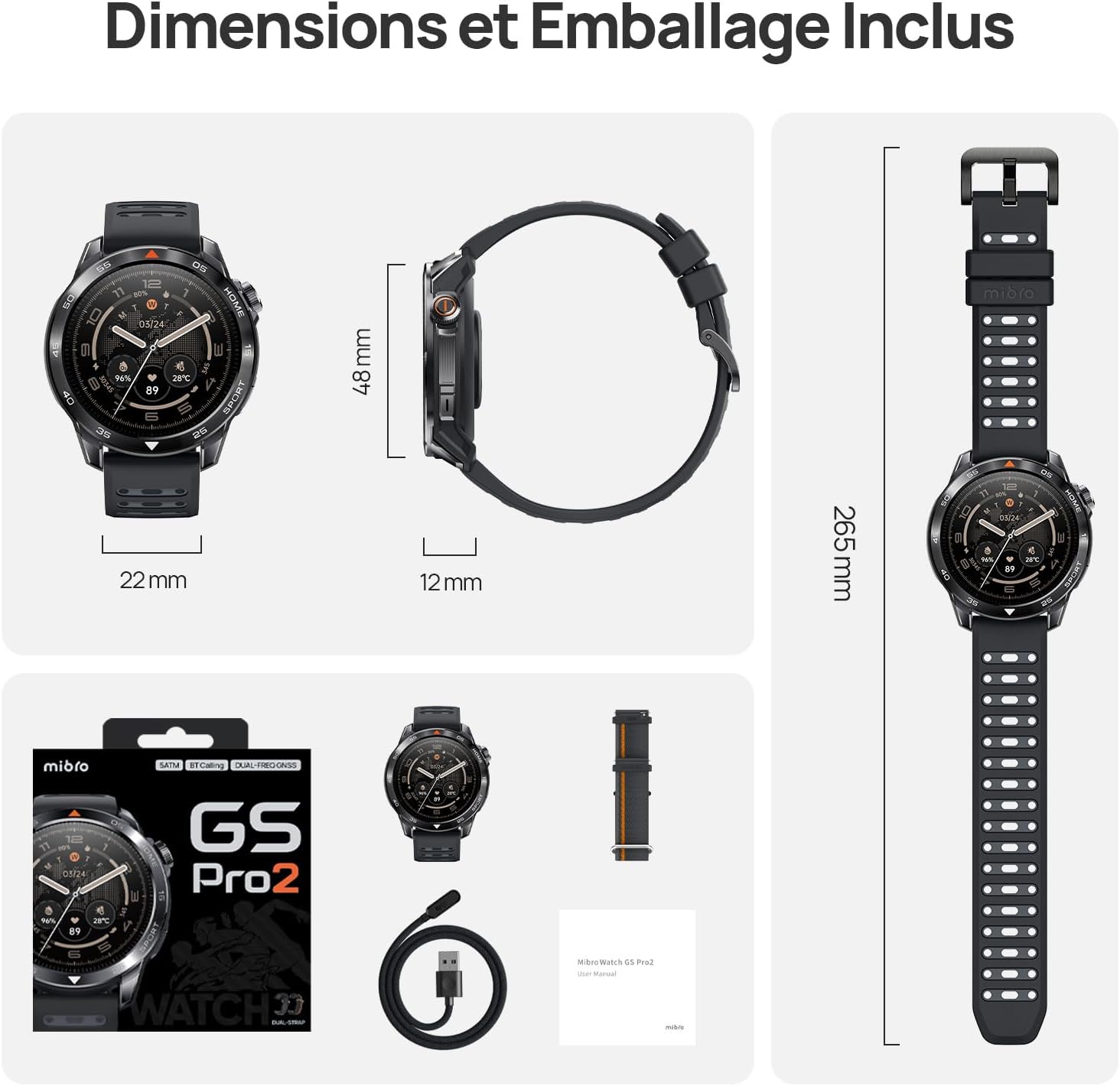
Image 7.1: Mibro GS Pro2 Dimensions and Included Packaging. This image provides a visual representation of the watch's dimensions (48mm diameter, 12mm thickness, 265mm strap length) and shows the contents of the product packaging, including the watch, charging cable, and user manual.
8. Záruka a podpora
8.1 Záruka výrobce
The Mibro GS Pro2 comes with a 1letá záruka výrobceTato záruka se vztahuje na vady materiálu a zpracování při běžném používání. Uschovejte si prosím doklad o koupi pro případ uplatnění záruky.
Záruka se nevztahuje na škody způsobené nesprávným použitím, nehodami, neoprávněnými úpravami nebo běžným opotřebením.
8.2 Zákaznická podpora
For technical assistance, troubleshooting, or warranty inquiries, please refer to the official Mibro website or contact their customer support channels. Specific contact details may be found on the product packaging or the official Mibro webmísto.