
1. Úvod
Děkuji za nákupasing the FYDEE A9 Record Player. This manual provides essential information for the safe and efficient operation of your new device. Please read these instructions thoroughly before use and retain them for future reference.
2. Bezpečnostní informace
- Zdroj napájení: Use only the provided AC adapter. Ensure the voltage odpovídá místnímu napájení.
- Voda a vlhkost: Nevystavujte jednotku dešti, vlhkosti ani kapalinám. Nepokládejte na jednotku předměty naplněné tekutinami, například vázy.
- Teplo: Udržujte jednotku mimo dosah zdrojů tepla, jako jsou radiátory, topná tělesa, sporáky nebo jiná zařízení (včetně amplifikátory), které produkují teplo.
- Větrání: Zajistěte dostatečné větrání. Neblokujte žádné větrací otvory.
- Čištění: Před čištěním odpojte přístroj ze zásuvky. Používejte pouze měkký, suchý hadřík.
- Servis: Nepokoušejte se o opravu jednotky sami. Veškerý servis svěřte kvalifikovanému servisnímu personálu.
- Umístění: Umístěte jednotku na stabilní, rovný povrch, abyste zabránili jejímu poškození v důsledku pádu.
3. Obsah balení
- FYDEE A9 Record Player
- AC adaptér
- Transparent Acrylic Dust Cover
- RCA kabel
- Návod k použití
- Adaptér 45 RPM
4. Konec produktuview
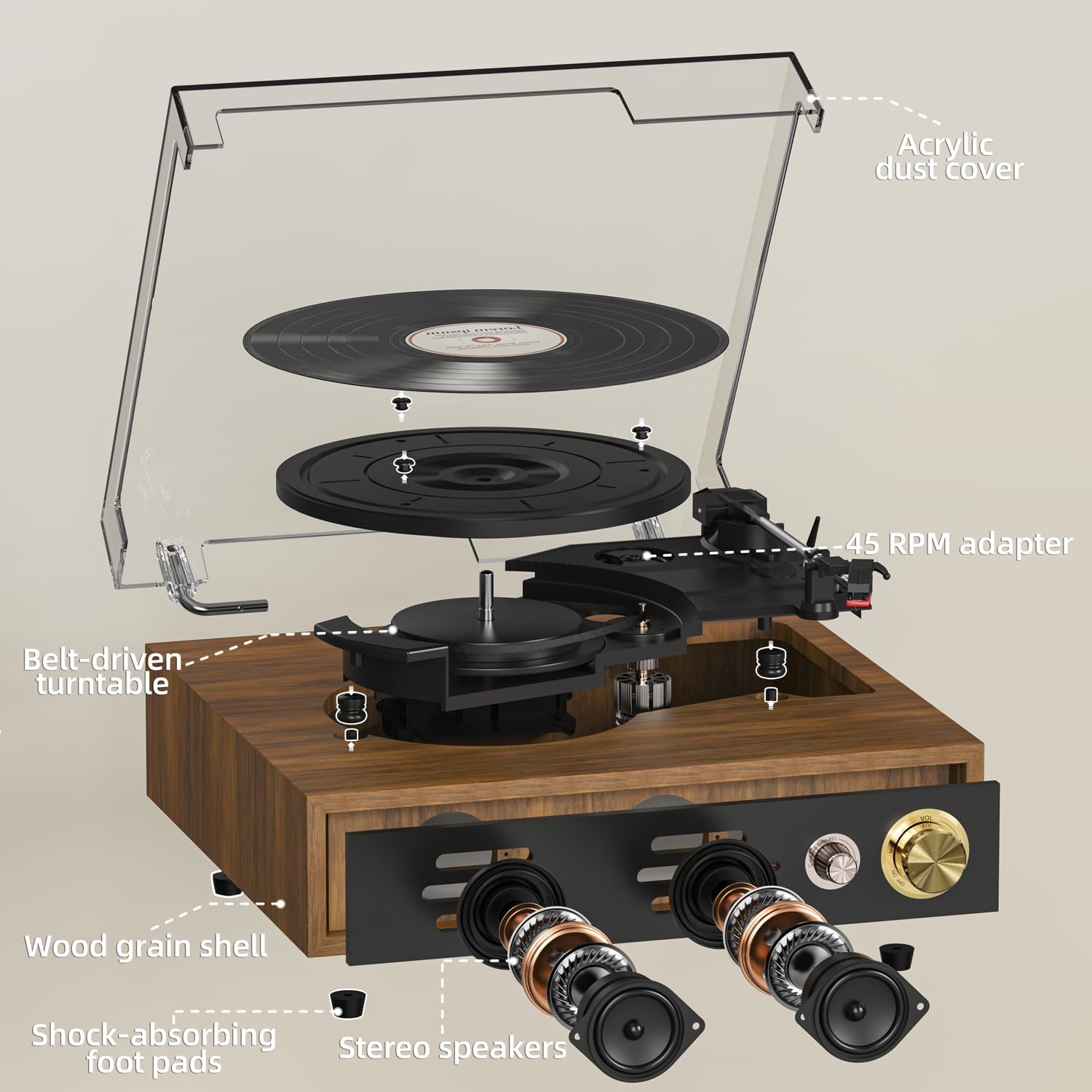
Familiarize yourself with the main components of your FYDEE A9 Record Player.
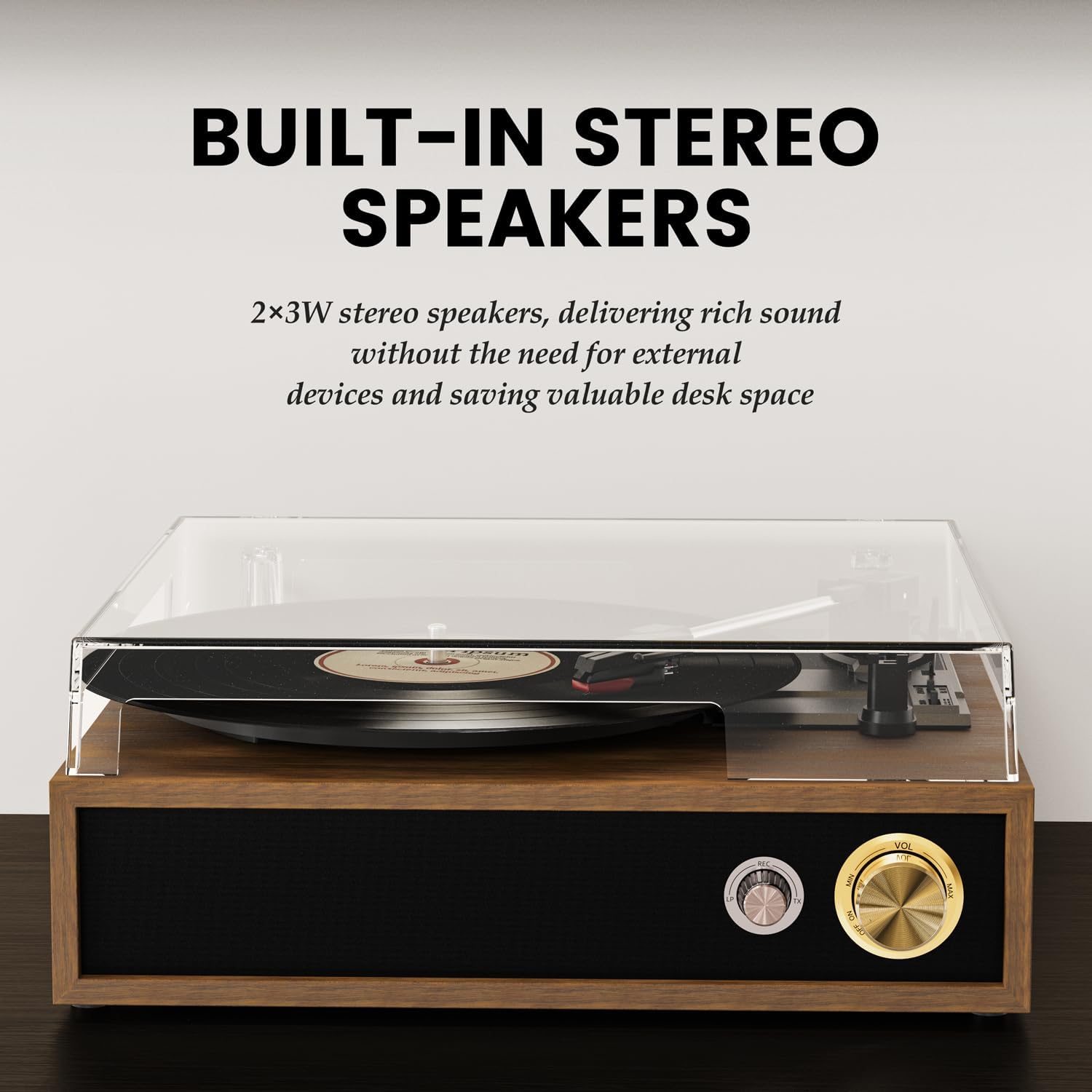
- Talíř talíře: Where vinyl records are placed for playback.
- Rameno: Drží stylus a sleduje drážky desky.
- Stylus (jehla): Reads the audio information from the record.
- Protiprachový kryt: Protects the turntable and records from dust.
- Volič rychlosti: Allows selection of 33, 45, or 78 RPM.
- Automatický spínač: Povolí nebo zakáže automatické zastavení talíře na konci desky.
- Ovladač napájení/hlasitosti: Turns the unit on/off and adjusts the volume.
- Knoflík režimu: Selects between LP (Vinyl), Bluetooth Receiving (BT RX), Bluetooth Transmission (BT TX), and USB modes.
- Sluchátkový jack: Pro soukromý poslech se sluchátky.
- USB port: Pro přehrávání a nahrávání z USB.
- RCA výstup: Pro připojení k externím reproduktorům nebo ampživější.
- Vstup DC 5V: Port pro připojení napájení.
5. Nastavení
- Rozbalení: Opatrně vyjměte všechny součásti z obalu. Obal uschovejte pro budoucí přepravu nebo skladování.
- Instalace krytu proti prachu: Align the hinges of the transparent acrylic dust cover with the slots on the back of the record player and gently slide it into place. This cover protects the turntable and records from dust when not in use.
- Připojení napájení: Connect the provided AC adapter to the DC 5V input port on the back of the record player and then plug it into a wall outlet.
- Ochrana stylusu: Remove the clear plastic stylus protective cap from the stylus assembly before playing any record.
- Optional: External Speaker Connection: If you wish to connect external speakers or an amplifier, use the provided RCA cable. Connect the red plug to the 'R' (Right) output and the white plug to the 'L' (Left) output on the record player. Connect the other end to the corresponding input on your external audio system.
For a visual guide on setting up the dust cover and initial connections, please refer to the video below:
1 video: Unboxing and initial setup of the FYDEE Record Player, including dust cover installation and cable connections.
6. Provoz
6.1 Přehrávání vinylových desek
- Zapnutí: Turn the Power/Volume knob clockwise to turn on the record player. The indicator light will illuminate.
- Select LP Mode: Turn the Mode knob to 'LP' for vinyl playback.
- Záznam o místě: Place a vinyl record on the turntable platter. If playing a 45 RPM single, use the included 45 RPM adapter.
- Vyberte rychlost: Adjust the speed selector switch (located near the tonearm) to match the record's speed (33, 45, or 78 RPM).
- Enable/Disable Auto-Stop: Set the Auto-Stop switch to 'ON' if you want the platter to stop spinning automatically at the end of the record. Set to 'OFF' for continuous play or if your record has a non-standard run-out groove.
- Pozice raménka přenosky: Gently lift the tonearm using the cueing lever. Move the tonearm over the desired starting track of the record.
- Spodní raménko: Pomalu spusťte raménko na desku pomocí páčky pro přehrávání. Hudba se začne přehrávat.
- Upravit hlasitost: Upravte hlasitost pomocí knoflíku Napájení/Hlasitost.

See the record player in action, including playing a vinyl record:
2 video: Demonstration of the FYDEE Turntable playing a 3-speed vinyl record, showcasing its operation and sound output.
6.2 Bluetooth Functionality (Bidirectional)
The FYDEE A9 supports Bluetooth 5.4 for both receiving and transmitting audio.
6.2.1 Bluetooth Receiving Mode (Turntable as Speaker)
- Zapnutí: Turn the Power/Volume knob clockwise to turn on the record player.
- Select BT RX Mode: Turn the Mode knob to 'BT RX'. The blue indicator light will flash, indicating it's ready for pairing.
- Spárovat zařízení: On your smartphone or other Bluetooth device, enable Bluetooth and search for 'A9'. Select it to pair. Once connected, the blue indicator light will stop flashing and remain solid.
- Přehrát zvuk: Play music from your connected device. The audio will play through the record player's built-in speakers.
- Upravit hlasitost: Control the volume using the Power/Volume knob on the record player or from your connected device.
6.2.2 Bluetooth Transmission Mode (Turntable to External Bluetooth Speaker)
- Zapnutí: Turn the Power/Volume knob clockwise to turn on the record player.
- Select BT TX Mode: Turn the Mode knob to 'BT TX'. The red indicator light will flash, indicating it's searching for an external Bluetooth speaker.
- Activate External Speaker: Přepněte externí Bluetooth reproduktor nebo sluchátka do režimu párování.
- Automatické připojení: The record player will automatically connect to the nearest discoverable Bluetooth speaker. Once connected, the red indicator light will stop flashing and remain solid.
- Přehrát vinyl: Play a vinyl record as described in section 6.1. The audio will be transmitted wirelessly to your external Bluetooth speaker.
- Upravit hlasitost: Control the volume primarily from your external Bluetooth speaker.
For a detailed guide on Bluetooth setup, watch this video:
3 video: A quick guide to setting up Bluetooth on the FYDEE Turntable, demonstrating both receiving and transmission modes.
6.3 Přehrávání a nahrávání z USB
The USB port allows for both playing digital audio files and recording your vinyl collection.
6.3.1 Přehrávání z USB
- Vložte USB disk: Vložte USB flash disk s audio soubory ve formátu MP3 filedo portu USB.
- Vyberte režim USB: Turn the Mode knob to 'USB'. The unit will automatically detect and begin playing MP3 files z USB disku.
- Upravit hlasitost: Upravte hlasitost pomocí knoflíku Napájení/Hlasitost.
6.3.2 USB Recording (Vinyl to MP3)
- Vložte USB disk: Vložte USB flash disk do USB portu.
- Select LP Mode: Turn the Mode knob to 'LP'.
- Spustit nahrávání: While a record is playing, press and hold the 'MODE' knob for a few seconds until the indicator light changes (refer to product specific light indicators for recording). The record player will begin recording the audio from the vinyl to the USB drive as MP3 files.
- Zastavit nahrávání: Press the 'MODE' knob again to stop recording. The recorded files will be saved on the USB drive.

7. Údržba
7.1 Čištění
- Protiprachový kryt: Wipe the dust cover gently with a soft, dry cloth. Do not use abrasive cleaners or solvents.
- Stylus: Use a soft brush (not included) to gently clean the stylus from back to front. Do not brush from side to side.
- Evidence: Keep your records clean by wiping them with an anti-static record brush (not included) before each play.
- Exteriér jednotky: Vnější povrch jednotky otřete měkkým, suchým hadříkem.
7.2 Výměna stylusu
The stylus is a consumable part and should be replaced after approximately 300-500 hours of use to maintain optimal sound quality and prevent damage to your records. Contact FYDEE customer support for replacement stylus information.
8. Řešení problémů
| Problém | Možná příčina | Řešení |
|---|---|---|
| Žádná síla | Power adapter not connected; Power outlet not active; Unit not turned on. | Ensure AC adapter is securely connected and plugged into a live outlet. Turn the Power/Volume knob clockwise to power on. |
| Žádný zvuk z reproduktorů | Volume too low; Incorrect mode selected; Stylus protective cap still on. | Increase volume. Ensure 'LP' mode is selected for vinyl. Remove stylus cap. |
| Zkreslení nebo přeskakování zvuku | Record is dirty or damaged; Stylus is worn or dirty; Incorrect speed selected; Unit not on a stable surface. | Clean record. Clean or replace stylus. Select correct RPM. Place unit on a stable, level surface. |
| Problémy s párováním pomocí rozhraní Bluetooth | Incorrect Bluetooth mode; Device too far; Interference. | Ensure correct BT mode (RX or TX) is selected. Keep devices within range (approx. 10m). Reduce interference from other electronic devices. |
| USB not playing/recording | Incorrect mode; USB drive not formatted correctly or unsupported file type; USB drive faulty. | Ensure 'USB' mode is selected. Use FAT32 formatted USB drives with MP3 files. Zkuste jiný USB disk. |
9. Specifikace
| Funkce | Detail |
|---|---|
| Značka | FYDEE |
| Model | A9 |
| Podporované rychlosti | 33 1/3, 45, 78 ot./min |
| Typ pohonu | Pohon řemenem |
| Konektivita | Bidirectional Bluetooth 5.4, USB, RCA Output, Headphone Jack |
| Reproduktory | Built-in Stereo Speakers (2x3W) |
| Speciální funkce | USB Recording (Vinyl to MP3), USB Playback, Auto-Stop Function, Acrylic Dust Cover |
| Zdroj napájení | AC adaptér (DC 5V) |
| Rozměry | 32 x 29 x 13 cm (12.6 x 11.4 x 5.1 palce) |
| Hmotnost | 2.62 kg (5.78 lb) |
| Materiál | Acrylic, Engineered Wood, Metal |
10. Záruka a podpora
FYDEE is committed to providing quality products and customer satisfaction. Your FYDEE A9 Record Player comes with a standard manufacturer's warranty. For specific warranty details, please refer to the warranty card included in your package or contact our customer support.
Our dedicated support team is available to assist you with any setup, operational, or troubleshooting questions you may have. We also offer repair and replacement services as needed.
For assistance, please visit our official website or contact us via the email address provided in your product documentation.