
1. Úvod
This manual provides essential information for setting up, operating, maintaining, and troubleshooting your MINIX NR774 Mini PC. Please read this guide thoroughly before using the device to ensure proper functionality and longevity.

Obrázek 1.1: Přední strana view of the MINIX NR774 Mini PC, showcasing its compact design and accessible front ports.
2. Obsah balení
Ověřte, zda jsou v balení obsaženy všechny níže uvedené položky:
- 1 x MINIX NGC NR774 Mini PC
- 1 x držák VESA se šrouby
- 1 x Power Adapter with US/EU/UK Plug
- 1 x Uživatelská příručka (tento dokument)
3. Konec produktuview
The MINIX NR774 Mini PC is a compact desktop computer designed for various applications, from home office tasks to gaming and multimedia. It features a robust AMD Ryzen 7 8745HS processor, 32GB DDR5 RAM, and a 1TB PCIe 4.0 SSD, running on Windows 11 Pro.
3.1. Rozložení portů
Familiarize yourself with the available ports for connecting peripherals and network devices.

Image 3.1: Detailed diagram illustrating the front and rear port configurations of the MINIX NR774 Mini PC.
- Přední porty: Power Button, USB-A 3.2 Gen2 (x2), USB-C 4.0/PD 3.0 (x2), 3.5mm Audio Input/Output Combo Jack, Reset Hole.
- Zadní porty: DC IN Port, USB-A 2.0 (x2), HDMI, DP (DisplayPort), 2.5G RJ-45 Ethernet Port (x2).
4. Průvodce nastavením
Follow these steps for initial setup of your Mini PC.
4.1. Připojení periferií
- Připojení displeje: Use an HDMI or DisplayPort cable to connect your monitor to the corresponding port on the rear of the Mini PC. For 8K resolution, ensure your monitor and cable support 8K@60Hz and connect via a single USB-C 4.0 port.
- Připojení klávesnice a myši: Plug your USB keyboard and mouse into any available USB-A ports.
- Připojte napájení: Připojte napájecí adaptér k portu DC IN na zadní straně Mini PC a poté zapojte adaptér do elektrické zásuvky.
4.2. Zapnutí
Press the power button located on the front of the Mini PC. The device will boot up, and the operating system will begin loading.
4.3. Initial Windows 11 Pro Setup
Upon first boot, you will be guided through the Windows 11 Pro setup process. Follow the on-screen instructions to configure language, region, network, and user accounts.
4.4. Multi-Display Configuration
The MINIX NR774 supports up to four displays simultaneously via HDMI, DisplayPort, and two USB-C 4.0 ports. To configure multiple displays:
- Connect additional monitors to the available video output ports.
- Once connected, right-click on the desktop and select 'Display settings' (Windows).
- From the display settings, you can arrange your monitors, set their resolution, and choose display modes (e.g., Extend, Duplicate).
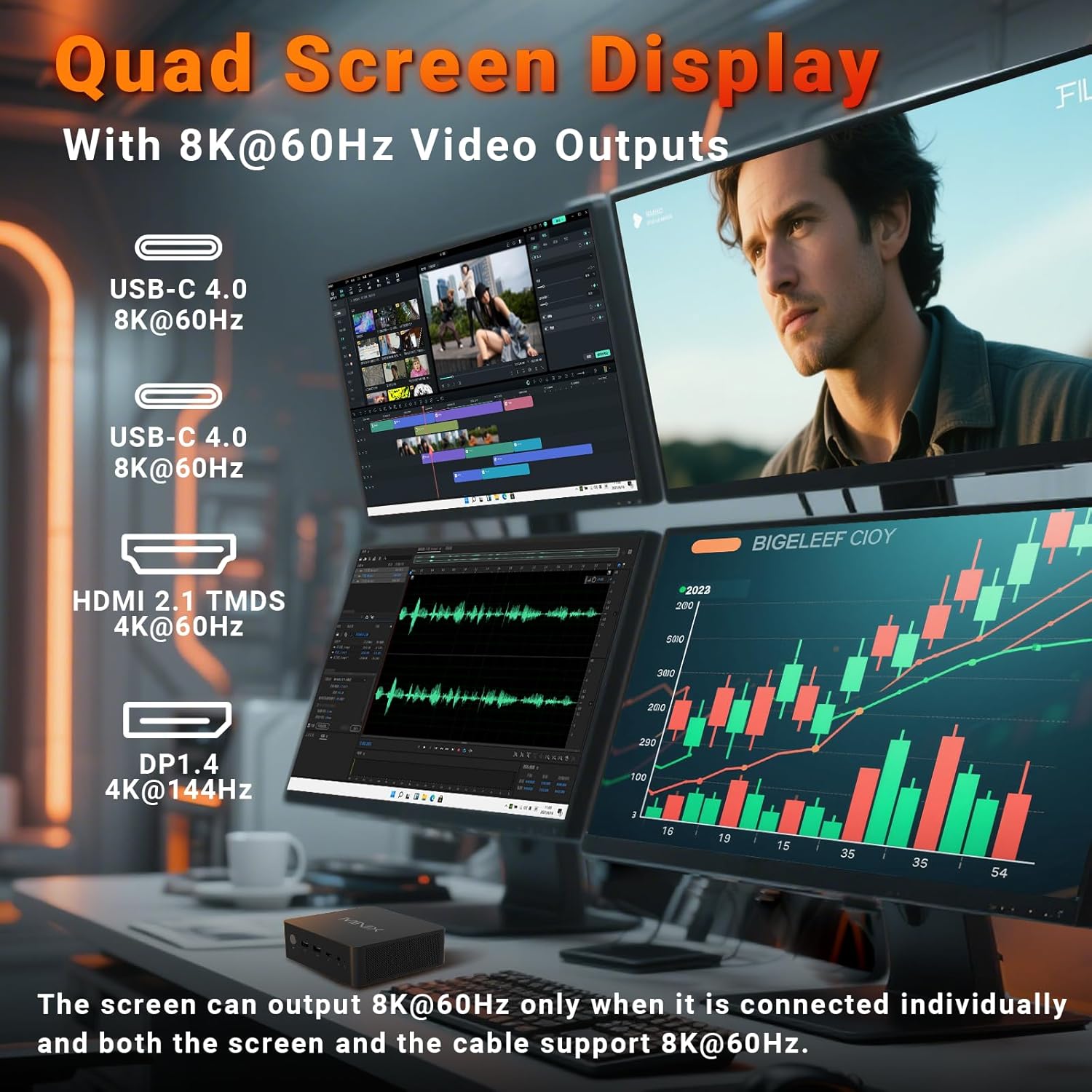
Image 4.1: The Mini PC supporting a quad-display setup, demonstrating its capability for enhanced productivity and immersive viewzkušenosti.
5. Návod k obsluze
5.1. Základní obsluha
The MINIX NR774 functions as a standard Windows 11 Pro desktop computer. Utilize the connected keyboard and mouse for navigation and interaction with the operating system and applications.
5.2. Připojení k síti
- Wi-Fi 6E: For wireless internet access, connect to your Wi-Fi network through Windows settings. The device supports 2.4GHz, 5GHz, and 6GHz bands for high-speed wireless communication.
- Duální 2.5G LAN: For wired network connections, plug Ethernet cables into the two 2.5G RJ-45 ports on the rear. This provides stable and high-speed multi-gigabit networking.
- Bluetooth 5.2: Pair Bluetooth devices such as headphones, speakers, or game controllers through Windows Bluetooth settings.

Obrázek 5.1: Zadní strana view of the Mini PC highlighting the dual 2.5G Ethernet ports, alongside other connectivity options.
5.3. Funkce USB4.0
The two USB-C 4.0 ports on the front support data transfer speeds up to 40Gbps and can be used for external GPUs, high-speed storage, or additional display output (up to 8K@60Hz).
5.4. Diverse Applications
The MINIX NR774 is suitable for various uses, including:
- Kancelářské práce: Efficiently handle productivity applications and multitasking.
- Domácí kino: Enjoy high-resolution streaming and media playback.
- Úprava videa: Process and render video content with its powerful processor and amppaměť.
- Hraní: Capable of running many games, especially at 1080p or 720p resolutions with appropriate settings.

Image 5.2: A user engaged in gaming, demonstrating the Mini PC's capability for entertainment.
6. Údržba
Regular maintenance helps ensure the optimal performance and longevity of your Mini PC.
6.1. Obecná péče
- Uchovávejte zařízení v čistém a suchém prostředí, mimo dosah přímého slunečního záření a extrémních teplot.
- Avoid blocking the ventilation holes to ensure proper airflow.
- Vnější povrch čistěte měkkým, suchým hadříkem. Nepoužívejte tekuté čisticí prostředky.
6.2. Storage and Memory Upgrades
The Mini PC supports upgrades for both RAM and SSD. It features two M.2 slots for storage and two DDR5 memory slots.
- BERAN: The device comes with 32GB DDR5 memory and can be upgraded up to 256GB (not included). For optimal performance, especially in gaming, ensure dual-channel memory configuration.
- SSD: A 1TB PCIe 4.0 SSD is pre-installed. Storage can be expanded up to 8TB (not included) using additional M.2 PCIe 4.0 SSDs.
Consult a qualified technician for hardware upgrades to avoid damaging the device or voiding the warranty.

Obrázek 6.1: Vnitřní view of the Mini PC, illustrating the dual DDR5 RAM slots and M.2 PCIe 4.0 SSD slots for potential upgrades.
6.3. Chladicí systém
The Mini PC incorporates an advanced dual-fan cooling system with a heatsink to maintain optimal operating temperatures and minimize noise.

Obrázek 6.2: Znázornění diagramuasing the active cooling design of the Mini PC, featuring dual fans for efficient heat dissipation.
7. Řešení problémů
If you encounter issues with your MINIX NR774 Mini PC, refer to the following common solutions:
- Bez displeje:
- Ensure the monitor is powered on and the correct input source is selected.
- Check that video cables (HDMI, DisplayPort, USB-C) are securely connected to both the Mini PC and the monitor.
- Zkuste jiný videokabel nebo monitor, abyste vyloučili vadné zařízení.
- Bez napájení:
- Verify the power adapter is correctly plugged into the Mini PC and a working power outlet.
- Ujistěte se, že je tlačítko napájení pevně stisknuto.
- Problémy s připojením k síti:
- For Wi-Fi, check if the Wi-Fi adapter is enabled in Windows settings and ensure you are connected to the correct network.
- For wired LAN, ensure Ethernet cables are properly connected and your router/modem is functioning.
- Restart your router/modem and the Mini PC.
- Windows Not Loading/Operating System Issues:
- If Windows fails to load, try restarting the device.
- If issues persist, consider using Windows recovery options (accessible during boot by pressing F8 or Shift + Restart).
- Ujistěte se, že všechny ovladače jsou aktuální.
- Přehřívání:
- Ensure the Mini PC's ventilation holes are clear and not obstructed.
- Zařízení provozujte v dobře větraném prostoru.
If these steps do not resolve the issue, please contact MINIX customer support.
8. Specifikace
Detailed technical specifications for the MINIX NR774 Mini PC.
| Funkce | Specifikace |
|---|---|
| Značka | MINIX |
| Číslo modelu | NGC NR774 |
| Operační systém | Windows 11 Pro |
| Procesor | AMD Ryzen 7 8745HS (8 Cores/16 Threads, up to 4.9 GHz) |
| Grafický koprocesor | AMD Radeon 780M (integrovaná) |
| BERAN | 32GB DDR5 (rozšiřitelná až na 256GB) |
| Pevný disk | 1TB PCIe 4.0 SSD (Expandable up to 8TB) |
| Maximální rozlišení obrazovky | 7680x4320 (8K) |
| Bezdrátový typ | WiFi 6E (802.11ax), Bluetooth 5.2 |
| Ethernet | Duální 2.5G LAN |
| USB porty | 2x USB-A 3.0, 2x USB-A 2.0, 2x USB-C 4.0 |
| Video výstup | HDMI, DisplayPort, 2x USB-C 4.0 (Quad Display Support) |
| Hmotnost položky | 1.62 libry |
| Rozměry produktu | 5.45 x 5.17 x 2.05 palce |
9. Informace o záruce
MINIX products typically come with a standard manufacturer's warranty. For specific details regarding the warranty period and terms for your MINIX NR774 Mini PC, please refer to the warranty card included in your product packaging or visit the official MINIX webUschovejte si doklad o koupi pro případ reklamace.
10. Zákaznická podpora
For technical assistance, troubleshooting, or any inquiries regarding your MINIX NR774 Mini PC, please use the following contact methods:
- Online podpora: Log in to your Amazon account, navigate to 'Your Orders', and select 'Ask Product Question' for the MINIX NR774.
- Oficiální Webmísto: Navštivte oficiální stránky MINIX website for offline maintenance services and additional support resources.