
1. Úvod
This manual provides detailed instructions for the operation and maintenance of your CCYLEZ 5K 75MP Digital Camera. Please read this manual thoroughly before using the camera to ensure proper function and to maximize your photographic experience. This camera is designed to capture high-resolution 75MP images and record vibrant 5K HD video, featuring an 18X digital zoom, a 3.0-inch 180-degree flip screen, macro auto-focus capabilities, and integrated Wi-Fi for easy sharing.
2. Co je v krabici
Po otevření balení se prosím ujistěte, že obsahuje všechny následující položky:
- CCYLEZ 5K 75MP Digital Camera Body
- Rechargeable Lithium-Ion Battery (BL-5C)
- USB nabíjecí kabel
- Řemínek na zápěstí
- Čisticí hadřík
- Uživatelská příručka

Image: Contents of the camera package, showing the camera, battery, USB cable, wrist strap, and cleaning cloth.
3. Nastavení
3.1. Instalace baterie
- Najděte kryt prostoru pro baterie na boku fotoaparátu.
- Posunutím otevřete kryt.
- Insert the BL-5C lithium-ion battery into the compartment, ensuring the contacts align correctly.
- Zavřete kryt přihrádky na baterie, dokud bezpečně nezacvakne.
3.2. Instalace paměťové karty
This camera supports TF (MicroSD) cards. A memory card is required to save photos and videos.
- Otevřete kryt bateriového prostoru.
- Locate the TF card slot next to the battery.
- Insert the TF card with the gold contacts facing down until it clicks into place.
- Zavřete kryt prostoru pro baterie.
3.3. Nabíjení baterie
Před prvním použitím plně nabijte baterii.
- Connect the small end of the USB charging cable to the camera's USB port (located near the battery compartment).
- Druhý konec kabelu USB připojte k napájecímu adaptéru USB (není součástí balení) nebo k portu USB počítače.
- Rozsvítí se kontrolka nabíjení. Po dokončení nabíjení zhasne nebo změní barvu.
3.4. Zapnutí/vypnutí
- To power on: Press and hold the Power button (usually located on the top or side) until the screen illuminates.
- Vypnutí: Znovu stiskněte a podržte tlačítko napájení, dokud se obrazovka nevypne.
3.5. Adjusting the Flip Screen
The 3.0-inch HD screen can be flipped 180 degrees for various shooting angles, including selfies.
- Gently pull the screen upwards from the top edge.
- Rotate the screen to your desired angle. For selfies, flip it 180 degrees forward.
- To close, gently fold the screen back into its original position until it sits flush with the camera body.
Video: Demonstrates unboxing, battery and memory card installation, and the flip screen mechanism of the camera.

Image: The camera with its flip screen open, ideal for taking selfies or vlogging.
4. Návod k obsluze
4.1. Základy fotografování
Chcete-li pořídit fotografii:
- Ujistěte se, že je kamera zapnutá.
- Select your desired shooting mode using the mode dial (e.g., Automatic, Scenery, Portrait).
- Frame your shot using the flip screen.
- Press the shutter button halfway to activate auto-focus. The focus indicator will turn green when focus is achieved.
- Stiskněte tlačítko spouště až na doraz pro pořízení snímku.
4.2. Digitální zoom
The camera features an 18X digital zoom to bring distant subjects closer.
- Use the 'W' (Wide) and 'T' (Telephoto) buttons, typically located near the screen, to zoom in and out.
- Note that digital zoom may reduce image quality compared to optical zoom.
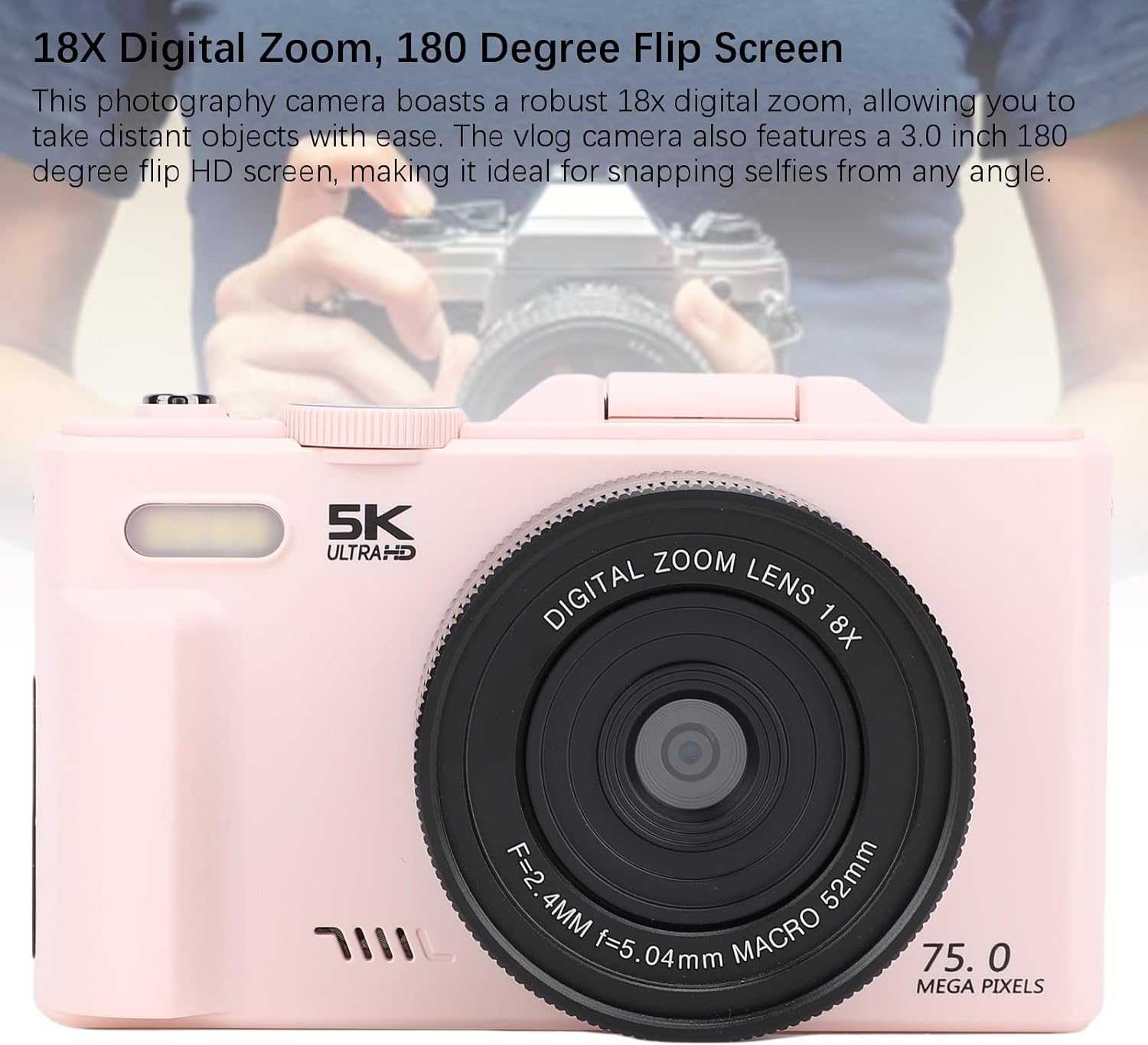
Image: The camera lens, indicating its 18X digital zoom feature.
4.3. Macro Photography
For detailed close-up shots of small objects like flowers or insects, use the macro mode.
- Select the macro mode from the mode dial or menu.
- Position the camera close to your subject. The camera's F/3.2 large aperture and 7.36mm macro lens will assist in capturing fine details.
- Press the shutter button halfway for auto-focus, then fully to capture.

Image: The camera focusing on a small subject, illustrating macro photography.
4.4. Nahrávání videa
Chcete-li nahrát video:
- Switch the mode dial to video recording mode.
- Press the shutter button to start recording. A red indicator or timer will appear on the screen.
- Dalším stisknutím tlačítka spouště nahrávání zastavíte.
4.5. WiFi Instant Sharing
The camera features built-in Wi-Fi for wireless transfer of photos and videos to your smartphone or tablet.
- Povolte Wi-Fi na fotoaparátu prostřednictvím nastavení nabídky.
- Download the dedicated camera app (refer to the camera's on-screen instructions or manual for app name) on your smartphone/tablet.
- Connect your smartphone/tablet to the camera's Wi-Fi network (SSID and password will be displayed on the camera screen).
- Pomocí aplikace můžete procházet, stahovat a sdílet média.

Image: Camera connected to a smartphone via Wi-Fi, demonstrating wireless sharing.
4.6. Používání vestavěného blesku
The built-in flash assists in low-light conditions.
- The flash typically operates in automatic mode, firing when light conditions are insufficient.
- You can manually control flash settings (e.g., On, Off, Red-eye Reduction) through the camera's menu.

Image: Depiction of the camera's flash function in a dark environment.
4.7. Režimy fotografování
The camera offers various shooting modes to suit different scenarios. Rotate the mode dial to select:
- Ordinary & Daily Photography: Standardní režim pro každodenní snímky.
- Automatic Photography: Fotoaparát automaticky upraví nastavení.
- Camera Timer: For delayed shots (e.g., 2s, 5s, 10s).
- Scenery: Optimizes settings for landscapes.
- Portrét: Enhances skin tones and blurs backgrounds for portraits.
- Souvislé fotografování: Pořídí více fotografií v rychlém sledu.
- Slow Photography: For slow-motion effects.
- Časosběrné nahrávání: Captures images over time to create a time-lapse video.
- Nahrávání ve smyčce: Continuously records video, overwriting older footage.
- Video Recording Photography: Dedicated video mode.
- Noc View: Optimizes for low-light night scenes.
- Strana: Settings optimized for indoor party environments.

Image: The camera's mode dial illustrating different available shooting modes.
5. Údržba
5.1. Čištění fotoaparátu
- Use the provided cleaning cloth or a soft, lint-free cloth to gently wipe the camera body and screen.
- For stubborn smudges on the lens, use a specialized lens cleaning solution and cloth. Avoid harsh chemicals.
- Do not use excessive force when cleaning the flip screen.
5.2. Skladování
- Fotoaparát skladujte na chladném a suchém místě mimo dosah přímého slunečního záření a extrémních teplot.
- Pokud skladujete po delší dobu, vyjměte baterii, abyste zabránili vytečení.
- Keep the camera in its protective pouch (if included) to prevent scratches.
5.3. Péče o baterie
- Vyhněte se častému úplnému vybíjení baterie.
- Pravidelně nabíjejte baterii, i když ji nepoužíváte, abyste zachovali její životnost.
- Staré baterie zlikvidujte zodpovědně v souladu s místními předpisy.
6. Řešení problémů
If you encounter issues with your camera, please refer to the following common solutions:
| Problém | Možná příčina / řešení |
|---|---|
| Fotoaparát se nezapne. | Baterie je vybitá nebo nesprávně vložená. Ujistěte se, že je baterie nabitá a správně vložená. |
| Nelze pořizovat fotografie/videa. | Memory card is full, not inserted, or corrupted. Check card status, replace if necessary. Ensure correct shooting mode is selected. |
| Obrázky jsou rozmazané. | Camera not focused. Ensure auto-focus engages (half-press shutter). Check for smudges on the lens. Ensure sufficient lighting. |
| Problémy s připojením k Wi-Fi. | Ensure Wi-Fi is enabled on camera and smart device. Verify correct network name (SSID) and password. Restart both devices. |
| Blesk se neaktivuje. | Check flash settings in the menu. Ensure camera is in a mode that allows flash. |
| Obrazovka je prázdná nebo zamrzlá. | Try removing and reinserting the battery. If issue persists, contact customer support. |
7. Specifikace
Detailed technical specifications for the CCYLEZ 5K 75MP Digital Camera:
- Název modelu: CCYLEZz4wsnqrma7
- Technologie fotosenzoru: CMOS
- Maximum WebRozlišení obrazu kamery: 75 MP
- Efektivní statické rozlišení: 75 MP
- Formát záznamu videa: MP4 (5K HD)
- Optický zoom: 18x (Digital Zoom)
- Typ objektivu: Makro
- Minimální ohnisková vzdálenost: 7.36 milimetrů
- Maximální ohnisková vzdálenost: 7.36 milimetrů
- Režimy clony: F3.2
- Velikost obrazovky: 3 Inches (180-degree Flip HD Screen)
- Typ displeje: LCD
- Typ zaměření: Auto Focus (Continuous-Servo AF)
- Typ řízení expozice: Automaticky, Ručně
- Citlivost na světlo: ISO 100-3200
- Nastavení vyvážení bílé: Auto, Cloudy, Fluorescent, Incandescent
- Blesk fotoaparátu: Built-In (Automatic modes)
- Technologie připojení: Wi-Fi, Ethernet (for data transfer/streaming)
- Typ baterie: Lithium Ion (BL-5C)
- Kapacita baterie: 1150 miliamp hodiny
- Úroveň odolnosti proti vodě: Není odolný vůči vodě
- Kompatibilní zařízení: Smartphones, Tablets, TVs, Computers
- Specifické použití pro produkt: vlogování
8. Záruka a podpora
8.1. Informace o záruce
Your CCYLEZ 5K 75MP Digital Camera comes with a standard manufacturer's warranty. Please refer to the warranty card included in your package for specific terms, conditions, and duration. This warranty typically covers defects in materials and workmanship under normal use.
8.2. Zákaznická podpora
For technical assistance, troubleshooting beyond this manual, or warranty claims, please contact CCYLEZ customer support. Contact information can usually be found on the product packaging, the official CCYLEZ webwebu nebo prostřednictvím svého prodejce.
When contacting support, please have your camera model number (CCYLEZz4wsnqrma7) and purchase details readily available.