
1. Úvod
The FEELWORLD F5PROX is a 5.5-inch camera field touchscreen monitor designed to assist photographers and filmmakers with high-quality shooting. It features a 1600-nit high-brightness display, 1920x1080 IPS panel, and a suite of professional auxiliary functions including 3D LUT, Waveform, and Vector Map. This manual provides detailed instructions for the setup, operation, maintenance, and troubleshooting of your F5PROX monitor.
2. Obsah balení
Zkontrolujte prosím, zda jsou všechny níže uvedené položky součástí balení. Pokud některé položky chybí nebo jsou poškozené, kontaktujte svého prodejce.
- FEELWORLD F5PROX Monitor (x1)
- Micro HDMI Cable (x1)
- Montážní držák (x1)
- Sunshade (x1)
- Type-C to USB Adapter (x1)
- Removal Spanner (x1)
- Návod k použití (x1)

Figure 2.1: F5PROX Monitor and Included Accessories
3. Konec produktuview
3.1 Funkce displeje
The F5PROX monitor features a 5.5-inch IPS display with a resolution of 1920x1080 Full HD. It boasts a high brightness of 1600 nits, ensuring clear visibility even in bright daylight conditions. The display supports REC-709 color calibration for accurate and natural color reproduction, and offers a 160° viewúhel.

Figure 3.1: Display Specifications and Features
3.2 Physical Characteristics and Ports
The monitor is compact, measuring 148mm (L) x 93mm (H) x 20mm (D) and weighing 245g. It features multiple mounting points and supports 180° rotation for flexible positioning. Connectivity options include HDMI input and output ports, a DC power input, and a Type-C power input.

Figure 3.2: HDMI Input and Output Ports
4. Nastavení
4.1 Napájení monitoru
The F5PROX monitor offers flexible power options:
- Lithium Battery (NP-F series): Compatible with F970/F960/F950/F930/F770/F750/F730/F570/F550/F530 series batteries.
- DC adaptér: Connect a compatible DC power adapter to the DC IN 8.4V port.
- Napájecí zdroj typu C: Use a Type-C cable to power the monitor.
The monitor also supports an external power supply system compatible with F550/F750/F970 batteries, simplifying equipment setup by eliminating additional cables.

Figure 4.1: Flexible Power Supply Options

Figure 4.2: Powering a DSLR or Mirrorless Camera

Figure 4.3: External Power Supply System Integration
4.2 Montáž monitoru
Attach the included mounting bracket or tilt arm to the monitor's 1/4" thread hole. Secure the monitor to your camera rig or hot shoe mount. The monitor supports 360° rotation and 180° tilt for optimal viewing úhly.
4.3 Připojení k fotoaparátu
Use the provided Micro HDMI cable to connect your camera's HDMI output to the monitor's HDMI input. The monitor supports various HDMI input formats, including 1080i, 720p, 1080p, and 4K UHD signals up to 4096x2160 (24Hz).
5. Provoz
5.1 Základní obsluha
The F5PROX monitor can be controlled via its high-sensitivity touchscreen or physical buttons. The power switch can be used to turn the monitor on or off. Navigate menus and settings by tapping on the screen or using the menu and navigation buttons.

Figure 5.1: Touch and Key Control Interface
5.2 Professional Auxiliary Functions
The monitor is equipped with a range of professional tools to assist with accurate exposure, focusing, and composition:
- 3D LUT: Supports uploading up to 32 custom LUTs for real-time color grading preview.
- Křivka: Displays luminance and color distribution for precise exposure adjustment.
- Vector Map: Visualizes color hue and saturation.
- Histogram jasu: Shows the distribution of brightness levels in the image.
- Pomocné zaostření (obrysy): Zvýrazňuje zaostřené oblasti pro přesné manuální ostření.
- Anamorfní režim: Uvolňuje anamorfní footage.
- Exposure Tip (Zebra): Označuje přeexponované oblasti.
- Převrácení obrázku: Otočí obrázek vodorovně nebo svisle.
- Přiblížení obrázku: Zvětší část obrazu pro detailní prohlídku.
- Falešná barva: Assigns false colors to different exposure levels.
- Audio Columns: Zobrazuje úrovně hlasitosti.
- Devítidílná mřížka: Pomáhá s kompozicí pomocí mřížky s pravidlem třetin.
- Center Marker & Safe Frames: Aids in framing and ensuring content is within broadcast-safe areas.
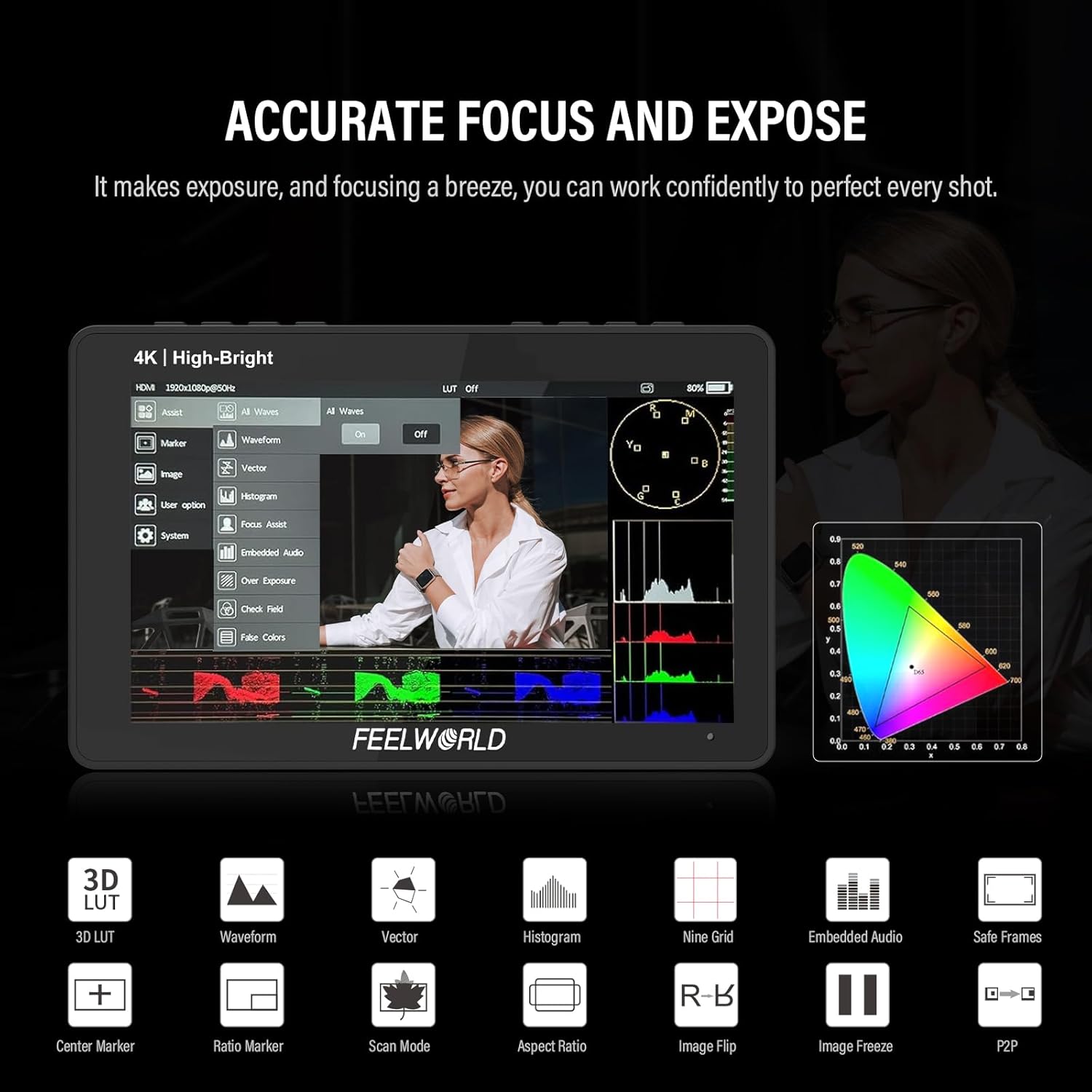
Figure 5.2: Professional Auxiliary Functions Interface
5.3 Customizing 3D LUTs
The F5PROX supports uploading up to 32 custom 3D LUTs. This feature allows you to preview your desired look directly on the monitor during field shooting, streamlining your post-production workflow. Note that after 32 groups, previous files will be automatically overwritten.

Figure 5.3: 3D LUT Customization
6. Údržba
To ensure the longevity and optimal performance of your FEELWORLD F5PROX monitor, follow these maintenance guidelines:
- Čištění: Use a soft, dry cloth to clean the monitor's exterior. For the screen, use a microfiber cloth specifically designed for electronics displays. Avoid using harsh chemicals or abrasive materials.
- Skladování: When not in use, store the monitor in a cool, dry place away from direct sunlight and extreme temperatures. Use the included sunshade or a protective case to prevent scratches and dust accumulation.
- Zacházení: Handle the monitor with care to avoid drops or impacts, which can damage internal components or the screen.
- Moc: Always disconnect the power supply before cleaning or prolonged storage.
7. Řešení problémů
This section addresses common issues you might encounter with your F5PROX monitor.
| Problém | Možná příčina | Řešení |
|---|---|---|
| Monitor se nezapne. | Slabá baterie nebo žádné připojení k napájení. | Ensure battery is charged or connect to a stable power source (DC adapter or Type-C). |
| Není zobrazen žádný obrázek. | Incorrect HDMI connection or camera output settings. | Check HDMI cable connection. Verify camera's HDMI output settings match monitor's supported formats. |
| Obraz je zkreslený nebo bliká. | Faulty HDMI cable or signal interference. | Try a different HDMI cable. Ensure no strong electromagnetic interference sources are nearby. |
| Dotykový displej nereaguje. | Temporary software glitch or screen lock. | Restart the monitor. Check if the touch function is disabled via the menu or shortcut button. |
| Auxiliary functions not working. | Function not enabled in menu. | Navigate to the monitor's menu and enable the desired auxiliary function. |
8. Specifikace
| Funkce | Specifikace |
|---|---|
| Číslo modelu | F5PROX |
| Velikost displeje | 5.5 palců |
| Rezoluce | 1920x1080 IPS |
| Jas | 1600 nitů |
| Kontrastní poměr | 1000:1 |
| Viewúhel | 160° |
| Barevná hloubka | 8 bitů |
| Hustota pixelů (PPI) | 368 |
| HDMI vstup/výstup | 4K HDMI IN/OUT |
| Vstup napájení | DC 8.4V, Type-C, NP-F Battery |
| Rozměry (DxVxH) | 148 mm x 93 mm x 20 mm |
| Hmotnost položky | 245 g (0.54 lb) |
| Výrobce | FEELWORLD |
| Datum první dostupnosti | 20. května 2025 |
9. Záruka a podpora
The FEELWORLD F5PROX monitor comes with a standard warranty. An extended warranty of 7+1 years may be available. For detailed warranty terms, technical support, or service inquiries, please refer to the official FEELWORLD webstránky nebo se obraťte na svého autorizovaného prodejce.