
1. Úvod
The Qubo X232 is a 4G mobile phone designed for simplicity and reliability, particularly suitable for seniors or users who prefer a straightforward device for calls, messages, and daily use without complications. It features a large display, big buttons, and an emergency SOS function for enhanced safety and ease of communication.
2. Konec produktuview
The Qubo X232 offers a user-friendly design with essential features for clear communication.
2.1 Klíčové vlastnosti
- Velký 2.3palcový displej: Provides clear visibility with larger text and icons for easy reading.
- Big Buttons & Backlit Keypad: Physical keys are large for comfortable dialing, and the backlit keypad aids use in low-light conditions. Voice announcement of keys pressed is also included.
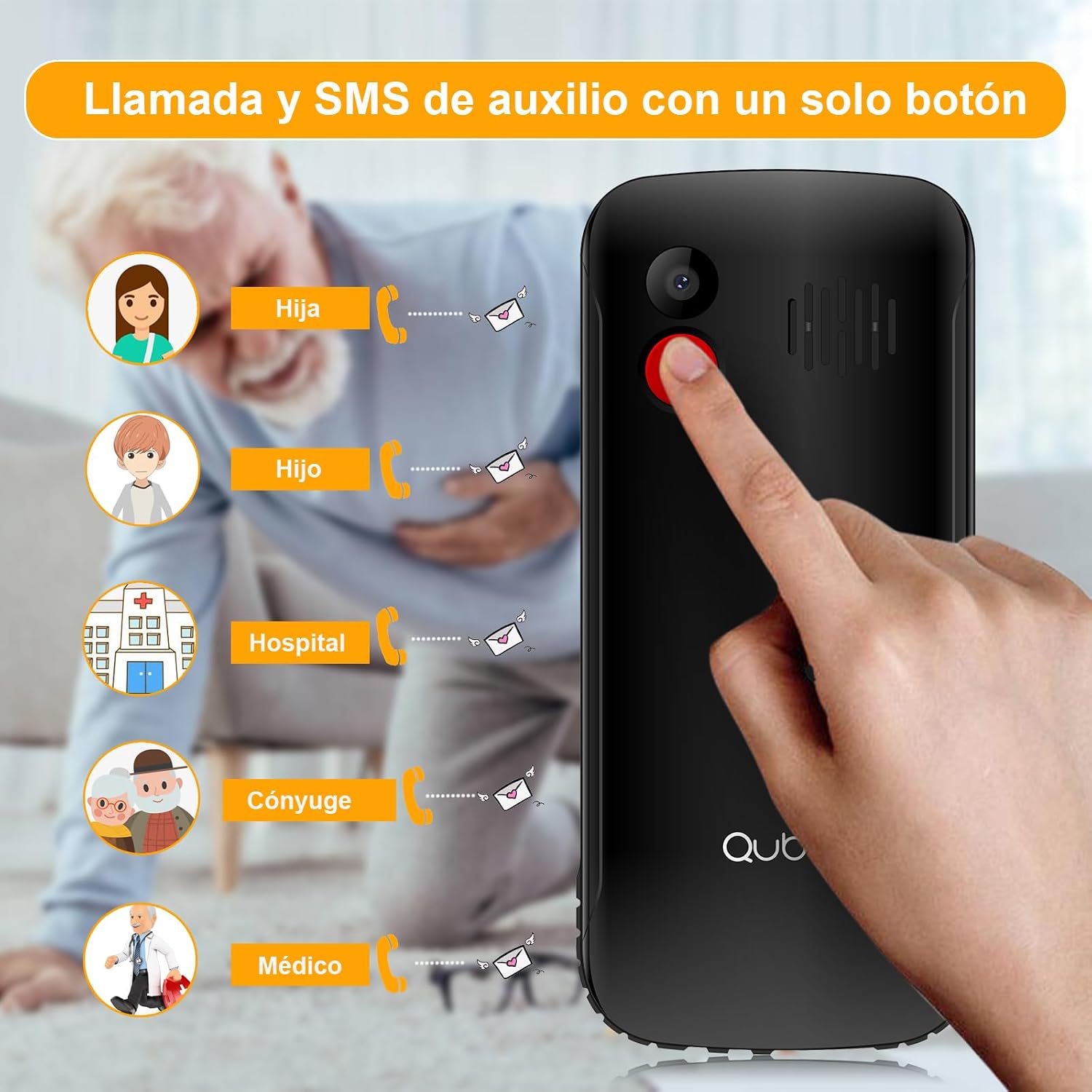
- Nouzové tlačítko SOS: A dedicated button for emergencies, allowing automatic calls and SMS to up to 5 pre-set contacts.
- Hlasitý zvuk: High volume for calls and ringtones, beneficial for users with hearing difficulties or in noisy environments.
- Dlouhotrvající baterie s kapacitou 1700 mAh: Offers extended standby time, reducing the frequency of charging.
- Unlocked & Wide Compatibility: Compatible with various network operators (Telcel, AT&T, Movistar, BAIT, CFE, Altan) and supports 4G/3G/2G networks.
- Convenient USB Type-C Charging: Modern and reversible charging port for easy connection.
- Integrovaná svítilna: Quick access to a powerful flashlight for convenience and emergencies.
- Další funkce: Includes FM radio, camera, music/video player, alarm, calendar, Bluetooth, microSD slot, and 3.5mm headphone jack.
2.2 Součásti telefonu




3. Nastavení
3.1 Instalace SIM karty a baterie
- Sejměte zadní kryt: Opatrně sejměte zadní kryt telefonu.
- Vložte SIM kartu(y): Locate the SIM card slot(s). The Qubo X232 supports Dual SIM. Insert your SIM card(s) into the designated slots, ensuring proper orientation as indicated on the phone.
- Vložení karty MicroSD (volitelné): If you wish to expand storage, insert a microSD card into its dedicated slot.
- Vložte baterii: Vložte baterii s kapacitou 1700 mAh do přihrádky na baterii a správně zarovnejte kontakty.
- Vyměňte zadní kryt: Bezpečně znovu nasaďte zadní kryt.
3.2 Nabíjení telefonu
Connect the provided USB Type-C cable to the phone's charging port and the other end to a power adapter. Plug the adapter into a wall outlet. The battery indicator on the screen will show charging status. Ensure the phone is fully charged before first use.
3.3 Zapnutí/vypnutí
To power on, press and hold the Power button (usually red) until the screen lights up. To power off, press and hold the Power button, then select 'Power Off' from the options.
4. Základní operace
4.1 Volání
- Vytáčení čísla: Zadejte telefonní číslo pomocí klávesnice.
- Zahájit hovor: Press the green Call button to make the call.
- Ukončit hovor: Press the red End Call button to hang up.
4.2 Příjem hovorů
When a call comes in, press the green Call button to answer. Press the red End Call button to reject or end the call.
4.3 Sending Messages (SMS)
- Přejděte do nabídky „Zprávy“.
- Vyberte „Nová zpráva“ nebo „Vytvořit SMS“.
- Zadejte telefonní číslo příjemce nebo jej vyberte z kontaktů.
- Napište zprávu pomocí klávesnice.
- Stiskněte tlačítko „Odeslat“.
4.4 Správa kontaktů
Access the 'Contacts' menu to add, edit, or delete contacts. You can assign speed dial numbers (M1, M2, M3) for quick access to important contacts. The phone also supports contacts with photos for easier identification.
5. Speciální funkce
5.1 Nouzové tlačítko SOS
The dedicated SOS button on the back of the phone is for emergencies. When pressed and held, it will automatically call up to 5 pre-set emergency contacts and send an emergency SMS message to them simultaneously. Ensure emergency contacts are properly configured in the phone settings.
5.2 Svítilna
The Qubo X232 includes a powerful flashlight. To activate or deactivate it, use the dedicated side button or navigate through the phone's menu options.
5.3 FM rádio
The phone features a built-in FM radio. Access it through the multimedia menu. No headphones are required to listen to the radio.
5.4 Ovládání hlasitosti
Adjust call and ringtone volume using the dedicated side buttons. The phone is designed to provide loud and clear audio.
6. Specifikace
| Funkce | Specifikace |
|---|---|
| Značka | Qubo |
| Název modelu | Qubo-X232 |
| Operační systém | Nucleus OS |
| Velikost obrazovky | 2.3 palců |
| Kapacita baterie | 1700 XNUMX mAh |
| Buněčná technologie | 4G (compatible with 5G SIMs at 4G speed) |
| Kompatibilita bezdrátových operátorů | All carriers (Telcel, AT&T, Movistar, BAIT, CFE, Altan) |
| SIM Card Count | Duální SIM |
| BERAN | 48 MB |
| Model CPU | 6X86 |
| Rychlost CPU | 2 GHz |
| Nabíjecí port | USB Type-C |
| Jack pro sluchátka | 3.5 mm |
| Rozměry | 132.1 x 58.2 x 14.1 mm |
| Hmotnost | Přibl. 110 g |
| Barva | Černý |
7. Řešení problémů
- Telefon se nezapne: Ujistěte se, že je baterie správně vložena a nabitá. Připojte nabíječku a zkuste to znovu.
- Bez signálu: Check if the SIM card is properly inserted. Ensure you are in an area with network coverage.
- Nelze uskutečňovat/přijímat hovory: Verify SIM card activation with your carrier. Check if the number is blocked or if call barring is active.
- Problémy s nabíjením: Ensure the USB Type-C cable and adapter are securely connected and undamaged. Try a different power outlet.
- Tlačítko SOS nefunguje: Confirm that emergency contacts are correctly set up in the SOS settings menu.
8. Bezpečnostní informace
Read all safety information before using your phone to ensure safe and proper use. Keep the phone away from water and extreme temperatures. Use only approved accessories. Do not attempt to disassemble or repair the phone yourself.
9. Záruka a podpora
The manufacturer offers a 30-day warranty for this product. For any issues or support inquiries beyond this period, please contact your retailer or the seller directly. Keep your purchase receipt as proof of purchase.