
1. Úvod
This manual provides essential information for setting up, operating, and maintaining your HP 17 Laptop. Please read this guide thoroughly to ensure proper use and to maximize the lifespan of your device. For additional assistance, refer to the support section.

Obrázek 1.1: Přední strana view of the HP 17 Laptop, highlighting its 17.3-inch display and key software/hardware features.
2. Co je v krabici
Ověřte, zda jsou v balení přítomny všechny položky:
- Notebook HP 17
- Napájecí adaptér a kabel
- Stručný průvodce (pokud je součástí dodávky)
Note: Additional accessories may be included depending on your specific purchase configuration.
3. Nastavení
3.1 První zapnutí
- Připojte napájecí adaptér k portu AC Smart Pin na notebooku a poté do elektrické zásuvky.
- Otevřete víko notebooku. Notebook se může zapnout automaticky nebo může být nutné stisknout tlačítko napájení.
- Follow the on-screen instructions to complete the Windows 11 Pro setup. This includes selecting your region, connecting to a Wi-Fi network, and creating a user account.
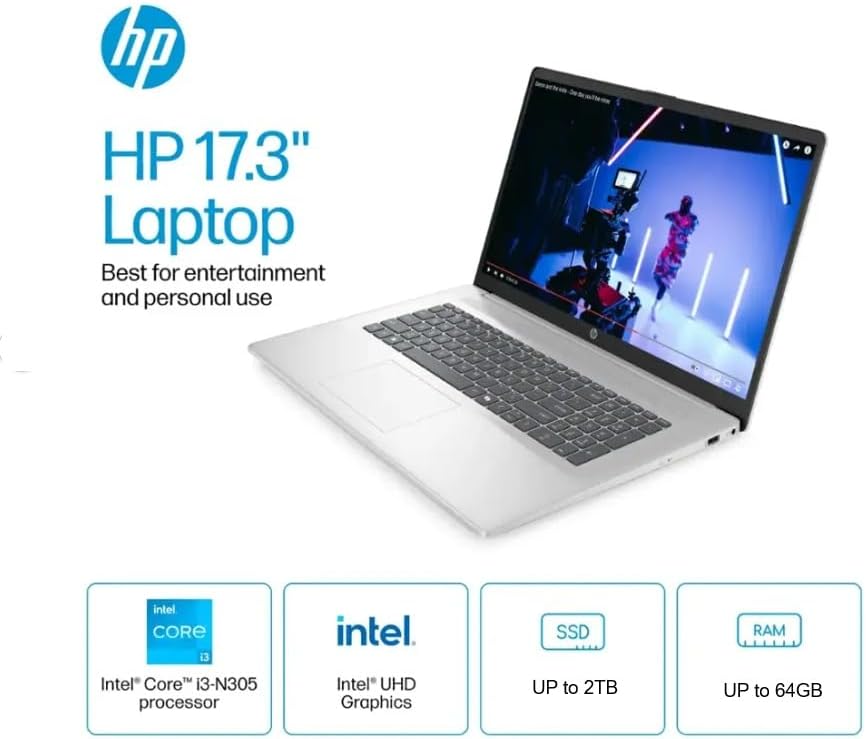
Obrázek 3.1: Přesview of the HP 17.3" Laptop, highlighting its core components like the Intel Core i3-N305 processor, Intel UHD Graphics, and expandable storage/RAM.
3.2 Microsoft Office 2024 Activation
Your laptop comes with Microsoft Office LTSC Professional Plus 2024 pre-installed and activated. No product key is required. To ensure continued functionality:
- Ne install Microsoft Office 365, as this may invalidate the Office 2024 license.
- Launch any Office application (e.g., Word, Excel) to confirm activation.
4. Ovládání notebooku
4.1 Klávesnice a touchpad
The laptop features a full-size, soft grey keyboard with a numeric keypad for efficient data entry. The integrated touchpad supports multi-touch gestures for navigation.

Obrázek 4.1: Strana view of the HP 17 Laptop, illustrating the engineered lift-hinge for improved typing comfort and airflow.
4.2 Porty a konektivita
Your HP 17 Laptop is equipped with various ports for connecting external devices:
- USB Type-A: Pro připojení standardních USB zařízení, jako jsou myši, klávesnice nebo externí disky.
- USB Type-C: A versatile port for data transfer and connecting compatible devices.
- HDMI: Pro připojení k externím displejům nebo projektorům.
- Kombinace sluchátek/mikrofonu: Pro audio vstup a výstup.
- Chytrý PIN pro AC: Pro připojení napájecího adaptéru.

Obrázek 4.2: Detailní view of the laptop's side ports, including USB Type-A, USB Type-C, HDMI, and the headphone/microphone combo jack.
4.3 Bezdrátová komunikace
The laptop supports Wi-Fi 6 for high-speed internet access and Bluetooth for connecting wireless peripherals.
5. Vlastnosti a specifikace
Below are the technical specifications for your HP 17 Laptop (Model TPN-I139_320M3AV):
| Funkce | Specifikace |
|---|---|
| Procesor | Intel Core i3-N305 (8 Cores, up to 3.8 GHz) |
| Operační systém | Windows 11 Pro |
| Zobrazit | 17.3" HD+ (1600 x 900), Anti-glare, 250 nits |
| Grafika | Grafika Intel UHD |
| BERAN | 16 GB DDR4 (konfigurovatelné až 64 GB) |
| Skladování | 256GB PCIe NVMe M.2 SSD (Configurable up to 2TB) |
| Bezdrátové připojení | Wi-Fi 6, Bluetooth |
| Porty | 2x USB Type-A, 1x USB Type-C, 1x HDMI 1.4b, 1x Headphone/Microphone Combo, 1x AC Smart Pin |
| Klávesnice | Full-size with numeric keypad |
| Rozměry (ŠxHxV) | 15.78 x 10.15 x 0.78 palce |
| Hmotnost | 4.6 liber (cca) |
| Barva | Stříbro |
| Baterie | 1 lithium-iontová baterie (součástí balení) |

Figure 5.1: The HP 17 Laptop demonstrating its multitasking capabilities with an Intel Core i3 processor and Wi-Fi 6 connectivity.

Figure 5.2: The HP 17 Laptop designed for user comfort, featuring HP Fast Charge and a spacious click pad.
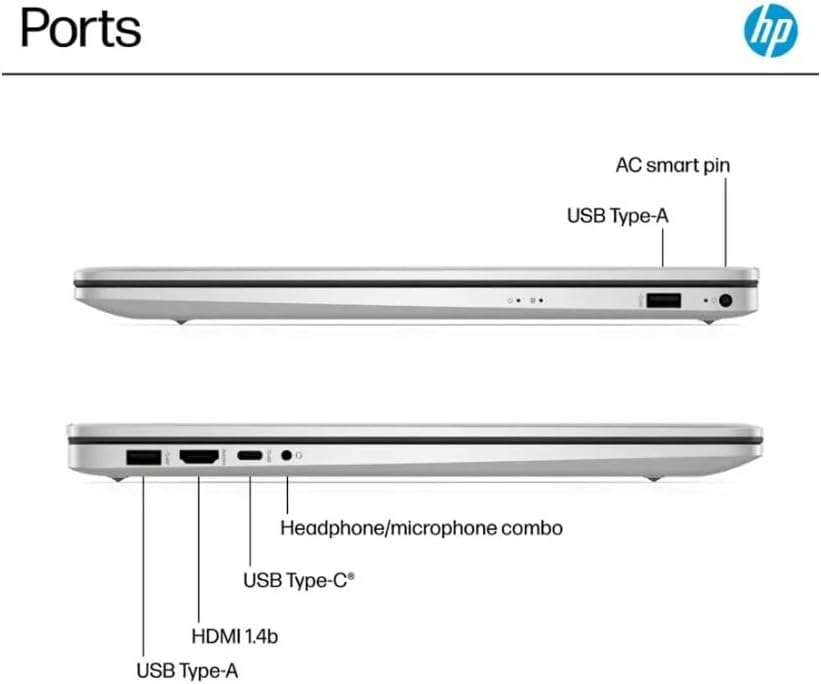
Figure 5.3: The HP 17 Laptop showcasing the Microsoft Copilot feature, designed to enhance productivity.

Figure 5.4: Physical dimensions and weight of the HP 17 Laptop for portability reference.

Figure 5.5: The HP 17 Laptop's environmental certifications, including EPEAT Gold and ENERGY STAR, and its use of recycled materials.
6. Údržba
Správná údržba zajistí dlouhou životnost a optimální výkon vašeho notebooku.
6.1 Čištění
- Use a soft, lint-free cloth to clean the screen. For stubborn marks, dampen the cloth slightly with water or a screen-cleaning solution.
- Klávesnici a šasi otřete měkkým, suchým hadříkem. Nepoužívejte agresivní chemikálie.
- Periodically use compressed air to clear dust from vents to prevent overheating.
6.2 Péče o baterii
- Vyhněte se častému úplnému vybíjení baterie.
- Pokud notebook delší dobu nepoužíváte, skladujte jej na chladném a suchém místě.
- Pro optimální stav baterie udržujte její nabití, pokud je to možné, mezi 20 % a 80 %.
6.3 Aktualizace softwaru
Pravidelně kontrolujte a instalujte aktualizace systému Windows a aktualizace ovladačů HP, abyste zajistili stabilitu a zabezpečení systému.
7. Řešení problémů
Tato část se zabývá běžnými problémy, se kterými se můžete setkat.
7.1 Notebook se nezapne
- Ujistěte se, že je napájecí adaptér bezpečně připojen k notebooku i k funkční zásuvce.
- Ověřte funkčnost elektrické zásuvky zapojením jiného zařízení.
- Pokud je baterie zcela vybitá, nechte ji nabíjet alespoň 30 minut, než se ji pokusíte znovu zapnout.
7.2 Problémy s připojením k Wi-Fi
- Zkontrolujte, zda je v nastavení systému Windows povolena Wi-Fi.
- Restartujte router a modem.
- Ujistěte se, že jste v dosahu vaší sítě Wi-Fi.
- Update your Wi-Fi drivers through Windows Update or HP Support Assistant.
7.3 Pomalý výkon
- Zavřete nepotřebné aplikace běžící na pozadí.
- Zkontrolujte a nainstalujte všechny čekající aktualizace systému Windows.
- Spusťte čištění a defragmentaci disku (pro pevný disk, pro SSD není nutné).
- Prohledejte systém, zda neobsahuje malware nebo viry.
- Zajistěte dostatečné větrání, aby nedošlo k přehřátí.
8. Záruka a podpora
Your HP 17 Laptop is covered by a standard manufacturer's warranty. For detailed warranty terms and conditions, please refer to the documentation included with your product or visit the official HP support webmísto.
For technical support, driver downloads, and service information, please visit the Podpora HP Webmísto.
When contacting support, have your laptop's model number (TPN-I139_320M3AV) and serial number ready.