
1. Úvod
Thank you for choosing the Qcwwy Smart Translator Glasses. These innovative glasses are designed to provide seamless communication and smart functionalities, including real-time AI translation, voice notes, and Bluetooth connectivity. With an IP65 rainproof design and efficient magnetic charging, they are built for convenience and durability. Please read this manual carefully to ensure proper use and maintenance of your device.
2. Komponenty produktu
Balíček obsahuje následující položky:
- Smart Translator Glasses
- Ochranné pouzdro
- Magnetický nabíjecí kabel
- Čisticí hadřík
- Ear Tips (if applicable, based on image)

Figure 2.1: Smart Translator Glasses and included accessories (protective pouch, charging cable, ear tips, cleaning cloth).

Figure 2.2: Detailed diagram showing the components of the glasses, including mirror legs, mirror frame, lens, charging contact, indicator light, right touch area, and left touch area. Also illustrates the magnetic charging method.
3. Specifikace
| Funkce | Specifikace |
|---|---|
| Model | B0F8R3K149 |
| Značka | Qcwwy |
| Materiál | PC |
| Hmotnost | Cca. 181 g (6.38 oz) |
| Překladové jazyky | 134 Jazyky |
| Kapacita baterie | 170mAh Li Battery (Built-in) |
| Způsob nabíjení | Nabíjení magnetickou absorpcí |
| Doba nabíjení | 30 to 50 hours (usage), 4 to 7 days (standby) |
| Rozměry produktu | 145.68 x 141.11 x 45.73 mm (5.73 x 5.56 x 1.8 palce) |
| Velikost objektivu | 53.46 x 41.79 mm (2.11 x 1.65 palce) |
| Šířka mostu | 19.54 mm (0.77 palce) |
| Vodotěsná úroveň | IP65 (odolné proti dešti) |
| Verze Bluetooth | Bluetooth BLE 6.0 |
| App | Ear Dance (or similar, based on "kulak dansı") |
| Čipová sada | Low-power AB5712F Chip |
| Redukce šumu | Redukce šumu ENC |
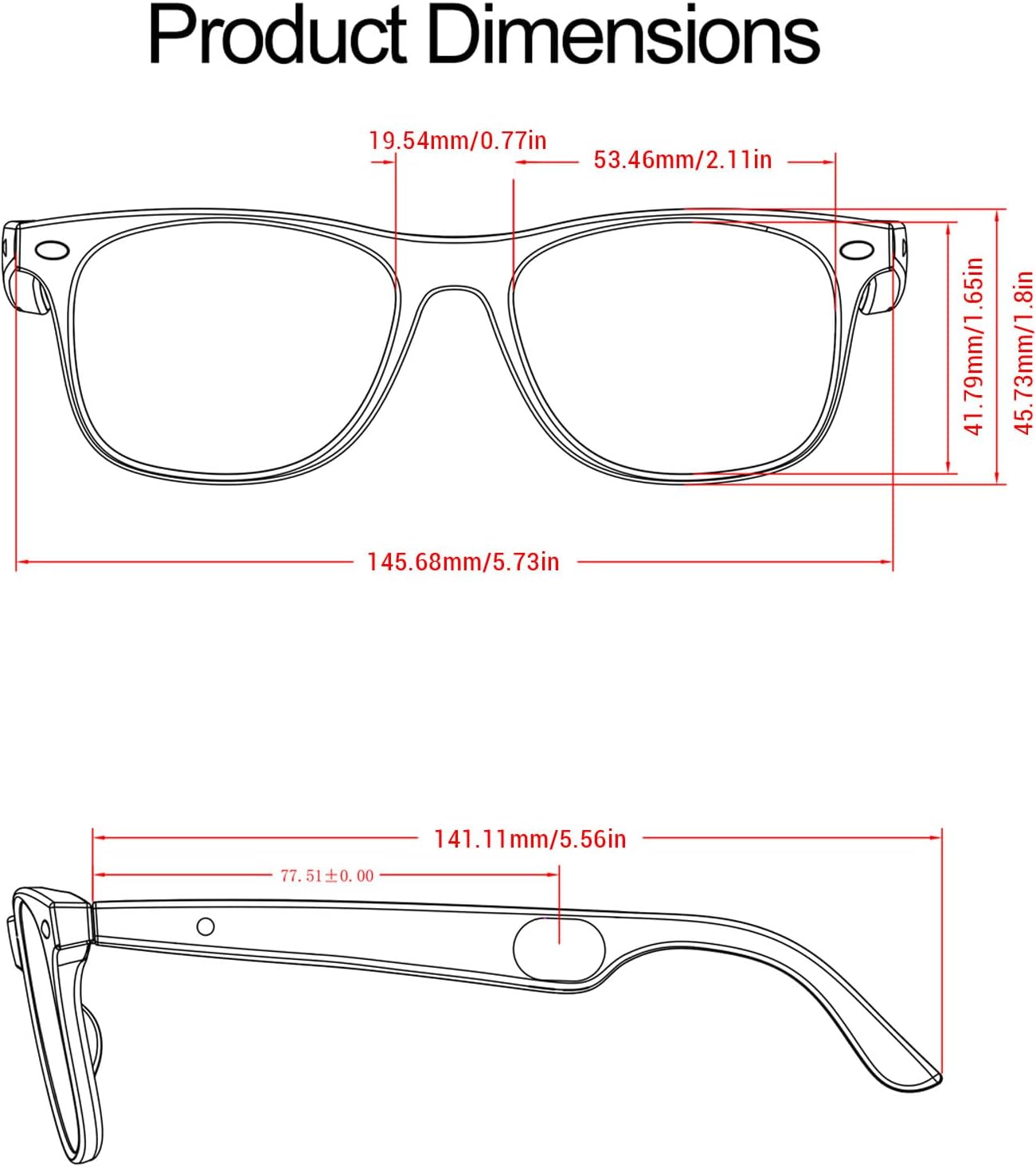
Figure 3.1: Detailed product dimensions of the Smart Translator Glasses.
4. Nastavení
4.1 Nabíjení brýlí
Before first use, fully charge your Smart Translator Glasses. Use the provided magnetic charging cable. Connect the magnetic end to the charging contacts on the glasses (refer to Figure 2.2) and the USB end to a power source (e.g., computer USB port, wall adapter).
- The red indicator light will remain on during charging.
- The light will turn off when the glasses are fully charged.
- The glasses are turned off during the charging process.
4.2 Zapnutí/vypnutí
The glasses feature a Smart Hall Sensor for automatic power on/off. Simply unfold the glasses to power them on, and fold them to power them off.
4.3 Párování Bluetooth
To use the translation and smart features, you need to pair the glasses with your smartphone via Bluetooth.
- Ujistěte se, že jsou brýle zapnuté.
- Povolte na svém smartphonu Bluetooth.
- Open the "Ear Dance" application (or specified companion app) on your smartphone.
- Follow the in-app instructions to search for and connect to your Smart Translator Glasses.
- Once connected, you will hear an audio confirmation, and the indicator light may change.
5. Návod k obsluze
5.1 Dotykové ovládání
The glasses feature intuitive touch controls on the left and right temples (refer to Figure 2.2 for touch area locations).
| Akce | Gesto | Funkce |
|---|---|---|
| Přehrávání hudby | Single tap (Left/Right touch area) | Přehrát/Pozastavit hudbu |
| Předchozí stopa | Triple tap (Left touch area) | Přejít na předchozí skladbu |
| Další stopa | Triple tap (Right touch area) | Přejít na další skladbu |
| Přijmout/ukončit hovor | Single tap (Left/Right touch area) | Answer incoming call / End current call |
| Odmítnout hovor | Long press (Left/Right touch area) | Odmítnout příchozí hovor |
| Ovládání hlasitosti | Long press for 2 seconds (Left/Right touch area) | Adjust volume (specific gesture not fully clear from source, typically swipe or hold) |
| Aktivujte asistenta s umělou inteligencí | Single button press (specific button not detailed, likely a dedicated button or a specific touch gesture) | Call AI assistant |
5.2 AI Smart Translation
The glasses support automatic identification and translation for 134 languages, offering seamless communication in various scenarios.
- Ensure the glasses are connected to the companion app.
- Activate the translation mode within the app.
- The glasses will capture audio and provide real-time translation, which can be displayed on your paired phone or heard through the glasses' speakers.
- The system supports real-time speaker differentiation and boasts a 98% transcription accuracy.

Figure 5.1: AI conversation feature, allowing the glasses to answer questions via an AI assistant.

Figure 5.2: AI intelligent translation in action, facilitating face-to-face conversation with translation displayed on a mobile phone.
5.3 Voice Notes
The voice note function allows you to record audio and convert it to text, retaining key content at any time.
- Access the Voice Notes feature through the companion app.
- Click the designated button within the app to start recording.
- The real-time recording will be converted to text for easy review.

Figure 5.3: Voice Notes feature, converting real-time recording to text on the connected smartphone.
5.4 Další funkce
- Překlad fotografie: Use the app to translate text from images.
- Fotografování na dálku: Control your phone's camera remotely via the glasses.
- Sleep Aid Mode: A feature designed to assist with sleep (details may be in app).
- Superior Sound Experience: Equipped with built-in box speakers and air conduction technology for high sensitivity and automatic noise reduction.
- Technologie péče o oči: Blue light blocking lenses protect your eyes from harsh light.

Obrázek 5.4: Přesview of key features including transparent sound, AI translation, intelligent interaction, long-lasting battery life, and IP65 waterproof/dustproof design.
6. Údržba
To ensure the longevity and optimal performance of your Smart Translator Glasses, follow these maintenance guidelines:
- Čištění: Use the provided cleaning cloth to gently wipe the lenses and frame. Avoid using abrasive materials or harsh chemicals.
- Skladování: When not in use, store the glasses in their protective pouch to prevent scratches and damage.
- Vystavení vodě: While the glasses are IP65 rainproof, avoid submerging them in water or exposing them to strong jets of water. Dry them thoroughly if they get wet.
- Teplota: Do not expose the glasses to extreme temperatures (hot or cold) or direct sunlight for prolonged periods.
- Nabíjení: Always use the original magnetic charging cable. Do not force the connection.
7. Řešení problémů
If you encounter any issues with your Smart Translator Glasses, please refer to the following common troubleshooting steps:
| Problém | Možná příčina / řešení |
|---|---|
| Brýle se nezapínají | Ensure the glasses are unfolded. Check battery level and charge if necessary. |
| Nelze se připojit přes Bluetooth | Ensure Bluetooth is enabled on your phone and the glasses are in pairing mode. Restart both devices. Make sure the glasses are charged. |
| Překlad nefunguje | Check internet connection on your phone (required for translation). Ensure the companion app is open and translation mode is active. Verify microphone access for the app. |
| Špatná kvalita zvuku | Ensure glasses are positioned correctly. Check for obstructions around the speakers. Clean any debris from the speaker area. |
| Dotykové ovládání nereaguje | Ensure your fingers are clean and dry. Restart the glasses. |
| App crashing or freezing | Update the app to the latest version. Clear app cache/data or reinstall the app. Ensure your phone's operating system is up to date. |
Pokud problém přetrvává i po vyzkoušení těchto kroků, kontaktujte prosím zákaznickou podporu.
8. Bezpečnostní informace
Please read and adhere to all safety warnings and instructions to prevent injury or damage to the device.

Figure 8.1: Important safety warning indicating that the product is not suitable for children. Always read product instructions and applicable age range carefully before purchase.
- Děti: This product is not suitable for children. Keep out of reach of young children.
- řízení: Do not use the glasses in a way that distracts you while driving or operating machinery.
- Ochrana sluchu: Vyhněte se dlouhodobému poslechu při vysoké hlasitosti, abyste předešli poškození sluchu.
- Bezpečnost baterie: Do not attempt to replace the battery yourself. Do not expose the battery to fire or extreme heat.
- Likvidace: Dispose of the device and its components responsibly according to local regulations. Do not dispose of with household waste.
9. Záruka a podpora
Qcwwy provides a standard manufacturer's warranty for this product. For detailed warranty terms and conditions, please refer to the warranty card included in your product packaging or visit the official Qcwwy webmísto.
For technical support, troubleshooting assistance, or any inquiries regarding your Smart Translator Glasses, please contact Qcwwy customer service through the contact information provided on the official webweb nebo vaše nákupní platforma.