
Zavedení
This manual provides detailed instructions for the setup, operation, and maintenance of your Edifier S300 Hi-Fi Tabletop Speaker. Please read this manual thoroughly before using the product to ensure proper functionality and to maximize your listening experience. Keep this manual for future reference.

The Edifier S300 Hi-Fi Tabletop Speaker, showcasing its elegant black walnut finish and front grille.
Důležité bezpečnostní pokyny
- Přečtěte si pozorně tyto pokyny.
- Uschovejte si tyto pokyny pro budoucí použití.
- Dbejte všech varování.
- Dodržujte všechny pokyny.
- Nepoužívejte toto zařízení v blízkosti vody.
- Čistěte pouze suchým hadříkem.
- Nezakrývejte žádné větrací otvory. Nainstalujte v souladu s pokyny výrobce.
- Neinstalujte v blízkosti zdrojů tepla, jako jsou radiátory, tepelné regulátory, kamna nebo jiná zařízení (včetně amplifikátory), které produkují teplo.
- Chraňte napájecí kabel před šlapáním nebo přiskřípnutím, zejména u zástrček, zásuvek a v místě, kde vychází z přístroje.
- Používejte pouze nástavce/příslušenství určené výrobcem.
- Odpojte toto zařízení během bouřky s blesky nebo když se delší dobu nepoužívá.
- Veškeré opravy svěřte kvalifikovanému servisnímu personálu. Servis je nutný, pokud bylo zařízení jakýmkoli způsobem poškozeno, například je poškozen napájecí kabel nebo zástrčka, pokud do zařízení vnikla tekutina nebo do něj spadly předměty, zařízení bylo vystaveno dešti nebo vlhkosti, nefunguje normálně. , nebo byla vypuštěna.
Co je v krabici
Po vybalení se prosím ujistěte, že jsou všechny níže uvedené položky přítomny a v dobrém stavu:
- S300 Speaker × 1
- Napájecí kabel × 1
- Kabel USB × 1
- 3.5mm-to-3.5mm Audio Cable × 1
- Dálkové ovládání × 1
- AAA baterie × 2
- Stručný průvodce × 1
- Důležité bezpečnostní pokyny × 1
Konecview of all items included in the Edifier S300 package.
Konec produktuview
Ovládací prvky a indikátory na předním panelu
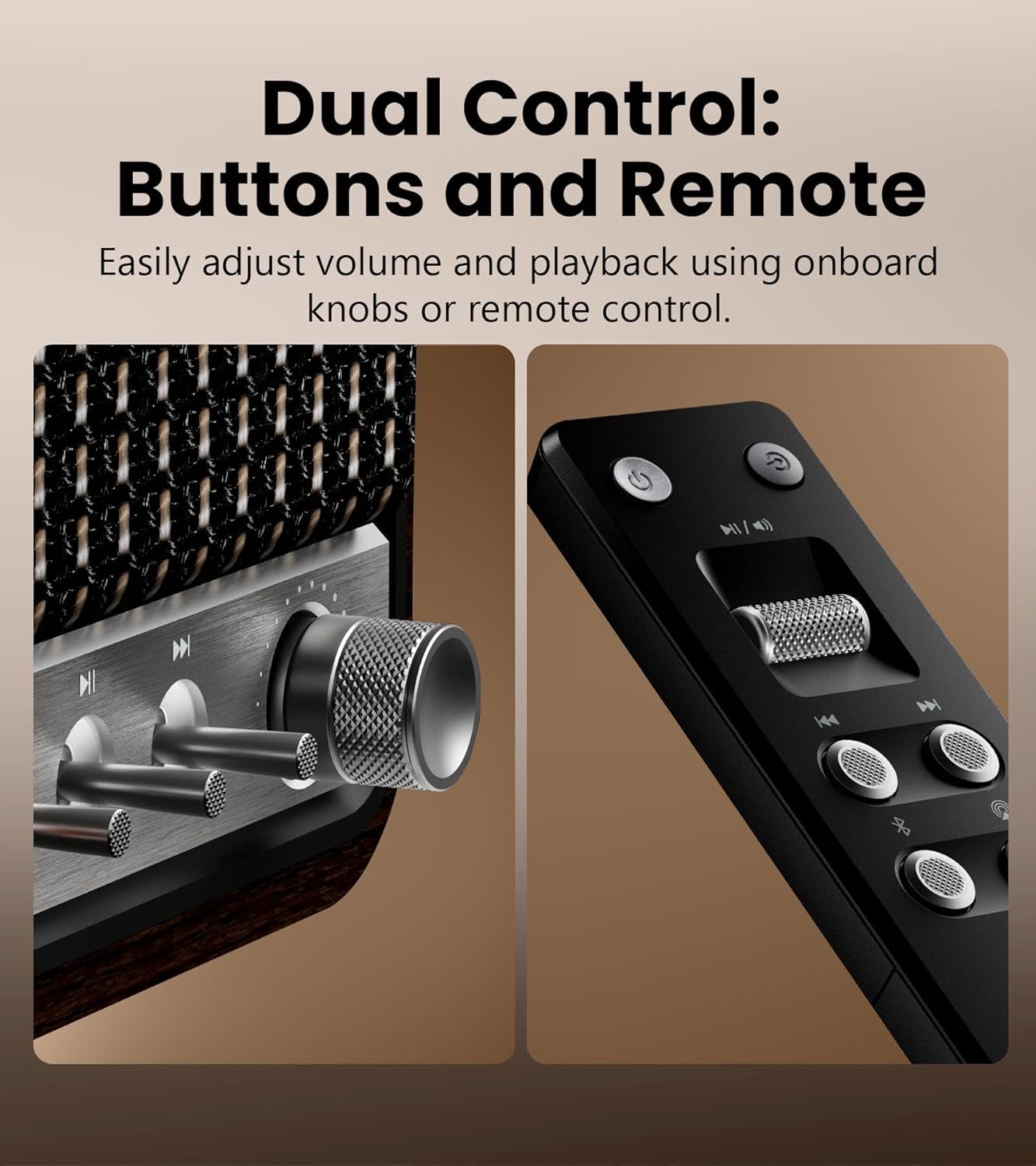
Detailní view of the speaker's control knobs and the included remote control.
- Volume/Input Selector Knob: Rotate to adjust volume. Press to cycle through input sources (Bluetooth, AirPlay, USB-C, AUX).
- Ovládání přehrávání: Buttons for Play/Pause, Previous Track, Next Track (functionality varies by input source).
- Kontrolka stavu: Displays current input mode and connection status.
Připojení zadního panelu

The rear panel of the Edifier S300, highlighting its various connectivity options.
- USB-C vstup: For connecting to computers or other USB-C audio sources.
- Vstup AUX: Standard 3.5mm audio jack for connecting to analog audio devices.
- Příkon: Zde připojte dodaný napájecí kabel.
Nastavení
Umístění reproduktorů
For optimal sound performance, place the Edifier S300 on a stable, flat surface. Ensure there is adequate space around the speaker for proper ventilation. Placing the speaker near a wall can enhance bass response, but avoid placing it directly in a corner, which might lead to boomy or unclear bass.

The dimensions of the Edifier S300 speaker, useful for placement planning.
Připojení napájení
- Connect the power cable to the power input port on the rear of the speaker.
- Zapojte druhý konec napájecího kabelu do zásuvky ve zdi.
- The speaker will power on automatically or can be turned on using the power button on the remote control.
Návod k obsluze
Výběr zdroje vstupu
The S300 supports multiple audio input sources. You can switch between them using the volume/input selector knob on the front panel or the dedicated input buttons on the remote control.
- Bluetooth: Pro bezdrátové streamování zvuku z kompatibilních zařízení.
- Air Play 2: For seamless multi-room audio and lossless streaming from Apple devices.
- USB-C: For direct digital audio connection to computers or other USB-C sources.
- AUX: For connecting traditional analog audio devices using a 3.5mm cable.
Párování pomocí Bluetooth

The Edifier S300 supports dual Bluetooth device pairing for convenient switching.
- Select Bluetooth input on the speaker. The status indicator will flash, indicating pairing mode.
- On your device (smartphone, tablet, computer), enable Bluetooth and search for "EDIFIER S300".
- Select "EDIFIER S300" to pair. Once connected, the indicator light will become solid.
- The S300 supports LDAC for high-resolution wireless audio on compatible Android 8.0+ devices.
- It also supports multi-device pairing, allowing two devices to be connected simultaneously.
AirPlay 2 Setup (for Apple Devices)

AirPlay 2 enables seamless multi-room audio and lossless streaming across your home.
- Ensure your S300 speaker is connected to the same Wi-Fi network as your Apple device.
- On your iOS device, open Control Center, tap the AirPlay icon, and select "EDIFIER S300".
- For multi-room audio, select multiple AirPlay 2 compatible speakers from the AirPlay menu.
- For stereo pairing, use the EDIFIER Home App to configure two S300 speakers as left and right channels.
Using the EDIFIER Home App
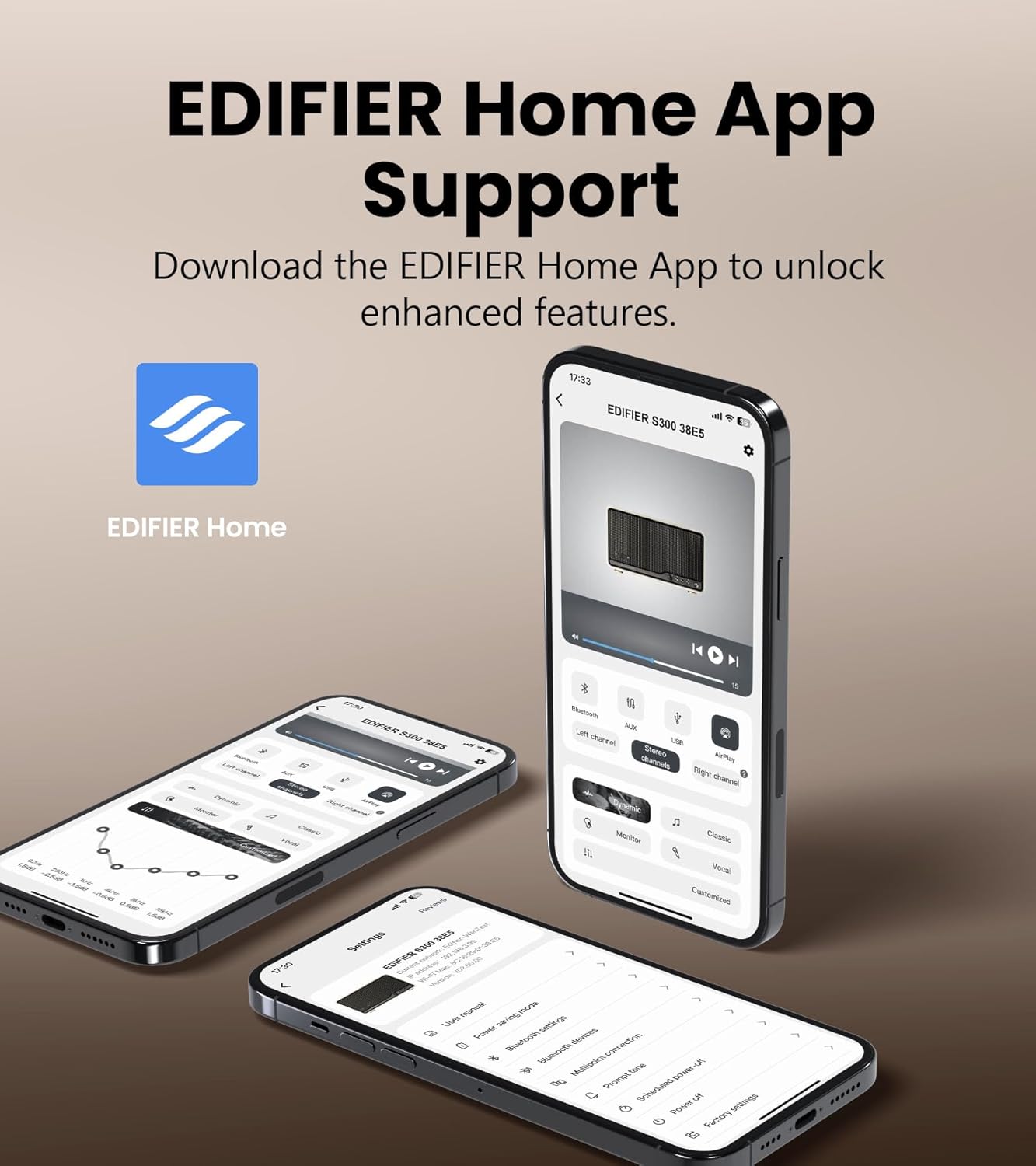
The EDIFIER Home App provides enhanced control and features for your S300 speaker.
Download the EDIFIER Home App from your device's app store to unlock enhanced features and control options for your S300 speaker. The app allows you to:
- Connect your speaker to a Wi-Fi network.
- Switch between input sources effortlessly.
- Control playback with ease.
- Customize sound effects to suit your preferences.
- Access the digital user manual anytime.
Údržba
- Čištění: Use a soft, dry cloth to clean the speaker's surface. Do not use liquid cleaners or aerosol sprays.
- Větrání: Ujistěte se, že ventilační otvory nejsou zablokovány, aby nedošlo k přehřátí.
- Skladování: Pokud budete reproduktor skladovat delší dobu, odpojte jej ze zásuvky a uložte jej na chladném a suchém místě.
Odstraňování problémů
| Problém | Možná příčina | Řešení |
|---|---|---|
| Žádný zvuk | Power not connected; incorrect input source selected; volume too low. | Ensure power cable is securely plugged in. Select the correct input source. Increase volume. |
| Připojení Bluetooth se nezdařilo | Reproduktor není v režimu párování; zařízení je příliš daleko; rušení. | Ensure speaker is in Bluetooth pairing mode. Move device closer to speaker. Avoid obstacles. Try re-pairing. |
| AirPlay 2 connection issues | Speaker and device on different Wi-Fi networks; network instability. | Verify both speaker and Apple device are on the same Wi-Fi network. Restart router and speaker. |
| Zkreslený zvuk | Hlasitost je příliš vysoká; kvalita zdroje zvuku je špatná. | Reduce volume. Check audio source quality. |
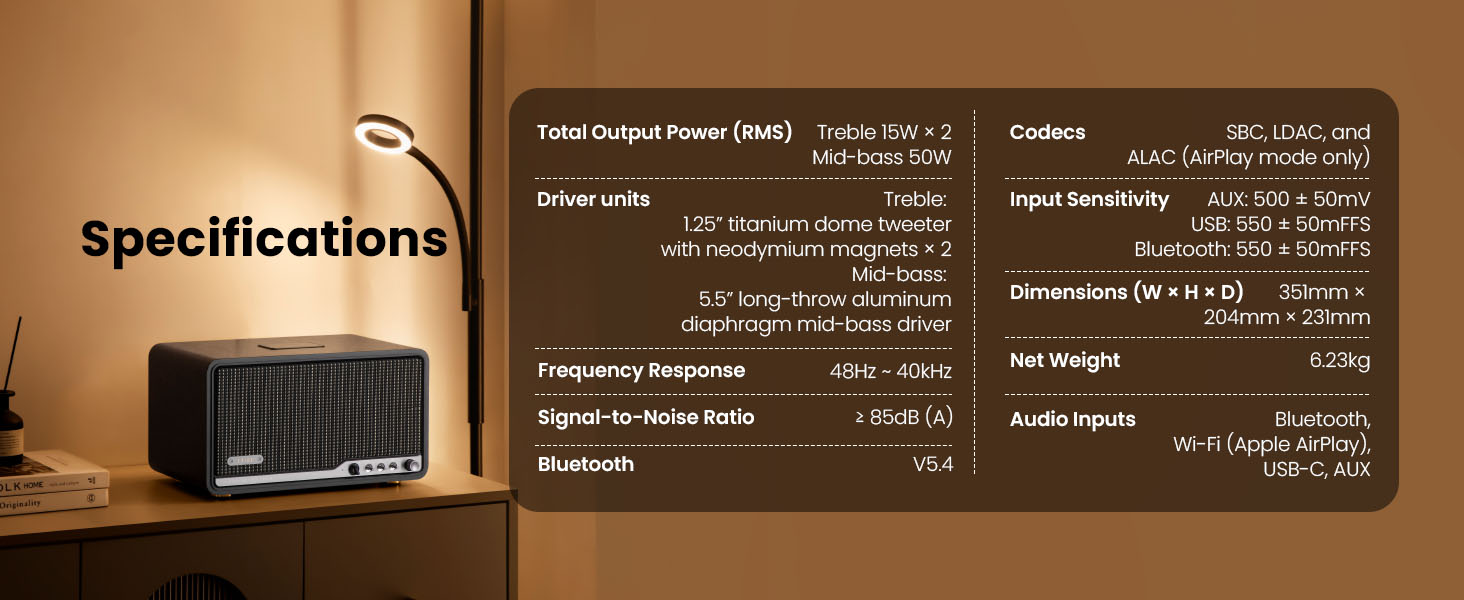
Specifikace

Detailed technical specifications of the Edifier S300 speaker.
| Funkce | Detail |
|---|---|
| Celkový výstupní výkon (RMS) | Treble 15W × 2, Mid-bass 50W |
| Jednotky řidiče | 1.25" titanium dome tweeter with neodymium magnets × 2, 5.5" long-throw aluminum diaphragm mid-bass driver |
| Frekvenční odezva | 48Hz ~ 40kHz |
| Odstup signálu od šumu | ≥ 85 dB (A) |
| Verze Bluetooth | V5.4 |
| Kodeky | SBC, LDAC, and ALAC (AirPlay mode only) |
| Vstupní citlivost | AUX: 500 ± 50mV, USB: 550 ± 50mFFS, Bluetooth: 550 ± 50mFFS |
| Rozměry (Š × V × H) | 351 mm × 204 mm × 231 mm (13.82" × 8.03" × 9.09") |
| Čistá hmotnost | 6.23 kg (13.73 lb) |
| Audio vstupy | Bluetooth, Wi-Fi (Apple AirPlay), USB-C, AUX |
Záruka a podpora
Edifier products are designed and manufactured to the highest quality standards. For information regarding warranty coverage, please refer to the warranty card included in your product packaging or visit the official Edifier webmísto.
For technical support, troubleshooting assistance, or service inquiries, please contact Edifier customer support through their official webwebu nebo kontaktních informací uvedených v dokumentaci k produktu.
Official Edifier Webmísto: www.edifier.com