
1. Úvod
Děkuji za nákupasing the VILTROX DC-A1 Camera Field Monitor. This 7-inch full HD touchscreen monitor is designed to enhance your video production workflow with its high brightness, versatile monitoring functions, and robust connectivity. This manual provides detailed instructions for proper setup, operation, and maintenance of your device.
2. Bezpečnostní informace
- Nevystavujte monitor dešti ani vlhkosti, abyste předešli úrazu elektrickým proudem nebo požáru.
- Do not disassemble the product. If repairs are needed, contact authorized service personnel.
- Avoid strong impacts or vibrations, which may damage internal components.
- Chraňte monitor před silnými magnetickými poli.
- Use only specified power adapters and batteries.
- Očistěte obrazovku měkkým suchým hadříkem. Vyhněte se používání agresivních chemikálií.
3. Obsah balení
Ověřte, zda jsou v balení obsaženy všechny níže uvedené položky:
- 1x VILTROX DC-A1 Camera Field Monitor
- 1x NP-F550 Battery
- 1x Sunshade Hood
- 1x adaptér pro studené patice VL-550
- 1x standardní HDMI kabel
- 1x Mini HDMI kabel
- 1x USB Type-C kabel
- 1x Přepravní pouzdro
- 1x Custom Screen Protectors
- 1x Uživatelská příručka
- 1x Balící krabice

Image: All components included in the VILTROX DC-A1 Camera Field Monitor package.
4. Konec produktuview
4.1. Klíčové vlastnosti
- 7-inch Full HD IPS Touch Screen: 1920x1080 resolution, 170° wide viewing angle, 1000:1 contrast ratio, SRGB/REC-709 color calibration.
- 2800 Nits Ultra-Brightness: Zajišťuje jasnou viditelnost i na přímém slunečním světle.
- 4K HDMI vstup a výstup pro smyčku: Supports up to 4K 60Hz signals for simultaneous monitoring.
- Profesionální monitorovací funkce: Includes Parade waveform, Oscillogram (RGB/YUV/Y), vector graph, brightness histogram, auxiliary focus, audio column, image flip, false color, and more.
- Podpora vlastních 3D LUT: Import 3D LUTs via USB-A for creative color effects and monitoring with camera Log modes.
- Intuitive Touch Control & Customizable Shortcut Keys: Easy menu navigation and quick access to frequently used functions (F1-F4).
- Více možností napájení: Compatible with NP-F series batteries, DC IN (10-18V/2A), and Type-C (≥9V/3A).
- Quick-Released Sunshade Hood: Detachable design for improved outdoor viewIng.
- Intelligent Cooling Fans: Efficient heat dissipation for extended operation.
4.2. Identifikace součásti

Image: Detailed diagram of the VILTROX DC-A1 monitor showing all ports, buttons, and features.
- Tlačítko Zpět/Menu
- Shortcut Key (F1-F4)
- Obrazovka displeje
- Výfukový otvor ventilátoru
- USB Interface (USB-A)
- Tlačítko napájení
- Indikátor signálu
- Knob Key
- 1/4 otvor pro šroub
- Vstup HDMI
- HDMI výstup
- 1/4 otvor pro šroub
- Jack pro sluchátka (3.5 mm)
- Port typu C
- DC Port (DC IN)
- Tlačítko pro uvolnění baterie
- Slot baterie
- Přívod chladicího vzduchu
5. Nastavení
5.1. Připojení monitoru
Use the included VL-550 Cold Shoe Adapter to mount the monitor onto your camera's hot shoe or a compatible rig. Securely tighten the adapter to prevent accidental detachment.

Image: The VILTROX DC-A1 monitor attached to a camera via the cold shoe adapter.
5.2. Zapnutí monitoru
The DC-A1 offers multiple power options:
- Baterie řady NP-F: Insert a charged NP-F series battery (e.g., NP-F550, NP-F750, NP-F970) into the battery slot on the back of the monitor. Ensure it clicks into place. To remove, press the battery release button.
- DC IN: Connect a compatible DC power adapter (10-18V/2A) to the DC IN port.
- Typ C: Connect a Type-C power source (≥9V/3A) to the Type-C port.
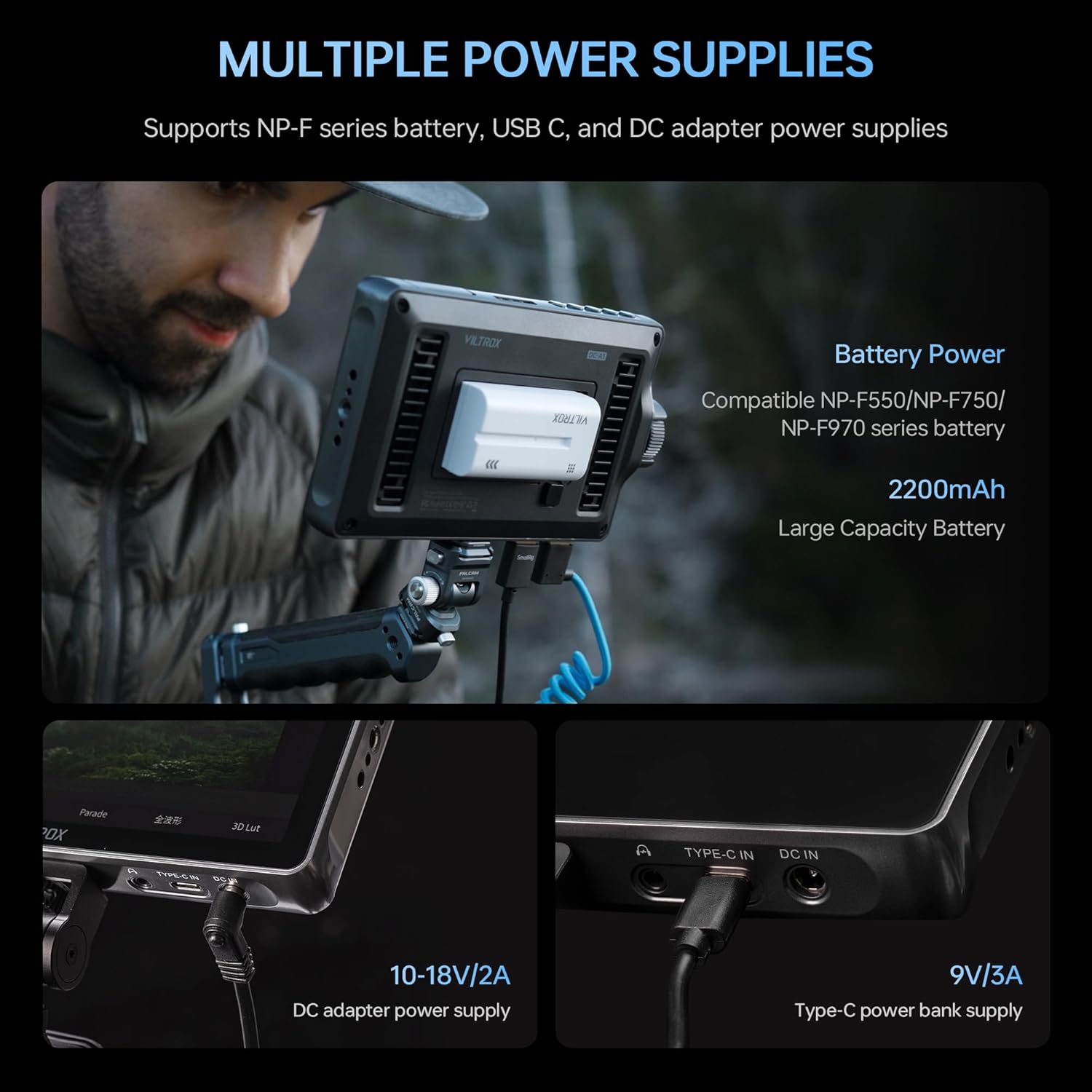
Image: The VILTROX DC-A1 monitor showing the battery slot, DC IN, and Type-C power ports.
5.3. Connecting HDMI
Connect your camera's HDMI output to the monitor's HDMI-IN port using the provided HDMI or Mini HDMI cable. If you need to loop the signal to another monitor, connect a second HDMI cable from the monitor's HDMI OUT přístav.

Image: The VILTROX DC-A1 monitor connected to a camera via HDMI, demonstrating the loop-out functionality.
5.4. Attaching the Sunshade Hood
For outdoor shooting, attach the sunshade hood to the monitor to reduce glare and improve screen visibility. The hood is designed for quick attachment and removal.

Image: The VILTROX DC-A1 monitor with the sunshade hood attached, enhancing outdoor viewIng.
6. Návod k obsluze
6.1. Zapnutí/vypnutí
Stiskněte a podržte Tlačítko napájení (6) to turn the monitor on or off. The signal indicator (7) will illuminate when the monitor is powered on.
6.2. Basic Touch Control
The DC-A1 features an intuitive touchscreen interface. Tap or swipe gestures can be used to navigate menus and adjust settings. Double-tap the screen to quickly access the main menu.

Image: A hand interacting with the VILTROX DC-A1 touchscreen to adjust settings.
6.3. Using the Knob Key and Shortcut Buttons
The Knob Key (8) can be rotated to adjust values and pressed to confirm selections. The four customizable Klávesové zkratky (2) (F1-F4) allow for quick access to your preferred monitoring functions. These can be configured in the system settings.
6.4. Professional Monitoring Functions
Access various professional tools through the menu:
- Waveform/Oscillogram: Provides detailed exposure and color information.
- Vektorový graf: Zobrazuje sytost a odstín barev.
- Histogram jasu: Shows the distribution of brightness levels.
- Pomocné zaostření (obrysy): Highlights in-focus areas for precise focusing.
- Falešná barva: Helps evaluate exposure levels by displaying different colors for different luminance values.
- Převrácení obrázku: Adjusts image orientation for various mounting setups.
- Zvukový sloupec: Monitors audio input levels.

Image: The VILTROX DC-A1 monitor displaying various monitoring functions like waveform, vector scope, and histogram.
6.5. 3D LUT Application
To import custom 3D LUTs:
- Save your .cube LUT files na USB disk.
- Connect the USB drive to the monitor's Rozhraní USB (5).
- Navigate to the 3D LUT menu option and select "Import".
- Choose the desired LUT file from the USB drive to load it onto the monitor.
Once imported, you can apply these LUTs to preview different color grades or convert Log footage k Rec.709 pro přesné monitorování.

Image: The VILTROX DC-A1 monitor with a USB drive connected, demonstrating the 3D LUT import process.
7. Údržba
- Čištění: Use a soft, lint-free cloth to clean the monitor screen and body. For stubborn smudges, slightly dampen the cloth with water or a screen-safe cleaning solution. Avoid abrasive materials or solvents.
- Skladování: When not in use, store the monitor in its carry case in a cool, dry place away from direct sunlight and extreme temperatures.
- Péče o baterie: If using NP-F batteries, ensure they are charged regularly and stored properly to prolong their lifespan. Remove batteries if the monitor will not be used for an extended period.
- Aktualizace firmwaru: Check the VILTROX official website periodically for firmware updates. Updates can be installed via the USB-A port.
8. Řešení problémů
| Problém | Možná příčina | Řešení |
|---|---|---|
| Monitor se nezapne. | Battery is low or not inserted correctly; power cable is loose or faulty. | Ensure battery is charged and properly seated. Check power cable connections or try a different power source. |
| Žádný video signál. | HDMI cable is loose or faulty; camera output settings are incorrect; monitor input is not selected. | Verify HDMI cable connection. Check camera's HDMI output settings. Ensure the correct input source is selected on the monitor. |
| Obrazovka je příliš tmavá/světlá. | Brightness settings are incorrect. | Adjust brightness settings via the touchscreen menu or knob. |
| Dotyková obrazovka nereaguje. | Dočasná softwarová závada; rušení ochranného krytu obrazovky. | Restart the monitor. Ensure screen protector is applied correctly or remove it to test. |
9. Specifikace
| Funkce | Detail |
|---|---|
| Název modelu | DC-A1 |
| Velikost obrazovky | 7 palce |
| Rezoluce | 1920x1080 (Full HD) |
| Jas | 2800 Nits (cd/m²) |
| Kontrastní poměr | 1000:1 |
| Viewúhel | 170° (IPS) |
| HDMI vstup/výstup | HDMI 2.0 (Supports up to 4K 60Hz) |
| Zvukový výstup | 3.5mm jack pro sluchátka |
| Vstup napájení | NP-F Battery, DC IN (10-18V/2A), Type-C (≥9V/3A) |
| Rozměry (D x Š x V) | 1.12"H x 7.4"Š x 4.3"V |
| Hmotnost položky | 12.2 unce (přibližně 346 g) |
| Kompatibilní zařízení | DSLR fotoaparáty |
10. Záruka a podpora
The VILTROX DC-A1 Camera Field Monitor comes with a 1letá záruka výrobce od data nákupu. Tato záruka se vztahuje na vady materiálu a zpracování při běžném používání.
Záruka se nevztahuje na:
- Damage caused by misuse, accident, modification, or unauthorized repair.
- Běžné opotřebení.
- Damage from external causes such as drops, liquid exposure, or power surges.
For warranty claims, technical support, or service inquiries, please contact VILTROX customer support through their official website or the retailer where you purchased the product. Please have your proof of purchase and product model number (DC-A1) ready.
11. Produktová videa
VILTROX DC-A1 7" Camera DSLR Field Monitor Overview
Video: Overview of the VILTROX DC-A1 7-inch Camera DSLR Field Monitor, showcasing its features and use cases. This video highlights the monitor's design, connectivity, and various functions in a practical setting.
VILTROX DC-A1 2800Nits Camera Field Monitor Features
Video: A detailed look at the VILTROX DC-A1 2800Nits Camera Field Monitor, focusing on its high brightness, touch controls, 4K HDMI capabilities, and professional monitoring tools like 3D LUTs and waveforms.