
Zavedení
This manual provides essential information for the setup, operation, and maintenance of your new Generic Replacement Remote Control. This remote is designed to be a direct replacement for various AUNA DisGo Box speaker systems, including models 100, 2100, 10033685, 10033686, 10030725, 10030726, and 10032598.
The remote control is pre-programmed and requires no additional setup or coding. Simply insert the batteries, and it will be ready for immediate use with your compatible speaker system.
Nastavení
1. Instalace baterie
Dálkové ovládání vyžaduje dvě (2) baterie AAA (not included). Please purchase new batteries from a local store before proceeding.
- Najděte přihrádku na baterie na zadní straně dálkového ovladače.
- Posuňte kryt přihrádky na baterie dolů nebo ve směru šipky, abyste jej otevřeli.
- Vložte dvě baterie AAA a ujistěte se, že kladný (+) a záporný (-) pól správně odpovídají označením uvnitř přihrádky. Nesprávné vložení může znemožnit funkci dálkového ovladače.
- Nasaďte kryt přihrádky na baterie tak, že jej zasunete zpět na místo, dokud bezpečně nezacvakne.

Figure 1: Battery compartment with cover removed, showing slots for two AAA batteries.
2. První použití
Once batteries are correctly installed, the remote control is ready for use. No programming or pairing is required. Point the remote directly at your AUNA DisGo Box speaker system and press the desired function button.
Návod k obsluze
The remote control provides full functionality for your compatible AUNA DisGo Box speaker system. Below is a general overview of the buttons and their functions.
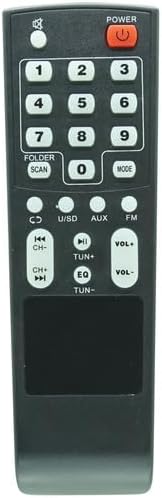
Obrázek 2: Přední strana view dálkového ovládání.
- MOC: Zapíná nebo vypíná systém reproduktorů.
- Číselná tlačítka (0-9): Used for direct track selection, radio station input, or other numerical inputs depending on the speaker system's mode.
- FOLDER / SCAN: Navigates through folders or initiates a scan function (e.g., for FM radio).
- REŽIM: Switches between different input modes (e.g., Bluetooth, USB, SD, AUX, FM, CD).
- CD / U/SD / AUX / FM: Direct selection buttons for specific input sources.
- Previous/Next Track (|<</>>|): Přeskočí na předchozí nebo další skladbu/file.
- Play/Pause (>||): Přehraje nebo pozastaví přehrávání zvuku.
- VOL+ / VOL-: Zvyšuje nebo snižuje hlavní hlasitost.
- EQ: Cykluje mezi předvolbami ekvalizéru.
- TUN+ / TUN-: Adjusts radio frequency up or down.
For specific functions and advanced operations, please refer to the original user manual of your AUNA DisGo Box speaker system.
Údržba
Výměna baterie
If the remote control's range decreases or it becomes unresponsive, it is likely time to replace the batteries. Follow the battery installation steps outlined in the "Setup" section.
Čištění
To clean the remote control, gently wipe it with a soft, dry cloth. Do not use liquid cleaners, abrasive materials, or solvents, as these can damage the remote's surface or internal components.
Odstraňování problémů
- Dálkové ovládání nereaguje:
- Ensure new batteries are correctly installed with the correct polarity.
- Check if there are any obstructions between the remote control and the speaker system's infrared receiver.
- Make sure you are within the effective range of the speaker system's IR receiver.
- Verify that the speaker system is powered on.
- Některé funkce nefungují:
- Confirm that your specific AUNA DisGo Box model is listed as compatible. If you are unsure, please contact the seller for verification.
- Ensure the speaker system is in the correct mode for the function you are trying to use (e.g., pressing track skip buttons while in FM radio mode might not work).
Pokud problémy přetrvávají i po provedení těchto kroků, kontaktujte prosím prodejce s žádostí o další pomoc.
Specifikace
| Funkce | Detail |
|---|---|
| ASIN | B0F8NQNH7W |
| Jsou vyžadovány baterie | 2 baterie AAA (nejsou součástí balení) |
| Výrobce | Obecný |
| Značka | Obecný |
| Speciální funkce | Není potřeba žádné další programování |
| Barva | Jak je znázorněno (černá) |
| Maximální počet podporovaných zařízení | 1 (Specific AUNA DisGo Box Speaker System) |
| Kompatibilní zařízení | AUNA DisGo Box 100, 2100, 10033685, 10033686, 10030725, 10030726, 10032598 Speaker Systems |
Záruka a podpora
Specific warranty information for this replacement remote control is not provided in this manual. For details regarding warranty coverage, returns, or technical support, please refer to the purchase documentation or contact the seller directly through the platform where the product was purchased.
If you are unsure about compatibility with your device, it is recommended to contact the seller before purchase or for troubleshooting assistance.