
1. Konec produktuview
The LongPlus 4K PoE Security Camera System, Model LP8MC84B2, provides advanced surveillance capabilities for both home and business environments. This system includes 4K (8MP) cameras, a Network Video Recorder (NVR) with a pre-installed 2TB Hard Disk Drive (HDD), and utilizes H.265+ video compression for efficient storage. Key features include 24/7 recording, spotlight color night vision, and clear video streaming. The Power over Ethernet (PoE) design simplifies installation by providing both power and data through a single Ethernet cable.

Image: LongPlus 4K PoE Security Camera System with NVR and four bullet cameras.
2. Co je v krabici
Ověřte prosím, zda jsou ve vašem balení obsaženy všechny níže uvedené položky:
- 1 x 8CH NVR with 48/1.875V Adaptor
- 4 x 4K PoE kamery
- 1 x myš USB
- 1 x 1M kabel Cat5
- 1 x kabel HDMI 1M
- 4 x 18M Cat5 kabely
- 2 x Extra Connectors
- 4 x sady šroubů a dalšího příslušenství
- 1 x Průvodce rychlým startem
3. Pokyny k nastavení
Follow these steps to set up your LongPlus 4K PoE Security Camera System:
- Připojte NVR k monitoru: Use the provided HDMI or VGA cable to connect the NVR to a compatible monitor.
- Power On the NVR: Connect the NVR to a power source using the provided power adapter and turn on the NVR power switch.
- Připojit k síti: Connect an Ethernet cable from the NVR's LAN port to your router's LAN port for internet access.
- Připojení kamer: Connect each PoE camera to any available PoE camera port on the NVR using the provided Ethernet cables. The cameras will receive both power and data through these cables.
- Připojení USB myši: Pro navigaci v systému zapojte USB myš do USB portu na NVR.
- Počáteční konfigurace: Follow the on-screen prompts on your monitor to complete the initial setup, including setting a password and configuring network settings.
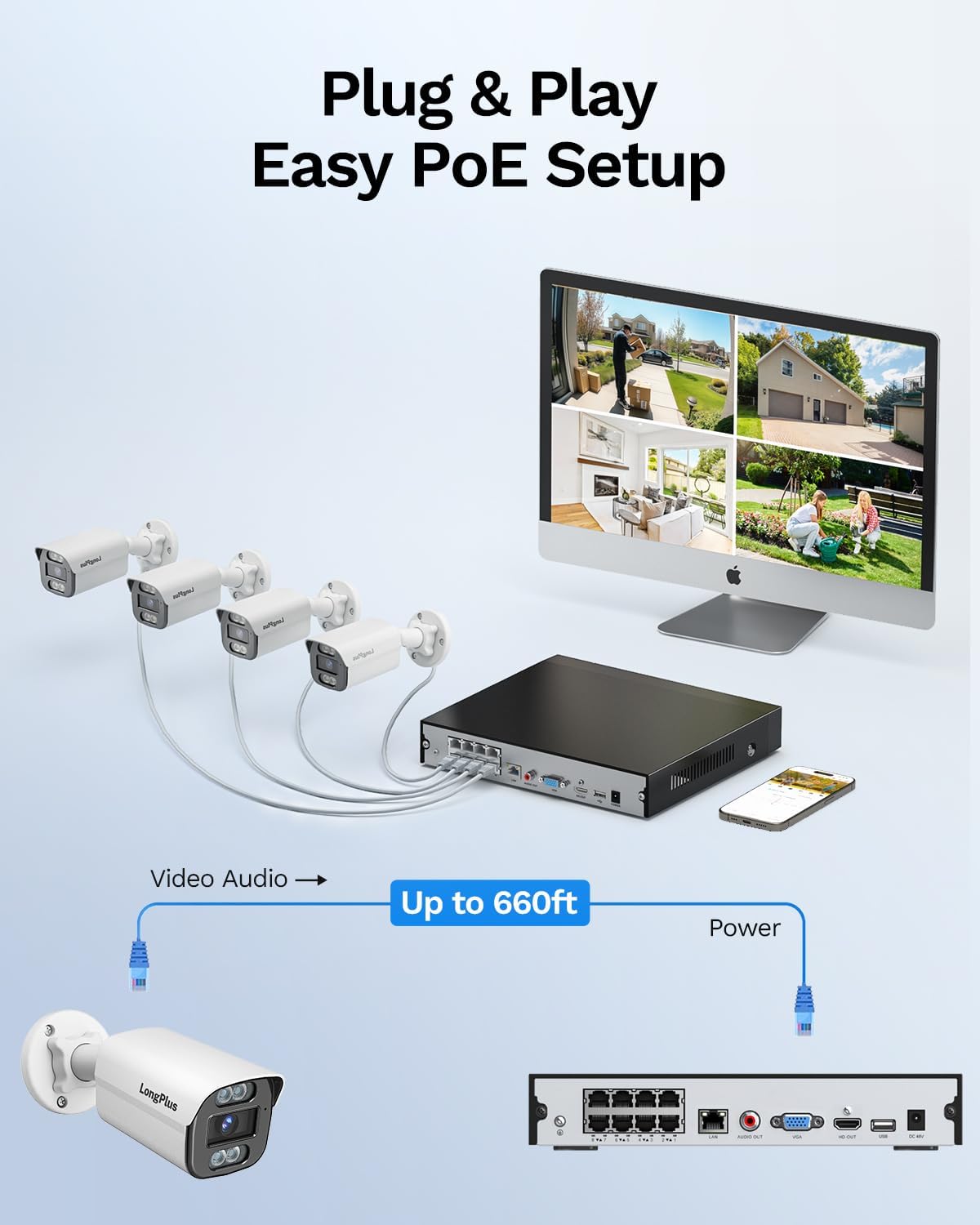
Image: Simplified PoE setup showing NVR, cameras, and monitor connections.
Video: LongPlus 8MP 16CH NVR Security System Unboxing & Setup Guide. This video demonstrates the unboxing process and step-by-step setup of the NVR and cameras.
4. Návod k obsluze
4.1. 4K UHD and Wide View Úhel
The system captures video in crystal-clear 4K (3840x2160) resolution, providing enhanced detail and clarity. The cameras feature a 132° wide view angle, offering broader coverage and minimizing blind spots in your surveillance area.

Image: Demonstration of 4K UHD video quality, highlighting clear details day and night.

Image: Comparison illustrating the 132° wide view angle of LongPlus cameras.
4.2. AI Motion Detection and Activity Zones
The smart PoE cameras utilize AI object detection to accurately identify humans and vehicles, reducing false alarms. You can define specific activity zones within the camera's field of view to focus detection on critical areas and ignore motion in irrelevant regions. Privacy masks can also be set to exclude certain areas from recording.

Image: Smart AI detection identifying persons and vehicles, triggering alerts.
4.3. Triple Night Vision Modes
The system offers three night vision modes to suit various lighting conditions:
- IR noční vidění: Standardní černobílé infračervené vidění.
- Barevné noční vidění: Provides full-color footage in low-light conditions, allowing for better identification of details up to 100ft/30m.
- Chytré noční vidění: Automatically switches between IR and color modes based on detected activity.
4.4. Audio and Strobe Light Alarm / Two-way Audio
When motion is detected, the cameras can automatically trigger an audio alarm and red & blue strobe lights to deter intruders. The built-in two-way audio feature allows for real-time communication through the camera, enabling you to speak to visitors or warn off unwanted individuals.

Image: Two-way audio functionality with integrated strobe light alarm.
4.5. Flexible Storage and Playback
The NVR includes a 2TB HDD for 24/7 continuous recording, expandable up to 10TB. H.265+ compression technology significantly reduces file sizes, saving storage space without compromising video quality. Bank-level encrypted cloud storage is also available as an option. The Longvision APP/Client allows for easy playback of recorded footage, with events highlighted on the timeline for quick review.

Image: Interface demonstrating 24/7 recording and smart playback features.

Image: Explanation of H.265+ compression for efficient storage.
4.6. Remote Access and Sharing
Přístup k živému footage and recorded videos remotely via the Longvision app, compatible with iOS, Mac, Windows, and Android devices. The system supports up to 32 users, allowing you to share access with family members or colleagues.

Image: Remote access to live camera feeds via the Longvision app.
Video: LongPlus 4Channel PoE Security Camera System Overview. This video showcases the system's features including PoE setup, app monitoring, 4K UHD, night vision, motion detection, and alarm functions.
5. Údržba
To ensure optimal performance and longevity of your security system, regular maintenance is recommended:
- Čištění objektivů fotoaparátu: Pravidelně čistěte objektivy fotoaparátu měkkým hadříkemamp hadříkem, abyste odstranili prach a šmouhy, které by mohly ovlivnit ostrost obrazu.
- Zkontrolujte připojení: Ensure all cable connections (power, Ethernet, video) are secure and free from damage.
- Aktualizace firmwaru: Regularly check for and install firmware updates for the NVR and cameras to benefit from new features and security enhancements.
- Review Nahrávky: Pravidelně znovuview zaznamenané footage, aby se zajistilo, že systém zachycuje události podle očekávání.
- Umístění NVR: Ujistěte se, že je NVR umístěn v dobře větraném prostoru, aby se zabránilo přehřátí.
6. Řešení problémů
If you encounter issues with your LongPlus security system, consider the following common troubleshooting steps:
- Bez zobrazení videa:
- Verify all power and video cables are securely connected.
- Ujistěte se, že je monitor nastaven na správný vstupní zdroj (HDMI/VGA).
- Restartujte NVR.
- Detekce pohybu nefunguje:
- Check motion detection settings in the NVR interface or app.
- Ensure activity zones are correctly configured and not excluding desired areas.
- Upravte nastavení citlivosti.
- Problémy se vzdáleným přístupem:
- Ověřte, zda je NVR připojen k internetu.
- Check network settings on the NVR and your router.
- Ensure the Longvision app is updated to the latest version.
- Špatná kvalita obrazu:
- Vyčistěte čočku fotoaparátu.
- Zkontrolujte, zda se v zorném poli kamery nenacházejí překážky. view.
- Pro optimální noční vidění zajistěte dostatečné osvětlení.
7. Specifikace
| Funkce | Detail |
|---|---|
| Značka | LongPlus |
| Technologie připojení | Kabelové |
| Rozlišení záznamu videa | 3840x2160, 4K |
| Speciální funkce | High Efficiency Video Coding, Red & Blue Flashing Lights, Easy to Install, Waterproof, Vehicle Detection, Adjustable, Motion Sensor, Siren Alarm/Flexible Storage (Local Storage/Cloud Storage), Smart Playback, Vehicle/Person/Animal Detection |
| Počet kanálů | 8 |
| Kapacita paměti | 2 TB (rozšiřitelné až na 10 TB) |
| Barva | Bílý |
| Zdroj napájení | Elektrický kabel |
| Rozměry položky D x Š x V | 13.29 x 10.23 x 9.4 palce |
| Kompatibilita operačního systému | Android, Mac OS, Windows, iOS |
| Doporučená použití | Indoor, Outdoor, Surveillance |
| Kompatibilní zařízení | Cameras, Laptops, Personal Computers, Smartphones |
| Další funkce fotoaparátu | Přední, zadní |
| Technologie nízkého osvětlení | Noční vidění |
| Rozsah nočního vidění | 100 stop |
| Snímková frekvence | 30 |
| Režim nahrávání | Záznam spouštěný pohybem (výchozí); plánované nahrávání, nahrávání 24/7 |
| Celkový počet portů USB | 2 |
| Hardwarové rozhraní | Ethernet, HDMI, USB, VGA |
| Typ objektivu | Široký úhel |
| Video vstup | VGA, USB, Ethernet, HDMI |
| Viewúhel | 132 stupňů |
| Výrobce | LongPlus Direct |
| Hmotnost položky | 13.26 libry |
| Datum první dostupnosti | 12. června 2025 |
8. Záruka a podpora
LongPlus provides a 2-letá záruka for this product, ensuring coverage against manufacturing defects. Additionally, lifetime technical support is available to assist with any inquiries or operational issues you may encounter. For support, please contact LongPlus customer service.