
1. Úvod
This manual provides essential information for the installation, operation, and maintenance of your ANNKE 3K PoE Turret Security Camera. Please read this manual thoroughly before using the product to ensure proper setup and functionality. Keep this manual for future reference.
2. Obsah balení
Ověřte, zda jsou všechny níže uvedené položky součástí balení. Pokud některé položky chybí nebo jsou poškozené, kontaktujte prosím zákaznickou podporu ANNKE.
- 1 x ANNKE 3K Wired PoE Camera
- 1 x sáčky s montážními šrouby
- 1 x 1m/3.2ft ethernetový kabel
- 1 x vodotěsné víko
- 1 x Uživatelská příručka

Obrázek 2.1: Obsah balení
3. Konec produktuview
The ANNKE 3K PoE Turret Security Camera is designed for both indoor and outdoor surveillance, offering high-resolution video, color night vision, and advanced AI detection capabilities.
3.1 Klíčové vlastnosti
- 3K (3072x1728) Super HD Resolution: Poskytuje jasné a podrobné video footage.
- 116° Wide Angle 2.8mm Lens: Zachycuje široké pole view, čímž se zmenšují slepá místa.
- Napájení přes Ethernet (PoE): Single Ethernet cable for both power and data transmission.
- Barevné noční vidění: Delivers vivid footage i za špatných světelných podmínek.
- Detekce osob a vozidel pomocí umělé inteligence: Snižuje počet falešných poplachů přesnou identifikací pohybu osob a vozidel.
- IP67 Odolnost proti povětrnostním vlivům: Durable design for reliable operation in various weather conditions.
- Flexibilní úložiště: Supports microSD card (up to 256GB, not included) or NVR recording.
- Vzdálený přístup: Monitor live view and playback via the ANNKE Vision app.

Figure 3.1: 3K HD Clarity and Wide View

Figure 3.2: 116° Wide Angle Lens

Figure 3.3: AI Human & Vehicle Detection

Figure 3.4: Color Night Vision in Low Light

Figure 3.5: Enhanced Color Night Vision

Obrázek 3.6: Provedení IP67 odolné vůči povětrnostním vlivům
4. Nastavení
4.1 Fyzická instalace
- Vyberte umístění: Vyberte vhodné vnitřní nebo venkovní umístění, které poskytuje požadované viewing angle and is within reach of an Ethernet cable. Ensure the mounting surface is sturdy enough to support the camera.
- Montáž: Use the provided mounting screw bags to securely attach the camera to the chosen surface (e.g., wall or ceiling). Drill pilot holes if necessary.
- Upravit úhel: Loosen the adjustment screws on the camera body to position the lens for optimal coverage. Tighten the screws once the desired angle is achieved.
- Waterproof Connection (Outdoor Use): For outdoor installations, use the included waterproof lid to protect the Ethernet cable connection from moisture.
4.2 Network Connection (PoE)
The camera utilizes Power over Ethernet (PoE), meaning a single Ethernet cable provides both power and data connectivity.
- Připojení ethernetového kabelu: Connect one end of the Ethernet cable to the camera's Ethernet port.
- Připojení k PoE zařízení: Connect the other end of the Ethernet cable to a PoE-enabled NVR, PoE switch, or PoE injector. (Power supply not included with camera, requires PoE source).
- Ověřit připojení: Once connected, the camera should power on and establish a network connection. Refer to your NVR or network device manual for specific connection indicators.
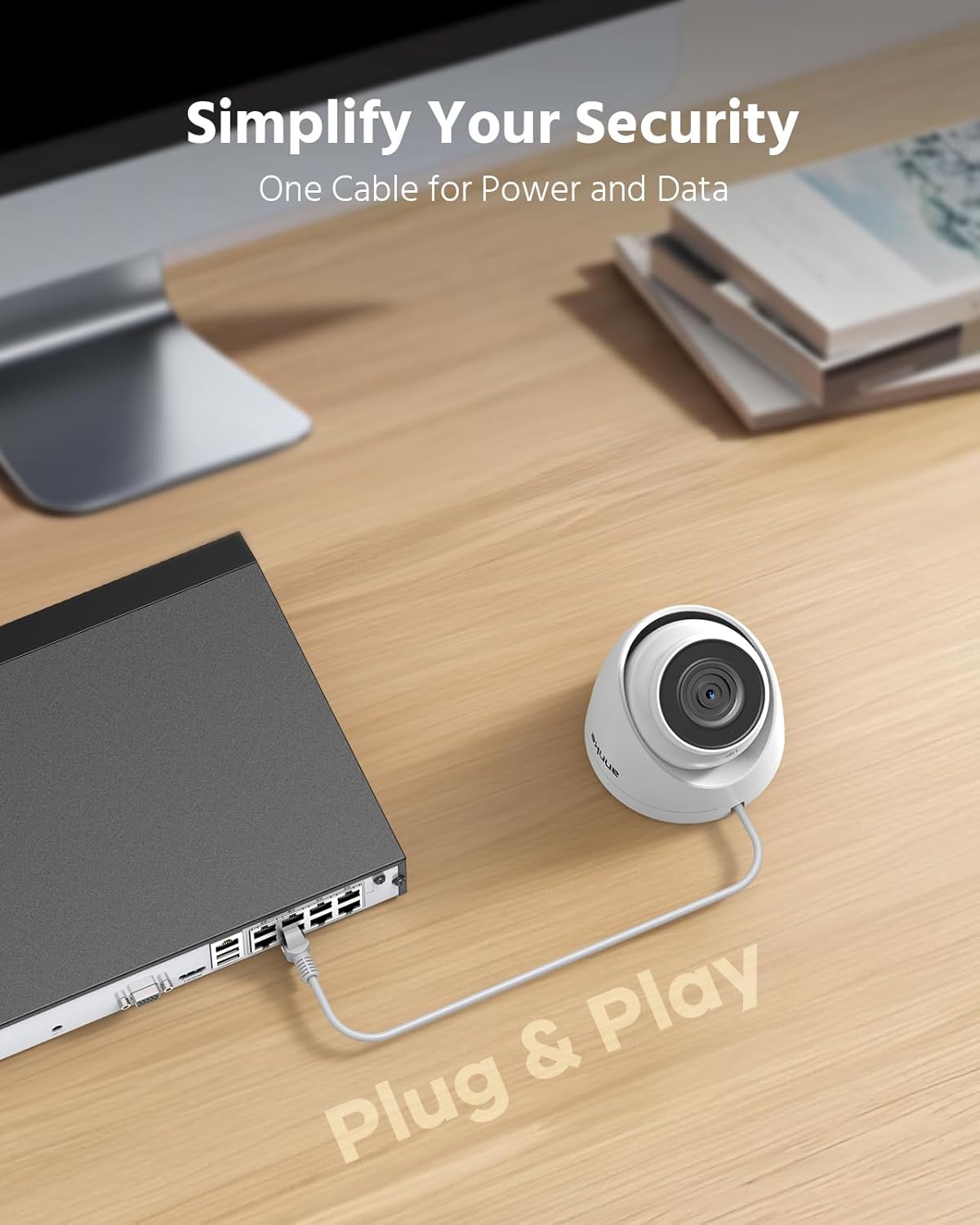
Figure 4.1: Easy PoE Setup

Figure 4.2: Single Cable for Power and Data
4.3 Nastavení aplikace (ANNKE Vision)
To access your camera remotely and receive alerts, download and configure the ANNKE Vision app.
- Stáhnout aplikaci: Hledat "ANNKE Vision" on the App Store (iOS) or Google Play (Android) and install it on your smartphone.
- Vytvořit účet: Otevřete aplikaci a postupujte podle pokynů na obrazovce a vytvořte si nový účet, nebo se přihlaste, pokud již nějaký máte.
- Přidat zařízení: Tap the "+" icon or similar option to add a new device. Scan the QR code on your camera or manually enter its serial number.
- Postupujte podle pokynů: Complete the setup process by following the app's instructions, which may include setting a password for the camera.

Figure 4.3: Remote Access via ANNKE Vision App
5. Provoz
5.1 Živě View a přehrávání
Přístup k živým video streamům a dalšímview zaznamenané footage through your NVR or the ANNKE Vision app.
- Žít View: In the ANNKE Vision app, select your camera to view the real-time video feed. On an NVR, select the corresponding channel.
- Přehrávání: Use the app or NVR interface to access recorded footage. You can typically filter by date, time, and event type (e.g., motion detection).

Figure 5.1: Multi-Device Monitoring
5.2 Možnosti nahrávání
The camera supports continuous 24/7 recording and motion-triggered recording.
- Nahrávání 24/7: When connected to an NVR or with a microSD card installed, the camera can record continuously.
- Záznam pohybu: Configure motion detection settings via the NVR or app to record only when movement is detected, saving storage space.

Figure 5.2: H.265+ Compression for Efficient Storage
5.3 AI Human & Vehicle Detection
The camera's AI capabilities distinguish between humans, vehicles, and other moving objects, providing more accurate alerts.
- Konfigurace detekčních zón: Use the ANNKE Vision app or NVR interface to define specific areas for motion detection.
- Receive Smart Alerts: Get real-time push notifications on your smartphone when human or vehicle activity is detected in the configured zones.

Figure 5.3: AI Detection Event Timeline

Figure 5.4: Instant Alerts for Detected Events
6. Údržba
6.1 Čištění fotoaparátu
Pravidelné čištění pomáhá udržovat optimální kvalitu obrazu.
- Čočka: Gently wipe the camera lens with a soft, clean cloth. If necessary, use a lens cleaning solution designed for optical surfaces. Avoid abrasive materials.
- Tělo fotoaparátu: Otřete tělo fotoaparátuamp tkanina. Nepoužívejte silné čisticí prostředky nebo rozpouštědla.
6.2 aktualizací firmwaru
Periodically check for firmware updates to ensure your camera has the latest features and security enhancements. Firmware updates are typically available through the ANNKE Vision app or the ANNKE official webmísto.
- Zkontrolovat aktualizace: Refer to the ANNKE Vision app settings or ANNKE support website for instructions on checking and applying firmware updates.
- Stabilní výkon: Ensure the camera has a stable power supply during the update process to prevent interruptions.
7. Řešení problémů
If you encounter issues with your ANNKE 3K PoE Turret Security Camera, refer to the following common troubleshooting steps.
- No Power/No Video:
- Ensure the Ethernet cable is securely connected to both the camera and the PoE source (NVR/switch/injector).
- Verify that your PoE source is functioning correctly and providing power.
- Check the Ethernet cable for damage. Try a different cable if available.
- Špatná kvalita obrazu:
- Vyčistěte objektiv fotoaparátu podle pokynů v části Údržba.
- Ensure the camera is properly focused (if adjustable) and not obstructed.
- Check network bandwidth. Insufficient bandwidth can affect video quality.
- Detekce pohybu nefunguje/Falešné poplachy:
- Review and adjust the motion detection sensitivity settings in the app or NVR.
- Ensure detection zones are correctly configured to cover only desired areas.
- Minimize environmental factors like moving branches or reflections that might trigger false alarms.
- Nelze vzdáleně přistupovat k fotoaparátu:
- Ověřte, zda má váš smartphone stabilní připojení k internetu.
- Ensure the camera and NVR (if applicable) are connected to the internet.
- Check firewall settings on your router; ensure necessary ports are open if required (refer to ANNKE support for specific port forwarding details if direct access is needed).
- Confirm the camera is properly added and online in the ANNKE Vision app.
For more detailed troubleshooting or issues not covered here, please visit the ANNKE support webnebo kontaktujte jejich zákaznický servis.
8. Specifikace
| Funkce | Specifikace |
|---|---|
| Rozlišení záznamu videa | 3K (3072*1728) |
| Čočka | 2.8 mm |
| Viewúhel | 116 stupňů |
| Technologie fotosenzoru | CMOS |
| Snímková frekvence | 20 snímků za sekundu |
| Technologie připojení | Ethernet (PoE) |
| Vnitřní/venkovní použití | Uvnitř, venku |
| Úroveň odolnosti vůči povětrnostním vlivům | IP67 Vodotěsný |
| Rozsah nočního vidění | 100 stop |
| Typ nočního vidění | Barevné noční vidění |
| Typ upozornění | Pouze pohyb (detekce osob/vozidel pomocí umělé inteligence) |
| Kompatibilní zařízení | NVR |
| Typ paměti Flash | Micro SD (up to 256 GB, not included) |
| Kódování videa | H.265 + |
| Hmotnost položky | 0.58 kg |

Obrázek 8.1: Rozměry produktu
9. Záruka a podpora
Výrobky ANNKE se obvykle dodávají se standardní zárukou výrobce. Prostudujte si prosím záruční list, který je součástí balení, nebo navštivte oficiální webové stránky ANNKE. webpodrobné záruční podmínky naleznete na webu.
For technical assistance, product inquiries, or warranty claims, please contact ANNKE customer support through their official webwebu nebo kontaktních informací uvedených v dokumentaci k produktu.
Oficiální web ANNKE Webmísto: www.annke.com
10. Oficiální produktová videa
Watch these official videos for additional guidance on your ANNKE 3K PoE Security Camera.
ANNKE 3K PoE Security Camera Overview
Toto video poskytuje obecný přehledview of the ANNKE 3K PoE Security Camera's features and capabilities, including night vision, motion alerts, and remote access.
ANNKE 3K Security Camera Unboxing
This video demonstrates the unboxing experience of the ANNKE 3K Security Camera, showing all included components and accessories.