
1. Úvod a konecview
The Edifier G2000 Pro Bluetooth Computer Speakers are designed to deliver an immersive audio experience for gaming, movies, and music. Featuring 7.1 virtual surround sound, customizable RGB lighting, and multiple connectivity options, these speakers are ideal for various desktop setups.
Klíčové vlastnosti:
- Compact Size, Big Soundstage: 32W RMS, 64W peak power and virtual 7.1 surround sound deliver explosive bass (75Hz) and precise enemy positioning for PC/PS5/Xbox gaming. 3-inch full-range drivers with dual bass reflex boost cinematic immersion. Compact 5.5×4.6×6.3-inch each, ideal for desktop setups.
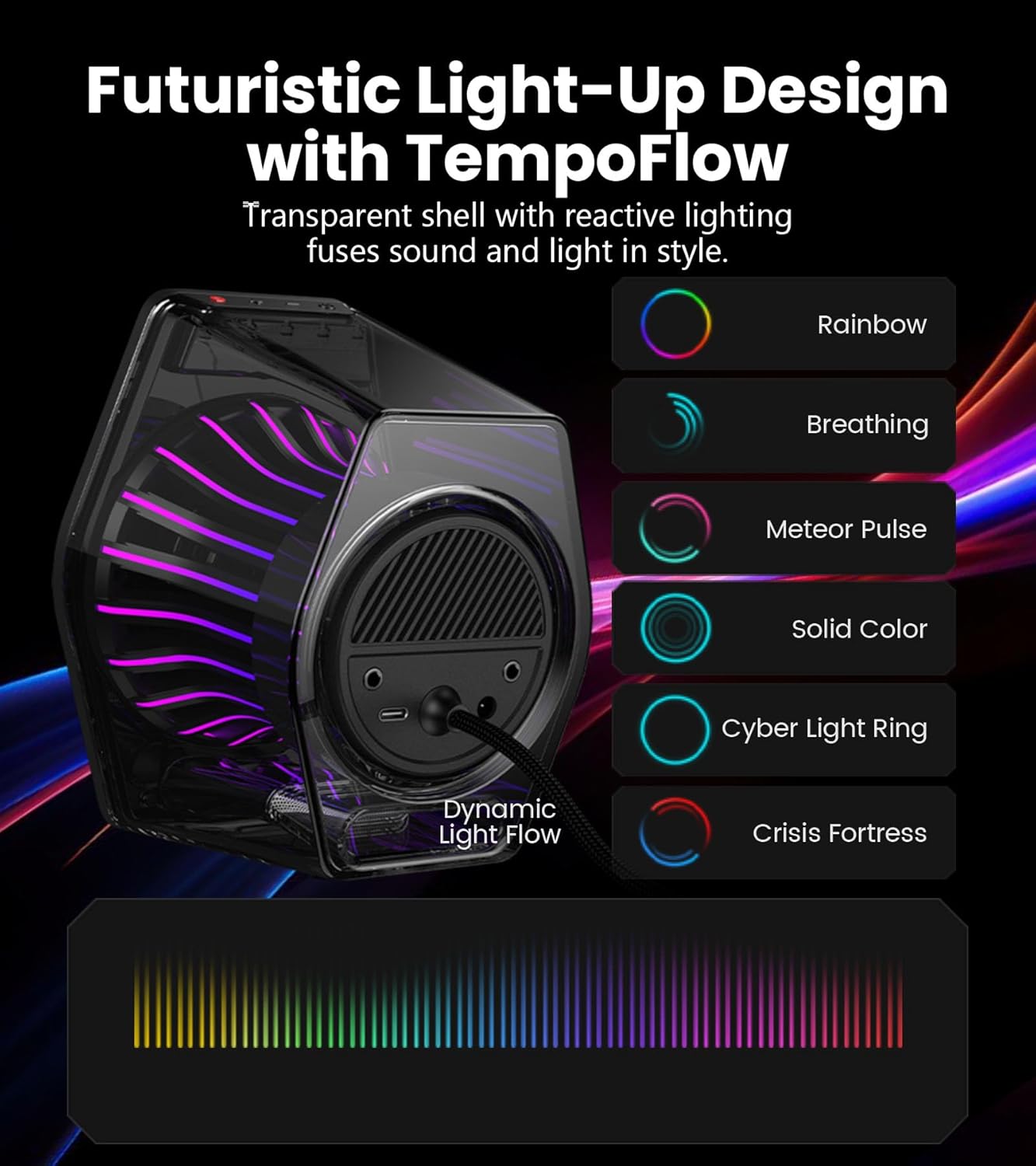
- 270° RGB Light TempoFlow Tech: Unleash the TempoFlow dynamic lighting engine – 20 LED strips + 100 RGB beads sync with gameplay via 7 modes. Control with HECATE software or buttons. Transparent enclosure amplifies 270° dynamic glow, creating a futuristic gaming zone.
- Multi-Device - Bluetooth 5.4/USB/AUX: Bluetooth 5.4 (33ft range) for wireless freedom, USB-C (ultra-low latency) for PC/PS5, 3.5mm AUX for Xbox/Switch. Includes USB-C to USB-A cable, 3.5mm audio cable, and power adapter.
- Pro Acoustic Design & Durability: MDF drivers + DSP chip eliminate distortion. Anti-slip feet isolate vibrations, aluminum caps resist scratches. Tested for 500+ hours in extreme temperatures.
- Game/Movie/Music Modes: Game Mode sharpens footsteps, Movie Mode activates 7.1 surround, Music Mode boosts vocals. Save EQ presets or use tactile buttons for instant switching.

2. Nastavení
Follow these steps to set up your Edifier G2000 Pro speakers:
- Unpack the Speakers: Opatrně vyjměte všechny součásti z obalu.
- Umístění reproduktorů: Place the speakers on your desktop, ensuring they are angled towards your listening position for optimal sound. The compact size is ideal for various desk setups.
- Connect the Speakers: Use the provided cable to connect the two speakers together.
- Připojení napájení: Connect the power adapter to the main speaker and then to a power outlet.
- Choose Your Audio Source: Connect your desired device using one of the following methods:
- USB-C: For PC or PS5, use the included USB-C to USB-A cable.
- 3.5 mm AUX: For Xbox or Switch, use the included 3.5mm audio cable.
- Bluetooth 5.4: For wireless connection with mobile phones or tablets.

Official unboxing video for the Edifier Hecate G2000 RGB Gaming Speakers, demonstrating the contents and initial setup.
3. Návod k obsluze
The Edifier G2000 Pro speakers offer intuitive controls and multiple audio modes for a tailored listening experience.
Ovládání:
- Vypínač: Long press to power on/off. Short press to switch between input modes (Bluetooth, USB, AUX).
- Ovládání hlasitosti: Adjust volume using the dedicated knob or buttons.
- Light Effects Button: Double tap the 'G' button to cycle through 7 RGB lighting modes.
- Přepínání režimů: Use tactile buttons to instantly switch between Game, Movie, and Music modes.
Zvukové režimy:
- Herní režim: Enhances specific audio cues like footsteps for a competitive gaming advantage.
- Režim filmu: Activates 7.1 virtual surround sound for an immersive cinematic experience.
- Hudební režim: Boosts vocals and optimizes sound for general music listening.

4. RGB Lighting (TempoFlow Tech)
The G2000 Pro speakers feature Edifier's TempoFlow dynamic lighting engine, offering 7 distinct modes with 20 LED strips and 100 RGB beads. The transparent enclosure amplifies the 270° dynamic glow, creating a futuristic gaming atmosphere.
- Aktivace: Double tap the 'G' button on the speaker to cycle through the available lighting effects.
- Přizpůsobení: Further customization and synchronization with gameplay can be achieved using the HECATE software.
5. Co je v krabici
Your Edifier G2000 Pro speaker package includes:
- Edifier G2000 Pro Speakers (2 units)
- Napájecí kabel
- Kabel USB-C na USB-A
- 3.5mm audio kabel
- Uživatelská příručka

6. Specifikace
| Funkce | Detail |
|---|---|
| Název modelu | G2000 Pro |
| Typ reproduktoru | Prostorový zvuk |
| Barva | Bílý |
| Maximální výstupní výkon reproduktoru | 64 W (špička) / 32 W RMS |
| Technologie připojení | Bluetooth 5.4, USB-C, 3.5mm AUX |
| Velikost reproduktoru | 3 Inches (Full-range drivers) |
| Odstup signálu od šumu | 96 dB |
| Rozměry produktu | 11.69"H x 9.88"Š x 7.08"V |
| Hmotnost položky | 3.52 liber (1.6 kilogramů) |
| Materiál | MDF |
7. Údržba
To ensure the longevity and optimal performance of your Edifier G2000 Pro speakers, follow these maintenance guidelines:
- Čištění: Use a soft, dry cloth to wipe the speaker surfaces. Avoid abrasive cleaners or solvents that may damage the finish.
- Umístění: Place speakers on a stable surface to prevent accidental falls. Ensure adequate ventilation around the speakers.
- Teplota: Avoid exposing the speakers to extreme temperatures or high humidity.
- Ochrana: The aluminum caps are designed to resist scratches, but handle with care to maintain their appearance.
8. Řešení problémů
If you encounter issues with your Edifier G2000 Pro speakers, try the following troubleshooting steps:
- Žádný zvuk:
- Ensure the speakers are powered on and the volume is turned up.
- Verify that the correct input mode (Bluetooth, USB, AUX) is selected on the speaker. Short press the power button to cycle through modes.
- Zkontrolujte všechny audio kabely, zda jsou bezpečně připojeny.
- Confirm that the audio output on your connected device (PC, console, phone) is not muted and volume is sufficient.
- Problémy s párováním Bluetooth:
- Ensure the speakers are in Bluetooth pairing mode (indicated by a flashing light).
- Vypněte a znovu povolte Bluetooth na vašem zařízení.
- Remove the speakers from your device's paired list and attempt to pair again.
- Zkreslený zvuk:
- Lower the volume on both the speakers and the connected device.
- Zkontrolujte, zda nejsou uvolněná kabelová spojení.
- Ensure the speakers are not placed too close to other electronic devices that might cause interference.
- RGB světla nefungují:
- Double tap the 'G' button to cycle through lighting modes.
- Ujistěte se, že jsou reproduktory zapnuté.
9. Záruka a podpora
For warranty information and technical support, please refer to the official Edifier website or contact Edifier customer service directly. Keep your purchase receipt as proof of purchase for warranty claims.