
Zavedení
This manual provides detailed instructions for the operation and maintenance of your TIMMKOO SR1 AI Voice Recorder. Please read this manual thoroughly before using the device to ensure proper functionality and to maximize its features. The TIMMKOO SR1 is a digital voice recorder equipped with advanced AI capabilities for transcription, summarization, and translation.
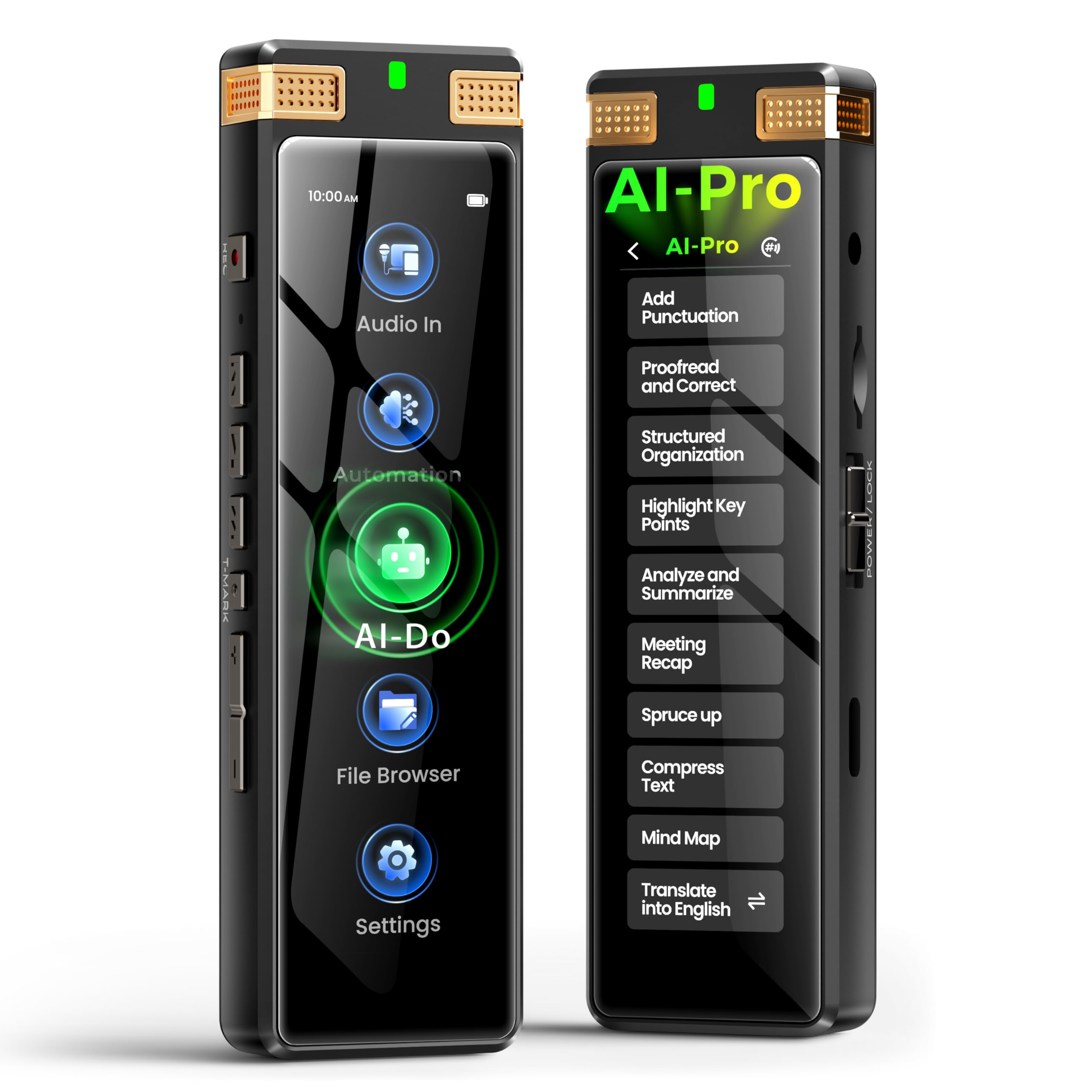
Image: The TIMMKOO SR1 AI Voice Recorder, a compact black device with a screen, shown from the front.
Konec produktuview
The TIMMKOO SR1 features a 3.7-inch high-definition touchscreen for intuitive navigation, complemented by traditional physical buttons for tactile control. It is designed for ease of use and versatility in various recording scenarios.

Image: A diagram illustrating the dual control options of the TIMMKOO SR1, showing both the physical buttons on the side and the touchscreen interface.
Klíčové komponenty:
- Zobrazit: 3.7palcová dotyková obrazovka s vysokým rozlišením.
- Mikrofony: Dual high-precision built-in microphones.
- Ovládání: Touchscreen interface and physical buttons (REC, T-MARK, Play/Pause, Volume, Power/Lock).
- Porty: USB Type-C for charging and data transfer, 3.5mm headphone jack, external microphone input.
- Skladování: 8GB internal storage, expandable via 128GB SD card (included), supports up to 1TB.
Nastavení
1. Nabíjení zařízení
Before first use, fully charge the TIMMKOO SR1.
- Connect the provided USB Type-C cable to the device's charging port.
- Druhý konec kabelu připojte k napájecímu adaptéru USB (není součástí balení) nebo k portu USB počítače.
- Rozsvítí se indikátor nabíjení. Úplné nabití obvykle trvá přibližně 2–3 hodiny.
- Once fully charged, the indicator light may change or turn off, depending on the device's status.
2. Zapnutí/vypnutí
- Zapnutí: Press and hold the Power/Lock button on the side of the device until the screen illuminates.
- Vypnutí: Press and hold the Power/Lock button until a power-off prompt appears on the screen. Select "Power Off" to shut down the device.
- Zamknutí/odemknutí obrazovky: Briefly press the Power/Lock button to lock or unlock the screen during operation.
3. Počáteční konfigurace
Upon first power-on or after a factory reset, you may be prompted to set up basic device parameters.
- Výběr jazyka: Choose your preferred operating language from the list.
- Datum a čas: Set the current date and time for accurate recording timestamps.
- Wi-Fi připojení: Connect to a Wi-Fi network to enable online AI features and firmware updates.
Návod k obsluze
1. Základní nahrávání
- From the main screen, tap the "Record" icon or press the dedicated REC button.
- The recording indicator will show that recording is in progress.
- To pause recording, tap the "Pause" icon on the screen or briefly press the REC button. Tap again to resume.
- To stop and save the recording, tap the "Stop" icon or press and hold the REC button. Confirm saving when prompted.
2. Režimy nahrávání
The SR1 offers several preset recording modes to optimize audio capture for different environments.
- STT Boost: Optimized for speech-to-text conversion, ideal for lectures, meetings, and interviews in environments with background noise.
- Posílení hlasu: Enhances vocal clarity, suitable for recording singing or spoken word where voice quality is paramount.
- Hifi: High-fidelity recording for capturing a wide range of sounds with minimal compression, suitable for music or ambient recordings.

Image: Visual representation of the TIMMKOO SR1's multiple recording modes: STT Boost for large audiences, Vocal Boost for close-up speech, and Hi-Fi for musical performances.
3. Automated Recording
The SR1 supports hands-free recording through scheduled and voice-activated modes.
- Plánované nahrávání: Set a specific time for the device to start and stop recording automatically. Access this feature in the settings menu.
- Voice-Activated Recording (VOR): The recorder will automatically start recording when sound is detected and pause when silence occurs, conserving storage space. Adjust sensitivity in settings.

Image: The TIMMKOO SR1 recorder on a bedside table, illustrating its unattended and voice-activated capture capabilities.
4. Externí audio vstup
For enhanced recording flexibility, the SR1 supports external microphones and line-in audio.
- Externí mikrofon: Connect a 3.5mm TRS or TRRS microphone to the designated port for improved audio quality or directional recording.
- Line-in Audio: Use an AUX cable to connect the SR1 to an external audio source for direct recording.

Image: A diagram showing the TIMMKOO SR1 connected to various external audio sources, including an external microphone and an AUX cable for line-in input.
5. Přehrávání
Přístup k vašim záznamům files through the "Files" or "Recordings" menu on the device.
- Select the desired recording to play.
- Use the on-screen controls or physical buttons to play, pause, fast forward, or rewind.
- Connect headphones to the 3.5mm jack for private listening.
6. AI Features: Transcription and Text Processing
The TIMMKOO SR1 integrates advanced AI technology for converting speech to text and processing textual content.
Offline Transcription:
The device supports offline speech-to-text conversion in up to 92 languages without requiring an internet connection. This ensures privacy as audio files are not uploaded.
- Post-Recording Transcription: Offers higher accuracy and broader language support. Select a recorded file and choose the transcription option.
- Real-Time Transcription: Provides faster transcription during recording with lower power consumption. Enable this feature in recording settings.

Image: Two TIMMKOO SR1 devices demonstrating the two ways of offline transcription: Post-Recording Trans for higher accuracy and Real-Time Trans for faster processing.
Online AI-Powered Text Processing:
When connected to Wi-Fi, the SR1 can leverage AI big data models for advanced text analysis and manipulation. Your audio files remain on the device; only the transcribed text is processed online.
- Proofreading and Correction: Improve the accuracy and grammar of transcribed text.
- Structured Organization: Organize text into logical sections.
- Analysis and Summarization: Generate concise summaries or extract key points from lengthy texts.
- Mind Mapping: Create visual mind maps from your notes.
- Meeting Recap: Automatically generate a summary of meeting discussions.
- Překlad: Translate transcribed text into various target languages.

Image: A person using a laptop with the TIMMKOO SR1 connected, demonstrating the powerful AI-driven tools for text processing such as summarization, mind mapping, and translation.
7. Správa dat
- Backup Feature: The SR1 automatically creates a duplicate of your recordings during the saving process to protect against data loss.
- File Převod: Connect the device to a computer using the USB Type-C cable to transfer recorded audio files and transcribed text. The device will appear as a removable storage drive.
- Import externího zvuku: The SR1 allows importing external audio files (MP3, MKA, OGG, AAC, WAV, MP2, AMR) for playback, transcription, and AI processing.

Image: The TIMMKOO SR1 resting on a laptop, highlighting its 1100mAh battery and 8GB internal storage plus 128GB SD card for large capacity and long battery life.
Údržba
- Čištění: Use a soft, dry cloth to clean the device's exterior. Avoid liquid cleaners or abrasive materials.
- Skladování: Zařízení skladujte na chladném a suchém místě mimo dosah přímého slunečního záření, extrémních teplot a vlhkosti.
- Péče o baterie: To prolong battery life, avoid fully discharging the battery frequently. If storing for an extended period, charge the device to about 50% and recharge every few months.
- Aktualizace softwaru: Periodically check for firmware updates through the device settings to ensure optimal performance and access to new features.
Odstraňování problémů
| Problém | Možné řešení |
|---|---|
| Zařízení se nezapne. | Ensure the battery is charged. Connect to a power source and try again. If unresponsive, perform a hard reset (refer to manufacturer's support for specific instructions). |
| Špatná kvalita záznamu. | Check microphone placement. Ensure no obstructions. Select an appropriate recording mode (e.g., STT Boost for speech, Hi-Fi for music). Consider using an external microphone for specific needs. |
| Transcription is inaccurate. | Ensure clear audio input. Speak clearly and at a moderate pace. Use the "STT Boost" recording mode. For online AI features, ensure a stable Wi-Fi connection. Review and correct the transcribed text manually if needed. |
| Zařízení nereaguje nebo zamrzlo. | Press and hold the Power/Lock button for approximately 10-15 seconds to force a restart. If the issue persists, contact customer support. |
| Nelze se připojit k Wi-Fi. | Ensure Wi-Fi is enabled on the device. Verify the Wi-Fi password. Check if the router is within range and functioning correctly. |
Specifikace
| Funkce | Detail |
|---|---|
| Značka | TIMMKOO |
| Model | SR1 |
| Kapacita paměti | 136 GB (8GB internal + 128GB SD card, expandable up to 1TB) |
| Hardwarové rozhraní | USB typ C |
| Kompatibilní zařízení | Osobní počítač |
| Velikost obrazovky | 3.7 palce |
| Formát mikrofonu | Built-In (Dual high-precision) |
| Průměrná životnost baterie | Up to 30 Hours (continuous recording) |
| Složení článků baterie | Lithium-iontová (1100 mAh) |
| Media Format Supported | WAV, MP3, MKA, OGG, AAC, MP2, AMR |
| Rozměry produktu | 1.52 x 3.56 x 11.18 cm (0.6 x 1.4 x 4.4 palce) |
| Hmotnost položky | 96 gramů (3.39 unce) |
| Jack pro sluchátka | 3.5 milimetru |
Záruka a podpora
For detailed warranty information and customer support, please refer to the official TIMMKOO webnebo se obraťte přímo na jejich zákaznický servis. Uschovejte si doklad o koupi pro případ reklamace.
Online zdroje: For the latest FAQs, software updates, and additional support, visit the TIMMKOO official support page.


