
1. Úvod
The STC My Home Q30 WiFi Range Extender is designed to expand and strengthen your existing Wi-Fi network, eliminating dead zones and providing stable, high-speed internet coverage throughout your home or office. This dual-band booster supports both 2.4GHz and 5GHz frequencies, offering speeds up to 1200 Mbps for seamless streaming, gaming, and browsing.
1.1 Obsah balení
- STC My Home Q30 WiFi Range Extender
- Power Adapter (Integrated)
- Rychlý průvodce
2. Konec produktuview
Familiarize yourself with the STC My Home Q30 extender's components and indicators.

Obrázek 2.1: Přední strana view of the STC My Home Q30 WiFi Range Extender. The device is white with a black central panel featuring the 'stc' logo.

Obrázek 2.2: Detailní záběr zepředu view of the STC Q30 extender, highlighting the indicator lights and WPS button area.
Obrázek 2.3: Zadní strana view of the STC Q30 extender, showing the ventilation and power plug area.
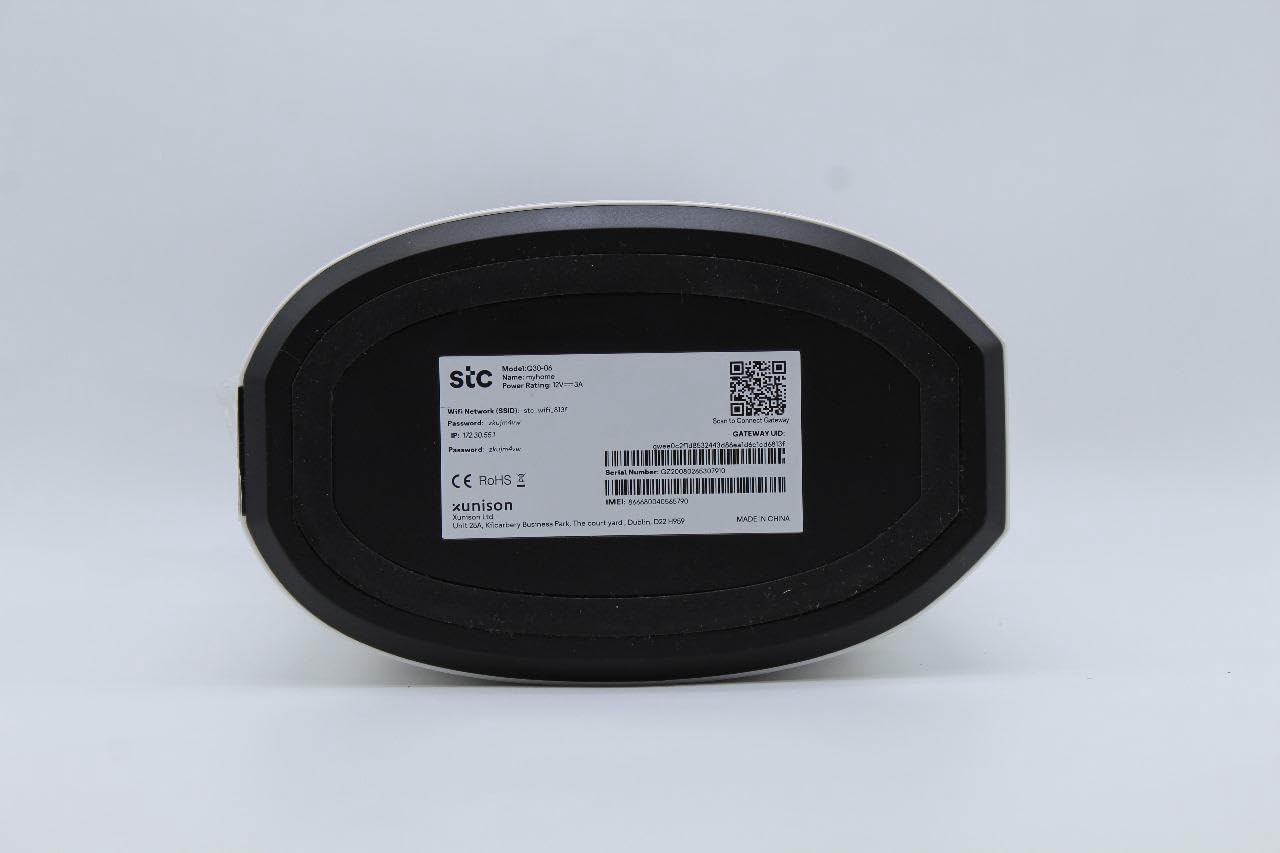
Image 2.4: Bottom label of the STC Q30 extender, displaying model information, serial number, default login details, and a QR code for quick access or setup.
2.1 Kontrolky
- LED napájení: Indikuje stav napájení.
- Wi-Fi LED: Indicates Wi-Fi signal status and activity.
- LED síla signálu: Shows the strength of the signal received from the main router.
2.2 Tlačítka a porty
- Tlačítko WPS: Pro rychlé a snadné nastavení s routery s podporou WPS.
- Resetovací tlačítko: Used to restore the extender to factory default settings (typically a small pinhole button).
- Ethernetový port: For connecting wired devices or for initial setup.
3. Pokyny k nastavení
The STC My Home Q30 offers two primary methods for setup: WPS (Wi-Fi Protected Setup) and Web Rozhraní.
3.1 WPS Setup (Recommended for Quick Setup)
- Plug the Q30 extender into an electrical outlet near your main Wi-Fi router. Wait for the Power LED to turn solid.
- Stiskněte tlačítko WPS na hlavním Wi-Fi routeru.
- Within two minutes, press the WPS button on the STC My Home Q30 extender.
- Wait for the Wi-Fi LED on the extender to turn solid, indicating a successful connection.
- Relocate the extender to a suitable location between your router and the Wi-Fi dead zone. Ensure the Signal Strength LED indicates a good connection (e.g., green or blue).
3.2 Web Nastavení rozhraní
- Plug the Q30 extender into an electrical outlet near your main Wi-Fi router. Wait for the Power LED to turn solid.
- Connect your computer or mobile device to the extender's default Wi-Fi network (e.g., "STC_Extender" or similar, usually found on the product label). No password is required initially.
- Otevřete a web prohlížeč a zadejte výchozí IP adresu nebo název domény (např.
192.168.1.1orstcextender.net) provided on the product label or quick start guide. - Log in using the default username and password (e.g.,
admin/adminor as specified on the label). - Follow the on-screen instructions of the setup wizard to select your main Wi-Fi network and enter its password.
- Configure the extender's Wi-Fi network name (SSID) and password. You can choose to keep the same as your main network or create a new one.
- Complete the setup. The extender will restart.
- Relocate the extender to an optimal position and connect your devices to the extended network.
4. Návod k obsluze
Once set up, the STC My Home Q30 operates automatically. Here are some operational guidelines:
- Optimální umístění: Place the extender roughly halfway between your main router and the area with weak Wi-Fi signal. The Signal Strength LED should indicate a strong connection to the router.
- Připojovací zařízení: Devices will automatically connect to the strongest available Wi-Fi signal. If you created a new SSID for the extender, connect to that network.
- Využití ethernetového portu: The Ethernet port can be used to connect a wired device (e.g., smart TV, gaming console, PC) to the extended network, providing a stable wired connection.
5. Údržba
Regular maintenance ensures optimal performance and longevity of your STC My Home Q30 extender.
- Aktualizace firmwaru: Periodically check the STC support website for firmware updates. Updating firmware can improve performance, add features, and fix bugs. Access the web interface to perform updates.
- Čištění: Gently wipe the device with a dry, soft cloth. Do not use liquid cleaners or abrasive materials. Ensure ventilation holes are clear of dust.
- Restartování: If you experience connectivity issues, try unplugging the extender from the power outlet for 10 seconds and then plugging it back in.
- Obnovení továrního nastavení: If the extender is not functioning correctly or you forget the login credentials, perform a factory reset by pressing and holding the Reset button for 5-10 seconds with a paperclip until the LEDs flash. Note that this will erase all custom settings.
6. Řešení problémů
Viz následující běžné problémy a jejich řešení.
- Bez napájení:
- Ujistěte se, že je prodlužovač zátěže bezpečně zapojený do funkční elektrické zásuvky.
- Check if the Power LED is illuminated.
- Po nastavení není k dispozici přístup k internetu:
- Ověřte, zda má váš hlavní router aktivní připojení k internetu.
- Check the Signal Strength LED on the extender. If it's red or off, the extender is too far from the router or the connection is poor. Relocate the extender closer to the router.
- Ensure you entered the correct Wi-Fi password for your main router during setup.
- Zkuste restartovat router i extender.
- Pomalá rychlost v rozšířené síti:
- Relocate the extender to an optimal position where the Signal Strength LED indicates a strong connection (e.g., green or blue). Avoid placing it near large metal objects or other interference sources.
- Ujistěte se, že váš hlavní router poskytuje dostatečnou rychlost.
- Check for firmware updates for the extender.
- Nelze přistupovat Web Stránka pro správu:
- Ujistěte se, že je vaše zařízení připojeno k síti Wi-Fi extenderu.
- Verify the IP address or domain name entered in the browser.
- Vymažte mezipaměť prohlížeče nebo zkuste jiný prohlížeč.
- Pokud jste zapomněli přihlašovací údaje, proveďte obnovení továrního nastavení.
7. Specifikace
| Číslo modelu | Q30 |
| Značka | STC (Generic) |
| Rychlost přenosu dat | Až 1200 Mbps |
| Band Frequency Supported | 2.4 GHz, 5 GHz (dvoupásmové) |
| Kompatibilní zařízení | WiFi-enabled devices |
| Barva | Bílý |
| Hmotnost položky | 1.33 kg |
| Rozměry balení | 34.8 x 18 x 14.8 cm |
8. Záruka a podpora
For warranty information and technical support, please refer to the documentation included with your purchase or contact your retailer. STC provides reliable network expertise, and support channels are typically available through the point of purchase or the official STC webmísto.
Uschovejte si doklad o koupi pro případ reklamace.