
1. Úvod
Thank you for choosing the Amaran Verge Key Light. This manual provides essential information for the safe and efficient operation of your device. Please read this manual thoroughly before use and retain it for future reference.
2. Bezpečnostní informace
- Do not expose the light to water or high humidity.
- Do not disassemble or modify the product. Unauthorized modifications may void the warranty and pose a safety risk.
- Use only the provided power adapter or a compatible USB-C PD power source.
- Udržujte světlo mimo dosah hořlavých materiálů.
- Zajistěte řádné větrání během provozu, aby nedošlo k přehřátí.
- Avoid direct eye exposure to the light source, especially at high brightness settings.
3. Obsah balení
Ověřte, zda jsou v balení přítomny všechny položky:
- Amaran Verge Key Light
- Napájecí adaptér USB-C
- Návod k použití

Image: Amaran Verge Key Light and its included USB-C power adapter.
4. Konec produktuview
The Amaran Verge Key Light is a compact, edge-lit rectangular panel designed for desktop creators, streamers, and video recording. It offers versatile control options and a soft, diffused light output.
Klíčové vlastnosti:
- Bi-color Temperature: Nastavitelná od 2700K do 6500K.
- Výkon měkkého světla: 26W power, providing up to 3,160 lux at 0.5m (4300K).
- Tichý provoz: Fanless design ensures noise-free recording.
- Plynulé ovládání jasu: 0-100% dimming.
- Více možností ovládání: Front-facing knobs, Amaran Desktop App, and Stream Deck plugin.
- Speciální světelné efekty: Includes 7 built-in effects: Fireworks, Faulty Bulb, TV, Strobe, Explosion, Fire.
- Příkon: USB-C PD compatible.
- Montáž: Integrated 1/4-20 inch screw mount for tripods, light stands, or other mounting solutions.

Obrázek: Přední strana view of the Amaran Verge Key Light, showcasing its sleek design and Amaran Verge branding.

Obrázek: Detail view of the integrated 1/4-20 inch screw mount, designed for easy attachment to various stands.
5. Nastavení
- Montáž světla:
- Locate the 1/4-20 inch screw mount on the bottom or side of the Amaran Verge Key Light.
- Attach the light to a compatible tripod, light stand, or desk clamp using the screw mount. Ensure it is securely fastened.
- Připojení napájení:
- Connect the provided USB-C power adapter to the USB-C port on the light.
- Plug the power adapter into a suitable power outlet. The light requires a power delivery (PD) compatible source.
6. Návod k obsluze
6.1 Zapnutí/vypnutí
Locate the power button on the device. Press it once to turn the light on, and press it again to turn it off.
6.2 Adjusting Brightness and Color Temperature (Manual Control)
The Amaran Verge Key Light features front-facing knobs for direct control:
- Knoflík jasu: Rotate to adjust the light intensity from 0% to 100%.
- Color Temperature Knob: Rotate to change the color temperature from 2700K (warm) to 6500K (cool).

Image: A hand adjusting the front-facing knobs on the Amaran Verge Key Light to control brightness and color temperature.
6.3 App Control (Amaran Desktop App)
For advanced control and remote operation, download the Amaran Desktop App:
- Download and install the Amaran Desktop App on your computer or mobile device.
- Ensure your Amaran Verge Key Light is powered on and within Bluetooth range of your device.
- Open the app and follow the on-screen instructions to pair your light.
- Use the app interface to precisely adjust brightness, color temperature, and access special lighting effects.
6.4 Stream Deck Integration
The Amaran Verge Key Light supports integration with Stream Deck for seamless control during live streaming or content creation:
- Ensure your Stream Deck software is up to date.
- Install the Amaran plugin for Stream Deck.
- Configure custom buttons on your Stream Deck to control light settings such as power, brightness, color temperature, and special effects.
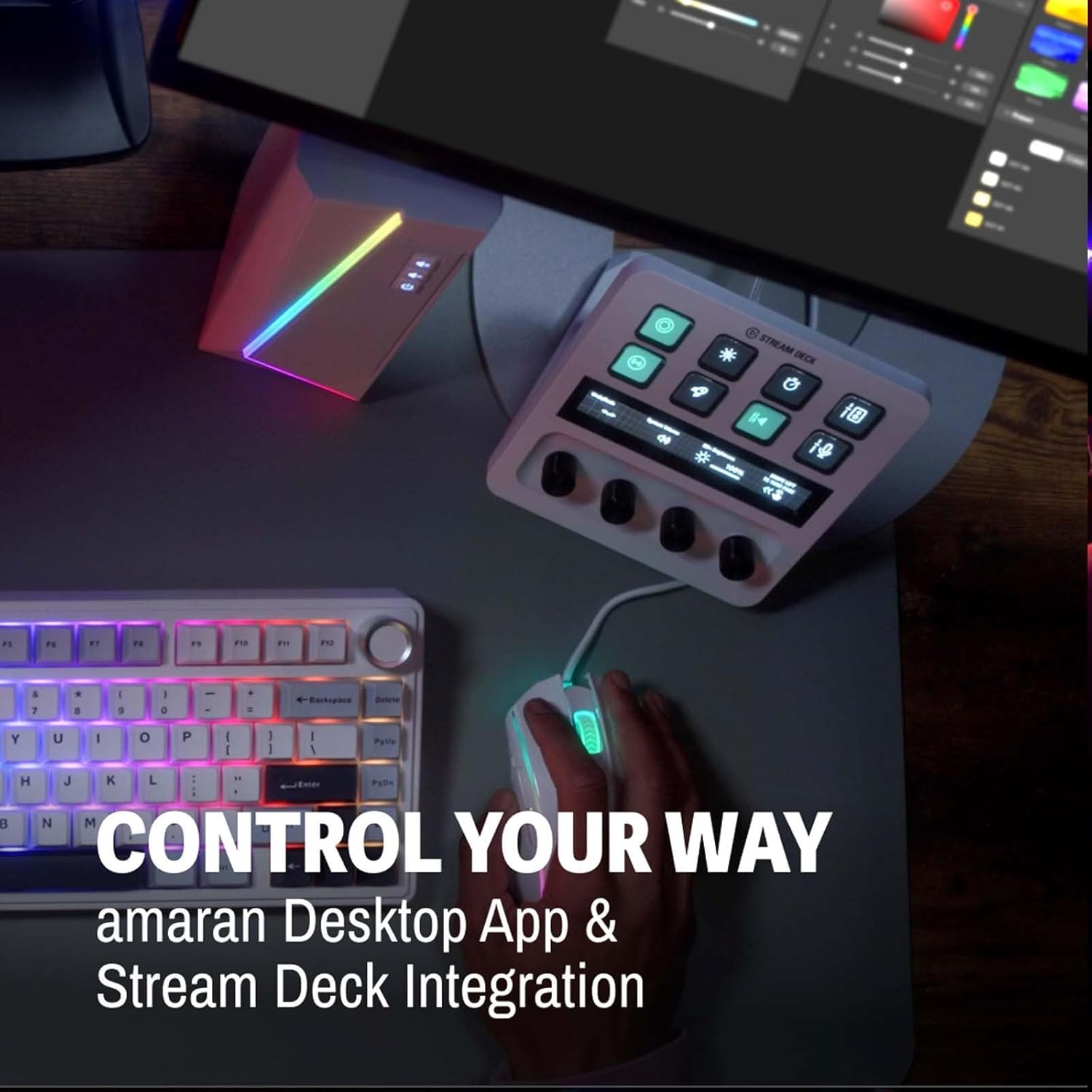
Image: A Stream Deck device integrated with the Amaran Verge Key Light, showing custom controls for lighting.
6.5 Special Lighting Effects
The light includes 7 built-in lighting effects. These can typically be accessed and controlled via the Amaran Desktop App or Stream Deck integration:
- Ohňostroj
- Chybná žárovka
- TV
- Stroboskop
- Výbuch
- Oheň
7. Údržba
- Čištění: K čištění povrchu světla používejte měkký, suchý hadřík. Nepoužívejte abrazivní čisticí prostředky ani rozpouštědla.
- Skladování: Pokud světlo nepoužíváte, skladujte ho na chladném a suchém místě, mimo dosah přímého slunečního záření a extrémních teplot.
- Péče o kabely: Zabraňte nadměrnému ohýbání nebo krimpování napájecího kabelu.
8. Řešení problémů
- Světlo se nerozsvítí:
- Ujistěte se, že je napájecí adaptér bezpečně připojen k světlu i k funkční zásuvce.
- Ověřte, zda je elektrická zásuvka funkční.
- Confirm that the USB-C power source is Power Delivery (PD) compatible and provides sufficient power.
- Ovládání aplikací nefunguje:
- Zkontrolujte, zda je světlo zapnuté.
- Ensure Bluetooth is enabled on your control device.
- Ujistěte se, že je světlo v dosahu Bluetooth.
- Restart the Amaran Desktop App and try pairing again.
- Light output is inconsistent:
- Check for any obstructions blocking the light panel.
- Ujistěte se, že připojení k napájení je stabilní.
9. Specifikace
| Funkce | Specifikace |
|---|---|
| Model | Verge Key Light |
| Teplota barev | 2700K-6500K |
| Výkon | 26W |
| Osvětlení (0.5 m) | Up to 3,160 lux (4300K) |
| Ovládání jasu | 0-100% Stepless |
| Chlazení | Fanless (Silent) |
| Technologie připojení | USB, Bluetooth (for App Control) |
| Hardwarové rozhraní | USB typ C |
| Compatible Mount Type | 1/4-20 inch screw mount, Cold Shoe |
| Hmotnost položky | 3.3 libry |
| Rozměry balení | 15 x 11.42 x 2.76 palce |
10. Záruka
Amaran products are covered by a limited warranty. Please refer to the official Amaran webKonkrétní záruční podmínky naleznete na webových stránkách nebo v dokumentaci k nákupu. Uschovejte si doklad o koupi pro případ reklamace.
11. Podpora
For technical support, troubleshooting assistance, or further inquiries, please visit the official Amaran website or contact their customer service department. Contact information can typically be found on the product packaging or the Amaran webmísto.


