
1. Úvod
Thank you for choosing the Chujianxi Mini Action Camera 1080P. This compact and versatile camera is designed to capture your adventures in high definition, whether on land or underwater. This manual provides essential information for setting up, operating, maintaining, and troubleshooting your device. Please read it thoroughly before use to ensure optimal performance and longevity of your camera.
2. Co je v krabici
Carefully unpack your Chujianxi Mini Action Camera and verify that all items listed below are included:
- Chujianxi Mini Action Camera
- Vodotěsné pouzdro
- 360° otočný zadní klip
- Magnetická šňůrka na krk
- Datový kabel typu C
- Rámeček fotoaparátu
- Montážní adaptér
- Rectangular Rubber Pad
- Bike Mounts
- Helma Mount
- Boční montáž
- Návod k použití

Image: All accessories included with the Chujianxi Mini Action Camera.
3. Konec produktuview
The Chujianxi Mini Action Camera is designed for ease of use and portability. It features a compact body with essential controls and ports.

Obrázek: Přední strana view of the Chujianxi Mini Action Camera.
Klíčové komponenty:
- Čočka: Wide-angle lens for capturing broad scenes.
- Power/Record Button: Used to power on/off and start/stop recording.
- Mikrofon: Pro nahrávání zvuku.
- LED indikátor: Displays camera status (e.g., recording, charging).
- Slot pro kartu Micro SD: Pro vložení paměťové karty.
- Port typu C: Pro nabíjení a přenos dat.
- Magnetická základna: For quick attachment to metallic surfaces.

Image: Size comparison of the camera, demonstrating its compact form factor.
4. Nastavení
4.1 Nabíjení fotoaparátu
Before first use, fully charge the camera. Connect the included Type-C cable to the camera's Type-C port and the other end to a USB power adapter (not included) or a computer's USB port. The LED indicator will show charging status and turn off when fully charged.
4.2 Vložení Micro SD karty
The camera requires a Micro SD card (TF card) for storing recordings. A card is not included in the package.
- Open the protective cover on the side of the camera.
- Insert a Micro SD card (Class 10 or higher, up to 256GB, V30 recommended) into the card slot with the contacts facing down until it clicks into place.
- Bezpečně zavřete ochranný kryt.
Note: Format the Micro SD card in the camera settings via the mobile app before initial use to ensure compatibility and optimal performance.
5. Návod k obsluze
5.1 Zapnutí/vypnutí
- Zapnutí: Press and hold the Power/Record button for 2-3 seconds until the LED indicator lights up.
- Vypnout: Press and hold the Power/Record button for 2-3 seconds until the LED indicator turns off.
5.2 Nahrávání videa
- With the camera powered on, short press the Power/Record button to start video recording. The LED indicator will flash.
- Short press the Power/Record button again to stop recording. The LED indicator will stop flashing.
5.3 Fotografování
In video standby mode, a single short press of the Power/Record button will capture a photo. The LED indicator will flash once.
5.4 Nahrávání ve smyčce
The camera supports loop recording. When the Micro SD card is full, the oldest files will be overwritten automatically to make space for new recordings. This feature can be managed via the mobile app.

Image: Camera supports recording while charging and loop recording functionality.
6. App Connectivity (WiFi)
The Chujianxi Mini Action Camera can be controlled and managed via a dedicated mobile application.
- Download the official Chujianxi app from your smartphone's app store (iOS or Android).
- Zapněte fotoaparát.
- On your smartphone, go to WiFi settings and connect to the camera's WiFi network (SSID and password can be found in the camera's settings or manual).
- Open the Chujianxi app. You should now see a live view from the camera and be able to control recording, adjust settings, and download files.
6.1 PC WebFunkce vačky
Connect the camera to your computer using the Type-C cable. The camera can function as a webkamera pro videohovory nebo živé streamování.

Image: Mobile app interface for controlling the camera via WiFi.
7. Možnosti montáže
The camera comes with a variety of accessories for flexible mounting in different scenarios.
7.1 Magnetické uchycení
The camera features a built-in magnet, allowing it to be securely attached to any metallic surface. This is ideal for quick setup on vehicles, refrigerators, or other metal objects.
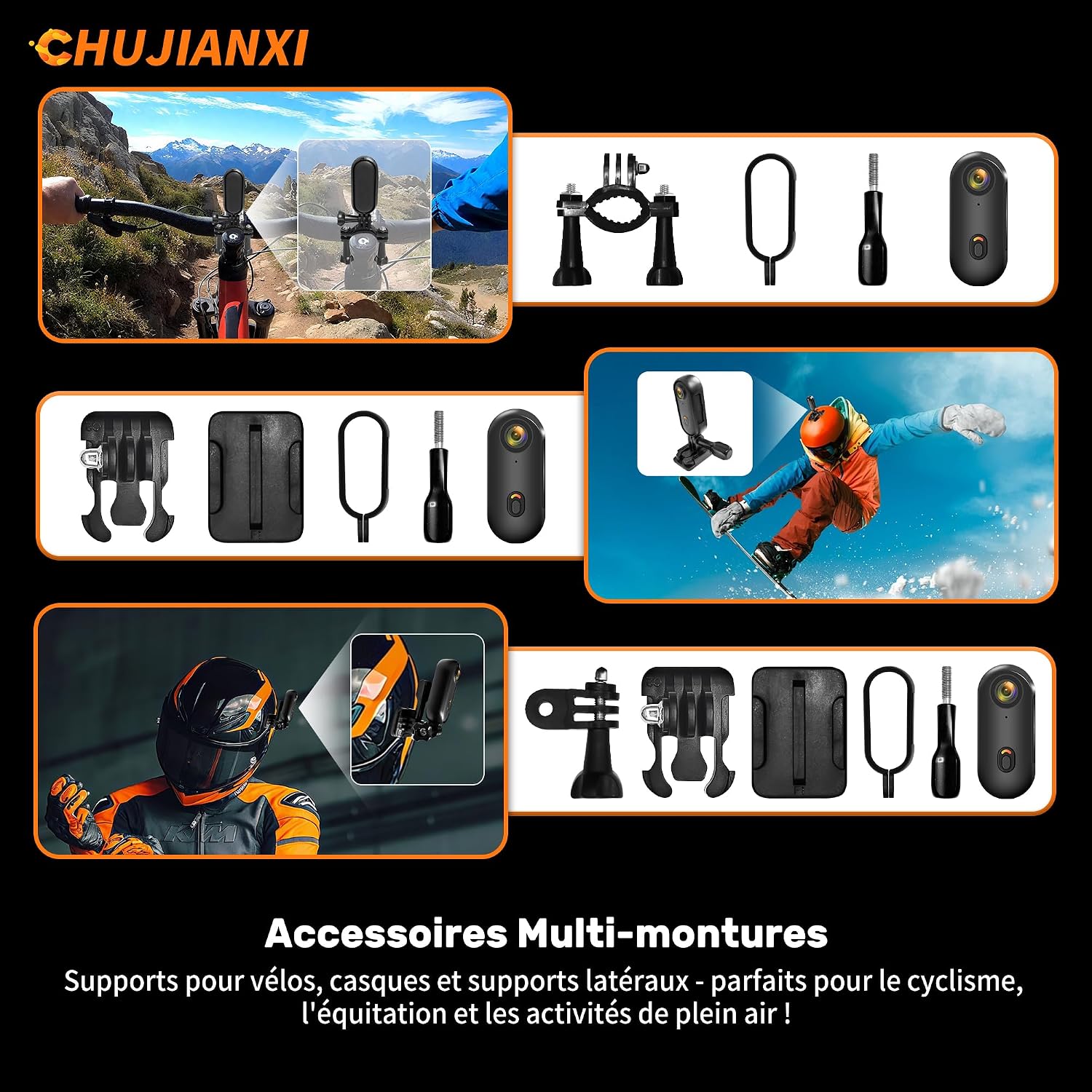
Image: Magnetic mounting of the camera.
7.2 Using the 360° Rotating Back Clip
Attach the camera to the 360° rotating back clip. This allows you to clip the camera onto clothing, backpacks, or other straps and adjust the angle as needed.
7.3 Other Mounts
Utilize the included bike mounts, helmet mount, and side mount with the camera frame or waterproof case for specific activities like cycling, skiing, or vlogging. These mounts provide secure attachment and versatile angles.

Obrázek: Přamples of the 6 versatile mounting kits in use.
7.4 Použití vodotěsného pouzdra
To use the camera underwater, it must be placed inside the included waterproof case. The case protects the camera up to a depth of 30 meters.
- Před vložením fotoaparátu do pouzdra se ujistěte, že je čistý a suchý.
- Open the waterproof case latch and carefully insert the camera.
- Pevně zavřete západku, abyste zajistili vodotěsné utěsnění.
- Before submerging, perform a leak test by placing the empty case in water for a few minutes.

Image: Camera secured within the waterproof case.
8. Údržba
- Čištění: Use a soft, dry cloth to clean the camera body. For the lens, use a specialized lens cleaning cloth and solution. Do not use harsh chemicals.
- Péče o vodotěsné pouzdro: After each use in water, rinse the waterproof case with fresh water and allow it to air dry. Check the rubber seal for any debris or damage.
- Skladování: Fotoaparát skladujte na chladném a suchém místě mimo dosah přímého slunečního záření a extrémních teplot. Pokud jej skladujete delší dobu, vyjměte kartu Micro SD.
- Baterie: For optimal battery life, avoid fully discharging the battery frequently. Charge the camera periodically if not used for a long time.
9. Řešení problémů
9.1 Kamera se nezapíná
- Ensure the battery is charged. Connect the camera to a power source.
- Press and hold the Power/Record button for at least 3 seconds.
9.2 Problémy se záznamem
- Check if a Micro SD card is inserted correctly and has sufficient free space.
- Ensure the Micro SD card is Class 10 or higher and formatted correctly.
- The battery might be low. Charge the camera.
9.3 WiFi Connection Problems
- Ensure the camera's WiFi is enabled.
- Check your phone's WiFi settings to ensure it's connected to the camera's network.
- Restartujte fotoaparát i smartphone.
9.4 Waterproof Case Leakage
- Always perform a leak test with the empty case before use.
- Ensure the rubber seal is clean, free of debris, and properly seated.
- Verify the latch is securely closed.
10. Specifikace
| Funkce | Specifikace |
|---|---|
| Značka | Chujianxi |
| Název modelu | Chujianxi Camera Sport 1080P |
| Rozlišení záznamu videa | 1080p Full HD |
| Efektivní rozlišení videa | 1080 XNUMX pixelů |
| Effective Photo Resolution | 12.2 megapixelů (4032x3024) |
| technologie Sensor | CMOS |
| Technologie připojení | USB, Wi-Fi |
| Typ paměti Flash | Micro SD (up to 256GB, Class 10, V30) |
| Formát záznamu videa | MP4 |
| Podporovaný formát obrázku | JPEG |
| Podporovaný formát zvuku | AAC |
| Speciální funkce | One-touch recording, Lightweight, Magnetic, Thumb-sized, Waterproof case |
| Úroveň odolnosti proti vodě | Waterproof (with case, up to 30 meters) |
| Stabilizace obrazu | Digitální |
| Hmotnost | 35 gramů |
| Baterie | 1 AAA (součástí balení) |
| Typ objektivu | Široký úhel |
| Typ zaměření | Automatické ostření |
| Viewúhel | 120 stupňů |
| Kompatibilní zařízení | Chytrý telefon, počítač |
11. Záruka a podpora
Your Chujianxi Mini Action Camera 1080P comes with a 1letá záruka výrobce od data nákupu. Tato záruka se vztahuje na výrobní vady a vady materiálu při běžném používání. Nevztahuje se na škody způsobené nesprávným použitím, nehodami, neoprávněnými úpravami nebo nesprávnou údržbou.
For warranty claims, technical support, or any questions regarding your product, please contact Chujianxi customer service through the retailer where you purchased the product or visit our official webstránky pro kontaktní informace.
Uschovejte si prosím doklad o koupi pro účely záruky.