
Zavedení
Thank you for choosing the Ceybo Original Solar Voice Remote Control. This remote is designed to provide seamless control over your compatible Samsung Smart TV, featuring convenient solar charging, voice command capabilities, and dedicated shortcut buttons for popular streaming services. This manual will guide you through the setup, operation, and maintenance of your new remote control.

Obrázek: Přední a zadní strana view of the Ceybo Solar Voice Remote Control, showcasing its sleek design and solar charging panel on the rear.
Nastavení
1. Nabíjení dálkového ovladače
Your Ceybo remote control features an eco-friendly solar charging panel and a USB-C port for convenient power options.
- Solární nabíjení: Place the remote control with its solar panel facing a light source (natural sunlight or indoor lighting) to charge the internal battery. For optimal charging, ensure the panel is exposed to light regularly.
- Nabíjení USB-C: For faster charging or when light is insufficient, connect a USB-C cable (not included) to the remote's USB-C port and a power adapter.

Image: The Ceybo remote control positioned to receive sunlight, illustrating its solar charging capability.
2. Párování s vaším chytrým televizorem Samsung
The Ceybo remote uses Bluetooth for connection. Follow these steps to pair it with your TV:
- Ujistěte se, že je váš televizor zapnutý.
- Point the remote towards your TV.
- Současně stiskněte a podržte Návrat button (curved arrow) and the Přehrát/Pozastavit tlačítko na 3 sekundy nebo déle.
- A red light on the remote will start blinking, indicating it is in pairing mode.
- A prompt will appear on your TV screen confirming that the remote is paired.
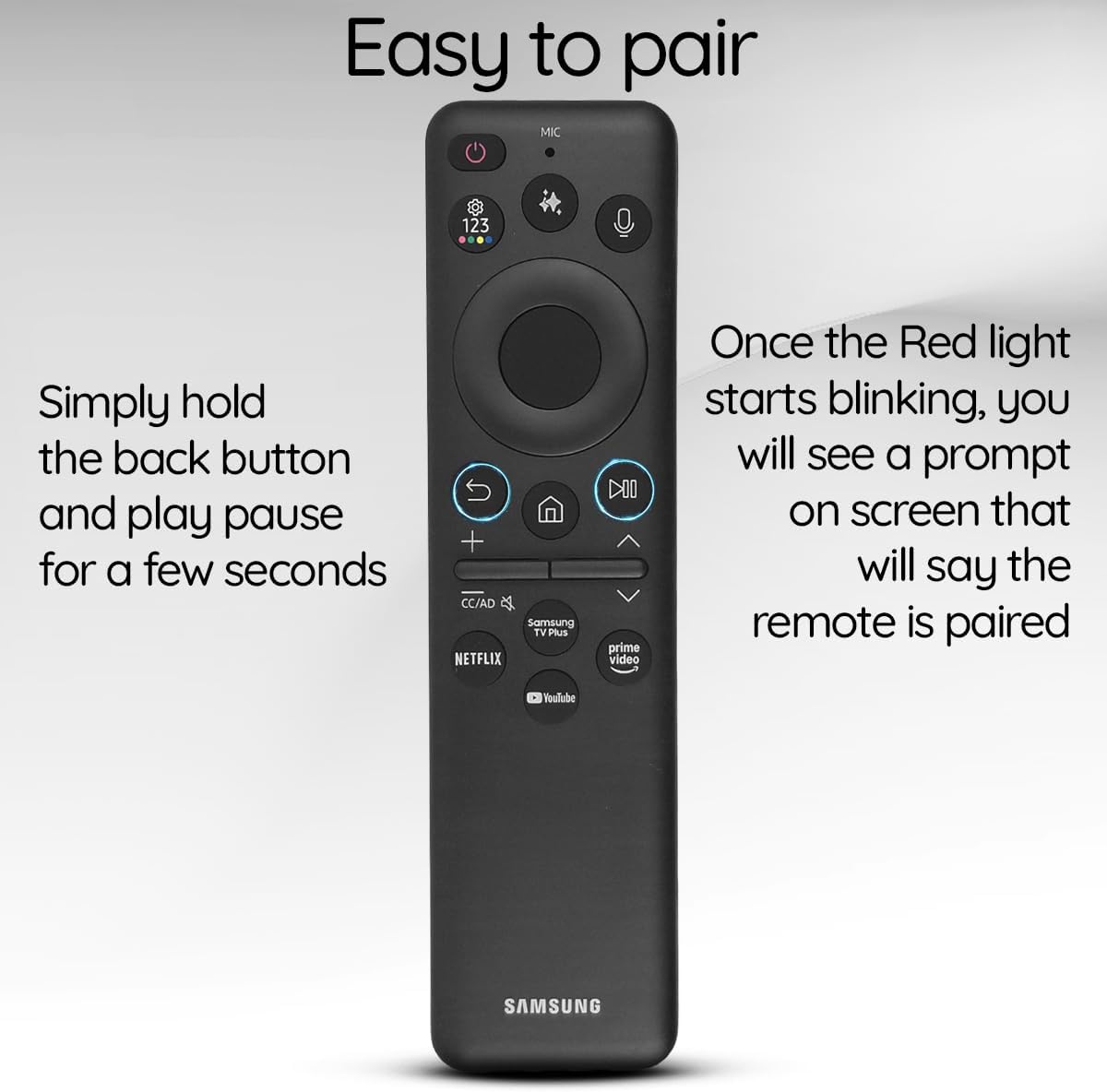
Image: The Ceybo remote control with a visual guide indicating the Return and Play/Pause buttons for pairing, and a text overlay explaining the pairing process.
Ovládání dálkového ovladače
Základní funkce
- Vypínač: Located at the top right, press to turn the TV on or off.
- Tlačítka hlasitosti (+/-): Adjust the TV's volume.
- Tlačítka kanálů (nahoru/dolů): Změňte televizní kanály.
- Directional Pad (Circular): Procházení nabídek a výběr položek.
- Tlačítko Domů: Return to the TV's home screen.
- Tlačítko návratu: Přejít zpět na předchozí obrazovku nebo nabídku.
- Tlačítko Přehrát/Pozastavit: Ovládání přehrávání médií.
Hlasové ovládání
Utilize the built-in voice assistant for hands-free control:
- Stiskněte tlačítko Mikrofon button (located near the top, with a microphone icon).
- Speak your command clearly, such as "Open Netflix," "Change to Channel 5," or "Increase volume."
- The TV will respond to your voice command.

Image: The Ceybo remote control with a magnified view of the microphone button, illustrating its use for voice commands.
Tlačítka zkratek
Access your favorite streaming services instantly with dedicated shortcut buttons:
- Stiskněte tlačítko Netflix button to launch Netflix.
- Stiskněte tlačítko Prime Video tlačítko pro spuštění služby Amazon Prime Video.
- Stiskněte tlačítko Youtube tlačítko pro spuštění YouTube.
- Stiskněte tlačítko Samsung TV Plus button to access Samsung's free streaming service.

Image: The Ceybo remote control with a magnified view of the dedicated shortcut buttons for Netflix, Prime Video, YouTube, and Samsung TV Plus.
Tlačítko AI
Some Samsung Smart TVs feature AI capabilities. If your TV supports it, press the Tlačítko AI (often depicted with a sparkle or star icon) to access AI features such as live translation or intelligent recommendations.

Image: The Ceybo remote control with a magnified view of the AI button, indicating its function for accessing artificial intelligence features.
Údržba
- Čištění: Wipe the remote control with a soft, dry cloth. Avoid using liquid cleaners or abrasive materials.
- Péče o solární panely: Keep the solar panel clean and free from obstructions to ensure efficient charging. Regularly expose the remote to light.
- Skladování: Store the remote in a cool, dry place away from direct sunlight for prolonged periods if not in use, but ensure it receives light periodically to maintain charge.
Odstraňování problémů
- Dálkové ovládání nereaguje:
- Ensure the remote is charged. Try charging via USB-C or exposing it to bright light.
- Re-pair the remote with your TV by holding the Return and Play/Pause buttons simultaneously for 3 seconds.
- Check for any obstructions between the remote and the TV.
- Hlasové ovládání nefunguje:
- Ujistěte se, že je dálkový ovladač správně spárovaný.
- Mluvte jasně a přímo do mikrofonu.
- Zkontrolujte nastavení televizoru a ujistěte se, že je povoleno hlasové ovládání.
- Shortcut buttons not launching apps:
- Ujistěte se, že je váš televizor připojen k internetu.
- Verify that the respective apps are installed and updated on your TV.
Specifikace
| Funkce | Detail |
|---|---|
| Číslo modelu | BN59-01480A |
| Zdroj napájení | Solar Charging, USB-C |
| Konektivita | Bluetooth |
| Speciální funkce | Voice Search, Dedicated Shortcut Buttons (Netflix, Prime Video, YouTube, Samsung TV Plus), AI Button |
| Kompatibilní zařízení | Chytré televizory Samsung |
| Barva | Černý |
| Hmotnost položky | 3.2 unce |
| Rozměry balení | 5.55 x 1.97 x 0.55 palce |
Kompatibilita
This Ceybo Solar Voice Remote Control (Model BN59-01480A) is compatible with a wide range of Samsung Smart TVs, including:
- Neo QLED 8K Series
- QLED Series
- Specific models include: QN42S90FAFXZA, QN43Q7FAAFXZA, QN43QN90FAFXZA, QN48S90FAFXZA, QN50Q7FAAFXZA, QN50QN90FAFXZA, QN55Q7FAAFXZA, QN55QN70FAFXZA, QN55QN80FAFXZA, QN55QN90FAFXZA, QN55S85FAFXZA, QN55S90FAFXZA, QN55S95FAFXZA, QN65Q7FAAFXZA, QN65QN70FAFXZA, QN65QN80FAFXZA, QN65QN900FFXZA, QN65QN90FAFXZA, QN65QN990FFXZA, QN65S85FAFXZA, QN65S90FAFXZA, QN65S95FAFXZA, QN75QN70FAFXZA, QN75QN80FAFXZA, QN75QN900FFXZA, QN75QN90FAFXZA, QN75QN990FFXZA, QN77S85FAFXZA, QN77S90FAFXZA, QN77S95FAFXZA, QN83S85FAFXZA, QN83S90FAFXZA, QN85Q7FAAFXZA, QN85QN70FAFXZA, QN85QN80FAFXZA, QN85QN900FFXZA, QN85QN90FAFXZA, QN85QN990FFXZA.

Image: The Ceybo remote control displayed alongside various Samsung Neo QLED and QLED televisions, illustrating its broad compatibility.

Image: A visual representation of the Ceybo remote control with a comprehensive list of compatible Samsung TV model numbers.
Záruka a podpora
Informace o záruce a zákaznické podpoře naleznete v dokumentaci dodané s vaším nákupem nebo se obraťte přímo na prodejce. Uschovejte si doklad o koupi pro případné reklamace.