
1. Úvod
This manual provides essential information for the safe and efficient use of your DOOGEE Blade 20 Pro Rugged Phone. Designed for durability and high performance, this device features an 11800mAh battery, a 125dB speaker, a 50MP main camera, and runs on Android 15. Please read this manual thoroughly before operating your device.

Obrázek: Přední a zadní strana view of the DOOGEE Blade 20 Pro, showcasinjeho robustní design a klíčové specifikace.
2. Nastavení
2.1 Vybalení a obsah balení
Carefully unpack your DOOGEE Blade 20 Pro. The package should contain the following items:
- 1 x Blade 20 Pro Rugged Smartphone
- 1 x USB kabel typu C
- 1 x 18W nabíječka
- 1 x ochranná fólie s potiskem (předem nanesená)
- 1 x jehla pro vyjmutí SIM karty
- 1 x Uživatelská příručka
- 1 x Záruční list

Image: All items included in the DOOGEE Blade 20 Pro retail package.
2.2 Rozšíření SIM karty a úložiště
The DOOGEE Blade 20 Pro supports dual 4G SIM cards and expandable storage up to 2TB via a TF card (purchased separately). To install:
- Vyhledejte držák SIM karty na boku zařízení.
- Vložte jehlu pro vyjmutí SIM karty do malého otvoru vedle přihrádky, abyste ji vysunuli.
- Place your Nano-SIM cards and/or TF card into the designated slots on the tray. Ensure correct orientation.
- Opatrně vložte zásobník zpět do telefonu, dokud nezacvakne na místo.
Důležitá poznámka:
- This device does not support Verizon or AT&T networks.
- Verify compatibility with your local carrier's frequency bands before use. Supported bands include: GSM: B2/B3/B5/B8, WCDMA: B1/B2/B4/B5/B8, FDD: B1/2/3/4/5/7/8/18/19/20/25/26/28AB/66, TDD-LTE: B34/B38/B39/B40/B41.
2.3 Počáteční nabíjení a zapnutí
Before first use, fully charge your device. Connect the Type-C USB cable to the phone and the 18W charger to a power outlet. The 11800mAh battery provides extended usage. Once charged, press and hold the power button on the side of the phone to turn it on.

Image: Visual representation of the phone's large battery capacity and fast charging feature.
3. Obsluha vašeho zařízení
3.1 Basic Functions and Android 15
The DOOGEE Blade 20 Pro runs on Android 15, offering a fast interface, enhanced privacy features, and efficient app management. Navigate using the touchscreen, and utilize the physical power and volume buttons for basic controls.
3.2 Displej
The device features a 6.6-inch HD+ IPS punch-hole screen with a 90Hz refresh rate for smooth visuals. With 380 nits brightness, the display remains readable in various lighting conditions.
3.3 Funkce fotoaparátu
Zachyťte okamžiky s všestranným kamerovým systémem:
- 50MP hlavní fotoaparát s umělou inteligencí: For crisp and vibrant photos in daylight.
- 20MP infračervená kamera s nočním viděním: Allows capturing images in low-light or complete darkness.
- 8MP přední fotoaparát: Pro selfie a videohovory.
The phone supports Widevine L1 certification for high-definition streaming. Various camera modes are available, including Night Mode, EIS Anti-shake, AI Recognition, Multi-frame Noise Reduction, Anti-flicker, Pro Mode, Panoramic Mode, Burst Mode, Beauty Mode, Portrait Mode, and HDR.
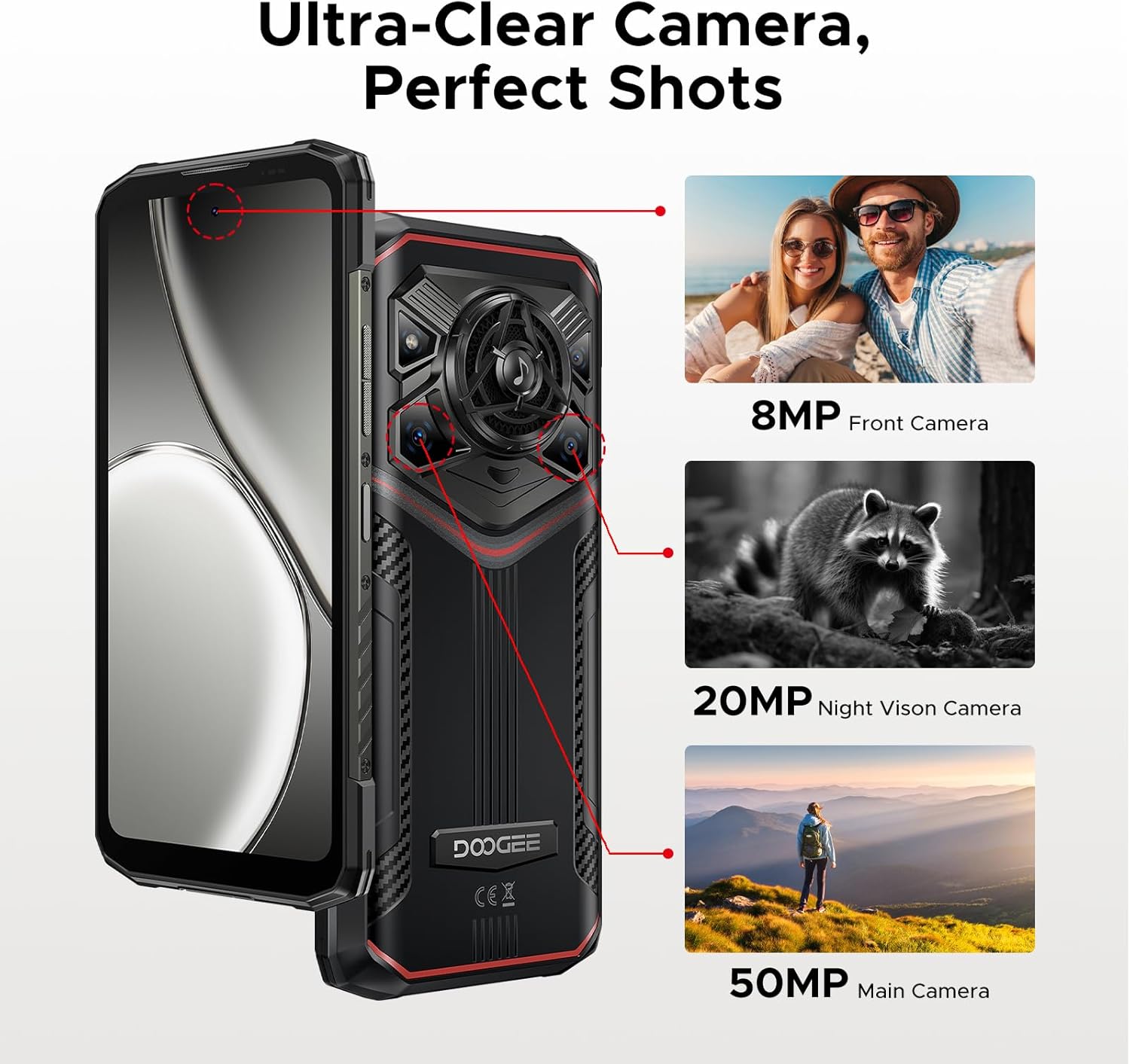
Obrázek: Overview of the DOOGEE Blade 20 Pro's camera system.
3.4 Audio systém
Experience powerful audio with the 125dB speaker, featuring a 36mm giant driver and 3.5W high power output. This ensures clear sound even in noisy environments.

Obrázek: Podrobný view of the phone's high-power speaker components.
3.5 Připojení a navigace
The device supports Wi-Fi 6 for fast internet access and NFC for convenient contactless payments and data transfer. For navigation, it includes built-in GPS, Glonass, Galileo, and Beidou systems.
3.6 Bezpečnostní funkce
Unlock your phone securely using Face ID or the integrated fingerprint sensor for quick and convenient access.
3.7 Integrace umělé inteligence Gemini
The DOOGEE Blade 20 Pro includes Gemini AI features to assist with various tasks, including content creation, image analysis, code development, language learning, and smart assistant functions.

Obrázek: Overview of the Gemini AI capabilities integrated into the device.
4. Údržba a trvanlivost
4.1 Rugged Standards
The DOOGEE Blade 20 Pro is built to withstand harsh environments, meeting IP68, IP69K, and MIL-STD-810H standards. This means it is waterproof, dustproof, and shockproof, designed to endure drops, rain, mud, and extreme temperatures.
4.2 Péče o baterii
The 11800mAh battery is designed for longevity. To maximize battery life, avoid exposing the device to extreme temperatures for prolonged periods. The battery is rated to maintain over 80% health after 1000 charge and discharge cycles, and can survive extreme temperatures from -40°C to 70°C.
5. Řešení problémů
If you encounter issues with your DOOGEE Blade 20 Pro, consider the following common solutions:
- Síťové připojení: Ensure your SIM card is correctly inserted and your carrier's frequency bands are supported by the device. Restarting the phone can often resolve temporary network issues.
- Vybíjení baterie: Close unused applications running in the background. Reduce screen brightness and disable features like Wi-Fi, Bluetooth, or GPS when not in use.
- Problémy s výkonem: Clear cache from apps, uninstall unnecessary applications, or perform a factory reset (back up your data first) if the device becomes consistently slow.
- Hlasitost reproduktoru: Ensure the volume is turned up and there is no obstruction to the speaker grille.
V případě přetrvávajících problémů se obraťte na oficiální podporu DOOGEE. webnebo kontaktujte zákaznický servis.
6. Specifikace
Key technical specifications for the DOOGEE Blade 20 Pro:
| Funkce | Specifikace |
|---|---|
| Název modelu | Blade20Pro |
| Operační systém | Android 15 |
| Procesor | Unisoc T7200 Octa-Core (12nm) |
| BERAN | 24 GB (6 GB základní + 18 GB virtuální) |
| Interní úložiště (ROM) | 256 GB (rozšiřitelné až na 2 TB pomocí TF karty) |
| Kapacita baterie | Lithium Polymer s kapacitou 11800 mAh |
| Nabíjení | 18W rychlé nabíjení, 5W OTG reverzní nabíjení |
| Velikost displeje | 6.6 palců HD+ IPS |
| Rezoluce | 720 x 1612 |
| Obnovovací frekvence | 90 Hz |
| Hlavní fotoaparát | 50MP fotoaparát s umělou inteligencí |
| Kamera pro noční vidění | 20MP infračervený |
| Přední kamera | 8 MP |
| Reproduktor | 125 dB, 3.5W Output, 36mm Driver |
| Hodnocení trvanlivosti | IP68, IP69K, MIL-STD-810H |
| Konektivita | 4G, Wi-Fi 6, Bluetooth, NFC, GPS (Glonass, Galileo, Beidou) |
| Zabezpečení | ID obličeje, snímač otisků prstů |
| Rozměry | 3.2 x 0.62 x 6.85 palce |
| Hmotnost položky | 1.37 libry |

Image: Visual representation of the Unisoc T7200 Octa-core Processor.
7. Záruka a podpora
7.1 Informace o záruce
For detailed warranty terms and conditions, please refer to the Warranty Card included in your product package. Keep your proof of purchase for warranty claims.
7.2 Zákaznická podpora
If you require further assistance, technical support, or have questions not covered in this manual, please contact DOOGEE customer support through their official webstránky nebo kontaktní informace uvedené v záručním listu.