
DOOGEE Blade 20 Pro
Uživatelská příručka k odolnému smartphonu DOOGEE Blade 20 Pro
Model: Blade 20 Pro
1. Úvod
The DOOGEE Blade 20 Pro is a robust and high-performance smartphone designed for durability and advanced functionality. It features a large battery, powerful audio, and a versatile camera system, all within a ruggedized body built to withstand challenging environments. This manual provides essential information for setting up, operating, maintaining, and troubleshooting your device.

Obrázek 1.1: Přední a zadní část view of the DOOGEE Blade 20 Pro, highlighting its rugged design and key specifications like 11800mAh battery, 125dB speaker, Android 15, 24GB RAM, and 256GB ROM.
2. Obsah balení
Ověřte, zda jsou v krabici s produktem přítomny všechny položky:
- 1 x Blade 20 Pro Rugged Smartphone
- 1 x USB kabel typu C
- 1 x 18W nabíječka
- 1 x ochranná fólie s potiskem (předem nanesená)
- 1 x jehla pro vyjmutí SIM karty
- 1 x Uživatelská příručka
- 1 x Záruční list
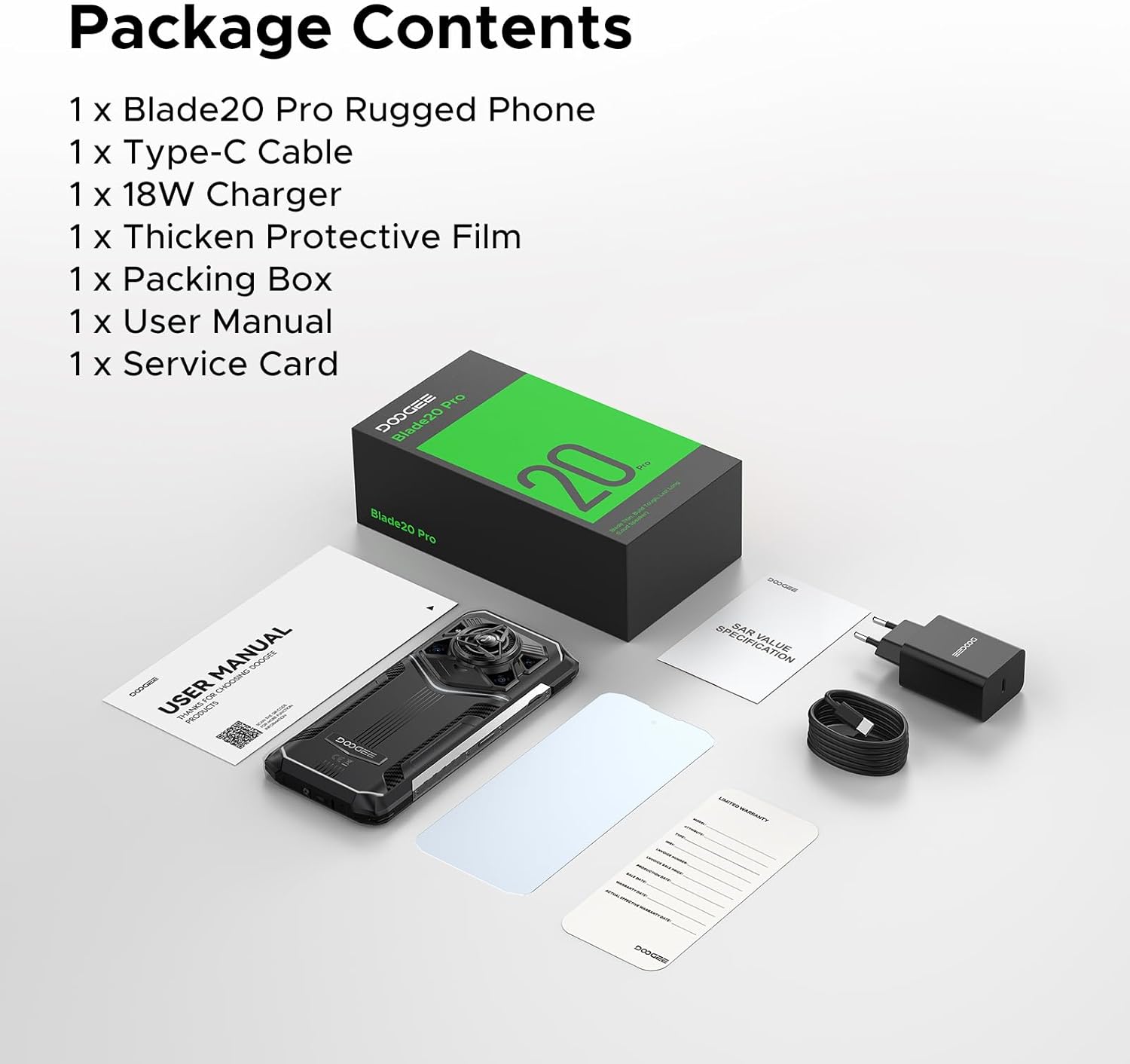
Image 2.1: Contents of the DOOGEE Blade 20 Pro retail package, including the phone, charger, cable, protective film, SIM tool, user manual, and warranty card.
3. Počáteční nastavení
3.1. Vložení SIM karet a paměťové karty
- Vyhledejte držák SIM karty na boku telefonu.
- Use the provided SIM card removal needle to eject the tray.
- Place your Nano-SIM cards and/or a microSD card (up to 2TB, purchased separately) into the designated slots on the tray. Ensure correct orientation.
- Opatrně vložte zásobník zpět do telefonu, dokud nebude v jedné rovině s tělem zařízení.
3.2. Nabíjení zařízení
- Připojte kabel USB typu C k nabíjecímu portu ve spodní části telefonu.
- Druhý konec kabelu připojte k 18W nabíječce.
- Zapojte nabíječku do elektrické zásuvky.
- Allow the phone to charge fully before first use. The 11800mAh battery supports 18W fast charging.
3.3. Zapnutí/vypnutí
- Zapnutí: Stiskněte a podržte tlačítko napájení (obvykle na pravé straně), dokud se neobjeví logo DOOGEE.
- Vypnutí: Stiskněte a podržte tlačítko Napájení a poté z možností na obrazovce vyberte možnost „Vypnout“.
- Restartovat: Stiskněte a podržte tlačítko Napájení a poté z možností na obrazovce vyberte „Restartovat“.
4. Obsluha vašeho zařízení
4.1. Operační systém Android 15
The Blade 20 Pro runs on Android 15, offering an intuitive user interface, enhanced privacy features, and efficient app management. Explore the various settings and customization options to personalize your experience.
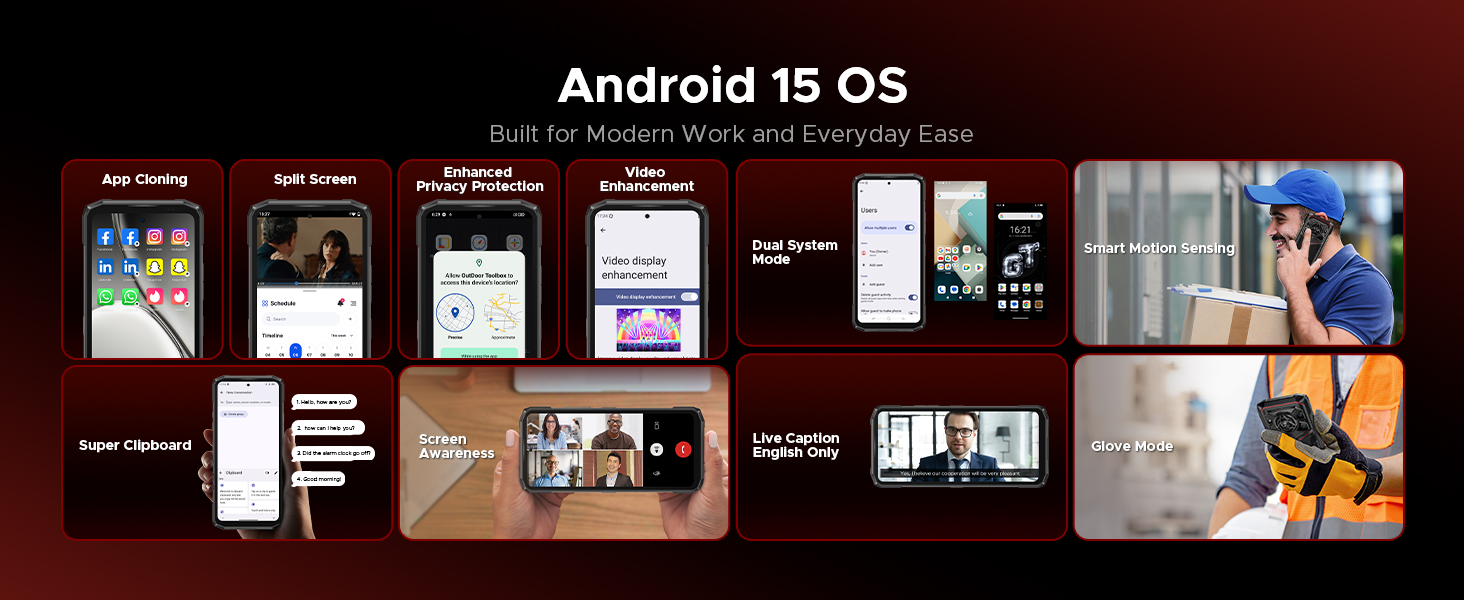
Obrázek 4.1: Konecview of Android 15 OS features, including App Cloning, Split Screen, Enhanced Privacy Protection, Video Enhancement, Dual System Mode, Smart Motion Sensing, Super Clipboard, Screen Awareness, Live Caption, and Glove Mode.
4.2. Displej
The device features a 6.6-inch HD+ IPS punch-hole screen with a 90Hz refresh rate for smooth visuals. With 380 nits brightness, the display remains clear even in direct sunlight. Widevine L1 certification allows for streaming high-definition content from platforms like Netflix and Prime Video.
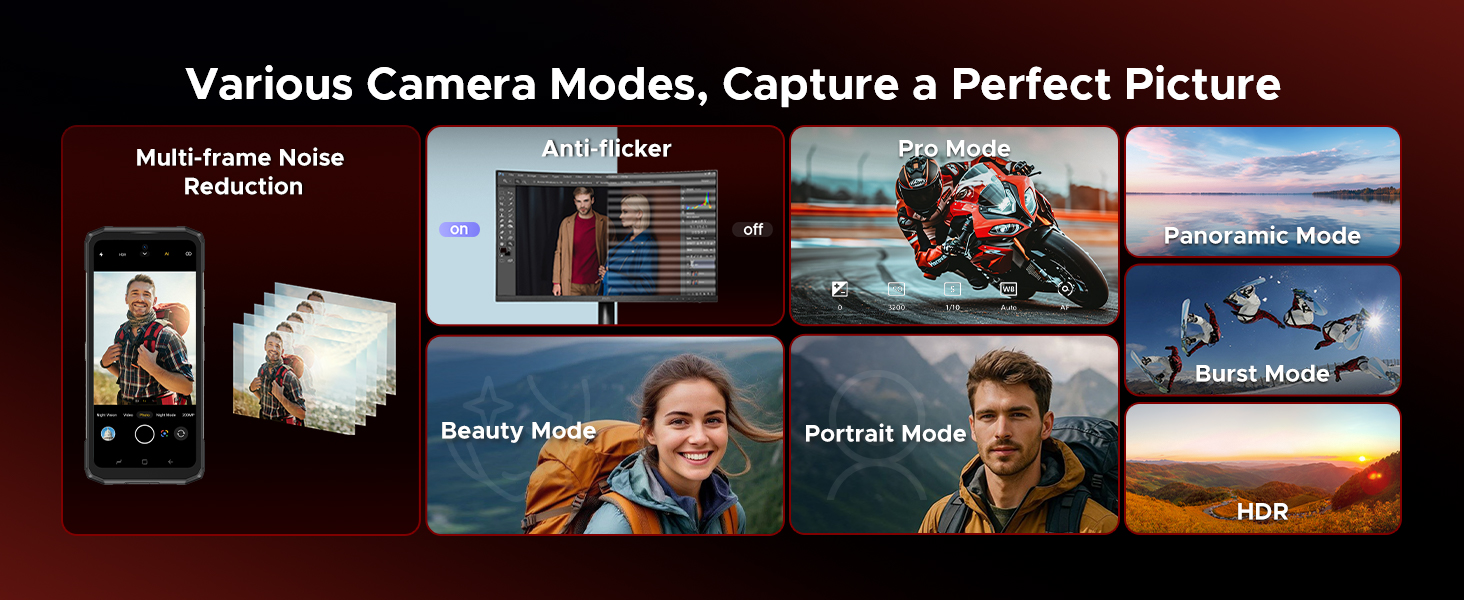
Image 4.2: Details of the 6.6-inch HD+ 90Hz display, showing 84% visual screen ratio, 16.7 million screen colors, 1500:1 screen contrast, 20:9 aspect ratio, and Widevine L1 for HD streaming.
4.3. Kamerový systém
Zachyťte okamžiky s všestranným nastavením fotoaparátu:
- 50MP hlavní fotoaparát s umělou inteligencí: For crisp and vibrant photos in various lighting conditions.
- 20MP infračervená kamera s nočním viděním: Allows capturing images in complete darkness.
- 8MP přední fotoaparát: Pro ostré selfie a videohovory.
The camera offers various modes including Night Mode, EIS Anti-shake, AI Recognition, Multi-frame Noise Reduction, Anti-flicker, Pro Mode, Panoramic Mode, Burst Mode, Beauty Mode, Portrait Mode, and HDR.
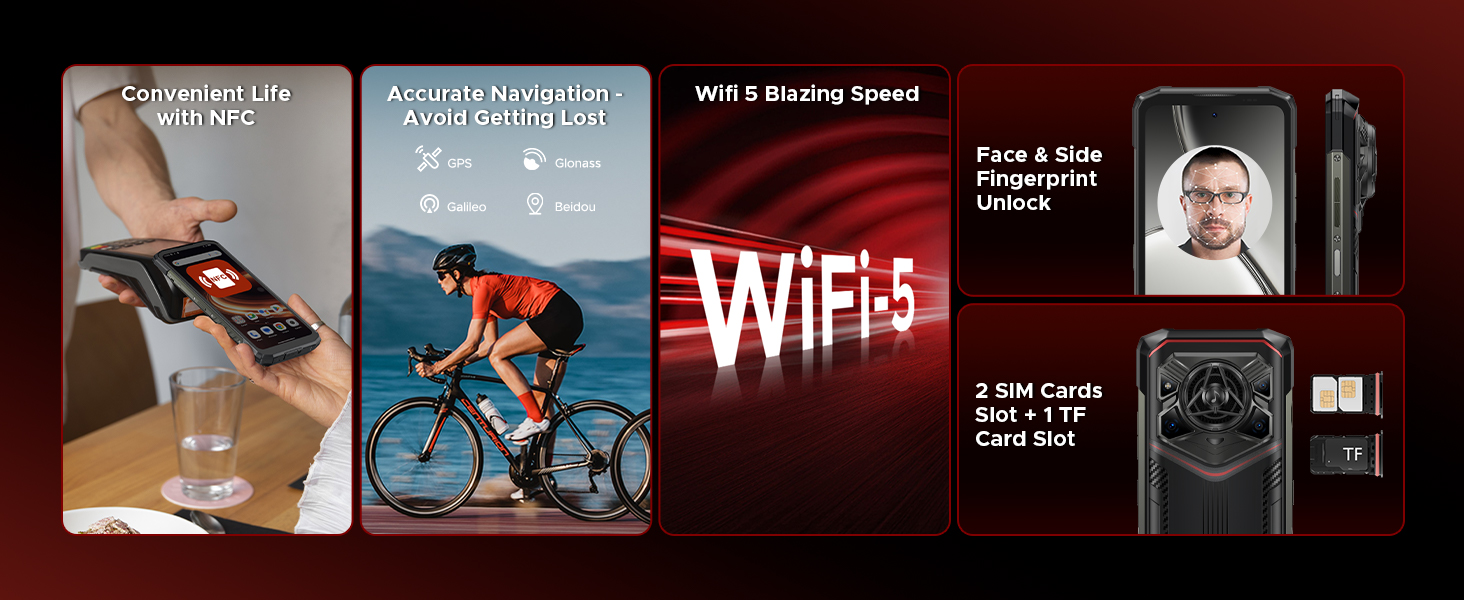
Image 4.3: Illustration of the DOOGEE Blade 20 Pro's camera system, featuring the 50MP main camera, 20MP night vision camera, and 8MP front camera, with exampfotky.
4.4. Audio
The Blade 20 Pro is equipped with a 36mm large amplitude speaker and 3.5W high power output, delivering an impressive 125dB sound. This ensures clear audio for calls, music, and media playback, even in noisy environments.
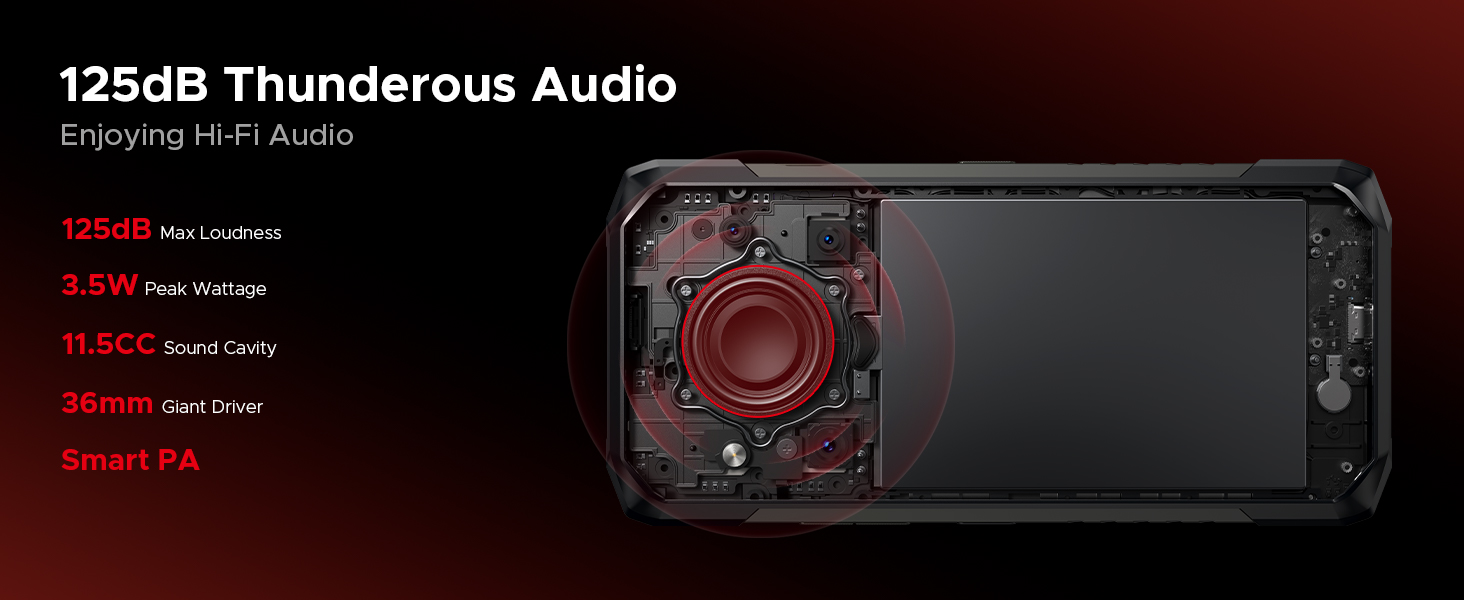
Image 4.4: Diagram showing the internal speaker components and specifications, including 125dB max loudness, 3.5W peak wattage, 11.5CC sound cavity, 36mm giant driver, and Smart PA technology.
4.5. Baterie a nabíjení
The device features an 11800mAh battery, providing extended usage times. It supports 18W fast charging via Type-C. Additionally, OTG reverse charging allows the phone to act as a power bank for other devices.
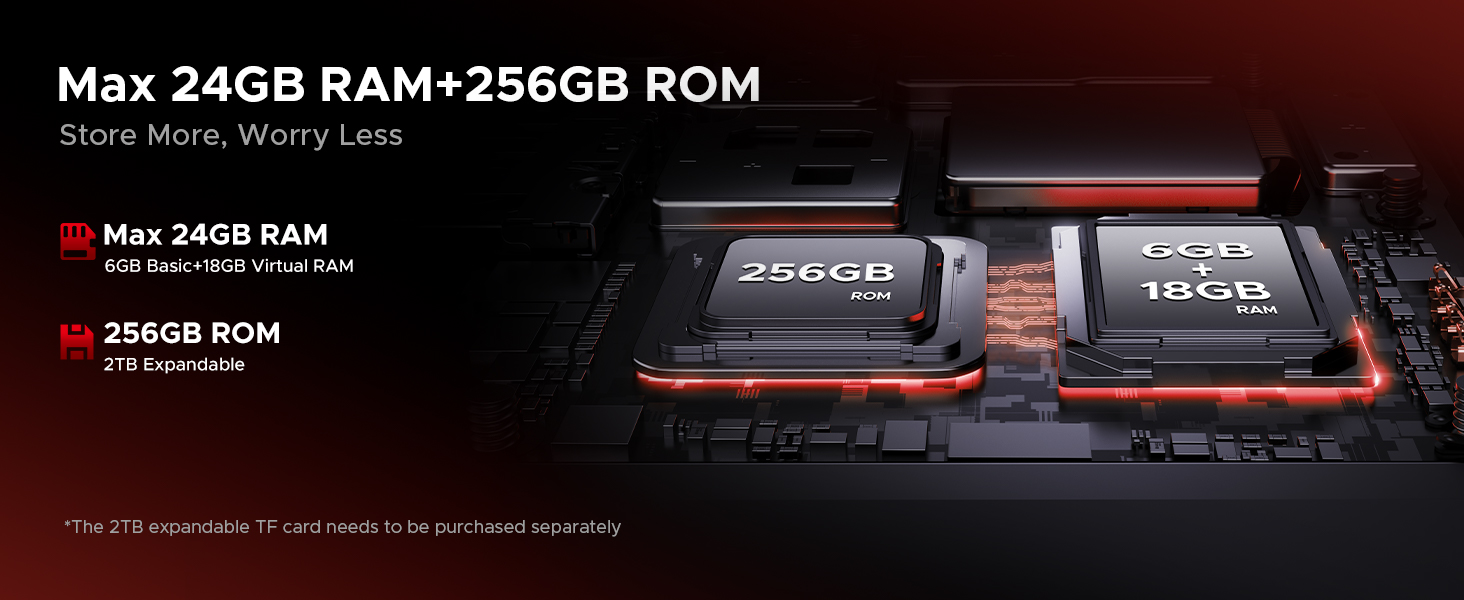
Image 4.5: Information on the 11800mAh Silicon Anode Battery, detailing 18W fast charging, 5W reverse charging, and estimated usage times for standby, calling, video watching, and web procházení.
4.6. Umělá inteligence Gemini
The Blade 20 Pro integrates Gemini AI, enhancing various functions such as content creation, image analysis, code development, language learning, and smart assistance.

Image 4.6: Visual representation of the Gemini AI features, including Content Creation, Image Analysis, Code Development, Language Learning, Smart Assistant, and Gemini Live.
4.7. Připojení a zabezpečení
The device supports dual 4G SIM cards (note: Verizon and AT&T are not supported). It includes NFC for convenient payments, accurate GPS navigation (GPS, Glonass, Galileo, Beidou), and Wi-Fi 5 for fast internet. For security, it offers Face ID and Fingerprint Unlock.
Obrázek 4.7: Konecview of connectivity and security features, including NFC for payments, GPS for navigation, Wi-Fi 5, Face ID and Fingerprint Unlock, and dual SIM card slots plus a TF card slot.
5. Údržba
The DOOGEE Blade 20 Pro is built to be rugged, meeting IP68, IP69K, and MIL-STD-810H standards for water, dust, and shock resistance. To ensure its longevity, follow these maintenance guidelines:
- Čištění: Použijte měkký, damp cloth to clean the device. Avoid harsh chemicals or abrasive materials. Ensure all ports are dry before charging or connecting accessories.
- Vystavení vodě: While waterproof, ensure all port covers are securely closed before exposing the phone to water. Do not intentionally submerge the phone beyond specified limits (IP68: 1.5m for 30 mins).
- Teplota: Avoid exposing the phone to extreme temperatures (below -40°C or above 70°C) for prolonged periods.
- Dopad: Although shockproof, avoid unnecessary drops or impacts to prevent potential damage.
- Aktualizace softwaru: Regularly update the device software to ensure optimal performance and security.
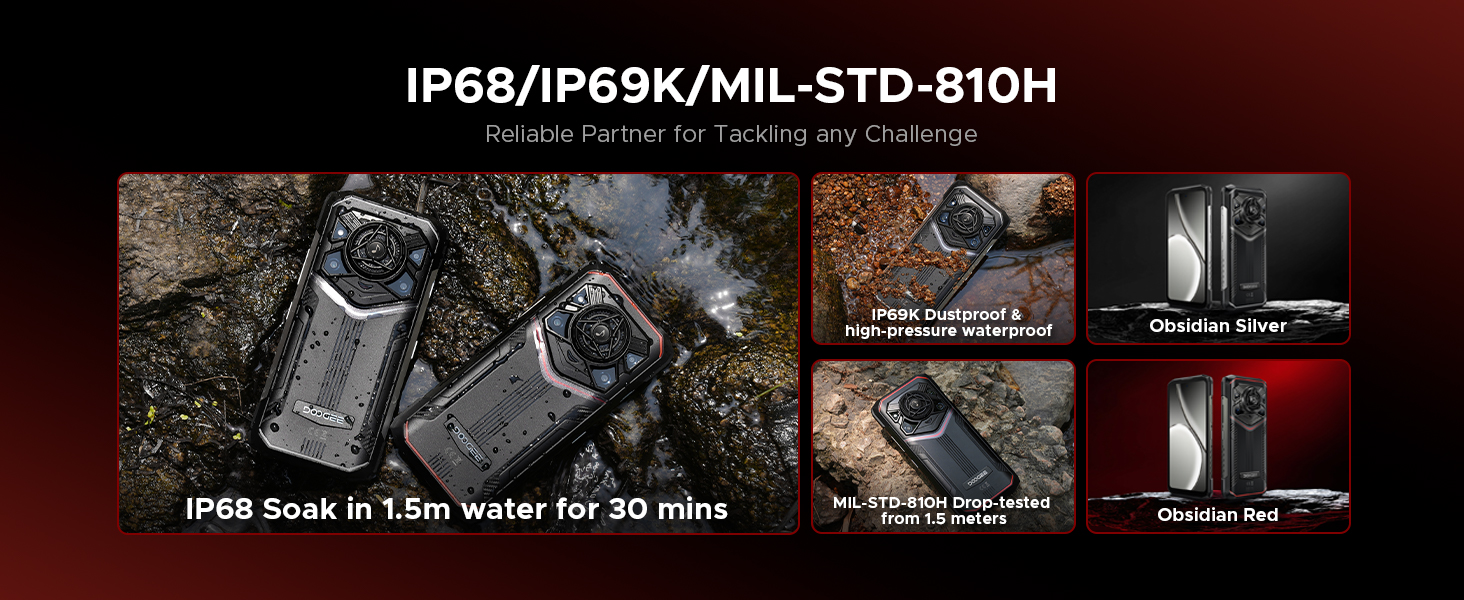
Image 5.1: Visual representation of the phone's durability, highlighting IP68 water immersion, IP69K dustproof and high-pressure waterproof, and MIL-STD-810H drop-tested from 1.5 meters.
6. Řešení problémů
If you encounter issues with your DOOGEE Blade 20 Pro, refer to the following common solutions:
| Problém | Možné řešení |
|---|---|
| Zařízení se nezapne | Ujistěte se, že je baterie nabitá. Připojte nabíječku a před opětovným zapnutím počkejte několik minut. Pokud zařízení nereaguje, proveďte vynucený restart podržením tlačítka napájení po dobu 10–15 sekund. |
| Baterie se rychle vybíjí | Check for background apps consuming power. Adjust screen brightness. Disable unused features like Wi-Fi, Bluetooth, GPS. Reduce screen timeout. |
| Nelze se připojit k síti | Ensure SIM card is correctly inserted. Check network settings. Verify carrier compatibility (Verizon and AT&T are not supported). Restart the device. |
| Kamera nefunguje | Restart the camera app or the phone. Clear the camera app's cache and data in settings. Ensure no physical obstruction is blocking the lens. |
| Sound issues (too low/high, distorted) | Check volume settings. Ensure speaker is not blocked or dirty. Restart the device. |
| Dotykový displej nereaguje | Restart the device. If the issue persists, ensure the screen is clean and dry. Remove any screen protectors that might interfere. |
For more complex issues, refer to the official DOOGEE support resources or contact customer service.
7. Technické specifikace
| Funkce | Specifikace |
|---|---|
| Název modelu | Blade 20 Pro |
| Operační systém | Android 15 |
| Procesor | Unisoc T7200 Octa-Core Processor (12nm) |
| BERAN | 24 GB (6 GB fyzického + 18 GB virtuálního) |
| Interní úložiště | 256 GB |
| Rozšiřitelné úložiště | Up to 2 TB via microSD card (purchased separately) |
| Velikost obrazovky | 6.6 Inches HD+ IPS Punch-Hole Display |
| Obnovovací frekvence | 90 Hz |
| Hlavní fotoaparát | 50 MP |
| Kamera pro noční vidění | 20MP infračervený |
| Přední kamera | 8 MP |
| Kapacita baterie | 11800 mAh (lithium-polymerová) |
| Nabíjení | 18W rychlé nabíjení, 5W OTG reverzní nabíjení |
| Reproduktor | 125dB Loudspeaker (36mm driver, 3.5W output) |
| Normy trvanlivosti | IP68, IP69K, MIL-STD-810H |
| Konektivita | Dual 4G SIM, Wi-Fi 5, Bluetooth, NFC, USB Type-C |
| Navigace | GPS, Glonass, Galileo, Beidou |
| Zabezpečení | Face ID, odemknutí otiskem prstu |
| Rozměry | 3.2 x 0.62 x 6.85 palce |
| Hmotnost | 1.3 libry |

Image 7.1: Details of the Unisoc T7200 Octa-Core Processor, highlighting its 12nm processing technology and overall performance.
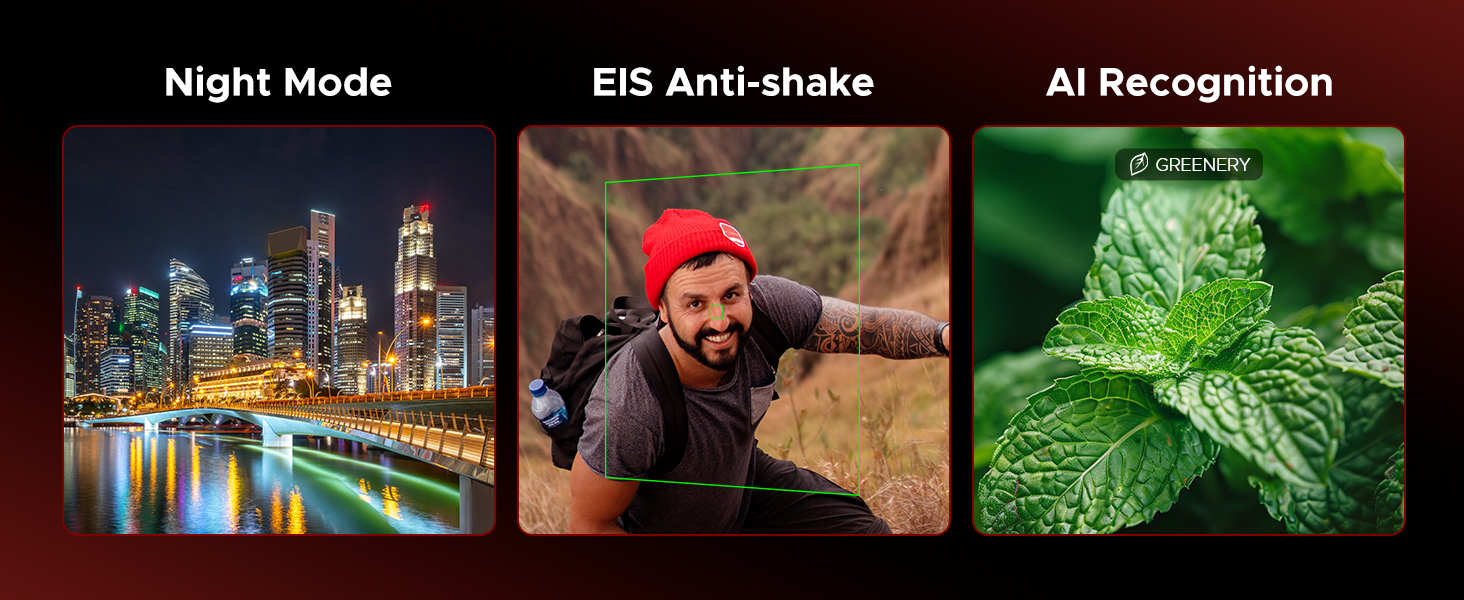
Image 7.2: Illustration of the memory configuration, showing 6GB basic RAM + 18GB virtual RAM for a total of 24GB, and 256GB ROM with 2TB expandability.
8. Záruka a podpora
Your DOOGEE Blade 20 Pro comes with a warranty. Please refer to the included Warranty Card in your package for detailed information regarding warranty terms, conditions, and duration.
For technical support, service, or further inquiries, please consult the contact information provided on your Warranty Card or visit the official DOOGEE webmísto.
Ask a question about this manual
Ask about setup, troubleshooting, compatibility, parts, safety, or missing instructions. Manuals+ will review the question and use this page’s manual context to help answer it.