
Zavedení
Thank you for choosing the MANKIW X15 Wireless Gaming Headset. This manual provides detailed instructions for setting up, operating, and maintaining your headset to ensure optimal performance and longevity. Please read this manual thoroughly before use and retain it for future reference.
Obsah balení
Prosím, ověřte, zda jsou v balení přítomny všechny položky:
- MANKIW X15 Wireless Gaming Headset
- 2.4GHz USB Dongle (with Type-C and Type-A adapters)
- Nabíjecí kabel USB-C
- 3.5mm audio kabel
- Uživatelská příručka
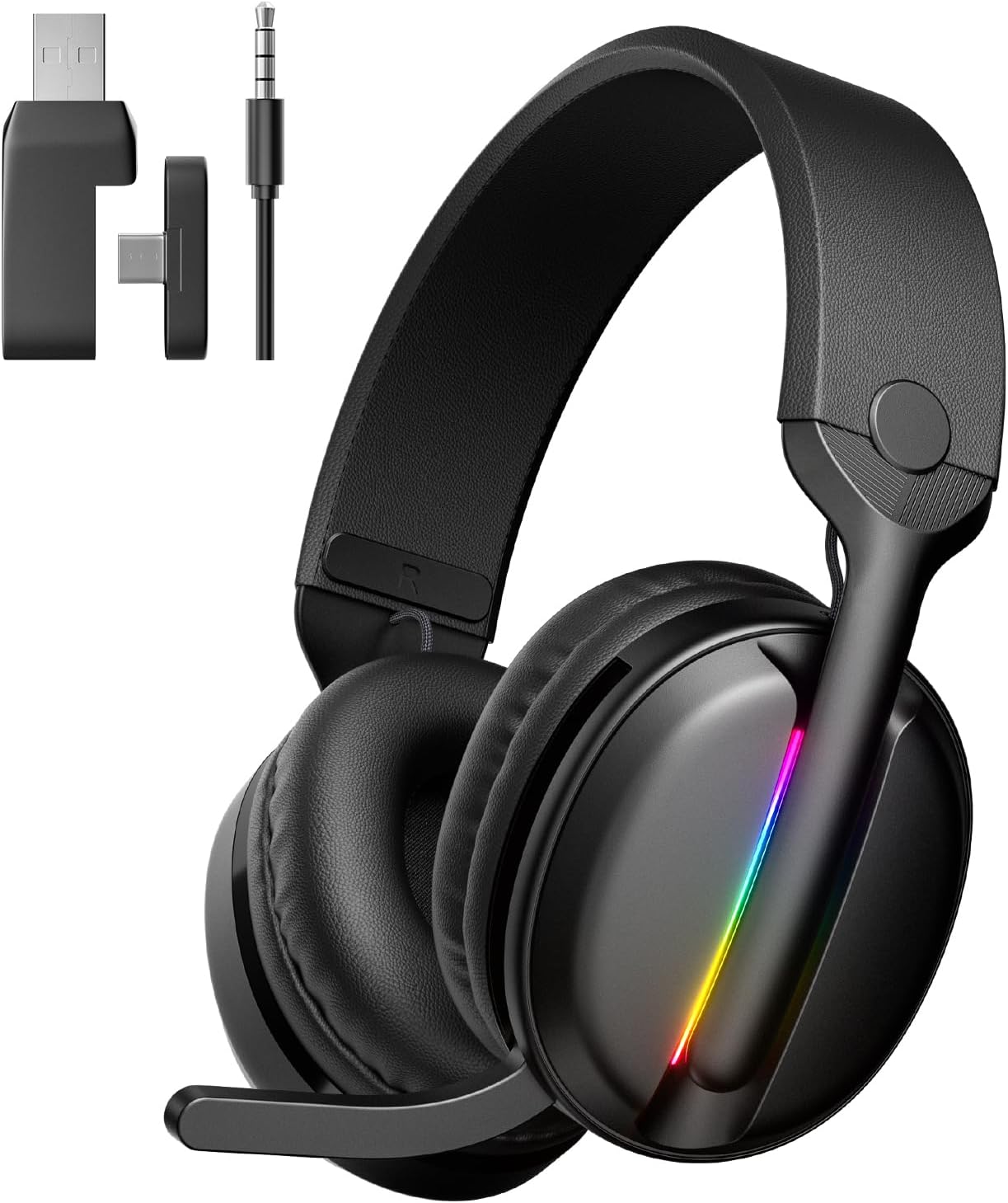
Image: MANKIW X15 Wireless Gaming Headset with its included 2.4GHz USB dongle, Type-C adapter, and 3.5mm audio cable.
Konec produktuviewOvládací prvky a komponenty
Seznamte se s ovládacími prvky a funkcemi headsetu:

Image: Detailed diagram illustrating the location and function of each control button on the MANKIW X15 headset.
- Type-C Charging Port / 3.5mm Wired Input: Used for charging the headset or connecting via the 3.5mm audio cable.
- Power Button / Light Control Button: Long press to power on/off. Single press to toggle RGB lighting. Triple press to enter Bluetooth pairing mode.
- Snížení hlasitosti / předchozí skladba: Single press to decrease volume. Long press for previous track.
- Zvýšení hlasitosti / další skladba: Single press to increase volume. Long press for next track.
- Multifunkční tlačítko: Single press for Play/Pause, Answer/Hang up calls. Double press to change sound effects. Long press to switch between 2.4GHz and Bluetooth modes.
- Kontrolka párování: Displays connection status (Green for 2.4GHz, Blue for Bluetooth, blinking blue for Bluetooth pairing).
The headset also features a detachable, omnidirectional microphone with advanced noise-canceling technology for clear communication.
Nastavení
1. Nabíjení náhlavní soupravy
Before first use, fully charge the headset. Connect the USB-C charging cable to the headset's Type-C port (1) and the other end to a USB power source (e.g., computer, wall adapter). The indicator light will show charging status and turn off when fully charged. A full charge takes approximately 2 hours.
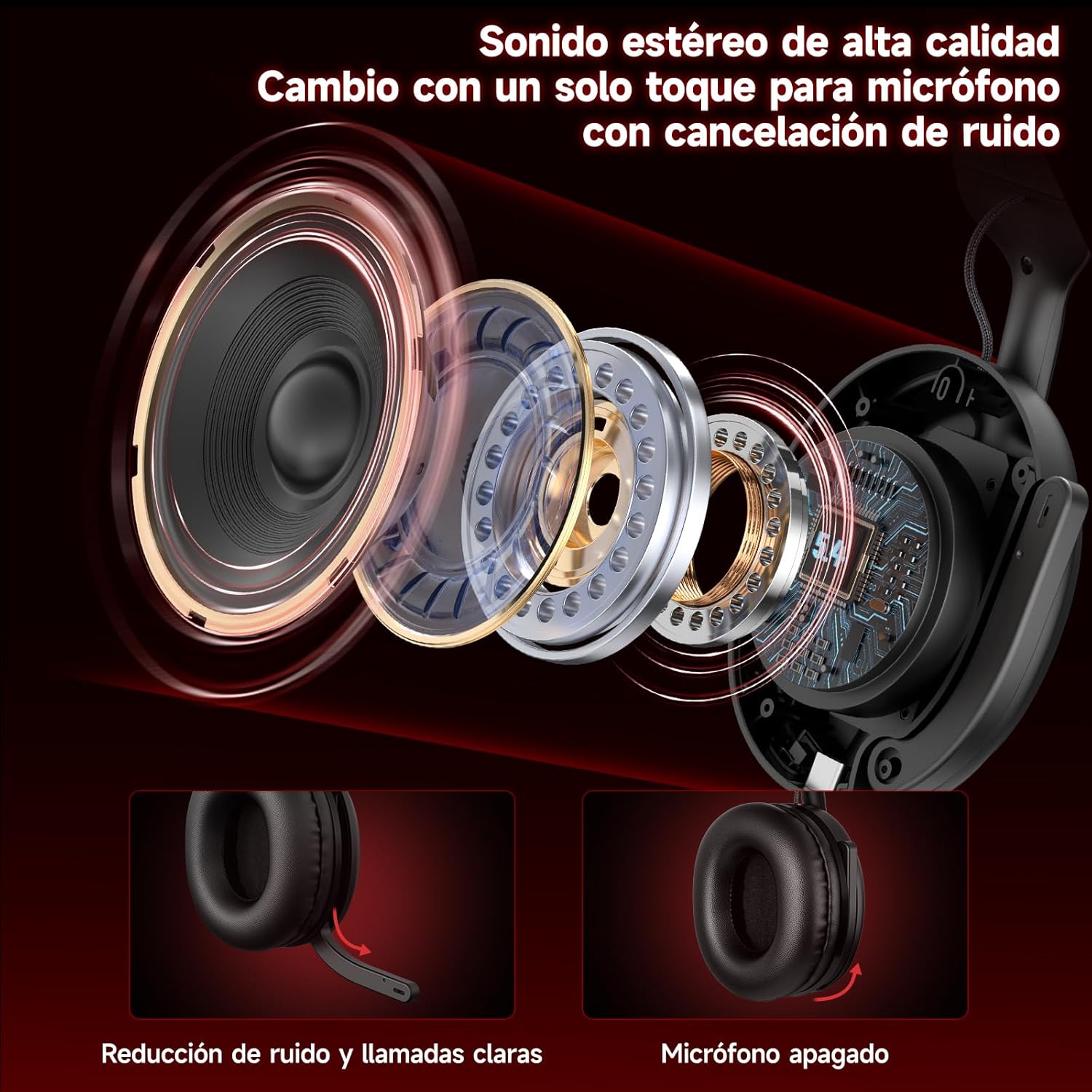
Image: The MANKIW X15 headset highlighting its long battery life, with icons indicating usage time for different modes and charging time.
2. Připojení náhlavní soupravy
The MANKIW X15 offers three connection modes:
- 2.4GHz Wireless Mode (Low Latency):
1. Insert the 2.4GHz USB dongle into your device's USB port. Use the Type-A or Type-C adapter as needed.
2. Long press the Power Button (2) on the headset to turn it on.
3. The headset will automatically connect to the dongle. The indicator light (6) will show a solid green when connected.
4. This mode provides ultra-low latency (≤20ms) for optimal gaming performance. - Režim Bluetooth 5.4:
1. Long press the Power Button (2) to turn on the headset.
2. Triple press the Power Button (2) to enter Bluetooth pairing mode. The indicator light (6) will blink blue.
3. On your device (smartphone, tablet, laptop), enable Bluetooth and search for "MANKIW X15".
4. Select "MANKIW X15" to pair. The indicator light (6) will turn solid blue when connected. - 3.5mm drátový režim:
1. Connect one end of the 3.5mm audio cable to the headset's 3.5mm input (1).
2. Connect the other end to your device's 3.5mm audio jack.
3. Poznámka: The microphone function is not available in 3.5mm wired mode.

Image: A visual guide demonstrating the MANKIW X15 headset's compatibility with various devices across 2.4GHz dongle, Bluetooth, and 3.5mm wired connections.
Návod k obsluze
Zapnutí/vypnutí
- Zapnutí: Long press the Power Button (2) until the indicator light illuminates.
- Vypnout: Long press the Power Button (2) until the indicator light turns off.
Ovládání hlasitosti
- Zvýšení hlasitosti: Press the Volume Up button (4).
- Snížit hlasitost: Press the Volume Down button (3).
Přehrávání zvuku a hovory
- Přehrát/pozastavit: Single press the Multifunction Button (5).
- Další skladba: Dlouze stiskněte tlačítko pro zvýšení hlasitosti (4).
- Předchozí skladba: Dlouze stiskněte tlačítko pro snížení hlasitosti (3).
- Přijmout/ukončit hovor: Single press the Multifunction Button (5).
- Change Sound Effects: Double press the Multifunction Button (5).
Přepínání režimů připojení
To switch between 2.4GHz wireless and Bluetooth modes, long press the Multifunction Button (5).
Použití mikrofonu
The detachable microphone features noise-canceling technology. Ensure it is securely plugged into the headset. Controls for muting the microphone are integrated into the earcup (refer to product diagram for specific location if available, otherwise use software controls on your device).

Obrázek: Explodoval view of the MANKIW X15 headset's audio drivers and a depiction of the noise-canceling microphone, illustrating its functionality.
RGB osvětlení
The headset features dynamic RGB lighting. To toggle the RGB lights on or off, single press the Light Control Button (part of 2). Note that keeping the RGB lighting active will reduce the overall battery life from 40 hours to approximately 20 hours.
Multiplatformní kompatibilita
The MANKIW X15 headset is designed for broad compatibility:
- Bezdrátové připojení 2.4 GHz: Compatible with PC, Mac, Laptops, PlayStation 4 (PS4), PlayStation 5 (PS5), and Nintendo Switch (via USB dongle).
- Bluetooth 5.4: Compatible with Smartphones, Tablets, and Laptops.
- 3.5mm kabel: Compatible with any device featuring a 3.5mm audio jack.
Údržba
To ensure the longevity and performance of your MANKIW X15 headset, follow these maintenance guidelines:
- Čištění: K čištění sluchátek s mikrofonem používejte měkký, suchý hadřík. Nepoužívejte agresivní chemikálie ani abrazivní materiály.
- Skladování: Sluchátka skladujte na chladném a suchém místě mimo dosah přímého slunečního záření a extrémních teplot.
- Péče o baterie: Nevystavujte baterii častému úplnému vybíjení. Pravidelně ji nabíjejte, i když ji delší dobu nepoužíváte, aby se zachovala její životnost.
- Zacházení: Nenechávejte sluchátka upadnout ani je nevystavujte nadměrnému tlaku, mohlo by dojít k poškození vnitřních součástí.

Image: A user wearing the MANKIW X15 headset, illustrating its comfortable design with breathable earcups and adjustable headband.
Odstraňování problémů
If you encounter issues with your MANKIW X15 headset, refer to the following common problems and solutions:
- Žádný zvuk:
- Ensure the headset is powered on and connected correctly (2.4GHz, Bluetooth, or 3.5mm cable).
- Check the volume levels on both the headset and your connected device.
- Verify that the correct audio output device is selected in your system settings. - Mikrofon nefunguje:
- Ensure the microphone is securely plugged into the headset.
- Confirm that the microphone is not muted on the headset or in your device's settings.
- Remember that the microphone function is not available in 3.5mm wired mode.
- Check for any background noise cancellation settings on your device that might be affecting microphone input. - Problémy s připojením (2.4 GHz/Bluetooth):
- Ensure the headset is within range of your device.
- For 2.4GHz, ensure the USB dongle is properly inserted and recognized by your device.
- For Bluetooth, try re-pairing the headset with your device (triple press Power Button to enter pairing mode).
- Disconnect other wireless devices that might cause interference. - Krátká výdrž baterie:
- RGB lighting consumes more power. Turn off RGB lights to extend battery life.
- Ensure the headset is fully charged before use.
Specifikace
| Název modelu | X15 |
| Značka | MANKIW |
| Technologie připojení | Bezdrátové připojení 2.4 GHz, Bluetooth 5.4, kabelové připojení 3.5 mm |
| Velikost ovladače | 50 mm |
| Impedance | 32 Ohmy |
| Latence (2.4 GHz) | ≤20 ms |
| Životnost baterie | Up to 40 hours (20 hours with RGB lighting) |
| Doba nabíjení | Přibližně 2 hodiny (přes USB-C) |
| Hmotnost | 360 g |
| Rozměry | 21.2 x 18.1 x 9.9 cm |
| Mikrofon | Odnímatelná, všesměrová, s potlačením hluku |
Záruka a podpora
For warranty information and technical support, please refer to the documentation included with your purchase or contact MANKIW customer service through the official brand store or your retailer. Keep your proof of purchase for warranty claims.
Pro další pomoc navštivte stránku MANKIW Official Store.